# PCIe-PXIe-8638

# PCI Express Control of PXI Express

# Features

● PXI-5 PXI Express hardware specification rev.2.0 compliant
● PCI Express® Base specifications rev.2.0 compliant
● PCIe Gen 2 x8 ports each support up to 4GB/s
● PXI Express link capability:
• Four link configuration: x4 x4 x4 x4
• Two link configuration: x16 x8
● Expansion distance up to 5m with 2m or 5m expansion cables
● Comprehensive hardware and software transparency
● Flexible option for multi-chassis expansion as a daisy-chain or star-chain configured

# Introduction

The PCIe-PXIe-8638 PCI Express-to-PXI Express expansion kit provides control of PXI Express modules installed in a PXI Express chassis using high bandwidth PCI Express technology. The extension kit can provide up to 4GB/s using PCIe Gen 2 x8 signaling.

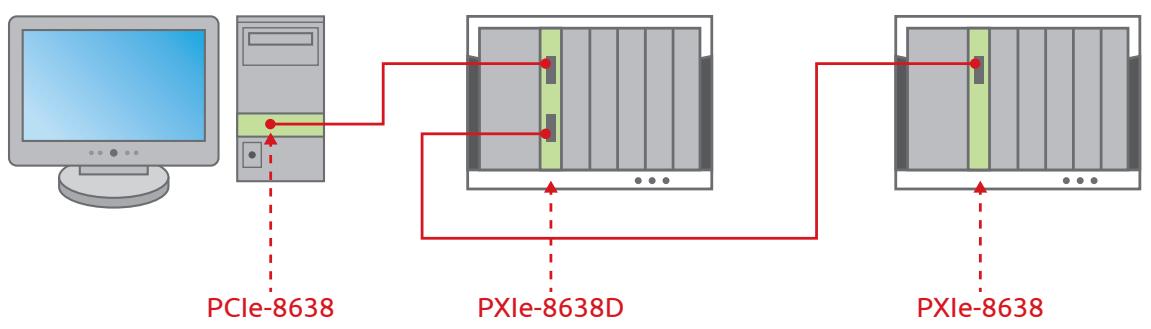
The PCIe-PXIe-8638 PCI Express-to-PXI Express expansion kit provides additional PXI instruments slots to the host computer by implementing a PCI Express-based control of PXI modules. The technology consists of a PCIe-8638 host adapter installed in the host computer, a PCIe x8 cable, and a PXIe-8638, a remote controller with the 3U (Eurocard) expansion module. The PCIe-8638 comes in a PCI Express x8 footprint and equips with PCIe x8 cable connector.

PXIe-8638D with dual ports provides capability of multi-chassis control as a daisy-chain configured. The upper port would be connected to a PCIe-8638 which be installed in a host PC. And the lower port would be connected to another PXIe-8638 or PXIe-8638D in subsequent chassis.

PXIe-8638P also is another option on multi-chassis expansion as a daisy-chain or star-chain configured for user only having PXIe-8638 at first place. with PXIe-8638P in a perapheral slot, it can connect to another chassis with PXIe-8638 or PXIe-8638D to establish multichassis control.

With comprehensive hardware and software transparency, the expansion kit enables fast and convenient detection of any PXI cards installed in the system, requiring no additional drivers or software.

![Exterior view of a power supply unit connected to a network card via cable (no visible text or symbols)](.pcie-pxie-8638-datasheet-20191014/20d548b6199cc05b7d6906d993d3d5bae5b828af0bb50eac6006c6d5fcaa5c48.jpg)

# Ordering Information

● PCIe-PXIe-8638 PCI Express-to-PXI Express Expansion 2 meter Kit
Includes one PCIe-8638, one PXIe-8638, and one ACL-PCIEX8-2 2 meter cable
. PCIe-PXIe-8638 PCI Express-to-PXI Express Expansion 5 meter Kit
Includes one PCIe-8638, one PXIe-8638, and one ACLPCIEX8-5 5 meter cable
● PCIe-8638 PXIe remote controller for PCIe-to-PXIe cable extension
● PXIe-8638P PXIe-to-PXIe extension for multi-chassis expansion as a daisy-chain or star-chain configured

# Cable Accessories

● PCIe-PXIe-8638/2M
PCIe X8 cable, 2M

● PCIe-PXIe-8638/5M

PCIe X8 cable, 5M

Specifications

<table><tr><td>Model Name</td><td>PXle-8638</td><td>PXle-8638D</td><td>PXle-8638P</td></tr><tr><td>Compliance</td><td>PXI-5 PXI Express hardware specification Rev.2.0 compliant</td><td>PXI-5 PXI Express hardware specification Rev.2.0 compliant</td><td></td></tr><tr><td>Maximum data throughput</td><td>PCI Express gen 2 x8 link with 4GB/s data throughput</td><td>Two PCIe gen 2 x8 ports each up to 4GB/s data throughput</td><td></td></tr><tr><td>Extended distance</td><td>Up to 5m</td><td>Two PCIe gen 2 x8 ports each up to 4GB/s data throughput</td><td></td></tr><tr><td>Installation</td><td>Controller slot 1</td><td>Controller slot 1</td><td>Peripheral slot</td></tr><tr><td>Dimensions</td><td>Low-profile PCI Express card 142 mm (W) x 69 mm (H)</td><td>PXI Express system module: 175 mm (W) x 107 mm (H)</td><td></td></tr><tr><td>Operating temperature</td><td colspan="3">0°C to 55°C</td></tr><tr><td>Storage temperature</td><td colspan="3">-40~71°C (-40~158°F)</td></tr><tr><td>Relative humidity</td><td colspan="3">10% to 90%, non-condensing</td></tr></table>

Product Illustration

![Based on the provided flowchart, here is the accurate description of the labeled blocks and connections:\n\n**Labeled Blocks:**\n*   **PCIe-8638**: A computer tower (connected to a monitor). A dashed red line points to a green highlighted area on the tower.\n*   **PXIe-8638D**: A chassis/rack unit. A dashed red line points to the chassis. It features two green vertical slots/connectors.\n*   **PXIe-8638**: A chassis/rack unit. A dashed red line points to the chassis. It features one green vertical slot.\n\n**Connections (Red Lines):**\n*   A red line connects the **PCIe-8638** (on the PC tower) to the top slot of the **PXIe-8638D**.\n*   A red line connects the **PCIe-8638** (on the PC tower) to the bottom slot of the **PXIe-8638D**.\n*   A red line connects the bottom slot of the **PXIe-8638D** to the slot of the **PXIe-8638**.](.pcie-pxie-8638-datasheet-20191014/b024273229a30c8ee49333ac7364db10da3fe393af29257dcff1772698859545.jpg)

Bus Extension Card Selection Guide

<table><tr><td rowspan="2">ADLINK Bus extension card</td><td colspan="4">Connector form factor</td></tr><tr><td>PCIe X8</td><td>PXIe system controller slot</td><td>PXIe peripheral slot</td><td>PXIe Hybrid slot</td></tr><tr><td>PCIe-8638</td><td>√</td><td></td><td></td><td></td></tr><tr><td>PXIe-8638</td><td></td><td>√</td><td></td><td></td></tr><tr><td>PXIe-8638D</td><td></td><td>√</td><td></td><td></td></tr><tr><td>PXIe-8638P</td><td></td><td></td><td>√</td><td>√</td></tr></table>
[🔗 Link to the original document](.pcie-pxie-8638-datasheet-20191014/pcie-pxie-8638-datasheet-20191014.pdf)