# Neuron SDK

# User’s Manual

Powerful SDK for Intelligent Robotics Development

Manual Rev.: 1.0

Revision Date: April 14, 2021

Part Number: 50M-00017-1000

# Preface

# Copyright

Copyright © 2021 ADLINK Technology, Inc. This document contains proprietary information protected by copyright. All rights are reserved. No part of this manual may be reproduced by any mechanical, electronic, or other means in any form without prior written permission of the manufacturer.

# Disclaimer

The information in this document is subject to change without prior notice in order to improve reliability, design, and function and does not represent a commitment on the part of the manufacturer. In no event will the manufacturer be liable for direct, indirect, special, incidental, or consequential damages arising out of the use or inability to use the product or documentation, even if advised of the possibility of such damages.

# Environmental Responsibility

ADLINK is committed to fulfill its social responsibility to global environmental preservation through compliance with the European Union's Restriction of Hazardous Substances (RoHS) directive and Waste Electrical and Electronic Equipment (WEEE) directive. Environmental protection is a top priority for ADLINK. We have enforced measures to ensure that our products, manufacturing processes, components, and raw materials have as little impact on the environment as possible. When products are at their end of life, our customers are encouraged to dispose of them in accordance with the product disposal and/or recovery programs prescribed by their nation or company.

![The image displays a black-and-white graphic. At the top, there is a line drawing of a trash bin with wheels, crossed out by a large 'X'. Below the bin is a solid black rectangle. A thick black vertical bar runs along the right edge of the image.](.neuron-sdk-50m-00017-1000-10/abddcd5a39e135a82419ae2158e88a5e8bcb2075f70dedd8e524f4c8216360dc.jpg)

Battery Labels (for products with battery)

![Simple line drawing of a trash bin with two crossed lines (no text or symbols)](.neuron-sdk-50m-00017-1000-10/507911515b070ec79858ba7efc306e821c6e43e8c0ef7c2191b802b2dd7fb993.jpg)

![The image displays a black recycling symbol enclosed within a thin black square border. Inside the square, three black-outlined arrows are arranged in a triangular formation, chasing each other in a clockwise direction.](.neuron-sdk-50m-00017-1000-10/cd168e181bdf4c20c1872ceed252235c48c4f307ee5ea05d39f4f2c859e56686.jpg)
Li-ion

![RECYCLE\nRBRC\nLi-ion\n7.800.822.8837](.neuron-sdk-50m-00017-1000-10/9e673fd90f646eb8b94291befdada0c30e3400e2441537d30db6450cdd9a75ac.jpg)

![A black square with rounded corners contains four white arrows pointing outward toward the four corners, with their arrowheads meeting in the center to form an X shape.](.neuron-sdk-50m-00017-1000-10/69bf143a5ad5b6107934e90375a1fa17849aa1eff5ac79f8d41f49e7919a5fc3.jpg)
廢電池請回收

# California Proposition 65 Warning

WARNING: This product can expose you to chemicals including acrylamide, arsenic, benzene, cadmium, Tris(1,3-dichloro-2-propyl)phosphate (TDCPP), 1,4-Dioxane, formaldehyde, lead, DEHP, styrene, DINP, BBP, PVC, and vinyl materials, which are known to the State of California to cause cancer, and acrylamide, benzene, cadmium, lead, mercury, phthalates, toluene, DEHP, DIDP, DnHP, DBP, BBP, PVC, and vinyl materials, which are known to the State of California to cause birth defects or other reproductive harm. For more information go to www.P65Warnings.ca.gov. Trademarks

Product names mentioned herein are used for identification purposes only and may be trademarks and/or registered trademarks of their respective companies.

Revision History

<table><tr><td>Revision</td><td>Description</td><td>Date</td></tr><tr><td>1.0</td><td>Initial release</td><td>2021-04-14</td></tr></table>

# Table of Contents

Introduction...
2 Installation Guide ......

2.1 Supported Platforms ...... .3
2.2 Installation Procedure ... 3
2.3 Installation Troubleshooting... 3
2.4 Manage Neuron SDK.. 4

3 Neuron Startup Menu ....

3.1 Usage ...... .5
3.2 Configuration ....... .6
3.3 Disable/Enable the Menu......

4 Neuron App ......
5 Neuron IDE.. .11

5.1 Introduction ... .11
5.2 Installation... .11
5.3 Getting Started.. . 12

6 Neuron Library ................. .25

6.1 Introduction ... .25
6.2 Supported Programming Languages...... .. 25
6.3 Hardware Pin Mapping . .25
6.4 Usage ...... .. 26

7 Neuron Comm ............... .29

7.1 DDS Configuration.. .. 30
7.2 Shared Memory .... .32
7.3 QoS... .. 36

8 Software License Agreement ... .47

This page intentionally left blank.

# 1 Introduction

ADLINK’s Neuron SDK is a powerful software development package for intelligent robotics development based on the Open Robotics Robotic Operating System 2 (ROS 2) project. ROS 2 is the successor to the highly successful Robotic Operating System (ROS 1), and is now an industry standard robotic middleware.

Despite the success, ROS 1 had certain weakness due to its fundamental design. To address these issues, Open Robotics started development of ROS 2. By incorporating DDS as its data delivery mechanism, ROS 2 comes with several advanced features, including:

• Removed dependency on a single master (i.e. roscore) broker.
• Node life-cycle management.
• Better launch system, with time control and/or criteria.
• Support for different DDS vendors.
• Support for real-time operating systems

As a result of addressing many critical aspects of the robotic system, ROS 2 is becoming the new standard for the industry. Porting packages from ROS1 to ROS 2 is progressing rapidly and robotics platforms such as TurtleBot, Navigation, and Intel® Movidius™ are already ROS 2 ready. ROS 2 LTS Foxy Fitzroy was released on June 5th, 2020 for Ubuntu 20.04 LTS. Foxy will be supported for three years.

Neuron SDK is based on Eclipse Cyclone DDS and has the following features:

• Neuron Startup Menu to easily switch ROS development environment
• Neuron App as a reference design to reduce development time
• Neuron IDE for better development experience
• Neuron Library to operate peripheral of controllers, includes ROS 2 examples
• Shared memory that dramatically reduces resource costs and time delays
• Added QoS for ROS 2: Ownership (see 7.3.2 ADLINK Extra QoS - Ownership)

This user’s manual provides an explanation of the Neuron SDK features. Refer to the following sections for detailed descriptions.

This page intentionally left blank.

# 2 Installation Guide

The chapter describes how to install Neuron SDK on ADLINK ROS controllers. You can download the Neuron SDK package from the ADLINK website. The filename format of Neuron SDK is as follows:

Neuron-SDK\_&lt;ROS version&gt;\_&lt;NSDK version&gt;\_&lt;Architecture&gt;.run

For example, Neuron-SDK\_foxy\_1.0.0\_x86-64.run is Neuron SDK for ROS 2 Foxy, version 1.0.0, and able to run on an x86 platform.

# 2.1 Supported Platforms

The following platforms are supported by Neuron SDK:

• Supported OS platform:
 Ubuntu 20.04
• Supported ROS version:
 ROS 2 LTS Foxy Fitzroy

# 2.2 Installation Procedure

To install Neuron SDK, follow the steps below. Make sure the controller is connected to the Internet.

1. Install Ubuntu on the controller.
2. Connect the controller to the Internet and install Neuron SDK from the terminal.

```batch
chmod a+x Neuron-SDK_foxy_1.0.0_x86-64.run
./Neuron-SDK_foxy_1.0.0_x86-64.run
```

3. A prompt will appear asking you to read the Software License Agreement in this user’s manual (Ch. 8 Software License Agreement on page 47). Enter “Y” to continue installing Neuron SDK.

```txt
Please make sure you've read the Software License Agreement in the User Manual before installation. Are you sure you want to install Neuron SDK? (y/N):
```

4. After installation, you will be asked to install ROS 1 and ROS 2. Enter “Y” if ROS is not installed on your controller.

```txt
Do you want to install ROS automatically? (y/N):
```

5. The next time you open the terminal, you will see the Neuron Startup Menu. Select "ROS 2 foxy Neuron SDK" to run Neuron SDK (see Sec. 3.1 Usage on page 5).

# 2.3 Installation Troubleshooting

If you encounter a connection failure due to the curl command not recognizing the domain name while installing Neuron SDK, you must manually bind the URL to an IP address.

```txt
Setting up neuron-library (1.1.0) ...
Setting up neuron-sdk-ros-pkgs-foxy-bionic (0.8.0) ...
curl: (7) Failed to connect to raw.githubusercontent.com port 443: Connection refused
```

Follow steps below to fix the error.

1. Check if your system can connect to githubusercontent.com.

ping raw.githubusercontent.com

If the output is as follows, it means the system can connect to the target host, and the domain name server can translate the URL into the IP address (199.232.28.133). If you cannot make the connection, check your internet settings.

64 bytes from 199.232.28.133: icmp\_seq=1 ttl=51 time=34.6 ms

2. Use a text editor to open /etc/hosts.

sudo gedit /etc/hosts

In the /etc/hosts file, add one line to map the IP address (199.232.28.133) from last step to raw.githubusercontent.com.

199.232.28.133 raw.githubusercontent.com

3. Save and close the modified /etc/hosts file.
4. Reinstall Neuron SDK. (See 2.2 Installation Procedure)

# 2.4 Manage Neuron SDK

To manage Neuron SDK, you can use the following nsdk-manager command line options.

• Show the current Neuron SDK version.

/opt/adlink/neuron-sdk/nsdk-manager version

• Uninstall Neuron SDK.

/opt/adlink/neuron-sdk/nsdk-manager uninstall

# 3 Neuron Startup Menu

Unix based systems often store its parameters in a format of "shell variables", commonly referred to as "environmental variables". Scripts and programs constantly load these variables as execution parameters or for internal usage. The process of configuring environmental variables is very tedious, especially when there are many conflicting settings between ROS / ROS 2, Python2 / Python3, OpenCV2 / OpenCV3, etc. Fortunately, Neuron SDK comes with a tool that prepares the environment for you: the Neuron Startup Menu.

After installing Neuron SDK, the user-friendly Neuron Startup Menu will display at each terminal startup. You can select from ROS, ROS 2 or ROS bridge in the menu. This saves time setting ROS environmental variables every time you open the terminal.

# 3.1 Usage

After installation, next time you open the shell, the terminal will show the following menu.

```txt
************************** Neuron Startup Menu for ROS **************************
* Usage: Please select the following options to load *
* ROS environment automatically.    *
**************************
0) Do nothing
1) ROS 1 noetic
2) ROS 2 foxy
3) ROS 2 foxy Neuron SDK
4) ROS2/ROS1_bridge
h) Help
Please choose an option:
```

The menu options are as follows:

• Do nothing

1. Don't setup an environment.

• ROS 1 noetic

1. Setup a ROS1 environment.

2. Set ROS\_IP and ROS\_MASTER\_IP to be the same as your host IP.

• ROS 2 foxy

1. Setup a ROS2 environment.

2. Set ROS\_DOMAIN\_ID to 30 and RMW\_IMPLEMENTATION to CycloneDDS.

• ROS 2 foxy Neuron SDK

1. Do the same as “ROS 2 foxy”

2. Setup a Neuron SDK environment.

• ROS2/ROS1\_Bridge

1. Do all the above for both ROS 1 and ROS 2 options.

2. Run ROS bridge automatically.

• Help

1. Show the ros\_menu usage list.

After selecting your option, you can view your settings via environmental variables or by running “ros\_menu\_env”.

```shell
# Check ROS version (1 or 2)
echo $ROS_VERSION
# Check ROS distribution (e.g. foxy)
echo $ROS_DISTRO
# Check DDS implementation (e.g. rmw_cyclonedds_cpp)
echo $RMW_IMPLEMENTATION
```

# 3.2 Configuration

You can configure the menu easily by modify \~/ros\_menu/config.yaml. The following are the options you can control.

• Config:

 menu\_enable: "true" to enable the menu, “false” or otherwise do nothing.
 ros\_option: “menu” to show the whole menu, or any option\_num you set to choose the option automatically.
 default\_ros\_domain\_id: set if you want to have the same domain ID for every ROS 2 version, otherwise the domain ID will be set to 30.

• Menu setting:

 ROS 1:

à option\_num: give the option name to this option, avoid using specific characters(e.g:help,H,h,0) or duplicate option name
à ROS\_version: 1
à distro\_name: the name of the ROS 1 you are using.
à ros1\_path: the path where the ROS 1 is.
à master\_ip: set the IP address of the master if master isn't on current computer.
à cmds: source your ROS 1 workspace here.

```txt
ROS 1 noetic:
    option_num: 1
    ROS_version: 1
    distro_name: noetic
    ros1_path: /opt/ros/noetic
    master_ip: # set if roscore isn't on this computer
    cmds:
    # - source ${HOME}/catkin_ws/devel/setup. ${shell}
    # - source_plugin openvino_bashrc
```

 ROS 2:

à option\_num: give the option name to this option, avoid using specific characters(e.g:help,H,h,0) or duplicate option name
à ROS\_version: 2
à distro\_name: the name of the ROS 2 you are using.
à ros2\_path: the path where the ROS 2 is.
à domain\_id: set the Domain ID for DDS communication. Keep empty to use \$default\_ros\_domain\_id(30)
à cmds: source your ROS 2 workspace here.

Note: source\_plugin dds\_bashrc is necessary when using ROS 2
```yaml
ROS 2 foxy:
    option_num: 2
    ROS_version: 2
    distro_name: foxy
    ros2_path: /opt/ros/foxy
    domain_id: # set if you don't want to use default domain id
    cmds:
    # - source ${HOME}/ros2_ws/install/local_setup. ${shell}
    | - source_plugin dds_bashrc 1
    # - source_plugin openvino_bashrc
```

 ROS2/ROS1\_bridge:

à option\_num: give the option name to this option, avoid using specific characters(e.g:help,H,h,0) or duplicate option name
à ROS\_version: bridge
à ros1\_version\_name: the name of the ROS 1 you are using.
à ros2\_version\_name: the name of the ROS 2 you are using.
à ros1\_path: the path where the ROS 1 is.
à ros2\_path: the path where the ROS 2 is.
à master\_ip: set the IP address of the master if master isn't on current computer.
à domain\_id: set the Domain ID for DDS communication. Keep empty to use \$default\_ros\_domain\_id(30)
à cmds: any command you want to run every time using ROS bridge.

Note: source\_plugin dds\_bashrc and ros2 run ros1\_bridge dynamic\_bridge --bridge-all-topics is required when using ROS bridge

```yaml
ROS2/ROS1_bridge:
    option_num: 3
    ROS_version: bridge
    ros1_version_name: noetic
    ros2_version_name: foxy
    ros1_path: /opt/ros/noetic
    ros2_path: /opt/ros/foxy
    master_ip:
    domain_id:
    cmds:
    - source_plugin dds_bashrc 1
    - ros2 run ros1_bridge dynamic_bridge --bridge-all-topics
```

# 3.3 Disable/Enable the Menu

To disable/enable the menu, type “ros\_menu\_disable“ / “ros\_menu\_enable”

```txt
#Disable ros_menu
ros_menu_disable
#Enable ros_menu
ros_menu_enable
```

This page intentionally left blank.

# 4 Neuron App

Neuron App is an integrated development package for AMR applications, ready for simulation and deployment on NeuronBot. When developing AMR applications, using Neuron App as a reference design can help reduce development time.

There are three essential AMR applications included in the Neuron IDE:

SLAM: The Simultaneous Localization and Mapping (SLAM) application includes an algorithm that generates a map of the area surrounding a robot. With ranging data collected by LiDAR and pose data on the robot as input, SLAM performs mapping and localization at the same time. Remote operating a robot in the field will result in a complete 2D grid map as output.
Navigation: A robot will locate itself by matching the input 2D grid map according to LiDAR, and autonomously navigate from one place to another. The path planner in this package can compute an optimized route and avoid obstacles to complete navigation.
Auto-inspection: This application combines Behavior Tree, Navigation, and photos taken by an onboard camera. “Behavior Tree” is a task manager package which tasks the robot with autonomously navigating to each pre-defined location and then takes photos for each place. You can also implement deep learning object detection to reinforce robustness of inspection.

Neuron IDE is recommended for building and executing Neuron App on ADLINK hardware platforms for better performance. See the Neuron IDE section for more information on how to use Neuron App with Neuron IDE.

For more information on new apps, go to the Neuron App page on GitHub:

https://github.com/Adlink-ROS/neuron\_app\_overview

This page intentionally left blank.

# 5 Neuron IDE

# 5.1 Introduction

Neuron IDE is a code editor especially designed for ROS developers. It provides various functions for software development without the need to type commands in the terminal. By integrating with Git and ROS packages, developers now can find file management, version control, and code compilation in a single application.

With Neuron IDE, monitoring ROS processes is much more efficient. The ROS Resource Widget is used to launch ROS nodes, visualize sensor data via RVIZ, and dynamically adjust ROS parameters with RQT. Instead of launching these applications in different terminals, Neuron IDE can control all of them in a single terminal.

Note that Neuron IDE currently only support ROS 2.

# 5.2 Installation

Neuron IDE comes preinstalled with Neuron SDK. Click the Show Applications icon to see the Neuron IDE shortcut.

![Type to search\nAdditional Driv...\nArchive Manager\nByobu Terminal\nCalculator\nCharacters\nDisks\nDocument Vie...\nFiles\nFirefox Web Br...\nFLUID\nFonts\ngazebo11.desk...\nHelp\nImage Viewer\nInput Method\nLanguage Supp...\nLibreOffice Base\nLibreOffice Calc\nLibreOffice Draw\nLibreOffice Im...\nLibreOffice Wri...\nLivepatch\nLogs\nneuronide\nFrequent	All\nNeuron IDE](.neuron-sdk-50m-00017-1000-10/f6b739f5af641d91105a7fd0fa9862f147da9a9d1d13f38df905b1b7f6987035.jpg)

# 5.3 Getting Started

When Neuron IDE is executed, the Getting Started page opens with a list of functions, as shown below.

![Neuron IDE Getting Started\nNeuron App\nSLAM\nNavigation\nAuto-inspection\nOpen\nOpen File\nOpen Folder\nOpen Workspace\nRecent Workspaces\nneuron_app_navigation /home/ros/neuron_app_navigation\nneuron_app_slam /home/ros/neuron_app_slam\nneuron_app_inspection /home/ros/neuron_app_inspection\nSettings\nOpen Preferences\nOpen Keyboard Shortcuts\nHelp\nROS Documentation\nROS2 Documentation\nROS Discourse](.neuron-sdk-50m-00017-1000-10/d91d967040915ffedfd963fce0333ed57e666a6a94bc42074a1490274276ef93.jpg)

Some of the more important functions are further described in the following sections.

If you are already familiar with the functions of the Neuron IDE and would like to proceed directly to the user workflow, go to 5.3.4 User Workflow.

# 5.3.1 Neuron App

There are three Neuron Apps shown on the Getting Started page: SLAM, Navigation, and Auto-inspection.

Click any Neuron App to automatically download packages and enter its workspace. After entering the workspace, there is a notification at the bottom right corner indicating that you have to install the dependent packages defined in the Neuron App. Click install to install the dependencies and build the Neuron App.

![Looks some repos defined under .repos file but not installed to your source directory yet. Do you want to install them?\nInstall Cancel](.neuron-sdk-50m-00017-1000-10/b5f2153defa472b50a37698d5951c07116e557827797b0d5e612f6111981ec37.jpg)

For detailed information on the Neuron App Workspace, see Sec 5.3.3 Workspace.

If there is an existing folder for package development, access the workspace by clicking Open Folder. The folder should contain an src subfolder where the ROS packages should be placed.

# 5.3.2 Settings

Preferences are found and can be changed under Settings > Open Preference. This section focuses only on the two parameters related to ROS usage, Default Domain ID and Default Rmw. To view the parameters, click Ros.

Default Domain ID: ROS 2 uses DDS as the underlying transport. DDS supports a physical segmentation of the network based on the “Domain ID”. Make sure to separate machines for different uses under different domains.
• Default Rmw: Selects the ROS middleware vendor. The default value is CycloneDDS.

We do not recommend modifying other parameters (like License Path or Nsdk Resource Path) that could cause the Neuron IDE to stop working.

![User Workspace\nGrunt\nGulp\nHosted Plugin\n)Html\nJake\n)Javascript\n)Json\nKeyboard\n)Less\n)Markdown\n)Merge Conflict\nNotification\nNpm\nOutput\nPreview\n)Problems\n)Python\nReferences\nRos\nScm\nRos\nDefault Domain Id\nDefault DDS domain ID under ROS2.\n30\nDefault Rmw\nDefault ROS2 RMW implementation\nrmw_cyclonedds_cpp\nLicense Path\nLicense Path for NSDK.\n/opt/adlink/neuron-sdk\nNsdk Resource Path\nSearching path for NSDK resources.\n/opt/adlink/neuron-sdk/ros/](.neuron-sdk-50m-00017-1000-10/c6ac336e38714f03446a9f282bd745ddb312b7758e652b236c5f94cc8437fbf2.jpg)

# 5.3.3 Workspace

As the main feature of Neuron IDE, workspace is where the ROS package development is done. A user interface with development tools is opened when accessing a Neuron App workspace. The development tools are easily accessed for ROS application development, include file editing, code compiling, and ROS resource management.

The workspace UI contains 4 elements:

• ROS Resource Widget
• Activity Bar
• Status Bar
• Menu Bar

Each of these elements is described in more detail in the sections below.

![The image features a solid blue circle containing a single white capital letter 'D' centered within it.](.neuron-sdk-50m-00017-1000-10/1634b51c5b947a1553ad10bf106d1a783dfc01dde2367af3ed20cab22c425fd5.jpg)

# Menu Bar

# ROS Resource Widget

![A blue circle containing a white capital letter 'A' in the center.](.neuron-sdk-50m-00017-1000-10/e974b556316dc952bf2473d57d1bfc88adfbeca927d8ceae22f288c16a04ebd2.jpg)

![File Edit Selection View Go Debug Terminal Virtualization Tool Help\nPreview README.md\nNeuron APP: Navigation\nSupport Platform:\nADLINK.Controller:\nROScube-II\nROScube-X\nROScube starsnet\nROS version:\nROS 2 loxy\nUsage\nQuickstart\nOnce users obtain the map, pgm file, and yamf file, navigation is good to go.\n1. Click application in Neuron App to open workspace. Click Navigation. It will build the resource at first time it's opened.\nFile Edit Selection View Go Debug Terminal Virtualization Tool Help\nEXPLORER NO FOLDER OPENED Getting Started #\nYou have not yet opened a\nTask resdep install ×\nTerminal will be reused by tasks.](.neuron-sdk-50m-00017-1000-10/dbf8fd0eae58bbc4f10003636e5122527af7719642ae59699d97f4db8d35f5aa.jpg)

![A blue circle containing a white, capital letter 'C' on a white background.](.neuron-sdk-50m-00017-1000-10/bd398ef02fc72a006cbb6b16799ddd710d4a5662fa34a7f52a1da4c3e4061112.jpg)

# Status Bar

# 5.3.3.1 ROS Resource Widget

The ROS Resource Widget is the main toolbar for users to execute ROS functions. Developers can launch ROS applications in Packages and view active processes with Monitor.

Outline: The symbol tree of the current, active editor. It shows an overview of the code object in the current file. Click the name of an object to quickly jump to sections where it has been initially declared.

![OUTLINE\n{ } os\n{ } get_package_share_directory\n{ } LaunchDescription\n{ } IncludeLaunchDescription\n{ } GroupAction\n{ } PythonLaunchDescriptionSource\n{ } LaunchConfiguration\n▼ generate_launch_description\n  gazebo_launch_dir\n  nb2nav_launch_dir\n  nb2nav_map_dir\n  use_sim_time\n  open_rviz\n  world_model\n  map_path\n  neuron_app_bringup\n  ld](.neuron-sdk-50m-00017-1000-10/be70609acbfd6f7f9fd7b837d585c91f9578efa7e7487ce6242855b0c2a56380.jpg)

• Packages: List of user packages in the ROS environment. There are three categories:

• ros-layer: Binary version of packages installed in the ROS repository
nsdk-layer: Overlay packages of Neuron SDK that executes functions of Neuron IDE as patches of the ros-layer package.
user-workspace: Built package in current workspace

![PACKAGES: RESOURCES\n) ros-layer\n) nsdk-layer\n) user-workspace](.neuron-sdk-50m-00017-1000-10/bd48ac2af89e04467680d400b332b22cb013b64bd4afe6cc9a21f792dd531563.jpg)

The run and launch processes should be done in this section. Expand the resource list of the package, and then right-click on the selected launch file and click Run > Run launch file.

![PACKAGES: RESOURCES\n) ros-layer\n) nsdk-layer\n✓ user-workspace\n✓ napp_navigation\ngazebo_navigation.launch.py\nneuronb Run Run Launch File\n) nav2_behavior_tree\n) neuronbot2_bringup\n) neuronbot2_description\n) neuronbot2_gazebo\n) neuronbot2_nav\n) neuronbot2_slam](.neuron-sdk-50m-00017-1000-10/8f48de61c1fe24cb712fd756b9be8948ef7d251c8309e62e848fc913547ec6a9.jpg)

Monitor: Displays a list of executing processes.

![MONITOR\n✓ NODE\n✓ /\n✓ bt_navigator\n→ /bt_navigator/transition_event\n→ /navigate_to_pose/_action/feedback\n→ /navigate_to_pose/_action/status\n→ /parameter_events\n→ /rosout\n← /clock\n← /goal_pose\n✓ TOPIC\n✓ /FollowWaypoints/_action/feedback\n← /waypoint_follower\n→ /rviz2\n) /FollowWaypoints/_action/status\n✓ SERVICE\n/amcl/change_state\n/amcl/get_available_states](.neuron-sdk-50m-00017-1000-10/1787dd83750a4c01ecfcdf75ea8bb636d9cb539c2cd979888e7cc59e312ccae4.jpg)

Node: List of current nodes. Expanding the list of each node shows topics and services related to the current node. A left-arrow indicates that a topic is published by the node. A right-arrow indicates that a topic is subscribed to by this node. An up-arrow indicates that the node is the service server.
Topic: List of current topics. A left-arrow indicates that a node publishes this topic. A right-arrow shows the node subscribes to this topic.
• Service: List of current services.

# 5.3.3.2 Activity Bar

The Activity Bar on the left can quickly switch between different components. Components can be inserted into the Activity Bar by clicking View in the Menu Bar.

Explorer: Used for file management in Neuron IDE to open, create, or edit files in the workspace.

![EXPLORER: NE...\n).theia\n) build\n) install\n) log\n) readme_resource\nsrc\n) napp_navigation\n) neuronbot2\n) rplidar_ros\n) serial\n. gitignore\nCHANGELOG\nneuron-app.repos\nneuron-ide.json\nREADME.md](.neuron-sdk-50m-00017-1000-10/3feed5e853cbe39eb18ee8fc5bcf73c59082cf4e180381324a39d4bba877a5c4.jpg)

Git: Used for source control to compare file changes between commits. Git is an open-source distributed version control system that developers can use with various command to manage code changes and errors for projects. Found under “more actions”.

![Message (press Ctrl to com\nCHANGES\n. distro . theia\nCommit (Amend)\nCommit (Signed Off)\nFetch...\nMerge...\nPull\nPull from...\nPush\nPush to...\nDiscard All Changes\nStage All Changes\nUnstage All Changes\nApply Latest Stash\nApply Stash...\nDrop Stash...\nPop Latest Stash\nPop Stash...\nStash...](.neuron-sdk-50m-00017-1000-10/1eb5a5d530d7a51ff080504c0e45c52ba3cc5a52b11303466920ef2a86da5e21.jpg)

Extensions: Used to install and manage additional extensions for programming.

![EXTENSIONS\nSearch Extensions in Open\nINSTALLED\nGitL... 16K ★5.0\nSupercharge the...\neamodio Uninstall\nBUILT-IN\nAbyss Th... 49K\nAbyss theme for ...\nvscode\nC/C++ La... 55K\nProvides snippet...\nvscode](.neuron-sdk-50m-00017-1000-10/aee2631b4bc3b724579e7912ad05f34b6defcad71760b7b9c2377905e7ffb4a5.jpg)

# 5.3.3.3 Status Bar

The Status Bar shows information about the open projects and the files you edit. It is provided to configure the Git repository and ROS environment for the current workspace.

![Based on the image provided, here is the accurate description of the labeled blocks and their connections:\n\n**Labeled Blocks:**\n*   **Top Row:** 'Repository', 'Build', 'ROS Distro'\n*   **Middle Bar (Left to Right):** 'neuron_app_navigator', 'master', 'UnitTest', 'Build', 'ROS commands', 'ROS Core Monitor', 'ROS Distro: (foxy)' (Note: There are also small icons with '0' next to them between 'master' and 'UnitTest').\n*   **Bottom Row:** 'Branch', 'ROS commands'\n\n**Connections:**\n*   **Repository** (top) connects vertically down to **neuron_app_navigator** (middle).\n*   **Build** (top) connects vertically down to **Build** (middle).\n*   **ROS Distro** (top) connects vertically down to **ROS Distro: (foxy)** (middle).\n*   **Branch** (bottom) connects vertically up to **master** (middle).\n*   **ROS commands** (bottom) connects vertically up to **ROS commands** (middle).](.neuron-sdk-50m-00017-1000-10/e87865569f63898ffbdb478b2564925243dd52f3854a9a9ab9f3d2db0e7bcd86.jpg)

ROS Distro: Selects the ROS distribution, versioned set of ROS packages, such as Foxy for ROS 2, or Noetic for ROS 1. ROS 2 foxy is the default version. Since ROS 1 is not supported now, you should only select ROS 2 version.

![Select a ROS distribution.\nnoetic Location: file:///opt/ros/noetic\nfoxy Location: file:///opt/ros/foxy\nnone Current workspace will be configured as underlay workspace.](.neuron-sdk-50m-00017-1000-10/b03e48b1eecb9ebc48f1dd0b098781921752b540437623e2228d9e9987583bd0.jpg)

• Build: Compiles packages in your workspace. There are 4 build types can be specified:

• Release: Build with no debugging information and full optimization.
• Debug: Build including debugging information, no optimization, etc.
• RelWithDebInfo: Same as Release, but with debugging information.
• MinSizeRel: Same as Release, with optimization configuration set to minimize size.

<table><tr><td colspan="2">Select the build task to run</td></tr><tr><td>colcon: IDE Built-in Release Build Task Workspace</td><td>detected tasks</td></tr><tr><td>colcon: IDE Built-in RelWithDbgInfo Build Task Workspace</td><td></td></tr><tr><td>colcon: IDE Built-in MinSizeRel Build Task Workspace</td><td></td></tr><tr><td>colcon: IDE Built-in Debug Build Task Workspace</td><td></td></tr></table>

• ROS commands: Used to download source code or binary versions of ROS packages.

• download source code: Download the Neuron App source code.
rosdep install: Install ROS dependencies required for ROS packages in workspaces.

![Select ROS command.\ndownload source code\nrosdep install](.neuron-sdk-50m-00017-1000-10/8b51595c8d4937e349adfa811224c86e1d96e94c0290a77fcd5248b970607e73.jpg)

Repository: Switches the local Git repository to do source control. The Git section in the Activity Bar will be simultaneously changed.

![Select repository to work with:\nneuron_app_navigation /home/ros/neuron_app_navigation\nneuronbot2 src/neuronbot2\nrplidar_ros src/rplidar_ros\nserial src/serial](.neuron-sdk-50m-00017-1000-10/8f05646467abce1bf8a62edc929aa950ebfdde97b3ca0f518750b906bb066c14.jpg)

• Branch: Switches the Git branch of the current repository.

![Select a ref to checkout or create a new local branch:\n\nCreate new branch...\n\norigin/master Remote branch at 6bb034b\n\norigin/HEAD Remote branch at 6bb034b](.neuron-sdk-50m-00017-1000-10/6642edaf362cd65f7d16b88f1e82140de9aaac5462331e824df246b65b898dc4.jpg)

# 5.3.3.4 Menu Bar

The Menu Bar consists of the Neuron IDE basic operations. The following are development tools for ROS in the Menu Bar.

• Visualization Tool: Contains ROS GUI tools that visualize an active ROS node and data.

![Terminal Virtualization Tool Help\nOpen RVIZ\nRQT tool\nRQT Topic Tool\nRQT Graph Tool](.neuron-sdk-50m-00017-1000-10/b476fd236b597444627acb829de12b27476a54a738536f986d3d860b326cac10.jpg)

RVIZ: A 3D visualizer for the ROS framework. It is used to display the position of each frame and published data, such as a laser scan, and point cloud.

![File Panels Help\nMove Camera Select Measure 2D Pose Estimate 2D Coal Pose\nDisplays\nGlobal Options\nFixed Frame map\nBackground Color 48; 48; 48\nFrame Rate 30\nGlobal Status: Ok\nGrid\nRobotModel\nTF\nLaserScan\nBumper Hit\nMap\nAmel Particle Swarm\nGlobal Planner\nController\nRealSense\nMarkerArray\nAdd Duplicate Remove Rename\nReset Left-Click: Rotate. Middle-Click: Move X/Y. Right-Click: Zoom. Shift: More options.\n26 fps](.neuron-sdk-50m-00017-1000-10/20055ff156ed9bbc1bf1898d98790fa137e9cf687fadff3d98b324a72b807d1b.jpg)

RQT: A graphical user interface framework that implements various tools and interfaces in the form of plugins. For example, in node graph you can monitor all the activating nodes and communicate between them.

![This is a ROS (Robot Operating System) Node Graph visualization, displaying nodes and topics as blocks and connections.\n\n**Labeled Blocks (Nodes):**\n\n*   **Left Side / Inputs:**\n    *   `global_costmap_client`\n    *   `local_costmap_client`\n    *   `ros_node`\n    *   `scanners`\n    *   `namespace/pointcloud`\n    *   `recycle_manager_localization_service_client`\n    *   `recycle_manager_localization`\n    *   `point`\n    *   `rosbridge_server`\n    *   `rostopic_pub_node`\n    *   `rostopic_server_node`\n    *   `rosbridge2_json_state`\n    *   `graph_state`\n    *   `rqt_graph`\n    *   `rosbag2_info`\n    *   `recycle_manager_navigation`\n    *   `recycle_manager_navigation_service_client`\n    *   `_clock` (Central Hub on the left)\n\n*   **Costmap Groups:**\n    *   **Global Costmap Group:** A box labeled `global_costmap` containing nodes: `global_costmap_node`, `global_costmap_node` (appears twice or similar), and `global_costmap_updates`.\n    *   **Local Costmap Group:** Nodes including `local_costmap`, `local_costmap_node`, `local_costmap_updates`, `local_costmap_published_baselink`, and `local_costmap_raw`.\n\n*   **Right Side / Nav2 & Actions:**\n    *   `nav2_node` (Central Hub on the right)\n    *   `waypoints`\n    *   `basepose`\n    *   **Follow Waypoints Group:** A box labeled `follow_waypoints` containing: `follow_waypoints_action_server`, `follow_waypoints_action_status`, `follow_waypoints_action_feedback`.\n    *   **Navigate To Pose Group:** A box labeled `navigate_to_pose` containing: `navigate_to_pose_action_server`, `navigate_to_pose_action_status`, `navigate_to_pose_action_feedback`.\n    *   **Follow Path Group:** A box labeled `follow_path` containing: `follow_path_action_server`, `follow_path_action_feedback`, `follow_path_action_status`.\n    *   `nav2_rclcpp_node`\n    *   `compute_path_to_pose`\n\n**Connections:**\n\n*   **Distribution from `_clock`:** The `_clock` node acts as a major distributor, with lines connecting it to `rosbridge2_json_state`, `graph_state`, `rqt_graph`, `rosbag2_info`, `recycle_manager_navigation`, `recycle_manager_navigation_service_client`, `global_costmap_client`, and `local_costmap_client`.\n*   **Localization Flow:** `scanners` connects to `namespace/pointcloud` and `recycle_manager_localization_service_client`. This service connects to `recycle_manager_localization`, which connects to `point`.\n*   **Navigation Hub (`nav2_node`):** The `nav2_node` is a central hub on the right, connecting to almost all other nodes including `global_costmap`, `local_costmap`, `follow_waypoints`, `navigate_to_pose`, `follow_path`, `waypoints`, `basepose`, `nav2_rclcpp_node`, and `compute_path_to_pose`.\n*   **Action Servers:** The boxes for `follow_waypoints`, `navigate_to_pose`, and `follow_path` group their respective action server, status, and feedback nodes together.\n*   **ROS Bridge:** `ros_node` connects to `rosbridge_server`. `rostopic_pub_node` connects to `graph_state`. `rostopic_server_node` connects to `rqt_graph`.](.neuron-sdk-50m-00017-1000-10/d3e4c85925a550e12470540c5ffd8cc37fc6369081aa03b4e23b22662d8e9d4a.jpg)

# 5.3.4 User Workflow

The followings are steps for developing Neuron Apps in the Neuron IDE workspace.

It is recommended that you deploy the Neuron App in the following order: SLAM → Navigation → Auto-inspection.

NOTE: shut down each terminal in the workspace when an application is done. Multiple Neuron Apps executed at the same time will cause Neuron IDE to become unstable.

1. Open a Neuron App workspace from the Getting Started page. (SLAM, Navigation, or Auto-inspection)

# Neuron IDE Getting Started

![The image shows a white icon on a dark background depicting a stylized file folder. The design features a rounded top section that curves downwards on the left, resembling an open folder flap, sitting above a rectangular base section.](.neuron-sdk-50m-00017-1000-10/3d03bc8f37525e30cbbab783df5ad31bbfcfcd9d0b49188762f92b0bf61b029f.jpg)

# Neuron App

SLAM

Navigation

Auto-inspection

2. Download the required ROS package for the specific Neuron App.

Click ROS command in the Status Bar.

![The image displays a blue horizontal bar containing four buttons with white text and icons. From left to right, the buttons are labeled: 'Build' (with a crossed wrench and screwdriver icon), 'ROS commands' (with a gear icon), 'ROS Core Monitor' (with a green circle icon), and 'ROS Distro: (foxy)' (with a database icon).](.neuron-sdk-50m-00017-1000-10/f2aa82a5ce7122d5ede53c77c5ad69080e74ed36e957b24c9410f3b6601d1c81.jpg)

Choose download source code.

![Select ROS command.\ndownload source code\nrosdep install](.neuron-sdk-50m-00017-1000-10/9a111fdc6415202bb6ec3e2780f97057fbb8c7e0089962acda9fc9fa52e2d7aa.jpg)

Click Install when prompted.

![Looks some repos defined under .repos file but not installed to your source directory yet. Do you want to install them?\nInstall Cancel](.neuron-sdk-50m-00017-1000-10/f1cda145715127ea7df4bd254e6d1dbe8b741111e153b9499eecb0e6ccdfc5be.jpg)

3. Install the binary version of the Neuron App dependency.

Click ROS command in the Status Bar at the bottom of the workspace.

![The image displays a blue horizontal toolbar containing four items with white text and icons, arranged from left to right:\n\n1.  A crossed wrench and screwdriver icon next to the word **Build**.\n2.  The ROS robot head icon next to the text **ROS commands**.\n3.  A green circle icon next to the text **ROS Core Monitor**.\n4.  A stack of cylinders icon next to the text **ROS Distro: (foxy)**.](.neuron-sdk-50m-00017-1000-10/469cea04928aec99b93985fc09b8a7b4895468870f1ba4c85dc5910ff0fca9f3.jpg)

Choose rosdep install. Enter your password if required.

![Select ROS command.\ndownload source code\nrosdep install](.neuron-sdk-50m-00017-1000-10/04b832287d58006f0943eff9248184afe9ecc6d7b197103e9beb7235cdf44f4a.jpg)

4. Build the ROS package in the current workspace.

Click Build in the Status Bar.

![The image displays a horizontal interface bar containing four distinct rectangular sections arranged side-by-side. From left to right:\n\n1.  A blue section with a white icon of crossed tools (a wrench and screwdriver) followed by the text '**Build**'.\n2.  A blue section with a white icon resembling a gear or wrench followed by the text '**ROS commands**'.\n3.  A light blue section with a green circle icon containing a white 'i' followed by the text '**ROS Core Monitor**'.\n4.  A grey section with a white icon resembling a stack of disks followed by the text '**ROS Distro: (foxy)**'.](.neuron-sdk-50m-00017-1000-10/7d6a253646e98733895565ab5796109559e1544419cf179132fb94f78853d96f.jpg)

Choose the desired build type.

![Select the build task to run\ncolcon: IDE Built-in Release Build Task Workspace detected tasks\ncolcon: IDE Built-in RelWithDbgInfo Build Task Workspace\ncolcon: IDE Built-in MinSizeRel Build Task Workspace\ncolcon: IDE Built-in Debug Build Task Workspace](.neuron-sdk-50m-00017-1000-10/dbb61139c10843c1327cdb8b0e4d2d00182f3ff30940e3b11e12629c3e04c3c8.jpg)

The following message will be shown when the build task is done.

```txt
Starting >>> rplidar_ros
Finished &lt;&lt;&lt; rplidar_ros [5.17s]
Starting &gt;>> serial
Finished &lt;&lt;&lt; serial [1.09s]
Starting &gt;>> neuronbot2_bringup
Finished &lt;&lt;&lt; neuronbot2_bringup [9.92s]

Summary: 9 packages finished [1min 18s]

Terminal will be reused by tasks.
```

# 5. Open the Neuron App user instructions.

Right-click on README.md in the root directory, and then click Open Preview.

![File Edit Selection View Go Debug Terminal Virtualization\nEXPLORER: NEURON_APP_NAVIGA...\n).theia\n) build\n) install\n) log\n) readme_resource\n) src\n. gitignore\n CHANGELOG\n neuron-app.repos\n neuron-ide.json\nREADME.md\nNew File Ctrl+N\nNew Folder\nOpen\nOpen Preview\nOpen With\nOpen in Terminal\nCompare With...\nSelect for Compare](.neuron-sdk-50m-00017-1000-10/a7be8854cadd904fa92020f737648af748579edd6987229157b89b5c91dfefa4.jpg)

# 6. Follow the instructions and launch a ROS application.

NOTE: launching a ROS application for the first time can take longer than expected, as Gazebo needs to do some initialization first.

![File Edit Selection View Go Debug Terminal Virtualization Tool Help\nEXPLORER: NEURON_APP_NAVIGATION\nbuild\ninstall\nlog\nreadme_resource\nsrc\nnapp_navigation\nnav2_behavior_tree\nneuronbot2\nrplidar_ros\nserial\ngitignore\nCHANGELOG\nneuron-app.repos\nneuron-ide.json\nREADME.md\nPreview README.md x\nNeuron APP: Navigation\nSupport Platform:\nADLINK Controller:\nROScube-I\nROScube-X\nROScube starterkit\nROS version:\nROS 2 foxy\nUsage\nQuickstart\nOnce users obtain the map, pgm file, and yamil file, navigation is good to go.\n1. Click application in Neuron App to open workspace. Click Navigation. It will build the resource at first time it's opened.\nFile Edit Selection View Go Debug Terminal Virtualization Tool Help\nEXPLORER: NO FOLDER OPENED\nGetting Started\nYou have not yet opened a workspace\nOpen Folder\nNeuron IDE Getting Started\nNeuron App\nSLAM\nNavigation\nAuto-inspection\nOpen\nOpen File\nOpen Folder\nOpen Workspace](.neuron-sdk-50m-00017-1000-10/2eb22337ba029d2207e7a0bd5047d1063e1c610bb64299ffe59046d77b15509f.jpg)

7. Remember to close the task and the workspace after running Neuron App. You cannot run several Neuron Apps at the same time.

![Task: roslaunch: napp_navigation:gazebo_navigation.launch.py) × close the task\n(recoveries_server-11) (INFO) (1615364346.701315089) (recoveries_server): Activating\n(recoveries_server-11) (INFO) (1615364346.701461213) (recoveries_server): Activating spi\n(recoveries_server-11) (INFO) (1615364346.701503792) (recoveries_server): Activating bad\n(recoveries_server-11) (INFO) (1615364346.701534334) (recoveries_server): Activating wai\n(lifecycle_manager-14) (INFO) (1615364346.712469131) (lifecycle_manager_navigation): Act\n(bt_navigator-12) (INFO) (1615364346.713825212) (bt_navigator): Activating\n(lifecycle_manager-14) (INFO) (1615364346.723905028) (lifecycle_manager_navigation): Act\n(waypoint_follower-13) (INFO) (1615364346.725155626) (waypoint_follower): Activating\n(lifecycle_manager-14) (INFO) (1615364346.732198288) (lifecycle_manager_navigation): Man\n(rviz2-15) (INFO) (1615364346.733465578) (rviz2): Waiting_for_the_lifecycle_manager_loca](.neuron-sdk-50m-00017-1000-10/012f15f48e3b0d2483fc78b6919c047524a95b810abd7bb40247915b12d19ff4.jpg)

![File Edit Selection View Go Run Term\nNew File Ctrl+N\nNew Folder\nOpen File... Ctrl+O\nOpen Folder...\nOpen Workspace... Alt+Ctrl+W\nOpen Recent Workspace... Alt+Ctrl+R\nSave Workspace As...\nSave Ctrl+S\nSave All Alt+Ctrl+S\nAuto Save\nSettings ▶\nClose Workspace\nClose Window Ctrl+Q](.neuron-sdk-50m-00017-1000-10/a79aecc497c74bacef77b86f37ee69818e267db9eba4637de0b3ce134a28273a.jpg)

# 6 Neuron Library

# 6.1 Introduction

Neuron Library is the API library for ADLINK products, such as ROScube-I and ROScube-X providing a common API to control the peripheral I/O of the controller, and includes examples for various programming languages.

As show in the diagram below, Neuron Library provides the interfaces between your program and the hardware. Instead of controlling I/O using Linux commands and modifying your code for each platform, you just need to call the API from the Neuron Library. You can port your code between ROScube-I and ROScube-X without any modifications, only rebuilding is needed.

Since ROScube-I and ROScube-X are products that are mainly used for ROS based projects, some ROS 2 (Foxy) examples are provided to demonstrate how to use these APIs on ROS 2. You can rewrite these examples to build your own programs.

![The diagram depicts a three-layered architecture with the following labeled blocks and vertical arrangement:\n\n**Top Layer:**\n*   **Application** (Left, yellow block)\n*   **ROS 2 package** (Right, yellow block)\n\n**Middle Layer:**\n*   **Neuron Library** (Center, green block spanning the full width)\n\n**Bottom Layer:**\n*   **ROScube-X** (Left, blue block)\n*   **ROScube-I** (Right, blue block)\n\n**Connections:**\nThere are no explicit lines or arrows drawn. The layout implies a vertical dependency where the **Application** and **ROS 2 package** sit atop the **Neuron Library**, which in turn sits atop the **ROScube-X** and **ROScube-I** hardware abstraction layers. Specifically, the **Application** is stacked directly above **ROScube-X**, and the **ROS 2 package** is stacked directly above **ROScube-I**.](.neuron-sdk-50m-00017-1000-10/a8eb2f7cd9ab484764855b4a843f00506d65977c1590a716b5bb038658a429ad.jpg)

• If you want to develop applications to control the I/O directly, use the Neuron Library API.
• If you want to develop ROS packages, ADLINK also provides ROS 2 package examples using Neuron API. You can adapt the examples for your own project.
• Neuron Library is a hardware independent library. You can port your code between different hardware platforms without any modifications.
• Neuron Library updates can be found at https://github.com/Adlink-ROS/mraa, and include usage examples and detailed information of the latest version.

# 6.2 Supported Programming Languages

• C
• Python3

# 6.3 Hardware Pin Mapping

This library is developed for ADLINK products. Supported hardware and information about the ROSCube I/O pin mapping can be found at: https://github.com/Adlink-ROS/mraa#supported-hardware.

# 6.4 Usage

After installation, the Neuron Library will be located in “/opt/adlink/neuron-sdk/neuron-library/”. Detailed API information can be found at:

• C: http://iotdk.intel.com/docs/master/mraa/
• Python3: http://iotdk.intel.com/docs/master/mraa/python/

# 6.4.1 For Neuron Library Users

For users not using ROS 2 for development (native users), refer to the examples in the following libraries:

• For C:

1. Create a working space under the /home directory and navigate to it.

```txt
mkdir neuronlibex_ws
cd neuronlibex_ws
```

2. Copy the example file to your working space.

```shell
cp -r /opt/adlink/neuron-sdk/neuron-library/share/mraa/* .
```

3. Create a ‘build’ directory under your working space and navigate to it.

```txt
mkdir build
cd build
```

4. Build the examples.

```batch
cmake ../examples/
make
```

5. Run the examples under the directory ‘\~/neuronlibex\_ws/build/c/’.

```txt
cd c/
#Examples should be run as root
sudo ./&lt;the example you want to execute&gt;
```

• For Python:

1. Create a working space under the /home directory and navigate to it.

```txt
mkdir neuronlibex_ws
cd neuronlibex_ws
```

2. Copy the example file to your working space.

```shell
cp -r /opt/adlink/neuron-sdk/neuron-library/share/mraa/* .
```

3. Move into the directory with the python examples.

```batch
cd examples/python/
```

4. Run the python3 examples:

Note: If the pin number is wrong, change the pin in the example.

```shell
sudo python3 &lt;the example you want to execute&gt;.py
```

# 6.4.2 For ROS 2 Users

For ROS 2 users, examples provided from ADLINK are available at the following link:

https://github.com/Adlink-ROS/neuron\_library\_example.git

https://github.com/Adlink-ROS/neuron\_library\_example.git

Follow the steps below.

1. Install ROS.

2. Create a workspace and git clone the following package from github.

```shell
# You can name your workspace.
mkdir -p neuronlib_example_ws/src
cd neuronlib_example_ws/src
git clone https://github.com/Adlink-ROS/neuron_library_example.git
cd ..
```

3. Build the ROS 2 package.

```batch
colcon build --cmake-args -DCMAKE_BUILD_TYPE=Release
```

4. Source the package.

```txt
Source the package everytime you open a new terminal source install/local_setup.bash
```

5. Tutorials of the examples are provided at the links below.

• GPIO example: https://github.com/Adlink-ROS/neuron\_library\_example/tree/master/gpio\_example
• I2 C example: https://github.com/Adlink-ROS/neuron\_library\_example/tree/master/i2c\_example
• LED example: https://github.com/Adlink-ROS/neuron\_library\_example/tree/master/led\_example
• Serial example: https://github.com/Adlink-ROS/neuron\_library\_example/tree/master/serial\_example
• PWM example: https://github.com/Adlink-ROS/neuron\_library\_example/tree/master/pwm\_example
• SPI example: https://github.com/Adlink-ROS/neuron\_library\_example/tree/master/spi\_example

This page intentionally left blank.

# 7 Neuron Comm

Neuron Comm is a ROS 2 communication tool providing users the best performance including, Data Distribution Service (DDS), shared memory, and Quality of Service (QoS).

• Data Distribution Service (DDS):

DDS was released by the Object Management Group (OMG) in 2004. It is a data distribution/subscription standard specifically designed for real-time systems.

DDS was first used in the US Navy to solve the compatibility problem of the large-scale software upgrades in the complex network environment of ships. It has become a mandatory standard of the US Department of Defense (DoD), and is widely used in defense, civil aviation, and industrial control, making it a standard solution for data publishing/subscription (pub/sub) in distributed real-time systems.

ROS 2 with DDS can fulfill stability, security, real-time capabilities and decentralized communication.

• Shared memory:

Any node-to-node communication in the same machine can use shared memory to perform efficient data transmission and reduce latency, compared with the traditional inter-process communication which goes through the network layer and causes latency.

• Quality of Service (QoS):

QoS is used in DDS to perform multiple options for data transmission under different scenarios. For example, users can choose best-effort data transmission in real-time systems, and reliable transmission in data logging systems.

# 7.1 DDS Configuration

Neuron SDK uses Cyclone DDS as its DDS implementation. Although the out-of-the-box configuration works well in most cases, Cyclone DDS still provides many configurable options. Users can fine-tune Cyclone DDS for their own scenarios using these settings. The sections below will guide you in configuring Cyclone DDS on Neuron SDK.

# 7.1.1 Environmental Variables

Cyclone DDS will try to find the configuration file based on the environmental variable CYCLONEDDS\_URI. Therefore, you can set the path of the configuration file with the following command:

```txt
export CYCLONEDDS_URI=file:///PWD/cyclonedds.xml
```

Note: You should run this command under the same path as cyclonedds.xml. You can also replace \$PWD with the absolute path of cyclonedds.xml.

# 7.1.2 Configuration Options

The Cyclone DDS configuration file in XML format, as in the following example.

```xml
&lt;?xml version="1.0" encoding="UTF-8" ?&gt;
&lt;CycloneDDS xmlns="https://cdds.io/config" xmlns:xsi="http://www.w3.org/2001/XMLSchema-instance" xsi:schemaLocation="https://cdds.io/config https://raw.githubusercontent.com/eclipse-cyclonedds/cyclonedds/master/etc/cyclonedds.xsd"&gt;
    &lt;Domain id="any"&gt;
    &lt;General&gt;
    &lt;NetworkInterfaceAddress&gt;auto&lt;/NetworkInterfaceAddress&gt;
    &lt;AllowMulticast&gt;default&lt;/AllowMulticast&gt;
    &lt;MaxMessageSize&gt;65500B&lt;/MaxMessageSize&gt;
    &lt;FragmentSize&gt;4000B&lt;/FragmentSize&gt;
    &lt;/General&gt;
    &lt;Internal&gt;
    &lt;Watermarks&gt;
    &lt;WhcHigh&gt;500kB&lt;/WhcHigh&gt;
    &lt;/Watermarks&gt;
    &lt;/Internal&gt;
    &lt;Tracing&gt;
    &lt;Verbosity&gt;config&lt;/Verbosity&gt;
    &lt;OutputFile&gt;stdout&lt;/OutputFile&gt;
    &lt;/Tracing&gt;
    &lt;/Domain&gt;
&lt;/CycloneDDS&gt;
```

The following are some useful configuration settings.

• NetworkInterfaceAddress: Selects which network interface is used. You can override the default interface.
• AllowMulticast: Configures whether or not multicast will be used. Some network interfaces do not support multicasting.
• MaxMessageSize: Determines the maximum size of an RTPS message. RTPS is the communication protocol of DDS.
• FragmentSize: Determines the fragment size into which very large samples get split.
• WhcHigh: The threshold above which the sender will wait for acknowledgement from the receiver because it has buffered too much unacknowledged data.
• Verbosity: The amount of detail in the log to output. This is useful when you want to see what happens inside DDS.
• Output: Where to output the log.

For more configuration details, refer to option.md in the Cyclone DDS GitHub, or config.rst for more background knowledge about these options.

# 7.1.3 Neuron SDK Configuration Example

After installing Neuron SDK, you can find some DDS configuration examples under /opt/adlink/neuronsdk/ros/\$ROS\_DISTRO/share/dds-configs/cyclonedds\_configs/.

• basic.xml: General settings for Cyclone DDS, as in the example configuration shown above.
• shmem.xml: Configuration with shared memory enabled.
• dds\_latency.xml: Configuration for better latency performance.
• dds\_throughput.xml: Configuration for better throughput performance.
• latency\_shmem.xml: Configuration with shared memory and better latency performance.
• throughput\_shmem.xml: Configuration with shared memory and better throughput performance.

If you use a configuration with better throughput, you may need to adjust the socket buffer size if you assign a larger buffer size in the DDS configuration.

sudo sysctl -w net.core.rmem\_max=26214400

# 7.2 Shared Memory

An important feature of the Neuron SDK is providing inter-process communication with shared memory. Although DDS is very effective at network communication, it still lacks efficiency when it comes to inter-process communication on single machine. Moreover, large data transmissions (e.g. point cloud, high resolution images) make the situation worse. To handle this shortcoming, ADLINK provides another inter-process communication mechanism for Cyclone DDS: shared memory.

Shared memory utilizes an inter-process communication (IPC) middleware for POSIX-based operating systems. It allows zero-copy data transfer and can be used in many domains like automotive, robotics, gaming, and provides a much more efficient communication mechanism. The Neuron SDK uses shared memory to optimize high volume inter-process data communication in Cyclone DDS.

The illustration below compares the communication mechanism between multiple ROS processes. Without shared memory, the data has to be copied into the network driver, while shared memory reduces the time needed for copying data.

![Based on the provided image, here is the accurate and concise description of the flowchart:\n\n**Labeled Blocks:**\n*   **Left Stack:** A vertical block labeled 'Process 1' sits next to a column of four stacked blocks labeled, from top to bottom: 'Durability', 'Spliced', 'DBMS', and 'DDS I2'.\n*   **Right Stack:** A vertical block labeled 'Process 2' sits next to a column of four stacked blocks labeled, from top to bottom: 'Durability', 'Spliced', 'DBMS', and 'DDS I2'.\n*   **Bottom Component:** A horizontal rectangular block labeled 'OS Network Layer'.\n\n**Connections:**\n*   There is a downward arrow originating from a circular port at the bottom of the 'DDS I2' block in the left stack, pointing to the 'OS Network Layer' block.\n*   There is a downward arrow originating from a circular port at the bottom of the 'DDS I2' block in the right stack, pointing to the 'OS Network Layer' block.](.neuron-sdk-50m-00017-1000-10/d45dec4a3b2e9f6af43c701947368ed04078f5bd93e9647ecd7d9dff4f86415f.jpg)

![This diagram centers on a cloud shape labeled **Shared Memory**.\n\n**Labeled Blocks:**\n*   **Process 1**, **Process 2**, **Process 3**, and **Process 4** (vertical rectangles arranged around the top).\n*   **xml** (a square box to the right).\n*   A bottom row containing four blocks: **Spliced**, **DDS12**, **DBMS**, and **Durability**.\n\n**Connections:**\n*   **Bidirectional arrows** connect the **Shared Memory** cloud to each of the four **Process** blocks (1 through 4).\n*   A **unidirectional arrow** points from the **Shared Memory** cloud to the **xml** block.\n*   A **thick, unidirectional arrow** points from the **DDS12** block upwards into the **Shared Memory** cloud.](.neuron-sdk-50m-00017-1000-10/4b7534fa6ead769865dfe96d0d8a80e51d37f2b738c55d943def40772e1b5c6b.jpg)

# 7.2.1 Configuration

There are two parts to configure in order to run Cyclone DDS with shared memory in Neuron SDK.

• Cyclone DDS Configuration
• Shared Memory Configuration

# 7.2.1.1 Cyclone DDS Configuration

Set the path configuration file for Cyclone DDS with the environmental variable CYCLONEDDS\_URI. The shmem\_log.xml sample configuration file with shared memory enabled can be found under /opt/adlink/neuronsdk/ros/\$ROS\_DISTRO/share/dds-configs/cyclonedds\_configs/.

```xml
&lt;?xml version="1.0" encoding="UTF-8" ?&gt;
&lt;CycloneDDS xmlns="https://cdds.io/config" xmlns:xsi="http://www.w3.org/2001/XMLSchema-instance" xsi:schemaLocation="https://cdds.io/config https://raw.githubusercontent.com/eclipse-cyclonedds/cyclonedds/master/etc/cyclonedds.xsd"&gt;
    &lt;Domain id="any"&gt;
    &lt;General&gt;
    &lt;NetworkInterfaceAddress&gt;auto&lt;/NetworkInterfaceAddress&gt;
    &lt;AllowMulticast&gt;default&lt;/AllowMulticast&gt;
    &lt;MaxMessageSize&gt;65500B&lt;/MaxMessageSize&gt;
    &lt;FragmentSize&gt;4000B&lt;/FragmentSize&gt;
    &lt;/General&gt;
    &lt;Internal&gt;
    &lt;Watermarks&gt;
    &lt;WhcHigh&gt;500kB&lt;/WhcHigh&gt;
    &lt;/Watermarks&gt;
    &lt;/Internal&gt;
    &lt;Tracing&gt;
    &lt;Verbosity&gt;config&lt;/Verbosity&gt;
    &lt;OutputFile&gt;stdout&lt;/OutputFile&gt;
    &lt;/Tracing&gt;
    &lt;SharedMemory&gt;
    &lt;Enable&gt;true&lt;/Enable&gt;
    &lt;LogLevel&gt;info&lt;/LogLevel&gt;
    &lt;CacheSize&gt;256&lt;/CacheSize&gt;
    &lt;/SharedMemory&gt;
    &lt;/Domain&gt;
&lt;/CycloneDDS&gt;
```

The &lt;SharedMemory&gt; tag has three options:

• EnableShm: true/false. Determines whether or not to enable shared memory.
• LogLevel: Determines the shared memory log level (off, fatal, error, warn, info, debug, verbose).
• CacheSize: Determines the cache size of the shared memory subscriber. The default max. size is 256.

# 7.2.1.2 Shared Memory Configuration

In most cases, no special shared memory configuration is required and the out-of-the-box configuration is sufficient. However, if the data is too large for shared memory, you may need to increase the memory configuration.

Neuron SDK provides a sample configuration file under /opt/adlink/neuron-sdk/ros/\$ROS\_DISTRO/share/ddsconfigs/iceoryx\_configs/roudi\_config.toml.

```toml
[general]
version = 1

[[segment]]

[[segment.mempool]]
size = 32
count = 10000

...

[[segment.mempool]]
size = 4194304
count = 200
```

There are several mempools in the configuration that determine the size of pre-allocated memory chunks. For example, there are 10,000 pre-allocate memory chunks below 32 bytes.

# 7.2.2 Run

To run Cyclone DDS with shared memory, first run RouDi ("Rou"ting and "Di"scovery) before running the ROS application. RouDi is the core of the shared memory system, which is responsible for discovery, shared memory management, and system introspection. RouDi will pre-allocate shared memory based on the configuration file. When Cyclone DDS wants to transmit data, it will ask RouDi to provide the appropriate shared memory to transmit the data.

After entering the Neuron SDK environment, run RouDi.

```txt
iox-roudi
```

You can also run RouDi with your own configuration.

```txt
iox-roudi -c &lt;your configuration path&gt;
```

There will be many logs generated while RouDi is running. You can hide log messages with the --log-level or -l options.

```txt
iox-roudi -l off
```

Now you can run any ROS application with shared memory.

# 7.2.3 Debug

When using shared memory communications, there is a introspection tool for monitoring communication status. To check the memory pool usage, processes and topics that are running, use the iceoryx\_introspection\_client command.

iox-introspection-client --all

Below is an example of the output.

<table><tr><td colspan="7">### Iceoryx Introspection Client ### 2020-06-10 15:37:39</td></tr><tr><td colspan="7">### MemPool Status ###</td></tr><tr><td colspan="7">Segment ID: 0
Shared memory segment writer group: chenying
Shared memory segment reader group: chenying</td></tr><tr><td colspan="7">MemPool | Chunks In Use | Total | Min Free | Chunk Size | Payload Size</td></tr><tr><td colspan="7">1 | 1 | 250 | 246 | 800 | 736</td></tr><tr><td colspan="7">2 | 1 | 10 | 8 | 24672 | 24608</td></tr><tr><td colspan="7">3 | 1 | 10 | 8 | 41056 | 40992</td></tr><tr><td colspan="7">4 | 1 | 10 | 8 | 1171552 | 1171488</td></tr><tr><td colspan="7">5 | 1 | 10 | 8 | 1718496 | 1718432</td></tr><tr><td colspan="7">Segment ID: 1
Shared memory segment writer group: chenying
Shared memory segment reader group: chenying</td></tr><tr><td colspan="7">MemPool | Chunks In Use | Total | Min Free | Chunk Size | Payload Size</td></tr><tr><td colspan="7">1 | 2 | 10000 | 9997 | 192 | 128</td></tr><tr><td colspan="7">2 | 0 | 5000 | 5000 | 1088 | 1024</td></tr><tr><td colspan="7">3 | 0 | 1000 | 1000 | 16448 | 16384</td></tr><tr><td colspan="7">4 | 0 | 200 | 200 | 131136 | 131072</td></tr><tr><td colspan="7">5 | 0 | 50 | 50 | 524352 | 524288</td></tr><tr><td colspan="7">6 | 0 | 30 | 30 | 1048640 | 1048576</td></tr><tr><td colspan="7">7 | 0 | 10 | 10 | 4194368 | 4194304</td></tr><tr><td colspan="7">### Processes ###</td></tr><tr><td>PID: 29719 Process: /roudi
PID: 2132 Process: /2132_1591774610365270357
PID: 2198 Process: /2198_1591774612762464836
PID: 3578 Process: /introspection
### Connections ###</td><td></td><td></td><td></td><td></td><td></td><td></td></tr></table>

# 7.2.4 Performance Test

ADLINK provides a benchmarking tool to test the performance of ROS 2 communication. The tool is based on the benchmark tool from Apex AI. Neuron SDK has several launch files which can load the settings and run all the processes of the benchmarking tools.

```batch
ros2 launch nsdk_benchmark_tools benchmark_cyclonedds.launch.py topic:=Array1k rate:=0
ros2 launch nsdk_benchmark_tools benchmark_cyclonedds_shmem.launch.py topic:=Array1k rate:=0
```

The commands below show how to test the performance of Cyclone DDS and Cyclone DDS with shared memory. benchmark\_cyclonedds.lauch.py is only for Cyclone DDS, while benchmark\_cyclonedds\_shmem.launch.py is for Cyclone DDS with shared memory. After performance testing is done, a log file is generated in csv format.

Change the topic and publish rate by adjusting the arguments. Some arguments supported include:

• topic: Topic name. Used this to change the data size. For example, Array1k, Array4k, Array16k, Array32k, Array60k, Array1m, Array2m, Array4m PointCloud512k, PointCloud1m, PointCloud2m, PointCloud4m, and PointCloud8m.
• rate: Publish rate. Default is 1000. 0 is unlimited.
• max\_runs: How many times the test runs.

# 7.2.5 Limitations

Although Cyclone DDS with shared memory is very powerful, there are some limitations.

• No multi-publisher support

Cyclone DDS with shared memory currently does not support multi-publisher mode, meaning you cannot have multiple publishers that publish to the same topic.

• No support for QoS in Cyclone DDS

Some QoSes need to utilize writer history cache (WHC) in DDS. When using shared memory, the data will go through shared memory directly and not enter into WHC. However, when using shared memory, the focus is often on large quantities and high rates of data. Under these conditions, QoS may not play an important role.

# 7.3 QoS

The latest version ROS 2 (Foxy Fitzroy) supports the following built-in QoS (Quality-of-Service):

• Reliability
• Durability
• History
• Lifespan
• Deadline .
• Liveliness

Although these built-in QoSes are able to fulfill most use cases in robotics applications, there are still around 20 QoSes in a typical DDS implementation. Therefore, as a contributor of Cyclone DDS, ADLINK allows Neuron SDK to support an additional QoS, Ownership (see section 7.3.2).

# 7.3.1 ROS 2 Built-in QoS

The ROS 2 built-in QoS allows developers to tune communication between nodes by adjusting QoS policies. ROS 2 benefits from the flexibility of the underlying DDS transport in environments with lossy wireless networks where a “best effort” policy would be more suitable, or in real-time applications which Quality of Service is needed to set deadlines.

# Introduction

ROS 2 provides a set of predefined QoS profiles for common use cases. The base QoS profile includes settings for the following policies.

# Reliability

The Reliability QoS indicates the level of guarantee offered by the DDS in delivering data to DataReaders. The reliability of a connection between a DataWriter and DataReader is entirely user configurable.

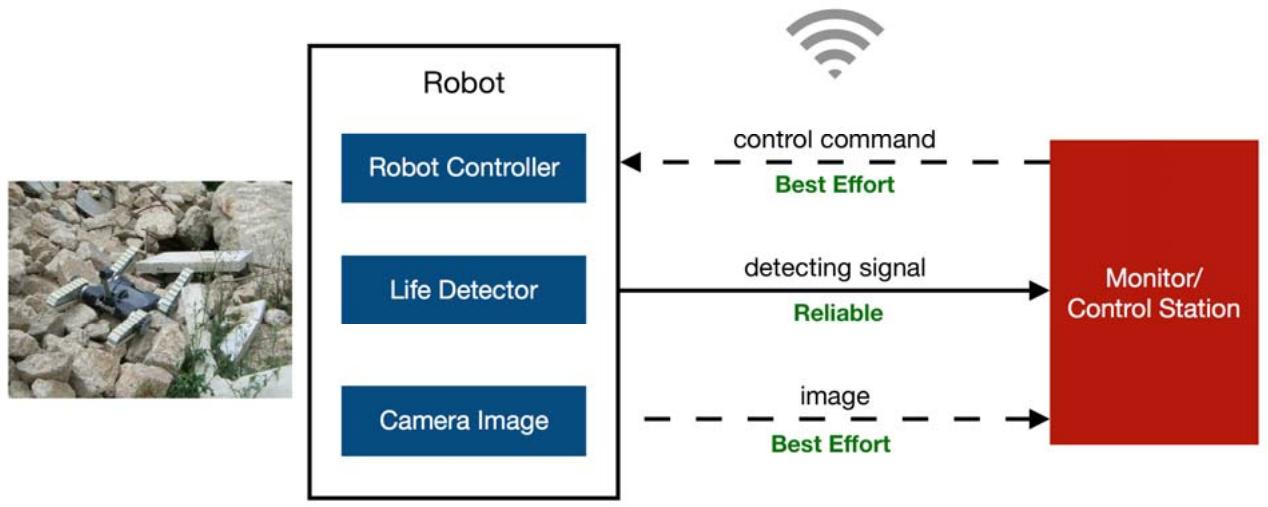
The figure below describes a system diagram of a wireless earthquake rescue robot. There are three tasks in the automaton: a robot controller, a life detector, and a camera. There is also a remote station used to control and monitor the robot. In this case, low latency communication between the camera and control command is needed to ensure the robot still working by receiving the new data. However, it is also important that the life detecting signal be extremely reliable so that no survivors are overlooked even when the wireless network is unstable.

WirelessEarthquakeRescueRobot
![The diagram illustrates a communication system between a **Robot** and a **Monitor/ Control Station**.\n\n**Blocks:**\n*   **Robot**: A large black-bordered box containing three blue sub-blocks:\n    *   **Robot Controller**\n    *   **Life Detector**\n    *   **Camera Image**\n*   **Monitor/ Control Station**: A large red box on the right.\n\n**Connections:**\n1.  **Robot -) Monitor (Control Command):** A dashed arrow points from the 'Monitor/ Control Station' back to the 'Robot Controller'. It is labeled 'control command' and 'Best Effort'. A Wi-Fi symbol sits above this connection.\n2.  **Robot -) Monitor (Detecting Signal):** A solid arrow points from 'Life Detector' to the 'Monitor/ Control Station'. It is labeled 'detecting signal' and 'Reliable'.\n3.  **Robot -) Monitor (Image):** A dashed arrow points from 'Camera Image' to the 'Monitor/ Control Station'. It is labeled 'image' and 'Best Effort'.](.neuron-sdk-50m-00017-1000-10/571eb51e654e496294129362081e7e2197756fa0850a11f2c787ad7a918221b5.jpg)

Possible variants include:

• Best Effort:

This variant indicates that it is acceptable to not retry propagation of any samples. This is the fastest and most efficient method of getting the last-published value, but there is no guarantee that the data sent will be received. For instance, camera image and control command should be set as Best Effort as it is especially suited for use cases where a robot is working in a dangerous situation, such as sending control commands for a drone or robot arm.

• Reliable:

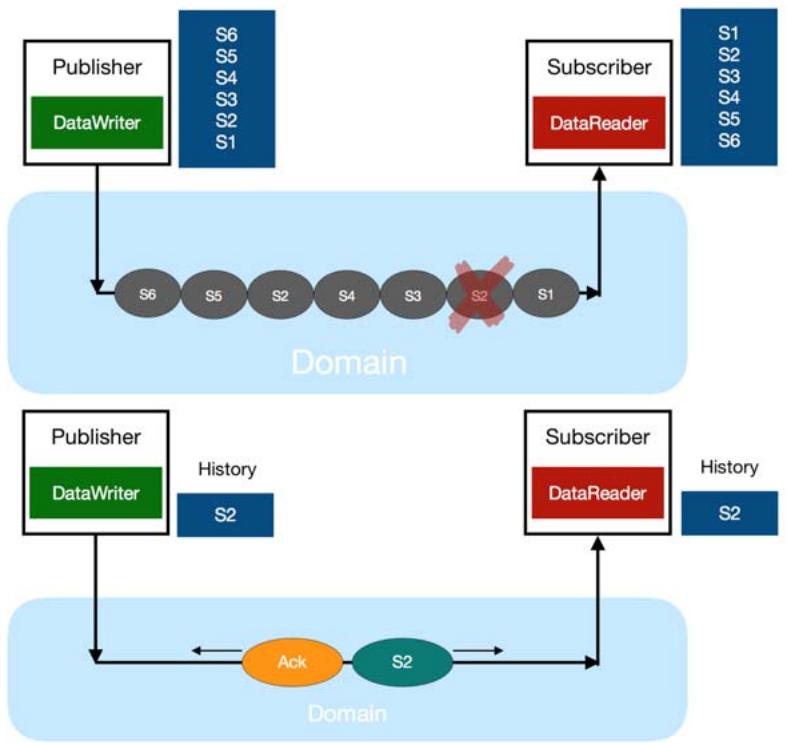
This variant attempts to deliver all samples in its history. Missed samples may be retried. In steady-state the middleware guarantees that all samples in the DataWriter history will eventually be delivered to all DataReaders. Therefore, a life detecting signal should be set as Reliable. The Reliable delivery is particularly suited for rigorous use cases. For example, the video stream should be reliable during visual odometry calculation, because it may cause feature points to lose track if there are too many frames lost.
![Based on the provided image, here is a description of the two diagrams:\n\n**Top Diagram:**\n*   **Blocks:**\n    *   **Publisher:** Contains a green block labeled **DataWriter**. To its right is a blue vertical list containing **S6**, **S5**, **S4**, **S3**, **S2**, **S1** (in descending order).\n    *   **Subscriber:** Contains a red block labeled **DataReader**. To its right is a blue vertical list containing **S1**, **S2**, **S3**, **S4**, **S5**, **S6** (in ascending order).\n*   **Connections:**\n    *   An arrow points from the **Publisher** down into the **Domain** area, specifically targeting the circle labeled **S6**.\n    *   An arrow points from the **Domain** area up to the **Subscriber**, originating from the circle labeled **S1**.\n*   **Domain:**\n    *   A light blue area labeled **Domain**.\n    *   Inside, a sequence of grey circles is arranged horizontally: **S6**, **S5**, **S2**, **S4**, **S3**, **S2** (which is crossed out with a red 'X'), and **S1**.\n\n**Bottom Diagram:**\n*   **Blocks:**\n    *   **Publisher:** Contains a green block labeled **DataWriter**. To its right is a blue horizontal box labeled **History** containing **S2**.\n    *   **Subscriber:** Contains a red block labeled **DataReader**. To its right is a blue horizontal box labeled **History** containing **S2**.\n*   **Connections:**\n    *   An arrow points from the **Publisher** down into the **Domain** area.\n    *   An arrow points from the **Domain** area up to the **Subscriber**.\n*   **Domain:**\n    *   A light blue area labeled **Domain**.\n    *   Inside, there are two ovals connected by a double-headed arrow: an orange oval labeled **Ack** and a teal oval labeled **S2**.\n    *   There appear to be directional arrows on the line: one pointing left from the **Ack** oval and one pointing right from the **S2** oval.](.neuron-sdk-50m-00017-1000-10/d997e4f28beea5ec7e826f1ec238607b57271d85df4c7ccacdbe219c9ed4c168.jpg)

The figure above illustrates how Reliability works. Every time a packet is successfully sent to DataReader, it will feedback an acknowledgment to DataWriter. In contrast, when a packet fails to be sent to DataReader, it will feedback a negative acknowledgment to DataWriter to re-send the packet.

<table><tr><td colspan="2"></td><td colspan="2">DataReader requests</td></tr><tr><td rowspan="3">DataWriter offers</td><td></td><td>Best Effort</td><td>Reliable</td></tr><tr><td>Best Effort</td><td>YES</td><td>incompatible</td></tr><tr><td>Reliable</td><td>YES</td><td>YES</td></tr></table>

The table above shows a ‘Request vs. Offered’ (RxO) model of reliability. Connections can only be made if the requested policy of the subscriber is not more stringent than that of the publisher. Reliability values are considered ordered such that BEST\_EFFORT &lt; RELIABLE. Hence when DataReader request "Best Effort", QoS can match it no matter if DataWriter offers "Best Effort" or "Reliable". However, QoS fails to match when DataReader requests "Reliable" and DataWriter only offers "Best Effort".

# Durability

Durability determines how many instances of a topic should be saved after being published.

In general, as soon as DataWriter and DataReader match, data published by the DataWriter will be delivered to the DataReader. However, in real use cases, users can create DataWriter and DataReader at any time. Therefore, a DataWriter may publish data before a DataReader has been created. For example, before you subscribe to a thermometer, there might be previously published temperature data. Subscribers that are created after the data has been published (called late-joiners) may also be interested in the data that was published before they were created (called historical data). To facilitate this use case, DDS provides ‘durability’ which controls the data availability with respect to late-joiners.

The figure below shows an automatic multi-robot search and rescue example. In the beginning, there are two search and rescue robots searching for survivors. To work more efficiently, they send their odometry to each other in order to let each other know which area has already been searched. Later, the third robot joins the search. With PERSISTENT durability policy in each robot’s DataWriter, the third robot (late-joiner) can get the other robots’ previous odometry and join the search without covering any areas already searched.

Automatic Multi-robot Searchand Rescue System
![This diagram illustrates a system involving two robots exchanging information about their search areas.\n\n**Central Components:**\n*   Two rectangular blocks are positioned centrally: a blue block labeled **'Robot 1'** on the left and a red block labeled **'Robot 2'** on the right.\n*   Two curved black arrows connect these blocks in a cycle:\n    *   An arrow pointing from **Robot 1** to **Robot 2** is labeled **'Robot1 searched area'**.\n    *   An arrow pointing from **Robot 2** to **Robot 1** is labeled **'Robot2 searched area'**.\n\n**Left Side (Robot 1):**\n*   To the left of the blue block is a grey cylinder labeled **'history of searched area'**.\n*   Above the blue block, dotted lines connect to a grey oval labeled **'Map'**. Inside this map, there is a red wavy arrow labeled **'R2'** and a blue curved arrow labeled **'R1'**.\n\n**Right Side (Robot 2):**\n*   To the right of the red block is a grey cylinder labeled **'history of searched area'**.\n*   Above the red block, dotted lines connect to a grey oval labeled **'Map'**. Inside this map, there is a single red wavy arrow labeled **'R2'**.](.neuron-sdk-50m-00017-1000-10/66f6b8bda843284a33ae80b7544911ae571d7f1b1c14fa3bc01aed7fae6e62d4.jpg)

Initially,thereareonlytworobotsearching survival indisasterenvironment

![This diagram depicts a system involving three robots and their associated maps.\n\n**Labeled Blocks:**\n*   **Map:** Three identical grey ovals (top-left, top-right, and bottom-right). Inside each oval is a blue arrow labeled '**R1**' and a red curved arrow labeled '**R2**'.\n*   **Robot 1:** A blue rectangle on the left. Next to it is a grey cylinder. Below the cylinder is the text '**history of searched area**'.\n*   **Robot 2:** A red rectangle on the right. Next to it is a grey cylinder. Below the cylinder is the text '**history of searched area**'.\n*   **Robot 3 (New joiner):** A green rectangle at the bottom center.\n\n**Connections:**\n*   **Between Robot 1 and Robot 2:** Two curved black arrows form a cycle.\n    *   An arrow pointing from Robot 1 to Robot 2 is labeled '**R1 searched area**'.\n    *   An arrow pointing from Robot 2 to Robot 1 is labeled '**R2 searched area**'.\n*   **From Robot 1 to Robot 3:** A curved arrow originates from the cylinder area below Robot 1 and points to Robot 3. It is labeled '**R1 searched area**'.\n*   **From Robot 2 to Robot 3:** A curved arrow originates from the cylinder area below Robot 2 and points to Robot 3. It is labeled '**R2 searched area**'.\n*   **Association:** Dotted grey circles connect each '**Map**' oval to its respective robot, indicating the robots are maintaining or utilizing these maps.](.neuron-sdk-50m-00017-1000-10/d9a4f6b42618703f281d6db3874716b21089a16363b6580909351a5fab2c4f59.jpg)

Robot3startto join therescuing work.Withusing PERSIsTENTdurability Robot3can know thepast searchedareawhich done by Robot1and 2.

Cyclone DDS provides the following Durability variants:

• Volatile:

Specifies that once data is published it is not maintained by DDS for delivery to late-joining applications.

• Transient\_Local:

Specifies that DataWriter stores data locally so that late-joining DataReaders get the last-published item if a DataWriter is still alive.

Although Transient and Persistent QoSes are included in the DDS specification, ROS does not currently support them.

# History

This QoS policy configures the number of DDS samples that DDS will store locally for DataWriters and DataReaders. In other words, the QoS history policy controls whether the DDS should deliver only the most recent value, attempt to deliver all intermediate values, or do something in between.

The policy can be configured to provide the following parameters:

• kind:

Keep All: The DDS will attempt to keep all the samples of each instance of data identified by its key.

Keep Last: The DDS will only attempt to keep the most recent "depth" samples of each instance of data identified by its key.

• depth:

An integer. The figure below show the DataReader will only keep the most recent "depth" samples.

![DataReader\n1 1\n2 1\n3 1\nHistory Depth = 1 (DDS Default)\nDataReader\n1 1 1 2 1 3 1 4 1 5\n2 1 2 2 2 3 2 4 2 5\n3 1 3 2 3 3 3 4 3 5\nHistory Depth = 5](.neuron-sdk-50m-00017-1000-10/e76e353b2da400aaddbed6075af18922f7f6fa4a45191aa0c04aad21c056b5de.jpg)

The figure below show an example when TRANSIENT\_LOCAL durability is used on both DataWriter and DataReader, and the KEEP\_LAST history policy with depth number settings as 1 and 2 is applied to DataWriter and DataReader, respectively. It is noticeable that the second instance delivers 1, 2 and 3, but the DataWriter only stores 3, which is the most recent value. On the other hand, DataReader keeps the last two values of 2 and 3.

![This diagram illustrates three sequential states of data transmission between a Data Reader and a Data Writer via a Network.\n\n**Row 1 (Top):**\n*   **Left Block (DataReader Cache):** A yellow box labeled 'Data Reader Cache' at the bottom.\n    *   Top text: 'History Depth = 2'.\n    *   Blue button: 'Data Reader'.\n    *   Grey box labeled 'Topic' containing three rows:\n        *   Row 1: Blue square '1', White square '1'.\n        *   Row 2: Orange square '2', White square '1'.\n        *   Row 3: Green square '3', White square '1'.\n*   **Connection:** A grey arrow pointing right labeled 'Network'. Inside the arrow are:\n    *   Blue square '1 2'.\n    *   Orange square '2 2'.\n    *   Orange square '2 3'.\n*   **Right Block (DataWriter Cache):** A green box labeled 'Data Writer Cache' at the bottom.\n    *   Top text: 'History Depth = 1 (DDS Default)'.\n    *   Red button: 'Data Writer'.\n    *   Grey box labeled 'Topic' containing three rows:\n        *   Row 1: Blue square '1', White square '2'.\n        *   Row 2: Orange square '2', White square '3'.\n        *   Row 3: Green square '3', White square '1'.\n\n**Row 2 (Middle):**\n*   **Left Block (DataReader Cache):** A yellow box labeled 'Data Reader Cache'.\n    *   Top text: 'History Depth = 2'.\n    *   Blue button: 'Data Reader'.\n    *   Grey box labeled 'Topic' containing:\n        *   Row 1: Blue square '1 1', Blue square '1 2'.\n        *   Row 2: Orange square '2 1', Orange square '2 2'.\n        *   Row 3: Green square '3 1'.\n*   **Connection:** A grey arrow pointing right labeled 'Network'. Inside the arrow is:\n    *   Orange square '2 3'.\n*   **Right Block (DataWriter Cache):** A green box labeled 'Data Writer Cache'.\n    *   Top text: 'History Depth = 1 (DDS Default)'.\n    *   Red button: 'Data Writer'.\n    *   Grey box labeled 'Topic' containing:\n        *   Row 1: Blue square '1', White square '2'.\n        *   Row 2: Orange square '2', White square '3'.\n        *   Row 3: Green square '3', White square '1'.\n\n**Row 3 (Bottom):**\n*   **Left Block (DataReader Cache):** A yellow box labeled 'Data Reader Cache'.\n    *   Top text: 'History Depth = 2'.\n    *   Blue button: 'Data Reader'.\n    *   Grey box labeled 'Topic' containing:\n        *   Row 1: Blue square '1 1', Blue square '1 2'.\n        *   Row 2: Orange square '2 2', Orange square '2 3'.\n        *   Row 3: Green square '3 1'.\n*   **Connection:** A grey arrow pointing right labeled 'Network'. The arrow is empty.\n*   **Right Block (DataWriter Cache):** A green box labeled 'Data Writer Cache'.\n    *   Top text: 'History Depth = 1 (DDS Default)'.\n    *   Red button: 'Data Writer'.\n    *   Grey box labeled 'Topic' containing:\n        *   Row 1: Blue square '1', White square '2'.\n        *   Row 2: Orange square '2', White square '3'.\n        *   Row 3: Green square '3', White square '1'.](.neuron-sdk-50m-00017-1000-10/5333e7974190ea9554cc9f688c93f6de5a1a372982df45144ca888fae8e47839.jpg)

# Lifespan

Lifespan defines how long a message is valid. A subscriber will not receive a message if it is expired, while the publisher will not send out the message in the same situation. QoS is useful for bypassing information that has expired and allowing only the latest messages to be processed.

The lifespan QoS attribute is “duration”, which is the maximum time for data validity. The expiration time can be computed by adding duration to the source timestamp. Note that lifespan QoS only takes effect on DataWriter, so there is no RxO limitation.

The following figure shows an example if current time t + lifespan duration is larger than t1, then the data in the cache will expire.

message is expired while t + lifespan duration &gt; t1
![The image displays a diagram of two data caches connected by a bidirectional arrow labeled 'Network'.\n\n**Left Component:**\nA green rounded rectangle labeled **'DataWriter Cache'** at the bottom. It contains three stacked blue blocks:\n*   **'Data F (t3)'** (top)\n*   **'Data E (t2)'** (middle)\n*   **'Data D (t1)'** (bottom)\nA red 'X' and the red text **'expired'** are positioned next to the bottom block, 'Data D (t1)'.\n\n**Right Component:**\nA yellow rounded rectangle labeled **'DataReader Cache'** at the bottom. It contains three stacked blue blocks:\n*   **'Data A (t1)'** (top)\n*   **'Data B (t2)'** (middle)\n*   **'Data C (t3)'** (bottom)\nA red 'X' and the red text **'expired'** are positioned next to the top block, 'Data A (t1)'.](.neuron-sdk-50m-00017-1000-10/4dceb9c7e85ad5e48794c78bec40d228c0ab1d29a6e6e794501667b1a51e15a2.jpg)

# Deadline

Deadline makes sure the time interval between messages should not be over the maximum expected value. The QoS is often used while data is published at regular intervals. The deadline QoS attribute is “duration”. On the publishing side, an application must publish data periodically at intervals under the duration. On the subscribing side, a subscriber also expects to receive data at intervals not above the duration.

When the deadline duration cannot be fulfilled, it will trigger a user-defined callback. For example, the callback can alarm the manager to check the device or network status when the data fails to update.

For deadline QoS, RxO is supported. That is, the duration in DataWriter should be equal to or smaller than the duration in DataReader. Deadline QoS will be incompatible if it cannot match the condition.

In the following figure, Publisher should publish data periodically and not be over the deadline, while Subscriber should receive the periodic data. If the deadline is passed, they will alarm the application with a callback.

![The diagram illustrates a communication architecture with two main components connected by a network.\n\n**Publisher Side (Left Box):**\n*   **Block:** A large square frame labeled **Publisher**.\n*   **Internal Component:** A blue rectangular block labeled **Data Writer**.\n*   **Connection:** A red upward arrow originating from the 'Data Writer' block. Next to it is the text **Alarm while over deadline**.\n*   **Caption:** Below the box is the text **Check publish data periodically**.\n\n**Network Connection (Center):**\n*   **Label:** The word **Network** appears above a large grey double-headed arrow connecting the Publisher and Subscriber boxes horizontally.\n\n**Subscriber Side (Right Box):**\n*   **Block:** A large square frame labeled **Subscriber**.\n*   **Internal Component:** A green rectangular block labeled **Data Reader**.\n*   **Connection:** A red upward arrow originating from the 'Data Reader' block. Next to it is the text **Alarm while over deadline**.\n*   **Caption:** Below the box is the text **Check receive data periodically**.](.neuron-sdk-50m-00017-1000-10/ae3db6ac525d5f3af3f2f7a57aef9779b41f8402ed6f3d50df98624f4e6bf811.jpg)

# Liveliness

Liveliness is a QoS which defines how entities report whether they are alive or not. This can be used to prevent an entity terminating unexpectedly without notifying others. There are two attributes for liveliness QoS. The first one is duration, which means how often the liveliness must be reported. The second one is the liveliness policy. There are two policies in ROS: automatic and manual by topic. Automatic means if the participant is alive, all the entities in the participant are considered alive. An application only needs to detect failures. However, manual by topic means an application takes responsibility to signal liveliness by either publishing data or calling assert liveliness.

There are also callbacks in liveliness QoS. When DataWriter or DataReader detect liveliness failure, the userdefined callback will be triggered. The mechanism ensures that the user application can be notified in time once the remote entity dies suddenly.

For liveliness RxO, there are two limitations for QoS compatibility. The first is that the liveliness duration of the subscriber should be larger than the one on the publisher. The second is that the policy for the publisher cannot be automatic if the subscriber is set to manual by topic. If any one of these is not fulfilled, the communication will fail.

The following figure shows the liveliness mechanism. DataWriter should send a ‘keepalive’ message whether automatically or manually, while DataReader should check the liveliness of Publisher. When the entity is not alive, the alarm callback should be triggered.

![The diagram illustrates a communication flow between two systems connected by a network.\n\n**Labeled Blocks:**\n*   **Publisher:** A large box on the left labeled 'Publisher'. Inside is a blue rounded rectangle labeled 'Data Writer'. Above the blue box, a red arrow points upward next to the text 'Alarm while not alive'. Below the main box, the text reads: 'Send keepalive either automatic or manual'.\n*   **Network:** A large grey double-headed arrow in the center labeled 'Network'.\n*   **Subscriber:** A large box on the right labeled 'Subscriber'. Inside is a green rounded rectangle labeled 'Data Reader'. Above the green box, a red arrow points upward next to the text 'Alarm while not alive'. Below the main box, the text reads: 'Check whether publisher is alive or not'.\n\n**Connections:**\n*   The 'Network' arrow connects the 'Publisher' block to the 'Subscriber' block, indicating bidirectional communication.](.neuron-sdk-50m-00017-1000-10/89dfba869a12cb7cdba3b1f296d29ecd86be7e17298d874e955ea1f2fe124496.jpg)

# ROS 2 Example

Refer to the ROS 2 demo code to learn how to develop robot applications with different QoS settings at:

https://github.com/ros2/demos/tree/foxy/quality\_of\_service\_demo

There is a tutorial about how to use QoS settings to handle lossy networks at:

https://index.ros.org/doc/ros2/Tutorials/Quality-of-Service/

# 7.3.2 ADLINK Extra QoS - Ownership

Ownership is very useful in redundancy scenarios. In addition, Neuron SDK is built on standard ROS 2, so it also inherits the six built-in QoSes. Hence, by using ADLINK Neuron SDK, robotics developers can utilize the extra properties of the Ownership QoS for their applications.

Currently, Ownership only supports in C++ with the ROS 2 client library.

<table><tr><td>Rclcpp</td><td>rclpy</td></tr><tr><td>Supported</td><td>Not Supported</td></tr></table>

# 7.3.2.1 Introduction

Topic ownership specifies whether it is allowed for multiple publishers to publish to the same topic. It is also a simple and easy mechanism that ensures topic data only comes from a single source.

The figure below shows an example in which the vehicle control computer on an autonomous vehicle has several publishers that publish to the ROS 2 /cmd\_vel topic. These nodes include:

1. Velocity Control
2. Adaptive Cruise Control that maintains following distance
3. Driver Input

Logically, the cruise speed control will have the lowest strength since any other condition will require the command to be overwritten. In this case, the driver’s input will have the highest strength since the driver should be able to brake at any moment.

![Velocity control\nStrength: 10\nActive/Adaptive Cruise\nStrength: 50\nBrake Pedal\nStrength: 100\nParking aid\n(in load)\nAirbag control unit\n(behind central console)\nElectric window & central locking\n(in footwell)\nAnti-lock braking system\n(under cover)\nAutomatic transmission\n(under cover)\nClimate control\n(behind dashboard)\nAlarm & immobiliser\n(behind glovebox)\nEngine management system\n(under bonnet)\nAutomatic wiper control\n(under bonnet)\nExclusive vehicle brake command](.neuron-sdk-50m-00017-1000-10/bf55242c0b9326f03fe1714585843f5b46d7b156f9dafebc52f3dd394170be62.jpg)

# Type

There are two types of ownership: shared and exclusive.

• Shared:

Shared ownership for each topic. Multiple publishers are allowed to update the same topic and all the updates are made available to the publisher.

• Exclusive:

For a nominal subscriber, subscription of a topic does not guarantee the uniqueness of publishing source. As a result, two publishers can publish to a topic, causing the data of a certain topic to jump between two publishers. This behavior is often not desired. By setting the DataReader to exclusive reception, data from only one publisher can reach the publisher callback. Therefore, the above example is set as exclusive.

# Strength

This policy only applies if the Ownership QoS policy is Exclusive. The publisher that has the right to present a topic to a DataReader is called the "owner" of the topic. If multiple publishers are publishing to the same topic, the "owner" is determined by "strength" assigned to the topic publisher. "Strength" is a simple integer assigned by the user, ranging from 0 to 65535 (0x0000 to 0xFFFF). In the example above, the strength of Driver Input, Adaptive Cruise Control, and Velocity Control are set as below:

• Driver Input strength: 100
• Adaptive Cruise Control strength: 50
• Velocity Control strength: 10

Neuron SDK comes with a ROS 2 wrapper for the DDS ownership QoS functionality that allows the user to easily assign a topic to be exclusive, and the topic subscriber will automatically choose the publisher with the highest strength. In the case that the node with the highest publishing strength goes offline, the same functionality will automatically switch to the next-highest-strength publisher. This backup mechanism is possible because topics from every node are actually already received by the underlying DDS structure and filtered by Cyclone DDS accordingly.

# 7.3.2.2 ROS 2 rclcpp Example

The following is an example of how to utilize the Ownership QoS. Although ROS 2 does not natively support Ownership, ROS 2 still provides an extra option which can be passed to the rmw layer while creating a ROS node. However, neither ROS 2 Dashing nor rclpy supports this extra option. This is why you the Ownership QoS in ROS 2 Dashing or rclpy cannot be used.

Follow these steps to use the Ownership QoS.

1. #include "cyclonedds\_options/cyclonedds\_options.hpp" is necessary regardless of the publisher or subscriber.
2. Create the cyclonedds\_options::PubOptions object and set its kind and strength of Ownership.
3. Store the object into rclcpp::PublisherOptions, which is the extra option provided by ROS 2.
4. Assign rclcpp::PublisherOptions while calling create\_publisher. Cyclone DDS will process the option and set the correct QoS.

```cpp
#include "cyclonedds_options/cyclonedds_options.hpp"

class OwnershipPublisherNode : public rclcpp::Node {
    public:
    OwnershipPublisherNode(enum cyclonedds_options::qos_ownership_kind kind, uint32_t strength, uint32_t id_in)
    : Node("Ownership_pub")
    {
    rclcpp::SystemDefaultsQoS qos;
    std::unique_ptr&lt;cyclonedds_options::PubOptions&gt; cyclonedds_options(new cyclonedds_options::PubOptions());
    cyclonedds_options->setOwnership(kind, strength);
    rclcpp::PublisherOptions po;
    po.rmw_implementation_payload = std::move(cyclonedds_options);
    pub_ = this->create_publisher&lt;nsdk_ownership::msg::Ownership&gt;("ownership", qos, po);
    ...
    }
    ...
};
```

A similar process needs to be performed on the subscriber side, but the option object is different from that of the publisher. Replace cyclonedds\_options::PubOptions with cyclonedds\_options::SubOptions and rclcpp::PublisherOptions with rclcpp::SubscriptionOptions, as show below.

```cpp
#include "cyclonedds_options/cyclonedds_options.hpp"

class OwnershipSubscriberNode : public rclcpp::Node {
    public:
    OwnershipSubscriberNode(enum cyclonedds_options::qos_ownership_kind kind)
    : Node("Ownership_sub")
    {
    rclcpp::SystemDefaultsQoS qos;
    ...
    std::unique_ptr&lt;cyclonedds_options::SubOptions&gt; cyclonedds_options(new cyclonedds_options::SubOptions());
    cyclonedds_options->setOwnership(kind);
    rclcpp::SubscriptionOptions so;
    so.rmw_implementation_payload = std::move(cyclonedds_options);
    sub_ = this->create_subscription&lt;nsdk_ownership::msg::Ownership&gt;("ownership", qos, callback, so);
    }
}
```

For cyclonedds\_options.hpp, refer to /opt/adlink/neuron-sdk/ros/foxy/include/ cyclonedds\_options/cyclonedds\_options.hpp. For the full example code, refer to https://github.com/Adlink-ROS/example\_ownership/tree/foxy.

Note that, for example, if we have two nodes with A) exclusive subscriber and B) nominal default subscriber, then node A will receive a topic exclusively from the publisher with the highest strength while node B will receive data from all publishers like the original ROS 2 node behavior. In other words, Neuron SDK is compatible with any ROS 2 node.

# 7.3.2.3 ROS 2 Example Test

Step 1: First run the publisher with lower strength.

```batch
ros2 run nsdk_ownership ownership_pub -k exclusive -i 100 -s 100
```

Step 2: Run the subcriber.

```batch
ros2 run nsdk_ownership ownership_sub -k exclusive
```

Step 3: Then run the publisher with higher strength.

```batch
ros2 run nsdk_ownership ownership_pub -k exclusive -i 200 -s 200
```

Step 4: You will see that only the publisher with the higher strength in the ownership\_sub terminal.

# 8 Software License Agreement

This software license Agreement is a legal agreement between you, the Customer, and ADLINK Technology Inc. (a company incorporated and registered 9F, No. 166, Jian Yi Road Chungho District, New Taipei City, 235, Taiwan) or any of its Affiliates with which your Purchase Order is concluded (“ADLINK”), for the provision of a software license as more particularly described below.

READ THE FOLLOWING TERMS AND CONDITIONS CAREFULLY BEFORE YOU DOWNLOAD, INSTALL OR USE THIS SOFTWARE. BY INSTALLING OR USING THE SOFTWARE, YOU AGREE TO BE BOUND BY THE FOLLOWING TERMS AND CONDITIONS. IF YOU DO NOT AGREE TO THE FOLLOWING TERMS AND CONDITIONS, DO NOT INSTALL OR USE THE SOFTWARE.

# 1. LICENSE GRANT

1.1 The Software and all associated copyrights and other Intellectual Property Rights are the property of the ADLINK. Customer acquires no Intellectual Property Rights or any title, right or interest in the Software other than the license granted herein.

1.2 ADLINK hereby grants to Customer, the non-exclusive, non-transferrable (without the right to sub-license) license to use the Software, subject to the terms and conditions of this Agreement.

1.3 Unless otherwise specified in written agreement, for each Software license that you are granted, you may install one (1) production instance of the Software on ADLINK's systems owned or operated by you.

# 2. INTELLECTUAL PROPERTY RIGHTS

All Intellectual Property Rights in and pertaining to the Software (including but not limited to any images, photographs, animation, video, audio, music, text, and applets incorporated into the Software) and any copies of the Software are owned by ADLINK, and/or its licensors. The Software is protected by copyright, other Intellectual Property Rights, trademark laws and international treaty provisions. Customer must treat the Software like any other copyrighted material for archival purposes, and Customer may not copy the printed materials accompanying the Software.

# 3. LIABILITY

3.1 In no event whatsoever will ADLINK be liable for any indirect or consequential loss or economic loss (including without limitation loss of use; data; information; business; revenue; profits; production; goodwill or anticipated savings), exemplary or incidental damages, or other special or punitive damages whatsoever, whether in contract, tort, (including negligence, strict liability and all others), warranty, indemnity or under statute, even if ADLINK has been advised of the likelihood of same.

3.2 The total liability of ADLINK for all claims related to the agreement, whether in contract, tort (including negligence, strict liability and all others) or otherwise, and whether in connection with this license or any collateral contract, shall in no circumstances exceed the total annual fees paid for the software.

3.3 The Software is provided by ADLINK on an “as is” basis. ADLINK does not warrant that the Software is free of defect or will function in any environment.

# 4. THIRD PARTY OPEN SOURCE SOFTWARE (“OS SOFTWARE”)

OS SOFTWARE may be supplied with the software. In this event such OS SOFTWARE is subject to the applicable license terms incorporated in the OS SOFTWARE (as defined in Exhibit A). Customer acknowledges that the OS SOFTWARE is supplied free, without license fees and is therefore provided with no warranties of any kind including the warranties of design, merchantability and fitness for a particular purpose, non-infringement, or arising from a course of dealing, usage or trade practice. Except to the extent prohibited by applicable law ADLINK shall have no liability in respect of the OS SOFTWARE, for damages of any kind including without limitation for any indirect or consequential loss; for any economic loss; for loss of use, data, information, business, revenue, profits, production, goodwill or anticipated Savings; for exemplary or incidental damages or other special or punitive damages whatsoever, whether in Contract, tort (including negligence, strict liability and all others), warranty, indemnity or under statute, even if ADLINK has been advised of the likelihood of same.

# 5. CONFIDENTIALITY

For a period of three (3) years after termination of this Agreement, the parties shall treat as confidential all information and take every reasonable precaution and use all reasonable efforts to prevent the unauthorized disclosure of the same. The parties agree to take all steps reasonably necessary and appropriate to ensure that their employees, agents, and/or assistants treat all information as confidential and to ensure that such employees, agents, and/or assistants are familiar with and abide by the terms of this Agreement.

# 6. TERM

The license granted in this Agreement is effective in perpetuity, as long as you own the Software License and adhere to the terms and conditions of this Agreement. The term of this Agreement and the license grant herein shall commence on the date you agree to this Agreement and install the Software.

# 7. TERMINATION

7.1 Either party may at any time by notice in writing to the other party terminate this Agreement with effect from the date of service of such notice if:

(a) the other party commits a material breach of this Agreement which is not remedied, or does not otherwise cease to be material, within 30 days after the non-breaching party has given written notice to the breaching party identifying the breach and requiring it to be remedied; or
(b) the other party has ceased business, been adjudged bankrupt or insolvent under the laws of any jurisdiction, made an assignment for the benefit of creditors, or filed a petition of bankruptcy, reorganization or other insolvency proceeding.

7.2 Upon termination or expiry of this Agreement, for whatever cause, all rights granted to the Customer under this license shall cease, the Customer must cease all activities authorized by this license and cease all use of the Software, remove or destroy the Software and Documentation and any copies made.

7.3 Termination under this clause shall not affect any other rights or remedies ADLINK may have.

# 8. COMPLIANCE WITH LAWS AND REGULATIONS

Customer acknowledges and agrees that it shall at all times comply with all prevailing laws, ordinances, codes, regulations, rules, policies, licensing requirements, regulations and procedures, applicable to the provision or use of the Software including without limitation, applicable Data Protection Legislation. Customer understands and agrees as follows; (i) Customer shall not import, export, or re-export the Software to or from any country in contravention of any applicable import or export laws or regulations of any government; (ii) Customer shall be responsible for compliance without limitation with all local laws and regulations applicable to the installation, use, import, export and re-export of the Software and shall obtain all necessary export and re-export licenses in connection with any subsequent export, re-export, transfer and use of all products, technology and software delivered under this Agreement.

The primary regulations concerning exports and re-exports are controlled by the U.S. Department of Commerce and Department of State, European Union, and local country legislation, all of which relate to hardware, software and technology. More information is available from the following sites.

<table><tr><td>US Department of Commerce Bureau of Industry and Security</td><td>http://www.bis.doc.gov/</td></tr><tr><td>US Department of State Directorate of Defense Trade Controls</td><td>http://pmddtc.state.gov/</td></tr><tr><td>US Department of Treasury Office of Foreign Assets Control</td><td>http://www.treasury.gov/about/organizational-structure/offices/Pages/Office-of-Foreign-Assets-Control.aspx</td></tr><tr><td>European Union</td><td>http://europa.eu/legislation_summaries/external_trade/index_en.htm</td></tr><tr><td>Local Country Regulations</td><td>http://www.wassenaar.org/</td></tr></table>

# 9. GOVERNING LAW

This Agreement will be construed by and governed in accordance with the laws of [Taiwan, the Republic of China]. The Parties submit to exclusive jurisdiction of the courts of [Taipei, Taiwan].

# 10. GENERAL

10.1 The parties expressly agree that the terms and conditions of this Agreement shall prevail over any standard terms and conditions printed or referred to in any such purchase contract, order or other written documentation issued by the Customer concerning the subject matter hereof.
10.2 This Agreement supersedes all prior discussions, negotiations and correspondence between the parties hereto and sets forth the entire agreement between the parties with respect to the subject matter hereof. This Agreement cannot be modified except by an instrument in writing.
10.3 If any provision or part-provision of this agreement is or becomes invalid, illegal or unenforceable, it shall be deemed deleted, but that shall not affect the validity and enforceability of the rest of this agreement and the parties shall negotiate in good faith to agree a replacement provision that, to the greatest extent possible, achieves the intended commercial result of the original provision.

# Exhibit A

# Open Source Software

Open License Terms includes the following licenses or distribution models: the Apache License Version 2.0 (Apache 2.0), the GNU Lesser or Library GPL (LGPL), the 3-Clause BSD License (BSD), the Eclipse Public License 2.0 (EPL 2.0) and any similar open source, free software or community licenses.

# Apache License

Version 2.0, January 2004

http://www.apache.org/licenses/

TERMS AND CONDITIONS FOR USE, REPRODUCTION, AND DISTRIBUTION

# 1. Definitions.

"License" shall mean the terms and conditions for use, reproduction, and distribution as defined by Sections 1 through 9 of this document.

"Licensor" shall mean the copyright owner or entity authorized by the copyright owner that is granting the License.

"Legal Entity" shall mean the union of the acting entity and all other entities that control, are controlled by, or are under common control with that entity. For the purposes of this definition, "control" means (i) the power, direct or indirect, to cause the direction or management of such entity, whether by contract or otherwise, or (ii) ownership of fifty percent (50%) or more of the outstanding shares, or (iii) beneficial ownership of such entity.

"You" (or "Your") shall mean an individual or Legal Entity exercising permissions granted by this License.

"Source" form shall mean the preferred form for making modifications, including but not limited to software source code, documentation source, and configuration files.

"Object" form shall mean any form resulting from mechanical transformation or translation of a Source form, including but not limited to compiled object code, generated documentation, and conversions to other media types.

"Work" shall mean the work of authorship, whether in Source or Object form, made available under the License, as indicated by a copyright notice that is included in or attached to the work (an example is provided in the Appendix below).

"Derivative Works" shall mean any work, whether in Source or Object form, that is based on (or derived from) the Work and for which the editorial revisions, annotations, elaborations, or other modifications represent, as a whole, an original work of authorship. For the purposes of this License, Derivative Works shall not include works that remain separable from, or merely link (or bind by name) to the interfaces of, the Work and Derivative Works thereof.

"Contribution" shall mean any work of authorship, including the original version of the Work and any modifications or additions to that Work or Derivative Works thereof, that is intentionally submitted to Licensor for inclusion in the Work by the copyright owner or by an individual or Legal Entity authorized to submit on behalf of the copyright owner. For the purposes of this definition, "submitted" means any form of electronic, verbal, or written communication sent to the Licensor or its representatives, including but not limited to communication on electronic mailing lists, source code control systems, and issue tracking systems that are managed by, or on behalf of, the Licensor for the purpose of discussing and improving the Work, but excluding communication that is conspicuously marked or otherwise designated in writing by the copyright owner as "Not a Contribution."

"Contributor" shall mean Licensor and any individual or Legal Entity on behalf of whom a Contribution has been received by Licensor and subsequently incorporated within the Work.

2. Grant of Copyright License. Subject to the terms and conditions of this License, each Contributor hereby grants to You a perpetual, worldwide, non-exclusive, no-charge, royalty-free, irrevocable copyright license to reproduce, prepare Derivative Works of, publicly display, publicly perform, sublicense, and distribute the Work and such Derivative Works in Source or Object form.

3. Grant of Patent License. Subject to the terms and conditions of this License, each Contributor hereby grants to You a perpetual, worldwide, non-exclusive, no-charge, royalty-free, irrevocable (except as stated in this section) patent license to make, have made, use, offer to sell, sell, import, and otherwise transfer the Work, where such license applies only to those patent claims licensable by such Contributor that are necessarily infringed by their Contribution(s) alone or by combination of their Contribution(s) with the Work to which such Contribution(s) was submitted. If You institute patent litigation against any entity (including a cross-claim or counterclaim in a lawsuit) alleging that the Work or a Contribution incorporated within the Work constitutes direct or contributory patent infringement, then any patent licenses granted to You under this License for that Work shall terminate as of the date such litigation is filed.

4. Redistribution. You may reproduce and distribute copies of the Work or Derivative Works thereof in any medium, with or without modifications, and in Source or Object form, provided that You meet the following conditions:

(a) You must give any other recipients of the Work or Derivative Works a copy of this License; and
(b) You must cause any modified files to carry prominent notices stating that You changed the files; and
(c) You must retain, in the Source form of any Derivative Works that You distribute, all copyright, patent, trademark, and attribution notices from the Source form of the Work, excluding those notices that do not pertain to any part of the Derivative Works; and
(d) If the Work includes a "NOTICE" text file as part of its distribution, then any Derivative Works that You distribute must include a readable copy of the attribution notices contained within such NOTICE file, excluding those notices that do not pertain to any part of the Derivative Works, in at least one of the following places: within a NOTICE text file distributed as part of the Derivative Works; within the Source form or documentation, if provided along with the Derivative Works; or, within a display generated by the Derivative Works, if and wherever such third-party notices normally appear. The contents of the NOTICE file are for informational purposes only and do not modify the License. You may add Your own attribution notices within Derivative Works that You distribute, alongside or as an addendum to the NOTICE text from the Work, provided that such additional attribution notices cannot be construed as modifying the License.

You may add Your own copyright statement to Your modifications and may provide additional or different license terms and conditions for use, reproduction, or distribution of Your modifications, or for any such Derivative Works as a whole, provided Your use, reproduction, and distribution of the Work otherwise complies with the conditions stated in this License.

5. Submission of Contributions. Unless You explicitly state otherwise, any Contribution intentionally submitted for inclusion in the Work by You to the Licensor shall be under the terms and conditions of this License, without any additional terms or conditions.
Notwithstanding the above, nothing herein shall supersede or modify the terms of any separate license agreement you may have executed with Licensor regarding such Contributions.
6. Trademarks. This License does not grant permission to use the trade names, trademarks, service marks, or product names of the Licensor, except as required for reasonable and customary use in describing the origin of the Work and reproducing the content of the NOTICE file.
7. Disclaimer of Warranty. Unless required by applicable law or agreed to in writing, Licensor provides the Work (and each Contributor provides its Contributions) on an "AS IS" BASIS, WITHOUT WARRANTIES OR CONDITIONS OF ANY KIND, either express or implied, including, without limitation, any warranties or conditions of TITLE, NON-INFRINGEMENT, MERCHANTABILITY, or FITNESS FOR A PARTICULAR PURPOSE. You are solely responsible for determining the appropriateness of using or redistributing the Work and assume any risks associated with Your exercise of permissions under this License.
8. Limitation of Liability. In no event and under no legal theory, whether in tort (including negligence), contract, or otherwise, unless required by applicable law (such as deliberate and grossly negligent acts) or agreed to in writing, shall any Contributor be liable to You for damages, including any direct, indirect, special, incidental, or consequential damages of any character arising as a result of this License or out of the use or inability to use the Work (including but not limited to damages for loss of goodwill, work stoppage, computer failure or malfunction, or any and all other commercial damages or losses), even if such Contributor has been advised of the possibility of such damages.
9. Accepting Warranty or Additional Liability. While redistributing the Work or Derivative Works thereof, You may choose to offer, and charge a fee for, acceptance of support, warranty, indemnity, or other liability obligations and/or rights consistent with this License. However, in accepting such obligations, You may act only on Your own behalf and on Your sole responsibility, not on behalf of any other Contributor, and only if You agree to indemnify, defend, and hold each Contributor harmless for any liability incurred by, or claims asserted against, such Contributor by reason of your accepting any such warranty or additional liability.

# GNU LESSER GENERAL PUBLIC LICENSE

# Version 3, 29 June 2007

Copyright © 2007 Free Software Foundation, Inc. &lt;https://fsf.org/&gt;

Everyone is permitted to copy and distribute verbatim copies of this license document, but changing it is not allowed.

This version of the GNU Lesser General Public License incorporates the terms and conditions of version 3 of the GNU General Public License, supplemented by the additional permissions listed below.

# 1. Additional Definitions.

As used herein, “this License” refers to version 3 of the GNU Lesser General Public License, and the “GNU GPL” refers to version 3 of the GNU General Public License. “The Library” refers to a covered work governed by this License, other than an Application or a Combined Work as defined below. An “Application” is any work that makes use of an interface provided by the Library, but which is not otherwise based on the Library. Defining a subclass of a class defined by the Library is deemed a mode of using an interface provided by the Library. A “Combined Work” is a work produced by combining or linking an Application with the Library. The particular version of the Library with which the Combined Work was made is also called the “Linked Version”. The “Minimal Corresponding Source” for a Combined Work means the Corresponding Source for the Combined Work, excluding any source code for portions of the Combined Work that, considered in isolation, are based on the Application, and not on the Linked Version. The “Corresponding Application Code” for a Combined Work means the object code and/or source code for the Application, including any data and utility programs needed for reproducing the Combined Work from the Application, but excluding the System Libraries of the Combined Work.

# 2. Exception to Section 3 of the GNU GPL.

You may convey a covered work under sections 3 and 4 of this License without being bound by section 3 of the GNU GPL.

# 3. Conveying Modified Versions.

If you modify a copy of the Library, and, in your modifications, a facility refers to a function or data to be supplied by an Application that uses the facility (other than as an argument passed when the facility is invoked), then you may convey a copy of the modified version: a) under this License, provided that you make a good faith effort to ensure that, in the event an Application does not supply the function or data, the facility still operates, and performs whatever part of its purpose remains meaningful, or b) under the GNU GPL, with none of the additional permissions of this License applicable to that copy.

# 4. Object Code Incorporating Material from Library Header Files.

The object code form of an Application may incorporate material from a header file that is part of the Library. You may convey such object code under terms of your choice, provided that, if the incorporated material is not limited to numerical parameters, data structure layouts and accessors, or small macros, inline functions and templates (ten or fewer lines in length), you do both of the following: a) Give prominent notice with each copy of the object code that the Library is used in it and that the Library and its use are covered by this License. b) Accompany the object code with a copy of the GNU GPL and this license document.

# 5. Combined Works.

You may convey a Combined Work under terms of your choice that, taken together, effectively do not restrict modification of the portions of the Library contained in the Combined Work and reverse engineering for debugging such modifications, if you also do each of the following: a) Give prominent notice with each copy of the Combined Work that the Library is used in it and that the Library and its use are covered by this License. b) Accompany the Combined Work with a copy of the GNU GPL and this license document. c) For a Combined Work that displays copyright notices during execution, include the copyright notice for the Library among these notices, as well as a reference directing the user to the copies of the GNU GPL and this license document. d) Do one of the following: 0) Convey the Minimal Corresponding Source under the terms of this License, and the Corresponding Application Code in a form suitable for, and under terms that permit, the user to recombine or relink the Application with a modified version of the Linked Version to produce a modified Combined Work, in the manner specified by section 6 of the GNU GPL for conveying Corresponding Source.

1) Use a suitable shared library mechanism for linking with the Library. A suitable mechanism is one that (a) uses at run time a copy of the Library already present on the user's computer system, and (b) will operate properly with a modified version of the Library that is interface-compatible with the Linked Version. e) Provide Installation Information, but only if you would otherwise be required to provide such information under section 6 of the GNU GPL, and only to the extent that such information is necessary to install and execute a modified version of the Combined Work produced by recombining or relinking the Application with a modified version of the Linked Version. (If you use option 4d0, the Installation Information must accompany the Minimal Corresponding Source and Corresponding Application Code. If you use option 4d1, you must provide the Installation Information in the manner specified by section 6 of the GNU GPL for conveying Corresponding Source.)

# 6. Combined Libraries.

You may place library facilities that are a work based on the Library side by side in a single library together with other library facilities that are not Applications and are not covered by this License, and convey such a combined library under terms of your choice, if you do both of the following:

a) Accompany the combined library with a copy of the same work based on the Library, uncombined with any other library facilities, conveyed under the terms of this License.
b) Give prominent notice with the combined library that part of it is a work based on the Library, and explaining where to find the accompanying uncombined form of the same work.

# 7. Revised Versions of the GNU Lesser General Public License.

The Free Software Foundation may publish revised and/or new versions of the GNU Lesser General Public License from time to time. Such new versions will be similar in spirit to the present version, but may differ in detail to address new problems or concerns.

Each version is given a distinguishing version number. If the Library as you received it specifies that a certain numbered version of the GNU Lesser General Public License “or any later version” applies to it, you have the option of following the terms and conditions either of that published version or of any later version published by the Free Software Foundation. If the Library as you received it does not specify a version number of the GNU Lesser General Public License, you may choose any version of the GNU Lesser General Public License ever published by the Free Software Foundation.

If the Library as you received it specifies that a proxy can decide whether future versions of the GNU Lesser General Public License shall apply, that proxy's public statement of acceptance of any version is permanent authorization for you to choose that version for the Library.

# The 3-Clause BSD License

https://opensource.org/licenses/BSD-3-Clause

Copyright 2020 ADLINK Technology Inc.

Redistribution and use in source and binary forms, with or without modification, are permitted provided that the following conditions are met:

i.Redistributions of source code must retain the above copyright notice, this list of conditions and the following disclaimer.
ii.Redistributions in binary form must reproduce the above copyright notice, this list of conditions and the following disclaimer in the documentation and/or other materials provided with the distribution.
iii.Neither the name of the copyright holder nor the names of its contributors may be used to endorse or promote products derived from this software without specific prior written permission.

THIS SOFTWARE IS PROVIDED BY THE COPYRIGHT HOLDERS AND CONTRIBUTORS "AS IS" AND ANY EXPRESS OR IMPLIED WARRANTIES, INCLUDING, BUT NOT LIMITED TO, THE IMPLIED WARRANTIES OF MERCHANTABILITY AND FITNESS FOR A PARTICULAR PURPOSE ARE DISCLAIMED. IN NO EVENT SHALL THE COPYRIGHT HOLDER OR CONTRIBUTORS BE LIABLE FOR ANY DIRECT, INDIRECT, INCIDENTAL, SPECIAL, EXEMPLARY, OR CONSEQUENTIAL DAMAGES (INCLUDING, BUT NOT LIMITED TO, PROCUREMENT OF SUBSTITUTE GOODS OR SERVICES; LOSS OF USE, DATA, OR PROFITS; OR BUSINESS INTERRUPTION) HOWEVER CAUSED AND ON ANY THEORY OF LIABILITY, WHETHER IN CONTRACT, STRICT LIABILITY, OR TORT (INCLUDING NEGLIGENCE OR OTHERWISE) ARISING IN ANY WAY OUT OF THE USE OF THIS SOFTWARE, EVEN IF ADVISED OF THE POSSIBILITY OF SUCH DAMAGE.

# Eclipse Public License - v 2.0

https://www.eclipse.org/legal/epl-2.0/

THE ACCOMPANYING PROGRAM IS PROVIDED UNDER THE TERMS OF THIS ECLIPSE PUBLIC LICENSE (“AGREEMENT”). ANY USE, REPRODUCTION OR DISTRIBUTION OF THE PROGRAM CONSTITUTES RECIPIENT'S ACCEPTANCE OF THIS AGREEMENT.

# 1. DEFINITIONS

“Contribution” means:

a) in the case of the initial Contributor, the initial content Distributed under this Agreement, and
b) in the case of each subsequent Contributor:

i. changes to the Program, and

ii.additions to the Program;

where such changes and/or additions to the Program originate from and are Distributed by that particular Contributor. A Contribution “originates” from a Contributor if it was added to the Program by such Contributor itself or anyone acting on such Contributor's behalf. Contributions do not include changes or additions to the Program that are not Modified Works.

“Contributor” means any person or entity that Distributes the Program.

“Licensed Patents” mean patent claims licensable by a Contributor which are necessarily infringed by the use or sale of its Contribution alone or when combined with the Program.

“Program” means the Contributions Distributed in accordance with this Agreement.

“Recipient” means anyone who receives the Program under this Agreement or any Secondary License (as applicable), including Contributors.

“Derivative Works” shall mean any work, whether in Source Code or other form, that is based on (or derived from) the Program and for which the editorial revisions, annotations, elaborations, or other modifications represent, as a whole, an original work of authorship.

“Modified Works” shall mean any work in Source Code or other form that results from an addition to, deletion from, or modification of the contents of the Program, including, for purposes of clarity any new file in Source Code form that contains any contents of the Program. Modified Works shall not include works that contain only declarations, interfaces, types, classes, structures, or files of the Program solely in each case in order to link to, bind by name, or subclass the Program or Modified Works thereof.

“Distribute” means the acts of a) distributing or b) making available in any manner that enables the transfer of a copy.

“Source Code” means the form of a Program preferred for making modifications, including but not limited to software source code, documentation source, and configuration files.

“Secondary License” means either the GNU General Public License, Version 2.0, or any later versions of that license, including any exceptions or additional permissions as identified by the initial Contributor.

# 2. GRANT OF RIGHTS

a) Subject to the terms of this Agreement, each Contributor hereby grants Recipient a non-exclusive, worldwide, royalty-free copyright license to reproduce, prepare Derivative Works of, publicly display, publicly perform, Distribute and sublicense the Contribution of such Contributor, if any, and such Derivative Works.
b) Subject to the terms of this Agreement, each Contributor hereby grants Recipient a non-exclusive, worldwide, royalty-free patent license under Licensed Patents to make, use, sell, offer to sell, import and otherwise transfer the Contribution of such Contributor, if any, in Source Code or other form. This patent license shall apply to the combination of the Contribution and the Program if, at the time the Contribution is added by the Contributor, such addition of the Contribution causes such combination to be covered by the Licensed Patents. The patent license shall not apply to any other combinations which include the Contribution. No hardware per se is licensed hereunder.
c) Recipient understands that although each Contributor grants the licenses to its Contributions set forth herein, no assurances are provided by any Contributor that the Program does not infringe the patent or other intellectual property rights of any other entity. Each Contributor disclaims any liability to Recipient for claims brought by any other entity based on infringement of intellectual property rights or otherwise. As a condition to exercising the rights and licenses granted hereunder, each Recipient hereby assumes sole responsibility to secure any other intellectual property rights needed, if any. For example, if a third party patent license is required to allow Recipient to Distribute the Program, it is Recipient's responsibility to acquire that license before distributing the Program.
d) Each Contributor represents that to its knowledge it has sufficient copyright rights in its Contribution, if any, to grant the copyright license set forth in this Agreement.
e) Notwithstanding the terms of any Secondary License, no Contributor makes additional grants to any Recipient (other than those set forth in this Agreement) as a result of such Recipient's receipt of the Program under the terms of a Secondary License (if permitted under the terms of Section 3).

# 3. REQUIREMENTS

3.1 If a Contributor Distributes the Program in any form, then:

a) the Program must also be made available as Source Code, in accordance with section 3.2, and the Contributor must accompany the Program with a statement that the Source Code for the Program is available under this Agreement, and informs Recipients how to obtain it in a reasonable manner on or through a medium customarily used for software exchange; and
b) the Contributor may Distribute the Program under a license different than this Agreement, provided that such license:

i) effectively disclaims on behalf of all other Contributors all warranties and conditions, express and implied, including warranties or conditions of title and non-infringement, and implied warranties or conditions of merchantability and fitness for a particular purpose;
ii) effectively excludes on behalf of all other Contributors all liability for damages, including direct, indirect, special, incidental and consequential damages, such as lost profits;
iii) does not attempt to limit or alter the recipients' rights in the Source Code under section 3.2; and
iv) requires any subsequent distribution of the Program by any party to be under a license that satisfies the requirements of this section 3.

3.2 When the Program is Distributed as Source Code:

a) it must be made available under this Agreement, or if the Program (i) is combined with other material in a separate file or files made available under a Secondary License, and (ii) the initial Contributor attached to the Source Code the notice described in Exhibit A of this Agreement, then the Program may be made available under the terms of such Secondary Licenses, and
b) a copy of this Agreement must be included with each copy of the Program.

3.3 Contributors may not remove or alter any copyright, patent, trademark, attribution notices, disclaimers of warranty, or limitations of liability (‘notices’) contained within the Program from any copy of the Program which they Distribute, provided that Contributors may add their own appropriate notices.

# 4. COMMERCIAL DISTRIBUTION

Commercial distributors of software may accept certain responsibilities with respect to end users, business partners and the like. While this license is intended to facilitate the commercial use of the Program, the Contributor who includes the Program in a commercial product offering should do so in a manner which does not create potential liability for other Contributors. Therefore, if a Contributor includes the Program in a commercial product offering, such Contributor (“Commercial Contributor”) hereby agrees to defend and indemnify every other Contributor (“Indemnified Contributor”) against any losses, damages and costs (collectively “Losses”) arising from claims, lawsuits and other legal actions brought by a third party against the Indemnified Contributor to the extent caused by the acts or omissions of such Commercial Contributor in connection with its distribution of the Program in a commercial product offering. The obligations in this section do not apply to any claims or Losses relating to any actual or alleged intellectual property infringement. In order to qualify, an Indemnified Contributor must: a) promptly notify the Commercial Contributor in writing of such claim, and b) allow the Commercial Contributor to control, and cooperate with the Commercial Contributor in, the defense and any related settlement negotiations. The Indemnified Contributor may participate in any such claim at its own expense.

For example, a Contributor might include the Program in a commercial product offering, Product X. That Contributor is then a Commercial Contributor. If that Commercial Contributor then makes performance claims, or offers warranties related to Product X, those performance claims and warranties are such Commercial Contributor's responsibility alone. Under this section, the Commercial Contributor would have to defend claims against the other Contributors related to those performance claims and warranties, and if a court requires any other Contributor to pay any damages as a result, the Commercial Contributor must pay those damages.

# 5. NO WARRANTY

EXCEPT AS EXPRESSLY SET FORTH IN THIS AGREEMENT, AND TO THE EXTENT PERMITTED BY APPLICABLE LAW, THE PROGRAM IS PROVIDED ON AN “AS IS” BASIS, WITHOUT WARRANTIES OR CONDITIONS OF ANY KIND, EITHER EXPRESS OR IMPLIED INCLUDING, WITHOUT LIMITATION, ANY WARRANTIES OR CONDITIONS OF TITLE, NON-INFRINGEMENT, MERCHANTABILITY OR FITNESS FOR A PARTICULAR PURPOSE. Each Recipient is solely responsible for determining the appropriateness of using and distributing the Program and assumes all risks associated with its exercise of rights under this Agreement, including but not limited to the risks and costs of program errors, compliance with applicable laws, damage to or loss of data, programs or equipment, and unavailability or interruption of operations.

# 6. DISCLAIMER OF LIABILITY

EXCEPT AS EXPRESSLY SET FORTH IN THIS AGREEMENT, AND TO THE EXTENT PERMITTED BY APPLICABLE LAW, NEITHER RECIPIENT NOR ANY CONTRIBUTORS SHALL HAVE ANY LIABILITY FOR ANY DIRECT, INDIRECT, INCIDENTAL, SPECIAL, EXEMPLARY, OR CONSEQUENTIAL DAMAGES (INCLUDING WITHOUT LIMITATION LOST PROFITS), HOWEVER CAUSED AND ON ANY THEORY OF LIABILITY, WHETHER IN CONTRACT, STRICT LIABILITY, OR TORT (INCLUDING NEGLIGENCE OR OTHERWISE) ARISING IN ANY WAY OUT OF THE USE OR DISTRIBUTION OF THE PROGRAM OR THE EXERCISE OF ANY RIGHTS GRANTED HEREUNDER, EVEN IF ADVISED OF THE POSSIBILITY OF SUCH DAMAGES.

# 7. GENERAL

If any provision of this Agreement is invalid or unenforceable under applicable law, it shall not affect the validity or enforceability of the remainder of the terms of this Agreement, and without further action by the parties hereto, such provision shall be reformed to the minimum extent necessary to make such provision valid and enforceable.

If Recipient institutes patent litigation against any entity (including a cross-claim or counterclaim in a lawsuit) alleging that the Program itself (excluding combinations of the Program with other software or hardware) infringes such Recipient's patent(s), then such Recipient's rights granted under Section 2(b) shall terminate as of the date such litigation is filed.

All Recipient's rights under this Agreement shall terminate if it fails to comply with any of the material terms or conditions of this Agreement and does not cure such failure in a reasonable period of time after becoming aware of such noncompliance. If all Recipient's rights under this Agreement terminate, Recipient agrees to cease use and distribution of the Program as soon as reasonably practicable. However, Recipient's obligations under this Agreement and any licenses granted by Recipient relating to the Program shall continue and survive. Everyone is permitted to copy and distribute copies of this Agreement, but in order to avoid inconsistency the Agreement is copyrighted and may only be modified in the following manner. The Agreement Steward reserves the right to publish new versions (including revisions) of this Agreement from time to time. No one other than the Agreement Steward has the right to modify this Agreement. The Eclipse Foundation is the initial Agreement Steward. The Eclipse Foundation may assign the responsibility to serve as the Agreement Steward to a suitable separate entity. Each new version of the Agreement will be given a distinguishing version number. The Program (including Contributions) may always be Distributed subject to the version of the Agreement under which it was received. In addition, after a new version of the Agreement is published, Contributor may elect to Distribute the Program (including its Contributions) under the new version.

Except as expressly stated in Sections 2(a) and 2(b) above, Recipient receives no rights or licenses to the intellectual property of any Contributor under this Agreement, whether expressly, by implication, estoppel or otherwise. All rights in the Program not expressly granted under this Agreement are reserved. Nothing in this Agreement is intended to be enforceable by any entity that is not a Contributor or Recipient. No third-party beneficiary rights are created under this Agreement.

# Safety Instructions

Read and follow all instructions marked on the product and in the documentation before you operate your system. Retain all safety and operating instructions for future use.

• Please read these safety instructions carefully.
Please keep this User‘s Manual for later reference.
• Read the specifications section of this manual for detailed information on the operating environment of this equipment.
• When installing/mounting or uninstalling/removing equipment, turn off the power and unplug any power cords/cables.
• To avoid electrical shock and/or damage to equipment:

Keep equipment away from water or liquid sources.
Keep equipment away from high heat or high humidity.
 Keep equipment properly ventilated (do not block or cover ventilation openings).
 Make sure to use recommended voltage and power source settings.
 Always install and operate equipment near an easily accessible electrical socket-outlet.
Secure the power cord (do not place any object on/over the power cord).
 Only install/attach and operate equipment on stable surfaces and/or recommended mountings.
 If the equipment will not be used for long periods of time, turn off and unplug the equipment from its power source.

• Never attempt to fix the equipment. Equipment should only be serviced by qualified personnel.

# Getting Service

Ask an Expert: http://askanexpert.adlinktech.com

# ADLINK Technology, Inc.

Address: 9F, No.166 Jian Yi Road, Zhonghe District New Taipei City 235, Taiwan

Tel: +886-2-8226-5877

Fax: +886-2-8226-5717

Email: service@adlinktech.com

# Ampro ADLINK Technology, Inc.

Address: 5215 Hellyer Avenue, #110, San Jose, CA 95138, USA

Tel: +1-408-360-0200

Toll Free: +1-800-966-5200 (USA only)

Fax: +1-408-360-0222

Email: info@adlinktech.com

# ADLINK Technology (China) Co., Ltd.

Address: 300 Fang Chun Rd., Zhangjiang Hi-Tech Park, Pudong New Area Shanghai, 201203 China

Tel: +86-21-5132-8988

Fax: +86-21-5132-3588

Email: market@adlinktech.com

# ADLINK Technology GmbH

Hans-Thoma-Straße 11

D-68163 Mannheim, Germany

Tel: +49-621-43214-0

Fax: +49-621 43214-30

Email: germany@adlinktech.com

Please visit the Contact page at www.adlinktech.com for information on how to contact the ADLINK regional office nearest you.
[🔗 Link to the original document](.neuron-sdk-50m-00017-1000-10/neuron-sdk-50m-00017-1000-10.pdf)
