| Icon | Meaning |
| Item of special significance or where caution needs to be taken. |
| Item contains helpful hint or special information. |
| Windows | Information applies to Windows (e.g. XP, 2003, Windows 7) only. |
| Unix | Information applies to Unix-based systems (e.g. Solaris) only. |
| Linux | Information applies to Linux-based systems (e.g. Ubuntu) only. |
| C | C language specific. |
| C++ | C++ language specific. |
| C# | C# language specific. |
| Java | Java language specific. |
# 2
# Introduction
# 2.1 Features
Lite RMI provides an implementation of the general concept of invoking a remote method over DDS. It enhances Lite with a service-oriented interaction pattern that can be used with combination with the native data-centric pattern. Lite RMI is a service invocation framework on top of DDS DCPS that uses DDS mechanisms to export, find and invoke services. It maps all the application-exchanged requests/replies into DDS data exchanges, and gives the ability to configure the associated QoS policies according to the application needs. Finally, Lite RMI enables the definition of a distributed services space over a DDS data space with all the known DDS benefits, such as discovery, fault tolerance, performance and real-time features.
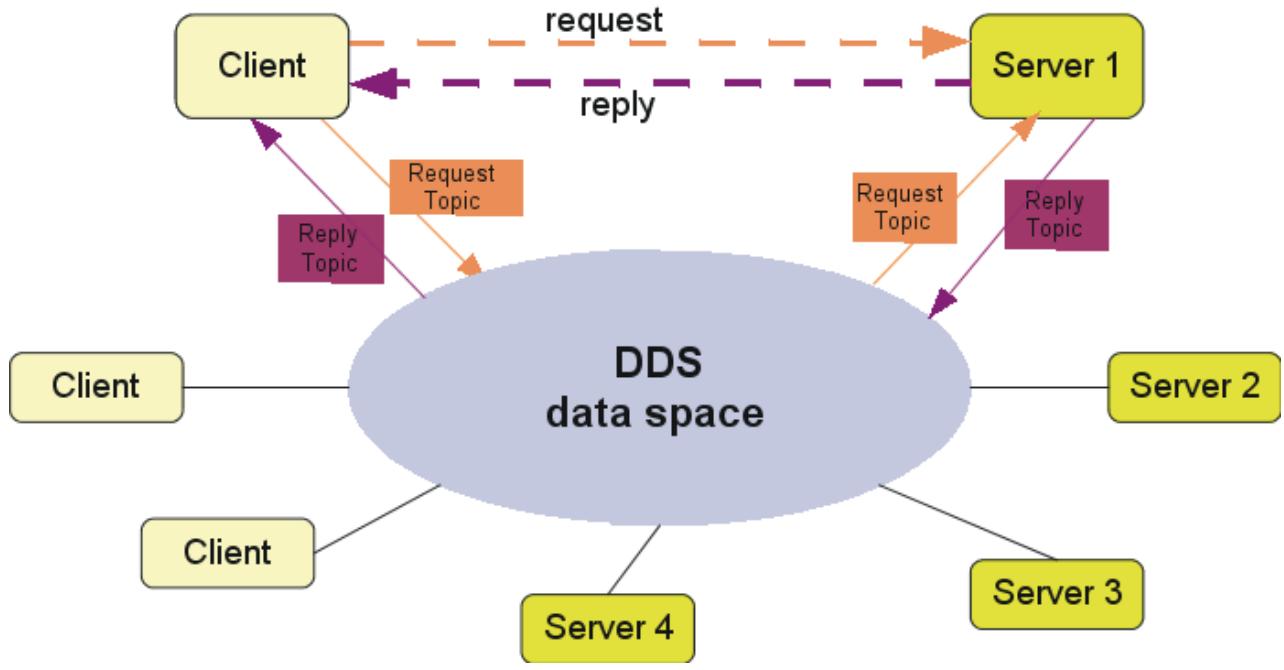
# RMI Communication Scheme
Lite RMI targets service-oriented applications needing a request/reply communication scheme while they need to have a very fine control over the data and the underlying network quality of service. Typically, Lite RMI can be used in systems to issue commands. Commands are a kind of stimulus that express the ability of the system to do something. As commands have the ‘do-something’ connotation, it is often useful to be informed synchronously that the command has been executed. Thanks to the various DDS QoSs, applications can associate expiration time, prioritities, persistency and so on to those commands.
# 2.2 Benefits
As a complementary paradigm to data centricity, Lite RMI provides these benefits:
• A more productive and higher abstraction level than can be achieved manually through topic exchanges and applications synchronization.
• A unique middleware technology for mixing Global Services and Data Spaces with an easy and dynamic services registration, data declaration, and the same discovery mechanisms.
• Enables data-centric applications to use RMI without the burden of an additional middleware technology (e.g. CORBA).
• Strong services location transparency. Thanks to the connectionless nature of DDS, service identities do not need to include any network-related information. In Lite RMI, a service is identified by a simple name. Services’ identities are exported naturally via a DDS publication on specific topics. Services can even move from one location to another without any impact on client applications.
• Simple API.
• Easy deployment process.
# 3
# Lite RMI over DDS
As in traditional service-oriented applications, communication from client to server is performed through a welldefined service model. The RMI module enables a user to build a service model with remote method invocation capabilities and completely hides the DDS DCPS API. Of course, using RMI does not prevent the application from using the DDS API as shown by the following figure:
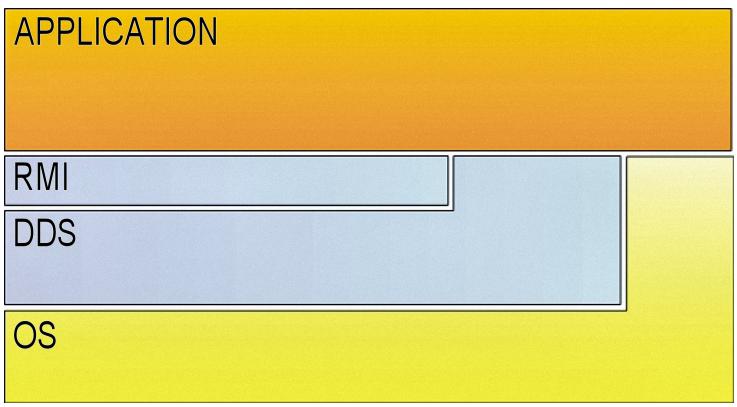
# RMI Relationship to DDS
A service model is defined by one or more object-oriented interfaces. A DDS RMI interface is an IDL interface having a name and a set of operations. Each operation has a fixed set of typed parameters. The RMI module provides:
• A service invocation framework that maps the different services operations onto a set of DDS topics that hold the operation’s invocation requests and replies. A set of mapping rules have been defined for this purpose. At runtime, this framework sets up the underlying DDS environment and handles the remote interface invocations using the basic DDS read/write operations.
• A simple and intuitive programming model for both the server application side implementing the interface, and the client application side invoking that interface. The server programming model is as simple as implementing an interface, and the client programming model is as simple as calling a local interface.
• A powerful feature to enable tuning of the invocation request and reply QoS by setting their corresponding DDS QoS policies. This feature enables developers to improve the invocations quality with real-time and high-performance features. For instance, priorities and validity durations (lifespan) could be set on the different operation requests/replies.
• Synchronous, asynchronous and oneway invocation modes. The synchronous mode is the invocation mode that blocks the client thread until the reply is sent back to him by the server. The asynchronous mode is similar to the CORBA Asynchronous Messaging Interface (AMI) callback model. It is a non-blocking mode where the client does not wait for the reply from the server, but rather provides a callback object that will be invoked by the middleware to deliver the request return values when they are received. Finally, the oneway mode is a fire-and-forget invocation mode where the client does not care about the success or failure of the invocation. A oneway method cannot return values and no reply message will ever return to the client once the request is sent to the server.
• C++ implementation.
# 3.1 Key components
The Lite RMI module includes the following components:
RMI Pre-processor (rmipp) Generates the interface-type-specific requests/replies topics and invocation handling classes.
Core library Provides the runtime setup operations and a generic invocation framework.
# 3.2 Binding Languages
The Lite RMI module is available for the C++ language.
# 4
# Building an RMI Application
# 4.1 About RMI Applications
The process of building a Vortex Lite RMI application is shown in Steps Building Applications with RMI below. The different steps are described in the following subsections.
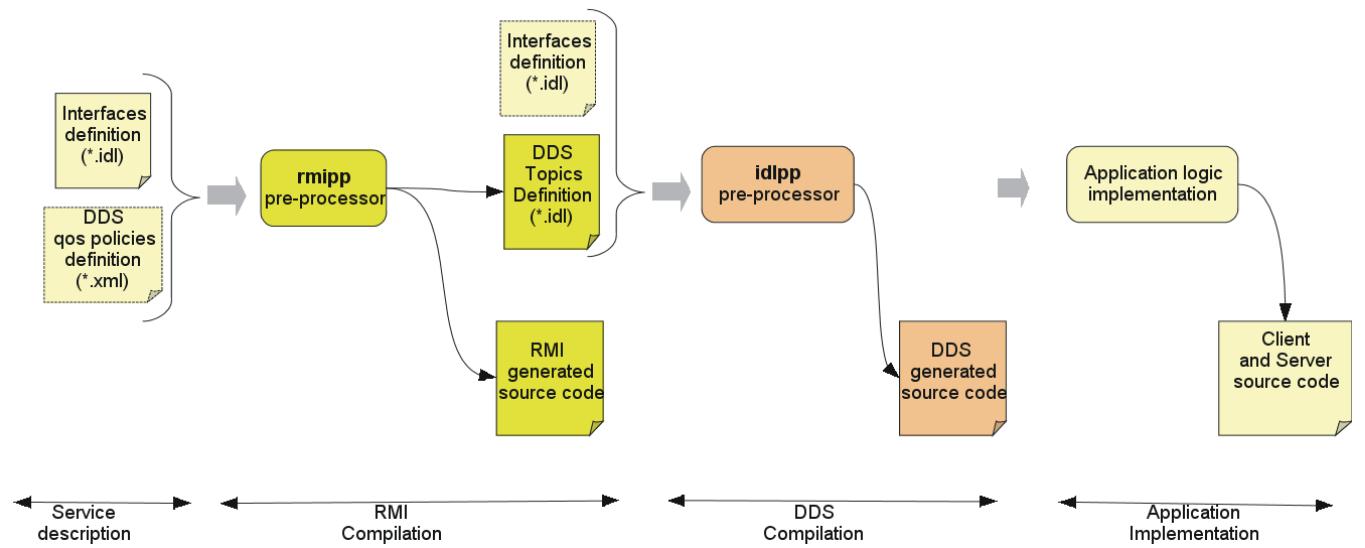
Steps Building Applications with RMI
# 4.2 Services description
The first step in building an RMI application is the definition of its provided services in terms of interfaces. The application interfaces should be declared using the OMG IDL language. The operations parameters can be either of basic (short, long, ...) or complex (struct, sequence, string, ...) types. However, the following restrictions should be respected:
• the Any and the valuetype IDL types are not supported because they are not supported by the underlying DDS DCPS layer. Union type is also not supported.
• Exceptions are not supported at this time.
• Each interface must extend DDS\_RMI::Services base interface to indicate that it is invocable over DDS. This interface is defined in the file dds\_rmi.idl, which must be included.
• Each interface must be declared ‘local’.
• Oneway operations are supported. The semantics of oneway operations is the same as for the OMG CORBA interfaces. A oneway operation must not contain any output parameter and must return a void type.
The following IDL snippet shows an example of a service data description:
```cpp
#include "dds_rmi.idl"
module HelloWorld
{
// interface definition
local interface HelloService : ::DDS_RMI::Services
{
string greet();
};
```
# 4.3 QoS policies description
The Lite RMI module provides the ability to tune the quality of service of the services invocations (requests and/or replies), if needed, by setting the underlying QoS policies. By default, the Lite RMI module uses the default values of the QoS policies except for the reliability QoS policy which is set to RELIABLE.
If needed, the application designer can define the QoS policies to be set on the invocations in an XML file. This file must respect the XML schema given in QoS policies XML schema.
Note that setting the QoS policies requires a good knowledge of the rules for mapping the specified interfaces onto the DDS topics description (please refer to RMI Interface to DDS topics mapping rules).
The following XML snippet shows an example:
```xml
<?xml version="1.0" encoding="ISO-8859-1" ?>
<dcps xmlns="http://www.omg.org/dds/"
xmlns:xsi="http://www.w3.org/2001/XMLSchema-instance"
xsi:schemaLocation="http://www.omg.org/dds/DCPS.xsd">
<domain id="">
<topic name="greet_req"
idltype="::HelloWorld::HelloService::greet_request" idlfile="">
<topic_qos>
<destinationOrderQosPolicy>
<destinationOrderKind>
BY_SOURCE_TIMESTAMP_DESTINATIONORDER_QOS
</destinationOrderKind>
</destinationOrderQosPolicy>
<durabilityQosPolicy>
<durabilityKind>
PERSISTENT_DURABILITY_QOS
</durabilityKind>
</durabilityQosPolicy>
<latencyBudgetQosPolicy>
<duration>
<nanosec>10000000</nanosec>
<sec>0</sec>
</duration>
</latencyBudgetQosPolicy>
<reliabilityQosPolicy>
<duration>
<nanosec>100000000</nanosec>
<sec>0</sec>
</duration>
<reliabilityKind>
RELIABLE_RELIABILITY_QOS
```
# 4.3. QoS policies description
```xml
</reliabilityKind>
</reliabilityQosPolicy>
</topic_qos>
</topic>
</domain>
</dcps>
```
This example specifies the QoS policies to be applied on the topic invocation request of the greet operation of the interface HelloWorld::HelloService. Note that the invocation request topic is named greet\_req and its IDL type is HelloWorld::HelloService::greet\_request.
# 4.4 RMI compilation
Once the application has defined its services and (optionally) its QoS settings, these definitions are compiled to generate type-specific code for the application services invocation.
The RMI compilation is done using the rmipp pre-processor applied on the interfaces definition file and the QoS file if it exists. The rmipp usage is:
```txt
rmipp [-I <path>] [-d <directory>] [-topics <qos_file>]
[-P dll_macro_name[,<header-file>]] <interfaces_file>
```
The parameters are:
-I <path> Define the include path directives.
-d <directory> Define the location to place the generated files.
-topics <qos\_file> Define the XML file including the QoS policies settings.
-P dll\_macro\_name[,<header-file>] Sets export macro that will be prefixed to all functions in the generated code. This allows creating DLLs from generated code. Optionally a header file can be given that will be included in each generated file.
<interfaces\_file> The IDL file including the interfaces definition.
The rmipp compilation will generate a set of C++ source files as well as an IDL file including the mapping of the provided interfaces onto the DDS topics. The generated IDL file name is the interfaces file name with “\_topics” concatenated.
rmipp follows the mapping rules described in Language mapping for Lite RMI.
Example usage:
```batch
rmipp -d generated HelloService.idl
```
The generated directory will include:
```txt
HelloService_topics.idl
HelloService_Interface.h
HelloService_Interface.cpp
HelloService_InterfaceProxy.h
HelloService_InterfaceProxy.cpp
```
In addition, the rmipp compiler performs a DDS compilation to generate the DDS/DCPS code that is required to support the requests/replies transport over DDS.
# 4.4. RMI compilation
# 4.5 Application implementation
As mentioned before, the target applications have a client/server design. A typical application includes a server part that implements the provided interfaces, and a client part that invokes these interfaces. This section describes the programming model of both parts.
# 4.5.1 Runtime starting and stopping
Any Lite RMI application process must initialize the RMI runtime prior to any other operation, regardless of whether it is a client and/or a server process. The runtime initialization sets up the underlying DDS infrastructure and configures it to make the services invocable and the clients capable of invoking the services. It is also important to stop the runtime when the application is no longer using RMI.
The following code snippets show the runtime initialisation and stopping procedure in C++.
C++
RMI runtime starting and stopping in C++
```cpp
#include "ddsrmi.hpp"
using namespace org::opensplice::DDS_RMI;
int main (int argc, char * argv[])
{
CRuntime_ref runtime = CRuntime::getDefaultRuntime();
if (runtime.get() == NULL)
{
std::cout << "Failed to get the Runtime " << std::endl;
exit(1);
}
// starting the runtime
bool result = runtime->start(argc, argv);
if (result != true)
{
std::cout << "Failed to start the Runtime " << std::endl;
exit(1);
}
...
// stopping the runtime
result = runtime->stop();
if (result != true)
{
std::cout << "Failed to stop the Runtime " << std::endl;
exit(1);
}
}
```
Comments below refer to line numbers in the sample code above:
1 Include the RMI library header file. Any Lite RMI application should include this file.
3 Declare the usage of the RMI library namespace.
7-12 Get the default DDS runtime. This selects the default DDS domain as the data space where all subsequent RMI requests and replies will be exchanged.
15-20 Initialize the created runtime. This creates all the needed DDS entities. A set of configuration options can be passed to the start operation via argc and argv parameters. This latter is a string array including possible option names and values, and argc is the length of this array. Note that these parameters are
# 4.5. Application implementation
typically the same parameters that were passed to the main program so that the RMI options can be specified on the command line, each following the format ‘--option=value‘. All of the supported options are described in the section RMI Runtime Configuration Options.
24-28 Stop the created runtime. This removes all the created DDS entities and releases the RMI-allocated resources. It is strongly recommended to stop the runtime when it no longer needed.
# 4.5.2 Server programming model
At the server side of the application, each provided interface should be implemented, then instantiated and finally registered to be invocable via DDS.
To define an implementation, the application developer must write an implementation class including public methods corresponding to the operations of the related IDL interface. The rmipp compilation generates for each interface a skeleton class, named ::DDS\_RMI::HelloWorld::HelloServiceInterface, that must be extended by the application-supplied implementation class. The language mapping rules of the RMI IDL interfaces are given in Language mapping for Lite RMI.
To make an interface invocable over DDS, it must be registered within the RMI framework, then activated. The registration process requires the following information:
• the implementation class object
• the server name, as well as a unique id identifying that interface inside the server.
The services activation makes the RMI runtime wait for incoming requests for all the registered services.
The following code snippets show the server programming model in C++
C++
C++ RMI interface implementation
```cpp
class HelloService_impl :
public virtual DDS_RMI::HelloWorld::HelloServiceInterface
{
public:
HelloService_impl();
~ HelloService_impl();
virtual DDS::String greet ();
}
```
C++
C++ RMI server
```cpp
01 #include "ddsrmi.hpp"
02 #include "HelloService_Interface.hpp"
03
04 using namespace org::opensplice::DDS_RMI;
05
06 int main (int argc, char * argv[])
07 {
08
09 // Runtime starting
10 ...
11
12 // implementation class instantiation
13 shared_ptr<HelloService_impl> impl (new HelloService_impl());
14
15 //interface registration
16 bool res = DDS_Service::register_interface<
17 ::DDS_RMI::HelloWorld::HelloServiceInterface, HelloService_impl>
```
# 4.5. Application implementation
```cpp
( impl, //implementation class
"HelloServer", // server name
1 // unique server id
);
if(!res)
{
std::cout << "Failed to register the
HelloWorld::HelloService interface");
System.exit(1);
}
//services activation
runtime->run()
// Runtime stopping
...
}
```
Comments below refer to line numbers in the sample code above:
1-2 Include the Lite RMI library header file as well as the generated interface skeleton header file.
4 Declare the usage of the RMI library namespace.
10 Start the DDS runtime.
13 Instantiate the implementation class of the HelloService interface and assign it to a smart pointer. The RMI library provides an implementation of smart pointers via the shared\_ptr template class.
16-27 Register the HelloService interface in the default DDS domain. The register\_interface function is a template function requiring the interface skeleton class and the interface implementation class as template parameters.
28 Activates all the registered services including the HelloServer service. This is a blocking call that makes the server runtime wait for incoming requests. To shut down the server runtime the shutdown() operation must be called.
31 Stop the DDS runtime.
# 4.5.3 Client programming model
As mentioned before, Lite RMI supports synchronous, asynchronous and oneway invocation modes. The following subsections present the synchronous and asynchronous programming model. The oneway programming model is similar to the synchronous one but, of course, with a different behaviour.
# Synchronous invocation mode
The client part of the RMI application is as simple as calling a local class. Note that these calls block until the server-side responds or an internal timeout expires. Typically, in case of failure, the call will block until the timeout expiration. This timeout value is set by default to 10 minutes, but it may be configured via the interface proxy object. This object is a generated object, named ::DDS\_RMI::HelloWorld::HelloServiceInterfaceProxy, that is the local representative of the RMI interface. This object is mainly used to call the RMI services, as shown in the following client code examples.
C++
C++ RMI client
```cpp
01 #include "ddsrmi.hpp"
02 #include "HelloService_InterfaceProxy.hpp"
03
```
# 4.5. Application implementation
```cpp
04 using namespace org::opensplice::DDS_RMI;
05
06 int main (int argc, char * argv[])
07 {
08
09 // Runtime starting
10 ...
11
12 // Getting the interface proxy
13 shared_ptr<::DDS_RMI::HelloWorld::HelloServiceInterfaceProxy> proxy;
14 bool ret = DDS_Service::getServerProxy<
15 ::DDS_RMI::HelloWorld::HelloServiceInterfaceProxy>
16 (
17 "HelloServer", //server name
18 1, //unique proxy instance id
19 proxy // proxy reference
20 );
21 // Calling the services
22 proxy->greet();
23
24 // Runtime stopping
25 ...
26
27 }
```
Comments below refer to line numbers in the sample code above:
1-2 Include the RMI library header file as well as the generated interface proxy header file.
4 Declare the usage of the RMI library namespace.
10 Start the DDS runtime.
13 Declare a smart pointer of the HelloService interface proxy type.
13-19 Get the HelloServer service proxy. The getServerProxy function is a template function requiring the proxy class type as a template parameter. This function accepts the service name, a proxy instance id and the smart pointer to the proxy object as parameters. In case of success, the smart pointer is set to the created proxy object. The proxy instance id is a unique identifier that refers to the created proxy. It is important to ensure the uniqueness of the identifiers of all the proxies of the same service.
If the requested service is not found, the getServerProxy operation will raise an org::opensplice::DDS\_RMI::SERVICE\_NOT\_FOUND exception.
22 Invoke the greet operation synchronously using the created proxy.
25 Stop the runtime.
# Asynchronous invocation mode
To invoke asynchronously a given non-oneway operation, such as the greet operation in the examples shown here, the client application must:
• Implement a specific reply handler class to handle the operation out/inout/return parameters if any. This handler must extend a base reply handler class that is generated for each operation and implement the greetReply callback function or method whose parameters are the out/inout/return parameters of the related IDL operation.
• Use the generated asynchronous function or method that maps to the IDL operation whose name is the concatenation of ‘async\_’ and the IDL operation name. This operation is a void operation that accepts only the in and inout IDL parameters, in addition to the eference of the implemented reply handler.
Note that the reply handler class is not re-entrant in the current implementation. It cannot handle concurrent replies. It means that if two successive asynchronous calls are made with the same reply handler instance, this
# 4.5. Application implementation
latter will reject the second reply if it has not finished dispatching the first one. In this case the asynchronous call will raise a BAD\_PARAM exception.

IMPORTANT: It is strongly recommended not to mix synchronous and asynchronous calls of the same operation without proper synchronization. The application should ensure that the asynchronous call has received its reply before requesting a synchronous one.
C++
C++ RMI Client with asynchronous invocation
```cpp
#include "ddsrmi.hpp"
#include "HelloService_InterfaceProxy.hpp"
using namespace org::opensplice::DDS_RMI;
/**
* Reply Handler of the 'async_greet' operation
*
*/
class MyGreetReplyHandler :
public virtual HelloWorld_HelloService_greet_Reply_Handler
{
void greet_Reply(DDS::String ret)
{
std::cout << "Reply received: " << ret << std::endl;
}
}
int main (int argc, char * argv[])
{
// Runtime starting
...
// Getting the interface proxy
shared_ptr<::DDS_RMI::HelloWorld::HelloServiceInterfaceProxy> proxy ;
bool ret = DDS_Service::getServerProxy<
::DDS_RMI::HelloWorld::HelloServiceInterfaceProxy>
(
"HelloServer", //server name
1, // proxy instance id
proxy // proxy reference
);
// instantiating a reply handler
MyGreetReplyHandler handler;
// Calling the services asynchronously
proxy->async_greet(&handler);
...
// Runtime stopping
...
}
```
Comments below refer to line numbers in the sample code above:
10-16 Provide the implementation class of the greet operation reply handler.
21 Start the DDS runtime.
24-31 Get the HelloServer service proxy as for the synchronous mode.
# 4.5. Application implementation
34 Instantiate the greet reply handler class.
37 Invoke the async\_greet() operation by providing the reply handler. This call is a non-blocking call. The application steps immediately to the next instruction. The invocation reply will be delivered to the application by invoking the greet\_Reply operation of the reply handler. Note that this operation will be invoked in a middleware-provided thread.
41 Stop the runtime. Note that some synchronization may be needed to avoid exiting before the async\_greet reply is delivered to the application.
# 4.6 Using a specific DDS domain
Using the default RMI CRuntime implies that all the RMI invocations will be performed within the default DDS domain. The default domain id is the one specified by the current Lite DDS configuration, specifically in the Domain Service section of the related XML file. The default Lite DDS configuration files set the domain id to 0. For more information on configuring Vortex Lite please refer to the Vortex Lite Configuration Guide.
If the RMI application operates with a user-defined domain id, using the default CRuntime enables RMI interactions within that domain. In case of an application operating in multiple domains, it should create a CRuntime object for the targeted domain id and get a DDS\_ServiceInterface object from that CRuntime. The DDS\_ServiceInterface object provides all the convenient methods for server applications to register/unregister services and for client applications to get service proxies on the relevant domain id. These methods are the same as the DDS\_Service object ones. The following code snippets show this in C++

Getting DDS\_ServiceInterface in C++
```cpp
// Getting a CRuntime on my specific domain
CRuntime_ref runtime = CRuntime::getRuntime(my_domain_id);
// Getting a DDS_ServiceInterface object
DDS_ServiceInterface_ref dds_service = runtime->getDDS_ServiceInterface();
```
# 5
# Language mapping for Lite RMI
Rmipp compilation follows a set of mapping rules to generate language-specific source code. Most of these rules come from the standard OMG IDL-to-C++ mapping specification but with some specific differences. This chapter focuses on specific parts of this mapping. For more information, please refer to the relevant OMG specifications.
The following figure shows the language mapping of the HelloService IDL interface previously defined.
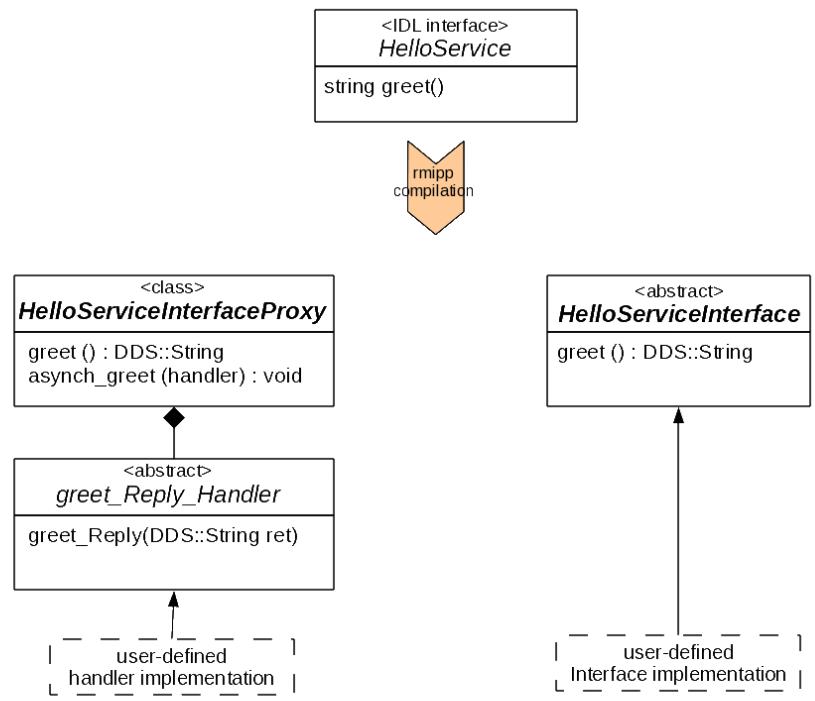
# IDL Interface Mapping
# 5.1 Mapping for interfaces
An interface is mapped to two C++ classes that contain public definitions of the operations defined in the interface.
The HelloServiceInterface abstract class is the base class of the HelloService implementation class. The HelloServiceInterfaceProxy class is the proxy object that represents locally the remote service. The client application should get a reference to this class to be able to invoke the remote service.
# 5.2 Mapping for operations
Each IDL operation, if not oneway, is mapped to two C++ functions. The first one, having the same name as the IDL operation, is used for synchronous invocations. The second one, having async\_ concatenated to the IDL operation, is used for asynchronous invocations. A oneway operation maps only to the synchronous form of the operations.
The operations parameters and return types obey the same parameter passing rules as for the standard OMG IDLto-C++ mapping. The asynchronous functions (methods) will return void and take only the in/inout parameters of the IDL operation, as well as a callback object used as a reply handler. This handler class is also generated for each non-void operation as an inner abstract class of the proxy class as depicted in the diagram with the greet\_Reply\_Handler class. This latter should be implemented by the user to handle the asynchronous invocation reply. Hence, the greet\_Reply function (method) provides all the inout/out/return parameters of the corresponding IDL operation.
# 5.3 Mapping for basic types
The table below shows the C++ mapping of the IDL types that can be declared in the RMI services description file.
IDL sequences are mapped as specified by the DDS standard.
Mapping for basic types