![Abstract geometric design with overlapping colored triangles and a stylized 'V' symbol (no text or symbols present)](.vortex-opensplice-dds-tutorial/d7449e1030876c2d1658129b5816803592642f0ef590d657f3f85c3c14bc3fc4.jpg)

# ORTEX

# The DDS Tutorial

# Release

# Contents

# 1 Foundations 1

1.1 The Data Distribution Service
1.2 The OMG DDS Standard
1.3 DDS in a Nutshell 2
1.4 Summary 6

# 2 Topics, Domains and Partitions 7

2.1 Topics Inside Out . 7
2.2 Scoping Information 11
2.3 Content Filtering 12
2.4 Summary 13

# 3 Reading and Writing Data 14

3.1 Writing Data 14
3.2 Accessing Data 17
3.3 Waiting and being Notified . 20
3.4 Summary 22

# 4 Quality of Service 23

4.1 The DDS QoS Model 23
4.2 Summary 27

# 5 Appendix A 28

5.1 Online Resources 28

# 6 Acronyms & Abbreviations 29

# 7 Bibliography 30

# 8 Contacts & Notices 32

8.1 Contacts 32
8.2 Notices 33

# 1

# Foundations

# 1.1 The Data Distribution Service

Whether you are an experienced programmer or a novice, it is highly likely that you have already experienced some form of Pub/Sub (Publish/Subscribe) – an abstraction for one-to-many communication that provides anonymous, decoupled, and asynchronous communication between a publisher and its subscribers. ‘Pub/Sub’ is the abstraction behind many of the technologies used today to build and integrate distributed applications, such as social applications, financial trading, etc., whilst keeping their component parts loosely-coupled and independently evolvable.

Various implementations of the Pub/Sub abstraction have emerged through time to address the needs of different application domains. DDS (Data Distribution Service) is an OMG (Object Management Group) standard for Pub/Sub introduced in 2004 to address the data-sharing needs of large scale mission- and business-critical applications. Today DDS is one of the hot technologies at the heart of some of the most interesting IoT (Internet of Things) and I2 (Industrial Internet) applications.

To the question ‘What is DDS?’ one answer is

it is a Pub/Sub technology for ubiquitous, polyglot, efficient and secure data sharing.

Another way of answering this question is to say that

DDS is Pub/Sub on steroids.

# 1.2 The OMG DDS Standard

The DDS standards family is comprised of the DDS v1.4 API (see OMG DDS 2015) and the DDSI v2.2 (see OMG DDSI 2014), the ISO/IEC C++ V1.0 API (see ISO/IEC C++ 2013) and the Java5 V1.0 API (see Java5 2013) as illustrated in The DDS Standard below.

![Based on the provided image titled 'The DDS Standard,' here is the accurate description of the blocks and their connections:\n\n**Blocks:**\n*   **Application** (Top block)\n*   **API** (Vertical label on the left side of the second layer)\n*   **DCPS** (Vertical label inside the API layer)\n*   **Durability** (Inside DCPS)\n*   **Ownership** (Inside DCPS)\n*   **Content** (Inside DCPS)\n*   **Minimal** (Inside DCPS)\n*   **Protocol** (Vertical label on the left side of the third layer)\n*   **DDSI** (Vertical label inside the Protocol layer)\n*   **Durability** (Inside DDSI)\n*   **Ownership** (Inside DDSI)\n*   **Content** (Inside DDSI)\n*   **Minimal** (Inside DDSI)\n*   **UDP** (Bottom block)\n*   **TCP** (Bottom block)\n*   **WebSock** (Bottom block)\n\n**Connections:**\nThe diagram depicts a vertical stack of layers:\n1.  The **'Application'** block sits at the very top.\n2.  Below 'Application' is the **'API'** layer, which contains the **'DCPS'** block. Inside 'DCPS' are the four blocks: **'Durability'**, **'Ownership'**, **'Content'**, and **'Minimal'**.\n3.  Below the 'API' layer is the **'Protocol'** layer, which contains the **'DDSI'** block. Inside 'DDSI' are the identical four blocks: **'Durability'**, **'Ownership'**, **'Content'**, and **'Minimal'**.\n4.  Below the 'Protocol' layer is the bottom layer containing the three blocks: **'UDP'**, **'TCP'**, and **'WebSock'**.](.vortex-opensplice-dds-tutorial/6f75fecf733d29e2af1b9f92e977939bb83c38e12e16f69ef7fba7f259a8c9f5.jpg)

The DDS API standard guarantees source code portability across different vendor implementations, while the DDSI standard ensures on-the-wire interoperability between DDS implementations from different vendors.

The DDS API standard defines several different profiles (see The DDS Standard) that enhance real-time Pub/Sub with content filtering and queries, temporal decoupling and automatic fail-over. Additionally, APIs are available in C, C++, C#, Java, JavaScript, CoffeeScript, Scala and more, that can be mixed in deployment as appropriate to the user application.

The DDS standard was formally adopted by the OMG in 2004 and today it has become the established Pub/Sub technology for distributing high volumes of data, dependably and with predictable low latency in applications such as Smart Grids, Smart Cities, Defense, SCADA, Financial Trading, Air Traffic Control and Management, High Performance Telemetry and Large Scale Supervisory Systems. It is also one of the reference communication architectures as defined by the Industrial Internet Consortium for the Internet of Things (IoT).

# 1.3 DDS in a Nutshell

To explain DDS this Tutorial will develop a ‘real-world’ example that is straightforward enough that it can be understood easily yet complex enough that it will illustrate all of the major features of a DDS system.

The example is a temperature monitoring and control system for a very large building.

Each floor of the building has several rooms, each of which is equipped with a set of temperature and humidity sensors and one or more conditioners. The application is intended to perform monitoring for all the elements in the building as well as temperature and humidity control for each room.

This application is a typical distributed monitoring and control application in which there is data telemetry from several sensors distributed throughout a space, and processing of the sensor data results in actions being applied to actuators (the conditioners).

# 1.3.1 Global Data Space

The key abstraction at the foundation of ‘Global Data Space’ is a fully-distributed GDS. It is important to remark that the DDS specification requires the implementation of the Global Data Space to be fully distributed in order to avoid single points of failure and bottlenecks.

The Global Data Space
![This flowchart depicts a publish-subscribe architecture, likely representing a DDS (Data Distribution Service) or similar middleware system, set against a light blue cloud background.\n\n**Labeled Blocks:**\n*   **Writers (Left Side):** Four circles labeled 'Data Writer' in different colors:\n    *   Orange (top)\n    *   Red (middle)\n    *   Green (middle-lower)\n    *   Blue (bottom)\n*   **Topics (Center):** Four white rounded rectangles, each with a small grey tag labeled 'QoS':\n    *   'TopicD' (top center)\n    *   'TopicA' (middle left)\n    *   'TopicC' (bottom left)\n    *   'TopicB' (middle right), which also has '...' written below it.\n*   **Readers (Right Side):** Four circles labeled 'Data Reader' in different colors:\n    *   Orange (top)\n    *   Orange (middle)\n    *   Red (middle-lower)\n    *   Green (bottom)\n\n**Connections:**\n*   **TopicD:** Connected to the top Orange 'Data Writer' (input), the top Orange 'Data Reader' (output), and the middle Orange 'Data Reader' (output).\n*   **TopicA:** Connected to the Red 'Data Writer' (input) and the Red 'Data Reader' (output).\n*   **TopicB:** Connected to the Green 'Data Writer' (input) and the Green 'Data Reader' (output).\n*   **TopicC:** Connected to the Blue 'Data Writer' (input).](.vortex-opensplice-dds-tutorial/6eb4efbd37daba54307d119440993e2fbe442fc93deaf91474d5b5c154bfe6ab.jpg)

Publishers and Subscribers can join or leave the GDS at any time, as they are dynamically discovered. The dynamic discovery of Publishers and Subscribers is performed by the GDS and does not rely on any kind of centralized registry like those found in other Pub/Sub technologies such as the Java Message Service (JMS).

Finally, the GDS also discovers application-defined data types and it propagates them as part of the discovery process.

The essential point here is that the presence of a GDS equipped with dynamic discovery means that when a system is deployed no configuration is needed. Everything is automatically discovered and data begins to flow.

Moreover, since the GDS is fully distributed there is no need to fear that the crash of some server having an unpredictable impact on system availability. In DDS there is no single point of failure, so although applications can crash and re-start, or disconnect and re-connect, the system as a whole continues to run.

# 1.3.2 Domain Participant

To do anything useful a DDS application needs to create a Domain Participant (DP). The DP gives access to the GDS – called domain in DDS applications.

Although there are several DDS API’s to choose from, this Tutorial is restricted to giving source code examples written in the ISO/IEC C++ API (see ISO/IEC C++ 2013).

The listing Creating a Domain Participant shows how a Domain Participant can be created; notice that domains are identified by integers.

Creating a Domain Participant
```txt
// create a Domain Participant, -1 defaults to value defined in configuration file dds::domain::DomainParticipant dp(-1);
```

```txt
// Creates a domain participant in the domain identified by
// the number 18
dds::domain::DomainParticipant dp2(18);
```

# 1.3.3 Topics

In DDS, the data flowing from Publishers to Subscribers belongs to a Topic, which represents the unit of information that can be produced or consumed.

A Topic is defined as a triad composed of

• a type,
• a unique name,
• and a set of Quality of Service (QoS) policies

which, as will be explained in detail later in this Tutorial, are used to control the non-functional properties associated with the Topic.

For the time being it is enough to say that if the QoSs are not explicitly set, then the DDS implementation will use some defaults prescribed by the standard.

Topic Types can be represented with the subset of the OMG Interface Definition Language (IDL) standard that defines struct types, with the limitations that Any-types are not supported.

Those unfamiliar with the IDL standard can regard Topic Types as being defined with C-like structures whose attributes can be primitive types (such as short, long, float, string, etc.), arrays, sequences, unions and enumerations. Nesting of structures is also allowed.

Those who are familiar with IDL may wonder how DDS relates to CORBA. The only thing that DDS has in common with CORBA is that it uses a subset of IDL; other than this, CORBA and DDS are two completely different standards and two completely different yet complementary technologies.

Returning to the temperature control application, we are going to define topics representing the reading of temperature sensors, the conditioners and the rooms in which the temperature sensors and the conditioners are installed. The listing IDL definition of a Temperature Sensor provides an example of how the topic type for the temperature sensor might be defined.

# 1.3. DDS in a Nutshell

IDL definition of a Temperature Sensor
```c
// TempControl.idl
enum TemperatureScale {
    CELSIUS,
    FAHRENHEIT,
    KELVIN
};

struct TempSensorType {
    short id;
    float temp;
    float hum;
    TemperatureScale scale;
};

#pragma keylist TempSensorType id
```

As the listing reveals, IDL structures really look like C/C++ structures, so learning to write Topic Types is usually effortless for most programmers.

Notice that the IDL definition of a Temperature Sensor also includes a #pragma keylist directive. This directive is used to specify keys. The TempSensorType is specified to have a single key represented by the sensor identifier (id attribute). At runtime, each key value will identify a specific stream of data; more precisely, in DDS each key-value identifies a Topic instance. For each instance it is possible to observe the life-cycle and learn about interesting transitions such as when it first appeared in the system, or when it was disposed.

Keys, along with identifying instances, are also used to capture data relationships as would be done in traditional entity relationship modeling.

Keys can be made up of an arbitrary number of attributes, some of which could also be defined in nested structures.

After the topic type has been defined and the IDL pre-processor nas been run to generate the language representation required for the topics, a DDS topic can be programmatically registered using the DDS API by simply instantiating a Topic class with the proper type and name.

Topic creation
```rust
// Create the topic
dds::topic::Topic&lt;tutorial::TempSensorType&gt; topic(dp, "TTempSensor");
```

# 1.3.4 Reading and Writing Data

Now that topics have been specified, this Tutorial will demonstrate how to make a Topic flow between Publishers and Subscribers.

DDS uses the specification of user-defined Topic Types to generate efficient encoding and decoding routines as well as strongly-typed DataReaders and DataWriters.

Creating a DataReader or a DataWriter is straightforward, as it simply requires the construction of an object by instantiating a template class with the Topic Type and the passing of the desired Topic object.

After a DataReader has been created for a TempSensorType you are ready to read the data produced by temperature sensors distributed in your system.

Likewise, after a DataWriter has been created for the TempSensorType you are ready to write (publish) data.

The listings Writing data in DDS and Reading data in DDS show the steps required to write and read data.

Writing data in DDS
```txt
// create a Domain Participant, -1 defaults to value defined in configuration file dds::domain::DomainParticipant dp(-1);
```

```rust
// Create the topic
dds::topic::Topic&lt;tutorial::TempSensorType&gt; topic(dp, "TTempSensor");
```

# 1.3. DDS in a Nutshell

```cpp
// Create the Publisher and DataWriter
dds::pub::Publisher pub(dp);
dds::pub::DataWriter&lt;tutorial::TempSensorType&gt; dw(pub, topic);
```

```rust
// Write the data
tutorial::TempSensorType sensor(1, 26.0F, 70.0F, tutorial::CELSIUS);
dw.write(sensor);
```

```cpp
// Write data using streaming operators (same as calling dw.write(...))
dw &lt;&lt; tutorial::TempSensorType(2, 26.5F, 74.0F, tutorial::CELSIUS);
```

Reading data in DDS
```cpp
// create a Domain Participant, -1 defaults to value defined in configuration file
dds::domain::DomainParticipant dp(-1);
// create the Topic
dds::topic::Topic&lt;tutorial::TempSensorType&gt; topic(dp, "TTempSensor");
// create a Subscriber
dds::sub::Subscriber sub(dp);
// create a DataReader
dds::sub::DataReader&lt;tutorial::TempSensorType&gt; dr(sub, topic);

while (true) {
    auto samples = dr.read();
    std::for_each(samples.begin(),
    samples.end(),
    [] (const dds::sub::Sample&lt;tutorial::TempSensorType&gt;& s) {
    std::cout &lt;&lt; s.data() &lt;&lt; std::endl;
    });
    std::this_thread::sleep_for(std::chrono::seconds(1));
}
```

This first DDS application (Reading data in DDS)uses polling to read data out of DDS every second. A sleep is used to avoid spinning in the loop too fast, since the DDS read is non-blocking and returns immediately if there is no data available.

Although polling is a valid method to use, DDS supports two other ways for informing your application of data availability: listeners and waitsets.

• Listeners can be registered with readers for receiving

notification of data availability as well as several other interesting status changes such as violation in QoS.

• Waitsets, modeled after the Unix-style select call, can

be used to wait for the occurrence of interesting events, one of which could be the availability of data. I will detail these coordination mechanisms later on in this tutorial.

The code may appear slightly puzzling at first glance, since the data reader and the data writer are completely decoupled. It is not clear where they are writing data to or reading it from, how they are finding out about each other, and so on. This is the DDS magic! As explained in the very beginning of this chapter, DDS is equipped with dynamic discovery of participants as well as user-defined data types. Thus it is DDS that discovers data producers and consumers and takes care of matching them.

It is strongly recommended that you try to compile the code examples available online (see Appendix A) and run them on your own machine or (even better) on a couple of machines.

Try running one writer and several readers. Then try adding more writers and see what happens. Also experiment with arbitrarily- terminating readers and writers and re-starting them. This way you will see the dynamic discovery in action.

# 1.4 Summary

This first chapter has explained the abstraction behind DDS and introduced some of its core concepts. It has also shown how to write a first DDS application that distributes temperature sensors’ values over a distributed system. It needed fewer than 15 lines of code to get the application working, which shows the remarkable power of DDS.

Upcoming chapters will introduce more advanced concepts, and by the end of this Tutorial all the DDS features will have been demonstrated whilst creating a sophisticated scalable, efficient and real-time Pub/Sub application.

# 2

# Topics, Domains and Partitions

The previous chapter introduced the basic concepts of DDS and walked through the steps required to write a simple Pub/Sub application.

This chapter will look at DDS in more depth, starting with data management.

# 2.1 Topics Inside Out

A Topic represents the unit for information that can produced or consumed by a DDS application. Topics are defined by a name, a type, and a set of QoS policies.

# 2.1.1 Topic Types

DDS is independent of the programming language as well as the Operating System (OS), so it defines its type system along with a space- and time-efficient binary encoding for its types. Different syntaxes can be used to express DDS topic types, such as IDL, XML. Some vendors, such as ADLINK, also support Google Protocol Buffers.

This Tutorial will focus on the subset of IDL that can be used to define a topic type. A topic type is made with an IDL struct plus a key. The struct can contain as many fields as required, and each field can be a primitive type (see table Primitive Types), a template type (see table IDL Template Types), or a constructed type (see table IDL Constructed types).

Primitive Types

&lt;table&gt;<tr><td>Primitive Type</td><td>Size (bits)</td></tr><tr><td>boolean</td><td>8</td></tr><tr><td>octet</td><td>8</td></tr><tr><td>char</td><td>8</td></tr><tr><td>short</td><td>16</td></tr><tr><td>unsigned short</td><td>16</td></tr><tr><td>long</td><td>32</td></tr><tr><td>unsigned long</td><td>32</td></tr><tr><td>long long</td><td>64</td></tr><tr><td>unsigned long long</td><td>64</td></tr><tr><td>float</td><td>32</td></tr><tr><td>double</td><td>64</td></tr></table>

As shown in the table Primitive Types, primitive types are essentially what you would expect, with just one exception: the int type is not there! This should not be a problem since the IDL integral types short, long and long long are equivalent to the C99 int16\_t, int32\_t and int64\_t. And what is more: in contrast to the int type, which can have a different footprint on different platforms, each of these types has specified exactly what its footprint is.

# IDL Template Types

<table><tr><td>Template Type</td><td>Example</td></tr><tr><td>string</td><td>string s1;string&lt;32&gt;s2;</td></tr><tr><td>sequence</td><td>sequence&lt;octet&gt;oseq;sequence&lt;octet, 1024&gt;oseq1k;sequence&lt;MyType&gt;mtseq;sequence&lt;MyType, $10&gt;$mtseq10;</td></tr></table>

In the table IDL Template Types, the string can be parameterized only with respect to their maximum length, while the sequence type can be parameterized with respect to both its maximum length and its contained type. The sequence type abstracts a homogeneous random access container, pretty much like the std::vector in C++ or java.util.Vector in Java.

Finally, it is important to point out that when the maximum length is not provided the type is assumed to have an unbounded length, meaning that the middleware will allocate as much memory as necessary to store the values that the application provides.

The table IDL Constructed Types shows that DDS supports three different kinds of IDL constructed types: enum, struct, and union.

# IDL Constructed Types

<table><tr><td>Constructed Type</td><td>Example</td></tr><tr><td>enum</td><td>enum Dimension {1D, 2D, 3D, 4D};</td></tr><tr><td>struct</td><td>struct Coord1D { long x;};struct Coord2D { long x; long y; };struct Coord3D { long x; long y; long z; };struct Coord4D { long x; long y; long z, unsigned long long t;};</td></tr><tr><td>union</td><td>union Coord switch (Dimension) { case 1D: Coord1D c1d; case 2D: Coord2D c2d; case 3D: Coord3D c3d; case 4D: Coord4D c4d;};</td></tr></table>

It should be clear from this that a Topic type is a struct that can contain (as fields) nested structures, unions, enumerations, and template types, as well as primitive types. In addition, it is possible to define multi-dimensional arrays of any DDS-supported or user-defined type.

To tie things together, there are language-specific mappings from the IDL types described above to mainstream programming languages such as C++, Java, and C#.

# 2.1.2 Topic Keys, Instances and Samples

Each Topic comes with an associated key-set. This key-set might be empty or it can include an arbitrary number of attributes defined by the Topic Type. There are no limitations on the number, kind, or level of nesting, of attributes used to establish the key. There are some limitations to its kind though: a key should either be a primitive type (see table Primitive Types), an enumeration or a string. A key cannot be constructed type (although it may consist of one or more members of an embedded constructed type), an array or a sequence of any type.

# 2.1. Topics Inside Out

Keyed and Keyless Topics
```txt
enum TemperatureScale {
    CELSIUS,
    FAHRENHEIT,
    KELVIN
};

struct TempSensorType {
    short id;
    float temp;
    float hum;
    TemperatureScale scale;
};
#pragma keylist TempSensorType id

struct KeylessTempSensorType {
    short id;
    float temp;
    float hum;
    TemperatureScale scale;
};
#pragma keylist KeylessTempSensorType
```

Returning to the example application (the temperature control and monitoring system), it is possible to define a keyless variant of the TempSensorType defined in the Foundations chapter.

Keyed and Keyless Topics shows the TempSensorType with the id attribute defined as its key, along with the KeylessTempSensorType showing off an empty key-set as defined in its #pragma keylist directive.

If two topics associated with the types declared in Keyed and Keyless Topics are created, what are the differences between them?

```txt
dds::topic::Topic&lt;tutorial::TempSensorType&gt; topic(dp, "TTempSensor");
dds::topic::Topic&lt;tutorial::KeylessTempSensorType&gt; kltsTopic(dp, "KLTempSensorTopic");
```

The main difference between these two topics is their number of instances:

• Keyless topics have only one instance, and thus can be thought of as singletons.
• Keyed topics have one instance per key-value.

Making a parallel with classes in object-oriented programming languages, a Topic can be regarded as defining a class whose instances are created for each unique value of the topic keys. Thus, if the topic has no keys you get a singleton.

Topic instances are runtime entities for which DDS keeps track of whether

• there are any live writers,
• the instance has appeared in the system for the first time, and
• the instance has been disposed (explicitly removed from the system).

Topic instances impact the organization of data on the reader side as well as the memory usage. Furthermore, as will be seen later in this Tutorial, there are some QoSs that apply at the instance level.

We will now illustrate what happens when you write a keyless topic versus a keyed topic.

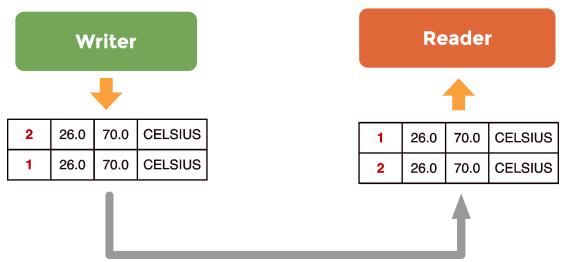
If we write a sample for the keyless KLSensorTopic this is going to modify the value for exactly the same instance, the singleton, regardless of the content of the sample.

On the other hand, each sample written for the keyed TempSensorTopic will modify the value of a specific topic instance, depending on the value of the key attributes (id in the example).

# Data Reader queue for a keyless Topic

# 2.1. Topics Inside Out
![This diagram illustrates a data flow between two entities:\n\n**Top Blocks:**\n*   **Writer:** A green rectangular block on the left.\n*   **Reader:** An orange rectangular block on the right.\n\n**Left Column (Under Writer):**\n*   An orange arrow points downward from 'Writer' to a data table.\n*   The table contains two rows of data:\n    *   Row 1: **2**, **26.0**, **70.0**, **CELSIUS**\n    *   Row 2: **1**, **26.0**, **70.0**, **CELSIUS**\n\n**Right Column (Under Reader):**\n*   An orange arrow points upward from a data table to 'Reader'.\n*   The table contains two rows of data:\n    *   Row 1: **1**, **26.0**, **70.0**, **CELSIUS**\n    *   Row 2: **2**, **26.0**, **70.0**, **CELSIUS**\n\n**Bottom Connection:**\n*   A grey L-shaped arrow originates from beneath the left data table, runs horizontally across the bottom, and points upward into the right data table.](.vortex-opensplice-dds-tutorial/34f6387ba309ae529d8acb98d0b58cbf78ecd5bb18c2ae07b1fb98b90022febf.jpg)

Thus, the code below is writing two samples for the same instance, as shown in Data Reader queue for a keyless Topic. These two samples will be posted in the same reader queue: the queue associated with the singleton instance, as shown in Data Reader queue for a keyless Topic.

```rust
dds::pub::DataWriter&lt;tutorial::KeylessTempSensorType&gt; kldw(pub, kltsTopic);
tutorial::KeylessTempSensorType klts(1, 26.0F, 70.0F, tutorial::CELSIUS);
kldw.write(klts);
kldw &lt;&lt; tutorial::KeylessTempSensorType(2, 26.0F, 70.0F, tutorial::CELSIUS);
```

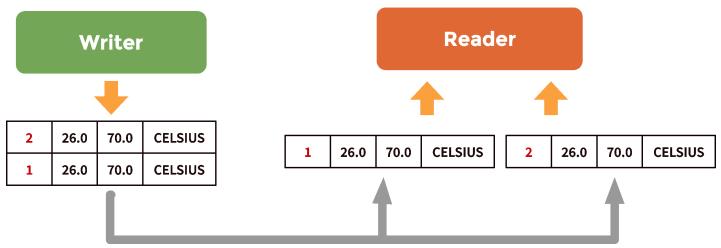
If we write the same samples for the TempSensorTopic, the end-result is quite different. The two samples written in the code fragment below have two different id values, respectively 1 and 2; they are referring to two different instances.

```rust
dds::pub::DataWriter&lt;tutorial::TempSensorType&gt; dw(pub, topic);
tutorial::TempSensorType ts(1, 26.0F, 70.0F, tutorial::CELSIUS);
dw.write(ts);
dw &lt;&lt; tutorial::TempSensorType(2, 26.0F, 70.0F, tutorial::CELSIUS);
```

These two samples are posted into two different queues, as represented in Data Reader queues for keyed Topics, one queue for each instance.

Data Reader queues for keyed Topics
![**Blocks:**\n*   **Writer:** A green rounded rectangle.\n*   **Reader:** An orange rounded rectangle.\n*   **Data Rows (Left Stack):** A stack of two rectangular rows.\n    *   Top row: '2', '26.0', '70.0', 'CELSIUS' (with '2' in red text).\n    *   Bottom row: '1', '26.0', '70.0', 'CELSIUS' (with '1' in red text).\n*   **Data Rows (Right Side):** Two separate rectangular rows.\n    *   Left row: '1', '26.0', '70.0', 'CELSIUS' (with '1' in red text).\n    *   Right row: '2', '26.0', '70.0', 'CELSIUS' (with '2' in red text).\n\n**Connections:**\n*   An orange arrow points downward from **Writer** to the top of the left stack.\n*   An orange arrow points upward from the left data row (under Reader) to **Reader**.\n*   An orange arrow points upward from the right data row (under Reader) to **Reader**.\n*   A thick grey arrow originates from the bottom of the left stack, extends horizontally to the right, and splits into two upward-pointing arrows targeting the left and right data rows under **Reader**.](.vortex-opensplice-dds-tutorial/558b7e36fdacbc86810ab2d36fcf77bba895bc3ffa0cdec00be8a6382221fc23.jpg)

In summary, Topics should be thought of as classes in an object-oriented language, and each unique key-value identifies an instance. The life-cycle of topic instances is managed by DDS and to each topic instance are allocated memory resources; think of it as a queue on the reader side. Keys identify specific data streams within a Topic. Thus, in our example, each id value will identify a specific temperature sensor. Differently from many other Pub/Sub technologies, DDS allows keys to be used to automatically de-multiplex different streams of data. Furthermore, since each temperature sensor represents an instance of the TempSensorTopic it is possible to track the lifecycle of the sensor by tracking the lifecycle of its associated instance. It is possible to detect when a new sensor is added into the system, because it introduces a new instance; it is possible to detect when a sensor has failed, because DDS can report when there are no more writers for a specific instance. It is even possible to detect when a sensor has crashed and then recovered thanks to information about state transitions that is provided by DDS.

Finally, before moving on from DDS instances, it is emphasized that DDS subscriptions concern Topics. Thus a subscriber receives all of the instances produced for that topic. In some cases this is not desirable and some scoping actions are necessary. Scoping is discussed in the next section.

# 2.2 Scoping Information

# 2.2.1 Domain

DDS provides two mechanism for scoping information, domains and partitions.

A domain establishes a virtual network linking all of the DDS applications that have joined it. No communication can ever happen across domains unless explicitly mediated by the user application.

# 2.2.2 Partition

Domains can be further organized into partitions, where each partition can represent a logical grouping of topics.

DDS Partitions are described by names such as SensorDataPartition, CommandPartition, LogDataPartition, etc., and a partition has to be explicitly joined in order to publish data in it or subscribe to the topics it contains.

Domains and partitions in DDS
![Based on the provided image, here is an accurate and concise description of the flowchart:\n\n**Labeled Blocks:**\n*   **Top Label:** 'Domain (0, 1, ... n)'\n*   **Main Container:** A large cloud shape labeled 'Partitions' containing a grid of nine hexagons.\n*   **Bottom Labels:** Three identical text labels reading 'building-1:floor-2:room-3'.\n\n**Connections:**\n*   An arrow connects the bottom-left text 'building-1:floor-2:room-3' to the bottom-left hexagon within the 'Partitions' cloud.\n*   An arrow connects the bottom-center text 'building-1:floor-2:room-3' to the bottom-center hexagon within the 'Partitions' cloud.\n*   An arrow connects the bottom-right text 'building-1:floor-2:room-3' to the bottom-right hexagon within the 'Partitions' cloud.](.vortex-opensplice-dds-tutorial/46230b4fb913a815fa3bb4ecf55464c80664e5ba293ad5198e479f8d10c1a5ce.jpg)

The mechanism provided by DDS for joining a partition is very flexible as a publisher or a subscriber can join by providing its full name, such as SensorDataPartition, or it can join all the partitions that match a regular expression, such as Sens\* or \*Data\*. Supported regular expressions are the same as those accepted by the POSIX fnmatch function (see POSIX fmatch).

To recap: partitions provide a way of scoping information. This scoping mechanism can be used to organize topics into different coherent sets.

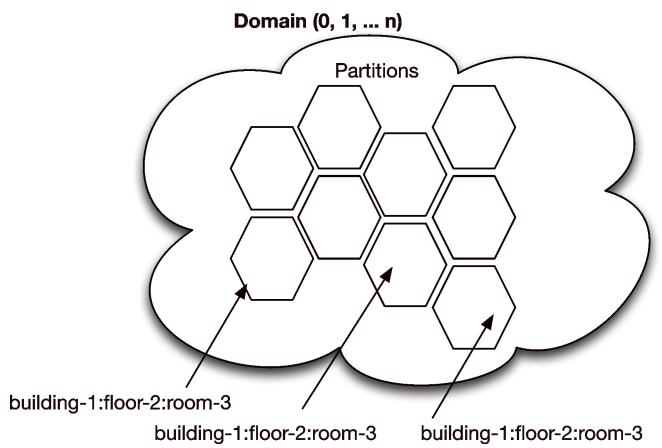
Partitions can also be used to segregate topic instances. Instance segregation can be necessary for optimizing performance or minimizing footprint for those applications that are characterized by a very large number of instances, such as large telemetry systems, or financial trading applications. Referring to the example temperature monitoring and control system, a scheme can be devised with a very natural partitioning of data that mimics the physical placement of the various temperature sensors. To do this, we can use partition names made of the building number, the floor level and the room number in which the sensor is installed:

building-&lt;number&gt;:floor-&lt;level&gt;:room-&lt;number&gt;

Using this naming scheme, as shown in Domains and partitions in DDS, all of the topics produced in room 51 on the 15th floor of building 1 would belong to the partition building-1:floor-15:room-51. Likewise, the partition expression building-1:floor-1:room-\* matches all of the partitions for all of the rooms at the first floor in building 1.

In a nutshell, partitions can be used to scope information, and naming conventions (such as those used for the example temperature control applications) can be used to emulate hierarchical organization of data starting from flat partitions. Using the same technique it is possible to slice and access data across different dimensions or views, depending on the needs of the application.

# 2.3 Content Filtering

Domains and Partitions are useful mechanisms for the structural organization of data, but what if it is neccessary to control the data received based on its content? Content Filtering enables the creation of topics that constrain the values that their instances might take.

When subscribing to a content-filtered topic an application will receive, amongst all published values, only those that match the topic filter. The filter expression can operate on the full topic content, as opposed to being able to operate only on headers as it happens in many other Pub/Sub technologies, such as JMS. The filter expression is structurally similar to a SQL WHERE clause.

The table lists the operators supported by DDS.

Legal operators for DDS Filters and Query Conditions

<table><tr><td>Constructed Type</td><td>Example</td></tr><tr><td>=</td><td>equal</td></tr><tr><td>&lt;&gt;</td><td>not equal</td></tr><tr><td>&gt;</td><td>greater than</td></tr><tr><td>&lt;</td><td>less than</td></tr><tr><td>&gt;=</td><td>greater than or equal</td></tr><tr><td>&lt;=</td><td>less than or equal</td></tr><tr><td>BETWEEN</td><td>between and inclusive range</td></tr><tr><td>LIKE</td><td>matches a string pattern</td></tr></table>

Content-Filtered topics are very useful from several different perspectives. First of all, they limit the amount of memory used by DDS to the instances and samples that match the filter. Furthermore, filtering can be used to simplify your application by delegating to DDS the logic that checks certain data properties. For instance, if we consider the temperature control application we might be interested in being notified only then the temperature or the humidity are outside a given range. Thus, assuming that we wanted to maintain the temperature between 20.5 and 21.5 degrees and the humidity between 30% and 50%, we could create a Content-Filtered topic that would alert the application when the sensor is producing values outside the desired ranges. This can be done by using the filter expression below:

```lisp
((temp NOT BETWEEN 20.5 AND 21.5)
OR
(hum NOT BETWEEN 30 AND 50))
```

The listing Content Filtered Topic shows the code that creates a content-filtered topic for the TempSensor topic with the expression above. Notice that the content-filtered topic is created starting from a regular topic. Furthermore it is worth noticing that the filter expression is relying on positional arguments %0, %2, etc., whose actual values are passed via a vector of strings.

Content Filtered Topic
```c
// Create the TTempSensor topic
dds::topic::Topic&lt;tutorial::TempSensorType&gt; topic(dp, "TTempSensor");

// Define the filter expression
std::string expression = "(temp NOT BETWEEN %0 AND %1) \
OR \
(hum NOT BETWEEN %2 and %3)";

// Define the filter parameters
std::vector&lt;std::string&gt; params = {"20.5", "21.5", "30", "50"};
// Create the filter for the content-filtered-topic
dds::topic::Filter filter(expression, params);
```

# 2.3. Content Filtering

```cpp
// Create the ContentFilteredTopic
dds::topic::ContentFilteredTopic&lt;tutorial::TempSensorType&gt; cfTopic(topic, "CFTTempSensor", filter);
dds::sub::Subscriber sub(dp);
//This data reader will only receive data that matches the content filter
dds::sub::DataReader&lt;tutorial::TempSensorType&gt; dr(sub, cfTopic);
```

# 2.4 Summary

This chapter has covered the most important aspects of data management in DDS: topics-types and topic instances, and the various mechanisms provided by DDS for scoping information.

Information can be structurally organized by means of domains and partitions, and special views can be created using content-filtered topics and query conditions.

It is recommended again that the reader compiles and runs the examples and experiments with the programs developed so far.

# 3

# Reading and Writing Data

The previous chapter covered the definition and semantics of DDS topics, topic-instances and samples. It also described domains and partitions and the roles they play in organizing application data flows. This chapter examines the mechanisms provided by DDS for reading and writing data.

# 3.1 Writing Data

As already illustrated, writing data with DDS is as simple as calling the write method on the DataWriter. Yet to be able to take full advantage of DDS it is necessary to understand the relationship between writers and topic-instances life-cycles.

To explain the difference between topics and the instances of a topic’s datatype, this Tutorial made the analogy between topics/topic datatypes and classes/objects in an Object-Oriented Programming language, such as Java or C++. Like objects, the instances of the topic’s datatype have:

• an identity provided by their unique key value, and
• a life-cycle.

The instance life-cycle of a topic’s datatype can be implicitly managed through the semantics implied by the DataWriter, or it can be explicitly controlled via the DataWriter API. The instance life-cycle transition can have implications for local and remote resource usage, thus it is important to understand this aspect.

# 3.1.1 Topic-Instances Life-cycle

Before getting into the details of how the life-cycle is managed, let’s see which are the possible states.

• An instance of a topic’s datatype is ALIVE if there is at least one DataWriter that has explicitly or implicitly (through a write) registered it. A DataWriter that has registered an instance declares that it is committed to publishing potential updates for that instance as soon as they occur. For that reason, the DataWriter has reserved resources to hold the administration for the instances and at least one of its samples. DataReaders for this topic will also maintain a similar resource reservation for each registered instance. As long as an instance is registered by at least one DataWriter, it will be considered ALIVE.
• An instance is in the NOT\_ALIVE\_NO\_WRITERS state when there are no more DataWriters that have registered the instance. That means no more DataWriters have an intent to update the instance state and all of them released the resources they had previously claimed for it. In this state DataReaders no longer expect any incoming updates and so they may release their resources for the instance as well. Be aware that when a Writer forgets to unregister an instance it no longer intends to update, it does not only leak away the resources it had locally reserved for it, but it also leaks away the resources that all subscribing DataReaders still have reserved for it in the expectation of future updates.
• Finally, the instance is NOT\_ALIVE\_DISPOSED if it was disposed either implicitly, due to some default QoS settings, or explicitly by means of a specific DataWriter API call. The NOT\_ALIVE\_DISPOSED state indicates that the instance is no more relevant for the system and should basically be wiped from all storage. The big difference with the NOT\_ALIVE\_NO\_WRITERS state is that the latter only indicates that nobody intends to update the instance and does not say anything about the validity of the last known state.

As an example, when a publishing application crashes it might want to restart on another node and obtain its last known state from the domain in which it resides. In the mean time it has no intention to invalidate the last known state for each of its instances or to wipe them from all storage in its domain. Quite the opposite, it wants the last known state to remain available for late-joiners, so that it can pick back up where it left off as soon as it is restarted. So in this case the Writer needs to make sure its instances go from ALIVE to NOT\_ALIVE\_NO\_WRITERS after the crash, which may then go back to ALIVE after the publishing application has been restarted.

On the other hand, if the application gracefully terminates and wants to indicate that its instances are no longer a concern to the DDS global data space, it may want the state of its instances to go to NOT\_ALIVE\_DISPOSED so that the rest of the domain knows it can safely wipe away all of its samples in all of its storages.

# 3.1.2 Automatic Life-cycle Management

We will illustrate the instances life-cycle management with an example.

If we look at the code in Automatic management of Instance life-cycle and assume this is the only application writing data, the result of the three write operations is to create three new topic instances in the system for the key values associated with the id = 1, 2, 3 (the TempSensorType was defined in the first chapter as having a single attribute key named id). These instances will be in the ALIVE state as long as this application is running, and will be automatically registered (we could say ‘associated’) with the writer. The default behavior for DDS is to then dispose the topic instances once the DataWriter object is destroyed, thus leading those instances to the NOT\_ALIVE\_DISPOSED state. The default settings can be overridden to simply induce instances’ unregistration, causing in this case a transition from ALIVE to NOT\_ALIVE\_NO\_WRITERS.

Automatic management of Instance life-cycle
```cpp
#include &lt;thread&gt;
#include &lt;chrono&gt;
#include &lt;TempControl_DCPS.hpp&gt;

int main(int, char**) {
    dds::domain::DomainParticipant dp(org::opensplice::domain::default_id());
    dds::topic::Topic&lt;tutorial::TempSensorType&gt; topic(dp, "TempSensorTopic");
    dds::pub::Publisher pub(dp);

    dds::pub::DataWriter&lt;tutorial::TempSensorType&gt; dw(pub, topic);

    //[NOTE #1]: Instances implicitly registered as part
    // of the write.
    // {id, temp hum scale}
    dw &lt;&lt; tutorial::TempSensorType(1, 25.0F, 65.0F, tutorial::CELSIUS);
    dw &lt;&lt; tutorial::TempSensorType(2, 26.0F, 70.0F, tutorial::CELSIUS);
    dw &lt;&lt; tutorial::TempSensorType(3, 27.0F, 75.0F, tutorial::CELSIUS);

    std::this_thread::sleep_for(std::chrono::seconds(10));

    //[NOTE #2]: Instances automatically unregistered and
    // disposed as result of the destruction of the dw object

    return 0;
}
```

# 3.1.3 Explicit Life-cycle Management

Topic-instances life-cycle can also be managed explicitly via the API defined on the DataWriter.

In this case the application programmer has full control of when instances are registered, unregistered and disposed.

Topic-instance registration is a good practice to follow when an application writes an instance very often and requires the lowest-latency write. In essence the act of explicitly registering an instance allows the middleware

# 3.1. Writing Data

to reserve resources as well as optimize the instance lookup. Topic-instance unregistration provides a means for telling DDS that an application is done with writing a specific topic-instance, thus all the resources locally associated with can be safely released. Finally, disposing topic-instances gives a way of communicating to DDS that the instance is no longer relevant for the distributed system, thus whenever possible resources allocated with the specific instances should be released both locally and remotely. Explicit management of topic-instances lifecycle shows an example of how the DataWriter API can be used to register, unregister and dispose topic-instances.

In order to show the full life-cycle management, the default DataWriter behavior has been changed so that instances are not automatically disposed when unregistered. In addition, to keep the code compact it takes advantage of the new C++11 auto feature which leaves it to the the compiler to infer the left-hand-side types from the right-hand-side return-type.

Explicit management of topic-instances life-cycle shows an application that writes four samples belonging to four different topic-instances, respectively those with id = 1, 2, 3. The instances with id = 1, 2, 3 are explicitly registered by calling the DataWriter::register\_instance method, while the instance with id=0 is automatically registered as result of the write on the DataWriter.

To show the different possible state transitions, the topic-instance with id=1 is explicitly unregistered, thus causing it to transition to the NOT\_ALIVE\_NO\_WRITER state; the topic-instance with id=2 is explicitly disposed, thus causing it to transition to the NOT\_ALIVE\_DISPOSED state. Finally, the topic-instance with id=0,3 will be automatically unregistered, as a result of the destruction of the objects dw and dwi3 respectively, thus transitioning to the state NOT\_ALIVE\_NO\_WRITER.

Once again, as mentioned above, in this example the writer has been configured to ensure that topic-instances are not automatically disposed upon unregistration.

```cpp
#include &lt;iostream&gt;
#include &lt;TempControl_DCPS.hpp&gt;

int main(int, char**) {
    dds::domain::DomainParticipant dp(org::opensplice::domain::default_id());
    dds::topic::Topic&lt;tutorial::TempSensorType&gt; topic(dp, "TempSensorTopic");
    dds::pub::Publisher pub(dp);

    // [NOTE #1]: Avoid topic-instance dispose on unregister
    dds::pub::qos::DataWriterQos dwqos = pub.default_datawriter_qos()
    &lt;&lt; dds::core::policy::WriterDataLifecycle::ManuallyDisposeUnregisteredInstances();

    // [NOTE #2]: Creating DataWriter with custom QoS.
    // QoS will be covered in detail in article #4.
    dds::pub::DataWriter&lt;tutorial::TempSensorType&gt; dw(pub, topic, dwqos);

    tutorial::TempSensorType data(0, 24.3F, 0.5F, tutorial::CELSIUS);
    dw.write(data);

    tutorial::TempSensorType key;
    short id = 1;
    key.id(id);

    // [NOTE #3] Registering topic-instance explicitly
    dds::core::InstanceHandle h1 = dw.register_instance(key);
    id = 2;
    key.id(id);
    dds::core::InstanceHandle h2 = dw.register_instance(key);
    id = 3;
    key.id(id);
    dds::core::InstanceHandle h3 = dw.register_instance(key);

    dw &lt;&lt; tutorial::TempSensorType(1, 24.3F, 0.5F, tutorial::CELSIUS);
    dw &lt;&lt; tutorial::TempSensorType(2, 23.5F, 0.6F, tutorial::CELSIUS);
    dw &lt;&lt; tutorial::TempSensorType(3, 21.7F, 0.5F, tutorial::CELSIUS);

    // [NOTE #4]: unregister topic-instance with id=1
```

# 3.1. Writing Data

```txt
dw unregister_instance(h1);
// [NOTE #5]: dispose topic-instance with id=2
dw.dispose_instance(h2);
//[NOTE #6]:topic-instance with id=3 will be unregistered as
// result of the dw object destruction
return 0;
}
```

# 3.1.4 Keyless Topics

Most of the discussion above has focused on keyed topics, but what about keyless topics? As explained in Topics, Domains and Partitions keyless topics are like singletons, in the sense that there is only one instance. As a result for keyless topics the state transitions are tied to the lifecycle of the data-writer.

Explicit management of topic-instances life-cycle

# 3.1.5 Blocking or Non-Blocking Write?

One question that might arise at this point is whether the write is blocking or not. The short answer is that the write is non-blocking; however, as will be seen later on, there are cases in which, depending on settings, the write might block. In these cases, the blocking behaviour is necessary to avoid data-loss.

# 3.2 Accessing Data

DDS provides a mechanism to select the samples based on their content and state, and another to control whether samples have to be read or taken (removed from the cache).

# 3.2.1 Read vs. Take

The DDS provides data access through the DataReader class which exposes two semantics for data access: read and take.

The read semantics, implemented by the DataReader::read method, gives access to the data received by the DataReader without removing it from its cache. This means that the data will remain readable via an appropriate read call.

The take semantics, implemented by the DataReader::take method, allows DDS to access the data received by the DataReader by removing it from its local cache. This means that once the data is taken, it is no longer available for subsequent read or take operations.

The semantics provided by the read and take operations enable you to use DDS as either a distributed cache or like a queuing system, or both. This is a powerful combination that is rarely found in the same middleware platform. This is one of the reasons why DDS is used in a variety of systems sometimes as a high-performance distributed cache, or like a high-performance messaging technology, and at yet other times as a combination of the two. In addition, the read semantics is useful when using topics to model distributed states, and the take semantics when modeling distributed events.

# 3.2.2 Data and Meta-Data

The first part of this chapter showed how the DataWriter can be used to control the life-cycle of topic-instances. The topic-instance life-cycle along with other information describing properties of received data samples are made available to DataReader and can be used to select the data access via either a read or take. Specifically, each data sample received by a DataWriter has an associated SampleInfo describing the property of that sample. These properties includes information on:

# 3.2. Accessing Data

• Sample State. The sample state can be READ or NOT\_READ depending on whether the sample has already been read or not.
• Instance State. As explained above, this indicates the status of the instance as being either ALIVE, NOT\_ALIVE\_NO\_WRITERS, or NOT\_ALIVE\_DISPOSED.
• View State. The view state can be NEW or NOT\_NEW depending on whether this is the first sample ever received for the given topic-instance or not.

The SampleInfo also contains a set of counters that allow you to determine the number of times that a topicinstance has performed certain status transitions, such as becoming alive after being disposed.

Finally, the SampleInfo contains a timestamp for the data and a flag that tells wether the associated data sample is valid or not. This latter flag is important since DDS might generate valid samples info with invalid data to inform about state transitions such as an instance being disposed.

# 3.2.3 Selecting Samples

Regardless of whether data are read or taken from DDS, the same mechanism is used to express the sample selection. Thus, for brevity, the following examples use the read operation; to use the take operation, simply replace each occurrence of a read with a take.

DDS allows the selection of data based on state and content.

• State-based selection is based on the values of the view state, instance state and sample state.
• Content-based selection is based on the content of the sample.

# State-based Selection

For instance, to get all of the data received, no matter what the view, instance and sample state, issue a read (or a take) as follows:

```rust
dds::sub::LoanedSamples&lt;tutorial::TempSensorType&gt; samples;
samples = dr.select().state(dds::sub::status::DataState::any()).read();
```

On the other hand, to read (or take) only samples that have not been read yet, issue a read (or a take) as follows:

```rust
samples = dr.select().state(dds::sub::status::SampleState::not_read()).read();
```

To read new valid data, meaning no samples with only a valid SampleInfo, issue a read (or a take) as follows:

```rust
samples = dr.select().state(dds::sub::status::State::new_data()).read();
```

Finally, to only read data associated to instances that are making their appearance in the system for the first time, issue a read (or a take) as follows:

```rust
dds::sub::status::State ds;
ds &lt;&lt; dds::sub::status::SampleState::not_read()
    &lt;&lt; dds::sub::status::ViewState::new_view()
    &lt;&lt; dds::sub::status::InstanceState::alive();
samples = dr.select().state(ds).read();
```

Notice that this kind of read only and always gets the first sample written for each instance.

Although it might seem a strange use case, this is quite useful for all those applications that need to do something special whenever a new instance makes its first appearance in the system. An example could be a new airplane entering a new region of control; in this case the system would have to do quite a few things that are unique to this specific state transition.

It is also worth mentioning that if the status is omitted, a read (or a take) can be used like this:

# 3.2. Accessing Data

```txt
auto samples2 = dr.read();
```

This is equivalent to selecting samples with the NOT\_READ\_SAMPLE\_STATE, ALIVE\_INSTANCE\_STATE and ANY\_VIEW\_STATE.

finally, it should be noted that statuses enable data to be selected based on its meta-information.

# Content-based Selection

Content-based selection is supported through queries. Although the concept of a query might seem to overlap with that of content filtering, the underlying idea is different.

Filtering is about controlling the data received by the data reader: the data that does not match the filter is not inserted into the data reader cache. On the other hand, queries are about selecting the data that is (already) in the data reader cache.

Content Query
```cpp
// Define the query expression
std::string expression = "(temp NOT BETWEEN (%0 AND %1)) \
    OR \
    (hum NOT BETWEEN (%2 and %3))";

// Define the query parameters
std::vector&lt;std::string&gt; params = {"20.5", "21.5", "30", "50"};
dds::sub::Query query(dr, expression, params);

auto samples = dr.select().content(query).read();
```

The syntax supported by query expressions is identical to that used to define filter expressions; for convenience this is summarized in the table.

Legal operators for content query

<table><tr><td>Constructed Type</td><td>Example</td></tr><tr><td>=</td><td>equal</td></tr><tr><td>&lt;&gt;</td><td>not equal</td></tr><tr><td>&gt;</td><td>greater than</td></tr><tr><td>&lt;</td><td>less than</td></tr><tr><td>&gt;=</td><td>greater than or equal</td></tr><tr><td>&lt;=</td><td>less than or equal</td></tr><tr><td>BETWEEN</td><td>between and inclusive range</td></tr><tr><td>LIKE</td><td>matches a string pattern</td></tr></table>

The execution of the query is completely under user control and is performed in the context of a read or take operation as shown in ListingB [Listing:DDS:Query].

# Instance-based Selection

In some instances you may want to only look at the data coming from a specific topic instance. As instances are identified by the values of their key attributes you may be tempted to use content filtering to discriminate between them. Although this would work perfectly well, it is not the most efficient way of selecting an instance. DDS provides another mechanism that allows you to pinpoint the instance you are interested in more efficiently than content filtering. In essence, each instance has an associated instance handle; this can be used to access the data from a given instance in a very efficient manner.

The listing Instance-based selection shows how this can be done.

Instance-based selection

# 3.2. Accessing Data

```txt
tutorial::TempSensorType key;
key.id() = 123;
auto handle = dr.lookup_instance(key);
auto samples = dr.select().instance(handle).read();
```

# 3.2.4 Iterators or Containers?

The examples shown so far were ‘loaning’ the data from DDS: in other words, you did not have to provide the storage for the samples. The advantage of this style of read is that it allows ‘zero copy’ reads. However, if you want to store the data in a container of your choice you can use iterator-based read and take operations.

The iterator-based read/take API supports both forward iterators as well as back-inserting iterators. The API allows you to read (or take) data into whatever structure you’d like, so long as you can get a forward or a backinserting iterator for it. Here we will focus on the forward-iterator-based API; back-inserting is pretty similar. you should be able to read data as follows:

```cpp
// Forward iterator using array.
dds::sub::Sample&lt;tutorial::TempSensorType&gt; samples[MAXSAMPLES];
unsigned int readSamples = dr.read(&samples, MAXSAMPLES);

// Forward iterator using vector.
std::vector&lt;dds::sub::Sample&lt;tutorial::TempSensorType&gt; > fSamples(MAXSAMPLES);
readSamples = dr.read(fSamples.begin(), MAXSAMPLES);

// Back-inserting iterator using vector.
std::vector&lt;dds::sub::Sample&lt;tutorial::TempSensorType&gt; > biSamples;
uint32_t readBiSamples = dr.read(std::back_inserter(biSamples));
```

# 3.2.5 Blocking or Non-Blocking Read/Take?

The DDS read and take are always non-blocking. If no data is available to read then the call will return immediately. Likewise if there is less data than requested the call will gather what is available and return right away. The non-blocking nature of read/take operations ensures that these can be safely used by applications that poll for data.

# 3.3 Waiting and being Notified

One way of coordinating with DDS is to have the application poll for data by performing either a read or a take every so often. Polling might be the best approach for some classes of applications, the most common example being control applications that execute a control loop or a cyclic executive. In general, however, applications might want to be notified of the availability of data or perhaps be able to wait for its availability, as opposed to polling for it. DDS supports both synchronous and asynchronous coordination by means of wait-sets and listeners.

# 3.3.1 Waitsets

DDS provides a generic mechanism for waiting on conditions. One of the supported kind of conditions are ReadConditions which can be used to wait for the availability data on one or more DataReaders. This functionality is provided by the Waitset class, which can be regarded as an object-oriented version of the Unix select.

# Using WaitSet to wait for data availability

```cpp
// Create the WaitSet
dds::core::cond::WaitSet ws;
// Create a ReadCondition for our DataReader and configure it for new data
```

# 3.3. Waiting and being Notified

```cpp
dds::sub::cond::ReadCondition rc(dr, dds::sub::status::DataState::new_data());
// Attach the condition
ws += rc;

// Wait for new data to be available
ws.wait();
// Read the data
auto samples = dr.read();
std::for_each(samples.begin(),
    samples.end(),
    [] (const dds::sub::Sample&lt;tutorial::TempSensorType&gt;& s) {
    std::cout &lt;&lt; s.data() &lt;&lt; std::endl;
});
```

If we wanted to wait for temperature samples to be available we could create a ReadCondition on our DataReader and make it wait for new data by creating a WaitSet and attaching the ReadCondition to it as shown in Using WaitSet to wait for data availability.

At this point, we can synchronize on the availability of data, and there are two ways of doing it. One approach is to invoke the Waitset::wait method, which returns the list of active conditions. These active conditions can then be iterated upon and their associated datareaders can be accessed. The other approach is to invoke the Waitset::dispatch, which is demonstrated in a separate example.

As an alternative to iterating through the conditions yourself, DDS conditions can be associated with functor objects which are then used to execute application-specific logic when the condition is triggered. The DDS eventhandling mechanism allows you to bind anything you want to an event, meaning that you could bind a function, a class method, or even a lambda-function as a functor to the condition. You then attach the condition to the waitset in the same way, but in this case you would invoke the Waitset::dispatch function, that causes the infrastructure to automatically invoke the functor associated with each triggered conditions before unblocking, as is shown in Using WaitSet to dispatch to incoming data. Notice that the execution of the functor happens in the context of the application thread, prior to returning from the Waitset::dispatch function.

Using WaitSet to dispatch to incoming data
```cpp
// Create the WaitSet
dds::core::cond::WaitSet ws;
// Create a ReadCondition for our DataReader and configure it for new data
dds::sub::cond::ReadCondition rc(dr,
    dds::sub::status::State::new_data(),
    [](const dds::sub::ReadCondition& srcCond) {
    dds::sub::DataReader&lt;tutorial::TempSensorType&gt; srcReader = srcCond.data_reader();
    // Read the data
    auto samples = srcReader.read();
    std::for_each(samples.begin(),
    samples.end(),
    [](const dds::sub::Sample&lt;tutorial::TempSensorType&gt;& s) {
    std::cout &lt;&lt; s.data() &lt;&lt; std::endl;
    });
    });
// Attach the condition
ws += rc;

// Wait for new data to be available
ws.dispatch();
```

# 3.3.2 Listeners

Another way of finding out when there is data to be read is to take advantage of the events raised by DDS and notified asynchronously to registered handlers. Thus, if we wanted a handler to be notified of the availability of data, we would connect the appropriate handler with the on\_data\_available event raised by the DataReader.

# 3.3. Waiting and being Notified

Using a listener to receive notification of data availability
```cpp
class TempSensorListener :
    public dds::sub::NoOpDataReaderListener&lt;tutorial::TempSensorType&gt;
    {
public:
    virtual void on_data_available(
    dds::sub::DataReader&lt;tutorial::TempSensorType&gt;& dr) {
    auto samples = dr.read();
    std::for_each(samples.begin(), samples.end(),
    [] (const dds::sub::Sample&lt;tutorial::TempSensorType&gt;& s) {
    std::cout &lt;&lt; s.data().id() &lt;&lt; std::endl;
    });
    }
};
```

```txt
TempSensorListener listener;
dr.listener(&listener, dds::core::status::StatusMask::data_available());
```

The listing Using a listener to receive notification of data availability shows how this can be done. The NoOpDataReaderListener is a utility class provided by the API that provides a trivial implementation for all of the operations defined as part of the listener. This way, you can override only those that are relevant for your application.

Something worth pointing out is that the handler code will execute in a middleware thread. As a result, when using listeners you should try to minimize the time spent in the listener itself.

# 3.4 Summary

This chapter has presented the various aspects involved in writing and reading data with DDS. It described the topic-instance life-cycle, explained how that can be managed via the DataWriter and showcased all the metainformation available to DataReader. It explained wait-sets and listeners and how these can be used to receive indication of when data is available.

It is recommended again that the reader compiles and runs the examples and experiments with the programs developed so far.

# 4

# Quality of Service

# 4.1 The DDS QoS Model

DDS provides applications policies to control a wide set of non-functional properties, such as data availability, data delivery, data timeliness and resource usage. The figure below shows the full list of QoS policies available.

DDS QoS Policies
![This diagram is a classification chart grouping various Quality of Service (QoS) parameters. It does not use flow arrows; instead, it organizes text labels into grouped containers based on a color-coded legend at the bottom.\n\n**Legend (Bottom Center):**\n*   **Tan Background:** 'RxO QoS'\n*   **White Background:** 'Local QoS'\n\n**Grouped Blocks:**\n\n1.  **Top-Left Group:** Contains 'DURABILITY' (Tan), 'HISTORY' (White), and 'LIFESPAN' (White).\n2.  **Top-Middle-Left Group:** Contains 'LIVENESS' (Tan), 'OWNERSHIP' (Tan), and 'OWN. STRENGTH' (White).\n3.  **Bottom-Left Group:** Contains 'USER DATA' (White), 'TOPIC DATA' (White), and 'GROUP DATA' (White).\n4.  **Bottom-Middle-Left Group:** Contains 'DEADLINE' (Tan), 'LATENCY BUDGET' (Tan), and 'TRANSPORT PRIO' (White).\n5.  **Top-Middle-Right Group:** Contains 'DEST. ORDER' (Tan), 'PARTITION' (White), 'PRESENTATION' (Tan), and 'RELIABILITY' (Tan).\n6.  **Top-Right Group:** Contains 'TIME-BASED FILTER' (White) and 'RESOURCE LIMITS' (White).\n7.  **Bottom-Right Group:** Contains 'DW LIFECYCLE' (White), 'DR LIFECYCLE' (White), and 'ENTITY FACTORY' (White).](.vortex-opensplice-dds-tutorial/8cef329bb18bead53a3cd8483199fb67911accba57b08bc80db57eb577123823.jpg)

The semantics and the behaviour of entities, such as a topic, data reader, and data writer, can be controlled through available QoS policies. The policies that control an end-to-end property are considered as part of the subscription matching.

DDS Request vs. Offer QoS Model
![Based on the provided flowchart, here is a concise description of the labeled blocks and their connections:\n\n**Labeled Blocks**\n*   **Publisher** (Green rectangle)\n*   **Subscriber** (Green rectangle)\n*   **DomainParticipant** (Red rectangle, appearing on both left and right sides)\n*   **DataWriter** (Orange and Blue rectangles)\n*   **DataReader** (Orange and Blue rectangles)\n*   **Type** (Red and Blue rectangles)\n*   **Topic** (Green diamond shapes)\n*   **Name** (Red oval shapes)\n*   **QoS** (Yellow rectangles, appearing in multiple locations including a top arc)\n*   **Type Matching** (Label above the central cloud)\n*   **QoS matching** (Label above the top dashed oval)\n\n**Connections and Flow**\n*   **Publisher Side:**\n    *   **DomainParticipant** connects to **Publisher**.\n    *   **Publisher** connects to both **DataWriter** blocks (orange and blue). The connection line includes '**...**'.\n    *   **Publisher** connects to a top-left **QoS** block.\n    *   **DomainParticipant** connects to the same top-left **QoS** block.\n    *   The orange **DataWriter** connects to a top **QoS** block.\n    *   The blue **DataWriter** connects to a bottom **QoS** block.\n\n*   **Central 'Type Matching' Cloud:**\n    *   The orange **DataWriter** connects via an arrow labeled '**writes**' to the red **Type**.\n    *   The blue **DataWriter** connects via an arrow labeled '**writes**' to the blue **Type**.\n    *   A dashed box labeled '**Type Matching**' encompasses the **Topic**, **Name**, and **Type** blocks.\n    *   The top **Topic** diamond connects to the top **Name** oval.\n    *   The bottom **Topic** diamond connects to the bottom **Name** oval.\n    *   A **QoS** block inside the cloud connects to the top **Topic**.\n    *   A **QoS** block below the bottom **Topic** connects to it.\n\n*   **Transmission/Reading:**\n    *   The red **Type** connects via an arrow labeled '**reads**' to the orange **DataReader**.\n    *   The blue **Type** connects via an arrow labeled '**reads**' to the blue **DataReader**.\n\n*   **Subscriber Side:**\n    *   The orange **DataReader** connects to **Subscriber**.\n    *   The blue **DataReader** connects to **Subscriber**. The connection line includes '**...**'.\n    *   **Subscriber** connects to the right-side **DomainParticipant**.\n    *   **Subscriber** connects to top-right **QoS** blocks.\n    *   The right-side **DomainParticipant** connects to a top-right **QoS** block.\n    *   The orange **DataReader** connects to a top-right **QoS** block.\n    *   The blue **DataReader** connects to a bottom-right **QoS** block.\n\n*   **Top Layer:**\n    *   A dashed oval labeled '**QoS matching**' encompasses a row of **QoS** blocks at the very top, indicating a global Quality of Service layer for the entire system.](.vortex-opensplice-dds-tutorial/887af61ab19cf9e0223bd2784826019011832c1c255b710c0e021631afcfedcc.jpg)

DDS uses a ‘request vs. offer’ QoS-matching approach, as shown in the figure DDS Request vs. Offer QoS Model in which a data reader matches a data writer if and only if the QoS it is requesting for the given topic does not exceed (i.e. it is no more stringent than) the QoS with which the data is produced by the data writer. DDS subscriptions are matched against the topic type and name, as well as against the QoS being offered and requested by data writers and readers.

This DDS matching mechanism ensures that:

• types are preserved end-to-end due to the topic type matching, and
• end-to-end QoS invariants are also preserved.

The remainder of this chapter describes the most important QoS policies in DDS.

# 4.1.1 Data availability

DDS provides the following QoS policies that control the availability of data to domain participants:

• The DURABILITY policy controls the lifetime of the data written to the global data space in a domain. Supported durability levels include:

– VOLATILE, which specifies that once data is published it is not maintained by DDS for delivery to late-joining applications;
– TRANSIENT\_LOCAL, which specifies that publishers store data locally so that late-joining subscribers get the last-published item if a publisher is still alive;
– TRANSIENT, which ensures that the GDS maintains the information outside the local scope of any publishers for use by late-joining subscribers; and
– PERSISTENT, which ensures that the GDS stores the information persistently so to make it available to late joiners even after the shutdown and restart of the whole system.

Durability is achieved by relying on a durability service whose properties are configured by means of the DURABILITY\_SERVICE QoS of non-volatile topics.

• The LIFESPAN QoS policy controls the interval of time during which a data sample is valid. The default value is infinite, with alternative values being the time-span for which the data can be considered valid.
• The HISTORY QoS policy controls the number of data samples (i.e. subsequent writes of the same topic) that must be stored for readers or writers. Possible values are the last sample, the last n samples, or all samples.

These DDS data availability QoS policies decouple applications in time and space. They also enable these applications to cooperate in highly dynamic environments characterized by continuous joining and leaving of publishers and subscribers. Such properties are particularly relevant in Systems-of-Systems (SoS) since they increase the decoupling of the component parts.

# 4.1.2 Data delivery

DDS provides the following QoS policies that control how data is delivered and how publishers can claim exclusive rights on data updates:

• The PRESENTATION QoS policy gives control on how changes to the information model are presented to subscribers. This QoS gives control of the ordering as well as the coherency of data updates. The scope at which it is applied is defined by the access scope, which can be one of INSTANCE, TOPIC, or GROUP level.
• The RELIABILITY QoS policy controls the level of reliability associated with data diffusion. Possible choices are RELIABLE and BEST\_EFFORT distribution.
• The PARTITION QoS policy gives control over the association between DDS partitions (represented by a string name) and a specific instance of a publisher/subscriber. This association provides DDS implementations with an abstraction that allow segregation of traffic generated by different partitions, thereby improving overall system scalability and performance.

• The DESTINATION\_ORDER QoS policy controls the order of changes made by publishers to some instance of a given topic. DDS allows the ordering of different changes according to source or destination timestamps.
• The OWNERSHIP QoS policy controls which writer ‘owns’ the write-access to a topic when there are multiple writers and ownership is EXCLUSIVE. Only the writer with the highest OWNERSHIP\_STRENGTH can publish the data. If the OWNERSHIP QoS policy value is shared, multiple writers can concurrently update a topic. OWNERSHIP thus helps to manage replicated publishers of the same data.

These DDS data delivery QoS policies control the reliability and availability of data, thereby allowing the delivery of the right data to the right place at the right time. More elaborate ways of selecting the right data are offered by the DDS content-awareness profile, which allows applications to select information of interest based upon their content. These QoS policies are particularly useful in SoS since they can be used to finely tune how and to whom data is delivered, thus limiting not only the amount of resources used, but also minimizing the level of interference by independent data streams.

# 4.1.3 Data timeliness

DDS provides the following QoS policies to control the timeliness properties of distributed data:

• The DEADLINE QoS policy allows applications to define the maximum inter-arrival time for data. DDS can be configured to automatically notify applications when deadlines are missed.
• The LATENCY\_BUDGET QoS policy provides a means for applications to inform DDS of the urgency associated with transmitted data. The latency budget specifies the time period within which DDS must distribute the information. This time period starts from the moment the data is written by a publisher until it is available in the subscriber’s data-cache ready for use by readers.
• The TRANSPORT\_PRIORITY QoS policy allows applications to control the importance associated with a topic or with a topic instance, thus allowing a DDS implementation to prioritize more important data relative to less important data. These QoS policies help ensure that mission-critical information needed to reconstruct the shared operational picture is delivered in a timely manner.

These DDS data timeliness QoS policies provide control over the temporal properties of data. Such properties are particularly relevant in SoS since they can be used to define and control the temporal aspects of various subsystem data exchanges, whilst ensuring that bandwidth is exploited optimally.

# 4.1.4 Resources

DDS defines the following QoS policies to control the network and computing resources that are essential to meet data dissemination requirements:

• The TIME\_BASED\_FILTER QoS policy allows applications to specify the minimum inter-arrival time between data samples, thereby expressing their capability to consume information at a maximum rate. Samples that are produced at a faster pace are not delivered. This policy helps a DDS implementation optimize network bandwidth, memory, and processing power for subscribers that are connected over limited-bandwidth networks or which have limited computing capabilities.
• The RESOURCE\_LIMITS QoS policy allows applications to control the maximum available storage to hold topic instances and a related number of historical samples. DDS’s QoS policies support the various elements and operating scenarios that constitute net-centric mission-critical information management. By controlling these QoS policies it is possible to scale DDS from low-end embedded systems connected with narrow and noisy radio links, to high-end servers connected to high-speed fiber-optic networks.

These DDS resource QoS policies provide control over the local and end-to-end resources, such as memory and network bandwidth. Such properties are particularly relevant in SoS since they are characterized by largely heterogeneous subsystems, devices, and network connections that often require down-sampling, as well as overall limits on the amount of resources used.

# 4.1.5 Configuration

The QoS policies described above provide control over the most important aspects of data delivery, availability, timeliness, and resource usage. DDS also supports the definition and distribution of user-specified bootstrapping information via the following QoS policies:

• The USER\_DATA QoS policy allows applications to associate a sequence of octets to domain participants, data readers and data writers. This data is then distributed by means of a built-in topic. This QoS policy is commonly used to distribute security credentials.
• The TOPIC\_DATA QoS policy allows applications to associate a sequence of octets with a topic. This bootstrapping information is distributed by means of a built-in topic. A common use of this QoS policy is to extend topics with additional information, or meta-information, such as IDL type-codes or XML schemas.
• The GROUP\_DATA QoS policy allows applications to associate a sequence of octets with publishers and subscribers; this bootstrapping information is distributed by means built-in topics. A typical use of this information is to allow additional application control over subscriptions matching.

These DDS configuration QoS policies provide useful a mechanism for bootstrapping and configuring applications that run in SoS. This mechanism is particularly relevant in SoS since it provides a fully-distributed means of providing configuration information.

# 4.1.6 Setting QoS

All the code examples you have have seen so far did rely on default QoS settings, so that we did not have to be concerned with defining the desired QoS. Setting QoS on DDS entities shows how you can create and set QoS on DDS entities.

Setting QoS on DDS entities
```cpp
// create a Domain Participant, -1 defaults to value defined in configuration file
dds::domain::DomainParticipant dp(-1);

dds::topic::qos::TopicQos topicQos
    = dp.default_topic_qos()
    &lt;&lt; dds::core::policy::Durability::Transient()
    &lt;&lt; dds::core::policy::Reliability::Reliable();

dds::topic::Topic&lt;tutorial::TempSensorType&gt; topic(dp, "TempSensor", topicQos);

dds::pub::qos::PublisherQos pubQos
    = dp.default_publisher_qos()
    &lt;&lt; dds::core::policy::Partition("building-1:floor-2:room:3");

dds::pub::Publisher pub(dp, pubQos);

dds::pub::qos::DataWriterQos dwqos = topic.qos();
dds::core::policy::TransportPriority transportPriority(10);
dwqos &lt;&lt; transportPriority;

dds::pub::DataWriter&lt;tutorial::TempSensorType&gt; dw(pub, topic, dwqos);
```

Along with an API to explicitly create QoS, DDS also provides the concept of a QoSProvider to make it possible to externalize the definition of the QoS and make it a deployment-time concern. The listing below shows how the QoSProvider can be used to fetch a QoS definition from a file.

Setting QoS on DDS entities using the QoSProvider
```cpp
dds::core::QosProvider qp("file://defaults.xml", "DDS DefaultQosProfile"); // create a Domain Participant, -1 defaults to value defined in configuration file dds::domain::DomainParticipant dp(-1);
```

```rust
dds::topic::qos::TopicQos topicQos = qp.topic_qos( );
dds::topic::Topic&lt;tutorial::TempSensorType&gt; topic(dp, "TempSensor", topicQos);
dds::pub::qos::PublisherQos pubQos = qp.publisher_qos( );
dds::pub::Publisher pub(dp, pubQos);
dds::pub::qos::DataWriterQos dwqos = qp.datawriter_qos( );
dds::pub::DataWriter&lt;tutorial::TempSensorType&gt; dw(pub, topic, dwqos);
```

# 4.2 Summary

This chapter has explained the role of QoS in DDS and shown how the various policies can be used to control the most important aspects of communication, data availability and resource usage. The code examples have also illustrated that setting QoS is pretty straightforward and the use of the QoSProvider can be of great help in making the selection of QoS a deployment concern.

# 5

# Appendix A

# 5.1 Online Resources

# 5.1.1 Examples Source Code

All the ISO C++ examples presented throughout the Tutorial are available online at https://github.com/PrismTech/dds-tutorial-cpp-ex.

The README.md provides all the information necessary to install and run the examples.

# 5.1.2 Getting a DDS Implementation

At the time of writing, the only open source DDS implementation that supports the new ISO C++ API is Vortex OpenSplice, which is freely available at http://ist.adlinktech.com/dds-community.

Commercial versions of Vortex OpenSplice and Vortex Lite are also available which support the ISO C++ API from http://vortex.adlinktech.com.

# 5.1.3 C++11 Considerations

Although some of the examples in this Tutorial take advantage of C++11, the new C++ API can also be used with C++03 compilers. That said, if you have the opportunity to use a C++11 compiler, then there are some additional aspects of the language that can be enabled.

# 6

# Acronyms & Abbreviations

AMQP Advanced Message Queuing Protocol

CDR Common Data Representation

CORBA Common Object Request Broker Architecture

DDS The Data Distribution Service

DDSI Data Distribution Service Interoperability Wire Protocol

DISR DoD Information-Technology Standards Registry

DoD Department of Defense (US)

DP Domain Participant

DR Data Reader

DW Data Writer

GDS Global Data Space

I2 Industrial Internet

IDL Interface Definition Language

IoT Internet of Things

JMS Java Message Service

MILVA Military Vehicle Association

MoD Mistry of Defence (UK)

MQTT Message Queuing Telemetry Transport

OMG Object Management Group

OS Operating System

Pub/Sub Publish/Subscribe

QoS Quality of Service

SoS Systems-of-Systems

SQL Structured Query Language

ULS Ultra Large Scale Systems

UML Unified Modeling Langauge

XML eXtensible Markup Langauge

# 7

# Bibliography

# OMG DDS 2015

Object Management Group, ‘Data Distribution Service for Real-Time Systems’, 2004

# OMG DDSI 2014

Object Management Group, ‘Data Distribution Service Interoperability Wire Protocol’, 2006

# OMG DDS XTYPES 10

Object Management Group, ‘Dynamic and Extensible Topic Types’, 2010

# OMG ISO/IEC C++ 2013

Object Management Group, ‘ISO/IEC C++ 2003 Language DDS PSM’, 2013

# OMG Java5 2013

Object Management Group, ‘Java 5 Language PSM for DDS’, 2013

# PowerGrid Blackout 2003

‘Northeast Blackout of 2003’, http://bit.ly/ne-blackout, 2003

# DDS OSPL

Open Splice,http://opensplice.com,2014

# DDS SimD

Angelo Corsaro, http://code.google.com/p/simd-cxx, 2011

# Gosling 2005 fk

James Gosling and Joy, Bill and Steele, Guy and Bracha, Gilad, ‘Java(TM) Language Specification’, 3rd Edition,

Addison-Wesley Professional,ISBN 0321246780,2005

# Cardelli 1985 kx

Luca Cardelli and Wegner, Peter, ‘On Understanding Types, Data Abstraction, and Polymorphism’, ACM Computing Surveys, Volume 17 Number 4, pages 471-522, 1985

# Cardelli 1996 uq

Luca Cardelli, ‘Type systems’, ACM Computing Surveys, Volume 28, pages 263-264, ISSN 0360-0300, http://dx.doi.org/10.1145/234313.234418, 1996

# Ramakrishnan 2002 vn

Raghu Ramakrishnan and Gehrke, Johannes, ‘Database Management Systems’, 3rd Edition, McGraw Hill Higher Education, ISBN 0071230572, 2002

# Java JMS

Sun Microsystems, ‘The Java Message Service Specification v1.1’, Java Community Process JSR-000914, http://www.oracle.com/technetwork/java/docs-136352.html, 2002

# Northrop 2006

L. Northrop and P. Feiler and R. P. Gabriel and J. Goodenough and R. Linger and T. Longstaff and R. Kazman and M. Klein and D. Schmidt and K. Sullivan and K. Wallnau, (Editor W. Pollak), ‘Ultra-Large-Scale Systems - The Software Challenge of the Future’, Software Engineering Institute, Carnegie Mellon, http://www.sei.cmu.edu/uls/downloads.html, http://www.bibsonomy.org/bibtex/253c6e83e1f7ec47b378721a81977c8e8/wnpxrz, June 2006

# POSIX fmatch

The Open Group, ‘fnmatch API (1003.2-1992) section B.6’, 1992

# 8

# Contacts & Notices

# 8.1 Contacts

# ADLINK Technology Corporation

400 TradeCenter

Suite 5900

Woburn, MA

01801

USA

Tel: +1 781 569 5819

# ADLINK Technology Limited

The Edge

5th Avenue

Team Valley

Gateshead

NE11 0XA

UK

Tel: +44 (0)191 497 9900

# ADLINK Technology SARL

28 rue Jean Rostand

91400 Orsay

France

Tel: +33 (1) 69 015354

Web: http://ist.adlinktech.com/

Contact: http://ist.adlinktech.com/

E-mail: ist\_info@adlinktech.com

LinkedIn: https://www.linkedin.com/company/79111/

Twitter: https://twitter.com/ADLINKTech\_usa

Facebook: https://www.facebook.com/ADLINKTECH

# 8.2 Notices

This work is made available under a Creative Commons Attribution-ShareAlike 4.0 International (CC BY-SA 4.0) license https://creativecommons.org/licenses/by-sa/4.0/legalcode

This document may be reproduced in whole but not in part. The information contained in this document is subject to change without notice and is made available in good faith without liability on the part of ADLINK Technology Limited. All trademarks acknowledged.
[🔗 Link to the original document](.vortex-opensplice-dds-tutorial/vortex-opensplice-dds-tutorial.pdf)
