| Features | Advantages | Benefits |
| General | Information-centric | Enable dynamic, loosely coupled system. | Simplified & better scalable architectures |
| Open standard | 'Off the shelf' solutions | Lower cost, no vendor lock in |
| Built on proven technology | Intended for most the demanding situations. | Assured quality and applicability |
| TNN/PT ‘inheritance’ | Decade long of ‘DDS’ experience | Proven suitability in mission critical domain |
| Functional | Real-time pub/sub | Dynamic/asynchronous data communication | Autonomous decoupled applications |
| Persistence profile | Fault tolerant data persistence | Application fault tolerance and data high availability |
| Content-sub. Profile | Reduced complexity & higher performance. | Easier application design & scalable systems |
| Performance | Shared memory | low footprint, instant data availability | Processor Scalability |
| Smart networking | Efficient data transport | Network Scalability |
| Extensive IDL sup. | Includes unbounded strings, sequences | Data Scalability |
| Usability | Multiple language | Any (mix) of C, C++, Java, Ada | Supports (legacy) code, allows hybrid systems |
| Multiple platforms | Any (mix) of Enterprise & RTE Oss | Intercons, enterprise and embedded systems |
| Tooling and Ease of use | All metadata at runtime | Dynamic discovery of all 'entity info' | Guaranteed data integrity |
| Powerful tooling | Support for complete system lifecycle | Enhanced productivity and System Integration |
| Remote connect | Web based remote access & control | Remote diagnostics using standard protocols |
| Legend: | Equal to competition | Better than competition | Far surpassing competition |
# 1.4.1 Vortex OpenSplice Tuner
The 100% Java based Vortex OpenSplice Tuner tool greatly aids the design, implementation, test and maintenance of OpenSplice-based distributed systems:
• Design - During the design phase, once the information model is established (in other words, topics are defined and 'registered' in a runtime environment, which can be both a host environment as well as a target environment), the Vortex OpenSplice Tuner allows creation of publishers/writers and subscribers/readers on the fly to experiment and validate how this data should be treated by the middleware regarding persistence, durability, latency, etc.
• Implementation - During the implementation phase, where actual application level processing and distribution of this information is developed, the Vortex OpenSplice Tuner allows injection of test input data by creating publishers and writers 'on the fly' as well as validating the responses by creating subscribers and readers for any produced topics.
• Test - During the test phase, the total system can be monitored by inspection of data (by making 'snapshots' of writer and reader history caches) and behaviour of readers & writers (statistics, like how long data has resided in the reader's cache before it was read).
• Maintenance - Maximum flexibility for planned and 'ad hoc' maintenance is offered by allowing the 100% JAVA based Vortex OpenSplice Tuner tool suite (which can be executed on any JAVA enabled platform without the need of Vortex OpenSplice to be installed) to remotely connect via the web based SOAP protocol to any 'reachable' Vortex OpenSplice system around the world (as long a HTTP connection can be established with the Vortex OpenSplice computing nodes of that system). Using such a dynamic connection, critical data may be logged and data sets may be 'injected' into the system to be maintained (such as new settings which can be automatically 'persisted' using the QoS features as offered by the 'persistence profile supported by Vortex OpenSplice).
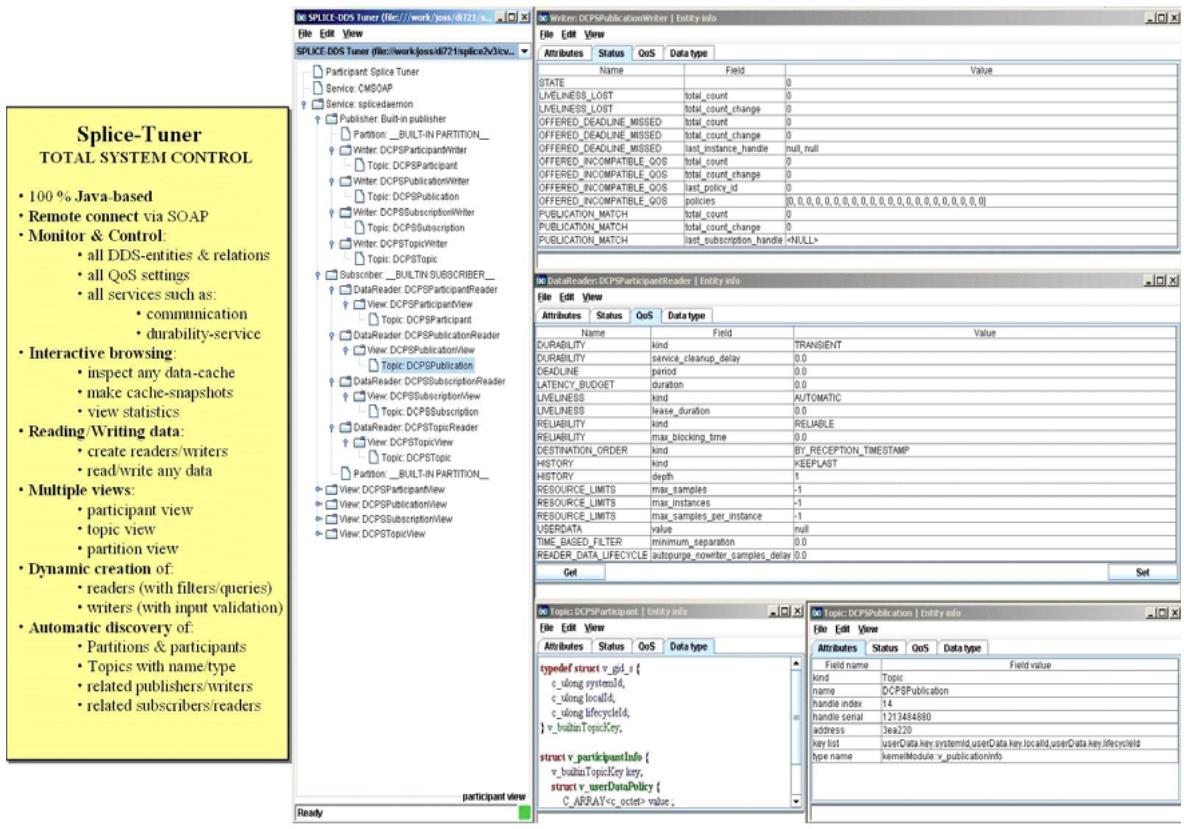
Figure 3 Vortex OpenSplice Tuner
# 1.5 Conclusion
PrismTech's Vortex OpenSplice product complemented by its tool sup-port together encompass the industry's most profound expertise on the OMG's DDS standard and products.
The result is unrivalled functional DDS-coverage and performance in large-scale mission-systems, fault-tolerance in information availability, and total lifecycle support including round-trip engineering. A complete DDS solution to ensure a customer's successful adoption of this exciting new technology and to support delivery of the highest-quality applications with shortest time to market in the demanding real-time world.
# CHAPTER
# 2 A DDS-based Chatroom
This section introduces the basic architecture of a Chatroom that is based on Vortex OpenSplice. Each subsequent section will elaborate on this basic architecture: a data model will be defined first, then the publishing side will be created, followed by the subscribing side, which will be developed in a number of iterations, increasing its functionality step by step. Finally a monitor will be added that keeps track of the number of Chatters that are currently logged on to the Chatroom.
# 2.1 Client-Server vs Peer-to-Peer
In this tutorial we want to build an application that uses Vortex OpenSplice to distribute chat messages. Traditionally, chatrooms are examples of common client-server architectures, where clients (the chatters) connect to a server (the chatroom) and identify themselves by giving their user name. (In most cases they will have to confirm their identity by providing a password as well.). After the server has recorded their identity, the clients can send as many chat messages as they like. The chatroom collects the chat messages of each client and will forward them to all other participating clients. New clients can request to join a chatroom at any moment in time: they will then have to identify themselves to the server, and the server will make sure that all chat messages received from that moment on will also be forwarded to the newly added client. An example of such a typical client-server approach is presented in Figure 4.
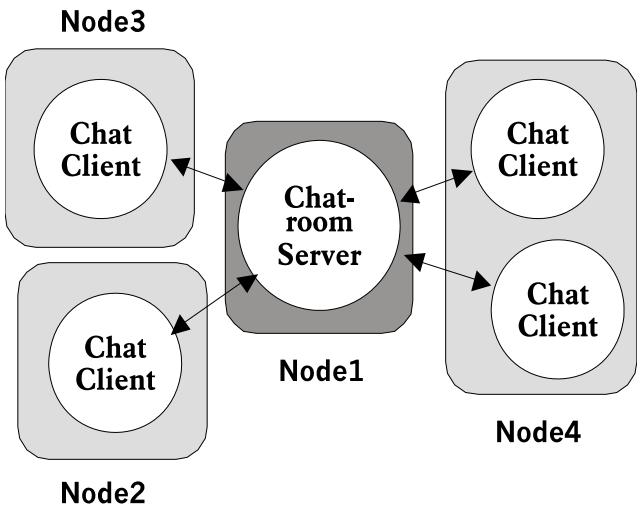
Figure 4 Client-Server Based Approach for a Chatroom
As can be seen from this example, the server is the single point of failure. If it fails, all chatter applications get disconnected. On top of that, every connection is point-to-point, meaning that every chat message is forwarded to each client individually. If the number of connected clients is doubled, the number of messages transmitted from the server is doubled as well. (Provided that the newly added clients do not transmit any chat messages of their own, which would increase the network load even further and could even quadruple it.)
To provide for a more efficient chatter approach, we will employ the DDS-DCPS. The idea is to remove the Chatroom server altogether and let the chat applications (which can now no longer be called clients) directly communicate with each other. The architecture will then become less centralized and will look more like the picture presented in Figure 5.
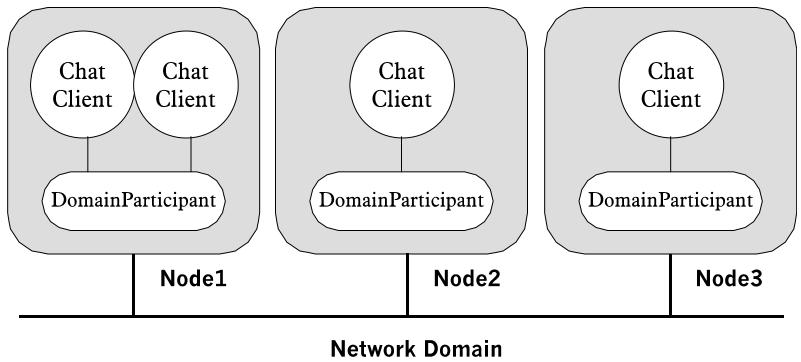
Figure 5 DDS-based Approach
As can be seen from this picture, all applications are equal; there is no centralized point of failure. If a node crashes, all Chatters on that node die, but all the others can keep communicating with each other. What's more, every chat message only has to be transmitted over the network once (using either multicast or broadcast) to deliver it to all the other interested Chatters. Scaling up the number of Chatter applications does not use up any more bandwidth, except of course for the messages sent by these newly added Chatters.
# 2.2 Analysing the Chatroom Example
In order to focus on the DDS aspect of our Chatroom example, and not on things such as its graphical representation, we will have to break down the problem into several autonomous applications. The following separate applications are distinguished:
• Chatter - This part is responsible for publishing the identity of the user, followed by all chat messages he or she wishes to transmit. (This application is write only.)
• MessageBoard - This part is responsible for subscribing itself to all chat messages and for displaying them in the order in which they are received. (This application is read-only).
• UserLoad - This part is responsible for continuously keeping track of users that join and leave the Chatroom. (This application is read only).
Each of these functional parts will be modelled as a separate process, each one using the standard output to print its messages. Although this constitutes a very primitive User Interface, it completely separates user input from user output thus completely removing the need for any layout related function calls. This helps us to focus our applications almost entirely on efficient utilization of the DCPS, which is the main purpose of this tutorial.
# CHAPTER
# 3 Data Modelling
Vortex OpenSplice distributes its data in structured data types, which are transported by means of topics. The first step when using Vortex OpenSplice consists of defining these data types. Since OpenSplice can be used on several different platforms with several different programming languages, OMG IDL is used as a language and platform independent modelling language.
This section starts by introducing some basic DDS terminology, which is required to understand the conceptual differences between topics, data types, samples and instances. After that, it will explain which subset of IDL you may use to model your data types, and how to annotate this model with your key field definitions. Finally it will explain how to use the OpenSplice preprocessor to compile the IDL model into your language of choice.
# 3.1 Data Types, Samples and Instances
All data you want to distribute using Vortex OpenSplice has to be defined as a topic. A topic is an aggregation of a structured data type, a keylist, and a specific Quality of Service (QoS) annotation. The keylist is specified as part of the data-type, and identifies the keyfields for that data type. These keyfields can be used to uniquely identify instances of the data type in question, which is a very common approach in relational modelling.
A topic is identified by a topic name that is unique in the context of the Domain where it is used. Note that a topic name and a type name represent two different things: the type name represents the name of the structured data type, the topic name represents the aggregation of this data type with a specific QoS annotation. One data type can be used in several different topic definitions (using different or even the same QoS annotations).
To clarify the efficient usage of topics and to avoid confusion, some basic DDS terms will have to be defined in more detail first:
• Data type - A DCPS data type represents the definition of a piece of information and is normally declared in IDL as a structured datatype. A data type may embed any number of other data types, but cyclic nesting data types is not possible. Datatypes that are to be distrubuted using topics must be annotated by a declaration of the key fields for that data type.
• Sample - A DCPS sample represents an allocated data type: in other words, a set of attribute values that is to be distrubuted using a topic.
• Keyfield - Some fields of a structured datatype can be annotated as being keyfields. The combined values of all keyfields in a sample make up the identity of the item whose state the sample describes.
• Instance - A DCPS instance represents the notion of a specific observable item, whose state at a certain moment in time can be represented by a sample of a specific data type. The observable item is uniquely identified by the values of its key fields: two samples with different key values represent the states of different instances; two samples with the same key values represent the state of the same instance (but probably these samples represent the state of the instance at different moments in time).
# 3.2 Modelling Data Types in IDL
A data type represents a structured data type, like an IDL struct with several members and a keylist. Whenever you want to read or write topics, you will actually be reading or writing samples of a specific data type. The definition of each data type you will be using has to be written in (a subset of) OMG IDL. The keylist cannot be expressed in IDL, so Vortex OpenSplice introduced a special #pragma statement for that purpose.
For our chatter application, we will have to define the data types that need to be used to exchange messages between several chatters. We will need at least one topic to transmit the chat messages, and these messages must be accompanied by the user ID of its sender. We can of course use the sender's username as the user ID, but this will mean that the topic's key field will be represented by a string, which may be expensive to process. For this reason, and also for some illustrational purposes, we will decide to make the user ID a 32 bit integer (in other words, an IDL long), and to introduce a second topic that maps this user ID to the user's name.
When a Chatter application starts, it will make its existence known to the world by publishing a NameService instance, containing a unique userID value and the name of the user (which can not be longer than 32 bytes, excluding the '\0' terminator according to the IDL). The userID field will act as a key to find the corresponding username. After the application has published his userID and username, it can start sending chat messages into the world. Each chat message is represented by a ChatMessage instance, containing the userID of its sender (which acts as its key field), a sequence number expressing the number of chat messages already transmitted, and the message itself, which is an unbounded string. Unbounded strings can be of arbitrary length. The resulting topic model is presented below:
```txt
module Chat {
const long MAX_NAME = 32;
typedef string<MAX_NAME> nameType;
struct ChatMessage {
long userID; // owner of message
long index; // message number
string content; // message body
};
#pragma keylist ChatMessage userID
struct NameService {
long userID; // unique user identification
nameType name; // name of the user
};
#pragma keylist NameService userID
};
```
In line 1 a module called Chat is opened, that acts as a scope for all the following declarations. Line 5 introduces the structured data type called ChatMessage, that contains all the information that is required to identify a specific chat message. Line 10 defines the keylist for this data type (using the #pragma keylist statement): it first identifies the data type to which it applies by name, followed by a list of the names of all attributes that represent its key fields (use spaces in case of multiple key fields).
Although the definition of ChatMessage is fully OMG IDL compliant, the keylist definition is specific to OpenSplice and mandatory for all data types that are to be used as a topic. The OpenSplice preprocessor will not generate appropriate DataReaders and DataWriters for data types that do not have a corresponding keylist definition. A keylist definition should always be located in the same module as the data type it applies to. Apart from that requirement, the exact location of the keylist statement is irrelevant (it may be located before or after the actual definition of the data type).
Data Types without a keylist definition can still be used as embedded structures for data types that do have a keylist definition. Data Types that are to be used as topics but that do not require any keyfields (so called singleton instances) still require a keylist definition, but with an empty keylist. In case of the example above, if we did not require any keys, line 10 could be replaced by the following statement:
```txt
#pragma keylist ChatMessage
```
In the example above, only a very limited subset of IDL is being used. Apart from the trivial primitives (e.g. structures consisting of (unsigned) short, (unsigned) long, (unsigned) long long, float, double, boolean, octet and char), OpenSplice is also capable of handling fixed length arrays, bounded and unbounded sequences, bounded and unbounded strings, union types and enumerations. Types can be nested, which means that a struct can contain a struct field or an array of structs, or a sequence of strings or an array of sequences containing structs or... many more complex examples you can think of. Any definition following the OpenSplice IDL subset is allowed (refer to the Vortex OpenSplice IDL Preprocessor Guide). It is important to know that the preprocessor used by the DCPS accepts struct definitions only, not interfaces or value types (occurrences of both types will be ignored by this preprocessor).
You have to remember, however, that in the case of sequences and strings, you as a programmer are responsible for claiming and releasing memory resources and initializing the data type. For example, the string field content of the ChatMessage can be used only after the programmer has allocated the necessary memory. For more information on using the generated C structs see the OMG’s C Language Mapping Specification.
# 3.3 Language Specific Representation
Even though the data type is defined using IDL, your application (when written in C) will be using an equivalent C struct. This is achieved by invoking the Vortex OpenSplice IDL preprocessor, an application that translates your IDL data type definition into a matching C definition. The exact translation is defined by the OMG IDL to C mapping. The ChatMessage definition will result in the following C code:
```c
#include <dds_dcps.h>
#ifndef _Chat_ChatMessage_defined
#define _Chat_ChatMessage_defined
#ifdef _cplusplus
struct Chat_ChatMessage;
#else /* __cplusplus */
typedef struct Chat_ChatMessage Chat_ChatMessage;
#endif /* __cplusplus */
#endif /* _Chat_ChatMessage_defined */
Chat_ChatMessage *Chat_ChatMessage_alloc (void);
struct Chat_ChatMessage {
DDS_long userID;
DDS_long index;
DDS_string content;
};
```
As can be seen, the preprocessor alters the IDL typename by adding the prefix Chat\_ (generated from the IDL module name), to allow for the scoping required by the IDL module. It also provides a typedef named Chat\_ChatMessage, which simplifies the declaration of a chatmessage variable because of its implicit struct declaration, as can be seen from the following example application:
```c
35 // explicit struct declaration.
36 struct Chat_ChatMessage message1;
37
38 // implicit struct declaration.
39 Chat_ChatMessage message2;
```
For C++, this way of declaring variables is already supported (so the typedef is not applied when a C++ compiler is being used), but for convenience we added it to the C API as well. The preprocessor also generates an allocation function, as mandated by the IDL to C language mapping, which can be used to allocate samples of a data type on heap. For our current example this allocation function is named Chat\_ChatMessage\_\_alloc() (see line 28). Additional information is provided in the Vortex OpenSplice C Reference Guide.
The type of each of the fields in the struct is based on the IDL to C mapping, with the difference that the CORBA\_ prefix of each primitive type is replaced by a DDS\_
prefix. (The semantics for each of the types have not been changed with respect to the language mapping). This deviation represents the fact that we are dealing with a standalone C API, that has no dependencies on CORBA whatsoever. API's that cohabitate with CORBA use the pre-processor that comes with the ORB to do the IDL translation. In that case there will be plenty of CORBA dependencies in the generated code.
# 3.4 Invoking the IDL Pre-processor
If you want to reproduce the example, create a file named Chat.idl. Insert the IDL definition given in the previous example into this file. Run the IDL pre-processor from the command line using:
```batch
% idlpp -S -l c Chat.idl
```
If it successfully completes, examine the resulting file called ChatDcps.h, which contains the C structs. Do not include this file directly into your application though, but use the Chat.h file instead. That file is a collection of all relevant information for your application. For now, ignore all other files that are also generated by the preprocessor, we will get back on some of those in a later section.
The -S option specifies that the IDL pre-processor should run in StandAlone mode, meaning that it does not have any dependency on CORBA and so can be used without any ORB being installed.
The -l option indicates the target language, which in this case represents C code. Other supported languages are Java (-l java) and C++ (-l cpp). See the IDL Pre-processor Guide for a summary of all other possible options.
# CHAPTER
# Managing Domains and Topics
In this section you will write your first Vortex OpenSplice application. Before you are ready to start writing the first lines of code, we need to explain a little about some basic DDS building blocks and the way data is handled in Vortex OpenSplice. The first example of an OpenSplice application is small and is just a declaration of the Domain to use, the topics to use inside it and the QoS settings that need to be applied to both.
The first section will introduce the generic API building blocks and explain their purpose. The second section will introduce you to the concept of QoS policies and will show the policies which are most relevant to our Chatter application. The third section will show you how to connect your application to a specific DDS Domain. The fourth section will demonstrate the steps that are necessary to introduce the required topics into that Domain.
# 4.1 Entities, Policies, Listeners and Conditions
The DDS can be seen as a large toolbox full of different building blocks. To understand the granularity of these DDS building blocks and the way in which they interact, we will first explain some higher level DDS concepts in more detail:
• Entity - An Entity is a basic DCPS building block. It represents either a producer of information (Publisher or DataWriter), a consumer of information (Subscriber or DataReader), a connection to information (DomainParticipant) or the information that is being communicated (Topic). The behaviour of each Entity can be influenced by means of QoS Policies that must be associated to it at creation time. To keep track of the communication status of an Entity, a StatusCondition object can be obtained from it, or a Listener object can be attached to it. An Entity can only be created or deleted using its corresponding factory. Some Entities may act as a factory for other Entities.
• QoS Policy - QoS Policies provide a generic mechanism for the application to control the behaviour of an Entity: each policy controls one aspect of the Entity and is represented by a structured type containing attributes for all relevant parameters. Entities have a varying set of supported policies: some of them are applicable to only one Entity, some others to more. To make sure neither more nor less than the supported policies are attached to each specific Entity, each Entity provides a specialized QoS structure that aggregates all applicable policies.
• StatusCondition - A StatusCondition object provides a generic mechanism for the application to be informed about relevant status changes in Entities, such as the availability of data corresponding to a subscription, conflicting QosPolicy settings between related Entities, contracts that are being violated, etc. Each of these individual statuses can be either TRUE or FALSE, and may change independently from all the others. The application can make a selection of the statuses it is interested in by setting a bit mask in the StatusCondition object, and when one or more of the selected statuses is TRUE, the overall status flag in the StatusCondition object itself becomes TRUE as well. This flag remains TRUE, until each and every of the selected statuses has been reset to FALSE again. Resetting these individual statuses can be done by invoking their corresponding status accessor method in the related Entity object. To find out which individual statuses are responsible for raising the StatusCondition flag, the Entity object offers a helpful operation that returns a mask that specifies the statuses that are currently set to TRUE.
• WaitSet - An application can use a WaitSet to block the current thread until one or more of the (Status) Conditions attached to that WaitSet will have a trigger value of TRUE, or until a specified timeout expires.
• Listener - A Listener provides a generic mechanism for the middleware to notify the application of changes in StatusConditions. Each Entity supports its own specialized kind of Listener interfaces, which offer specialized callback methods for every individual status change. The application can make a selection of the status changes it is interested in by setting a bit mask that can be supplied at creation time, or in the set\_listener operation.
Although DDS\_Listeners and DDS\_WaitSets both allow the middleware to notify the application of the occurrence of certain events (so that it does not need to poll for this) there are two differences in their intended usage:
1. Listeners are event based and trigger only when a selected status flag changes from FALSE to TRUE. WaitSets are state based and will trigger as long as a selected status flag remains TRUE.
2. Listeners offer callback methods that are invoked by a middleware thread. This means that using Listeners always result in multi-threaded applications. WaitSets can be used to block the current application thread temporarily, and do not necessarily require your application to be multi-threaded.
If an application chooses to use both Listeners and WaitSets to be notified of status conditions in the same DDS\_Entities, then OpenSplice will first trigger the DDS\_Listeners, and after that (if the DDS\_StatusConditions have not yet been reset by the listener operations) it will trigger the DDS\_WaitSets.
# 4.2 QoS Policies
The way Vortex OpenSplice communicates and stores samples, either in main memory or on disk, is defined by the key fields of their corresponding data type and the Quality of Service (QoS) Policies of their corresponding topic. Every topic must be created before it can be distributed by specifying its data type and associating a QoS Policy.
The QoS Policies that need to be associated with a specific topic describe several aspects of data management for that specific topic. In this tutorial we will not discuss each individual policy, but simply focus on the two most important ones, that define to a large extent the delivery characteristics of each participating Entity.
The Topic related QoS Policies that will be discussed in this tutorial are:
• DURABILITY - Vortex OpenSplice supports four types of durability. DURABILITY defines the lifespan of the data, categorized into VOLATILE, TRANSIENT\_LOCAL, TRANSIENT and PERSISTENT data. OpenSplice realizes no backup storage for volatile data. When volatile data is delivered, no guarantee is given that this data can be obtained again. Transient data is recorded by OpenSplice for late joining readers, but only during the up time of the OpenSplice infrastructure. As long as the OpenSplice infrastructure is up-and-running, a copy of all transient data is preserved. Persistent data outlives the lifetime of the OpenSplice infrastructure because it is saved on a number of redundant disks (depending on your configuration). Therefore a copy of persistent data is always available, even when the OpenSplice infrastructure is restarted. Typically, your system configuration data will be persistent. It is not wise to mark frequently updated information as PERSISTENT, since the benefits will probably not outweigh the overhead.
• RELIABILITY - Two types of RELIABILITY can be used in OpenSplice, which are BEST\_EFFORT and RELIABLE delivery. Data that is annotated for a reliable delivery is guaranteed to arrive ultimately because of automatic re-transmission of lost samples. Data that is marked for a best effort delivery gives no more guarantees than the network does: it remains unnoticed when the data gets lost on its way. Choosing not to re-transmit lost samples may be useful when data loses its accuracy quickly; second tries may unnecessarily use the infrastructure when more recent updates have already been sent.
All QoS policies have pre-defined (factory) settings. For the policies presented above, the default settings are depicted in Table 2.Refer to the C Reference Guide for all other policies and default settings.
Table 2 Default QosPolicy Settings
| DDS_Entity | Status Name | Meaning |
| DDS_Topic | DDS_INCONSISTENT_TOPIC_STATUS | Another DDS_Topic exists with the same name but with different characteristics. |
| DDS_Subscriber | DDS_DATA_ON_READERS_STATUS | New information is available. |
| DDS_DataReader | DDS_SAMPLE_REJECTED_STATUS | A (received) sample has been rejected. |
| DDS_LIVELINESS_CHANGED_STATUS | The liveliness of one or more DDS_DataWriter objects that were writing instances read through the DDS_DataReader has changed. Some DDS_DataWriter have become “active” or “inactive”. |
| DDS_REQUESTED_DEADLINE_MISSED_STATUS | The deadline that the DDS_DataReader was expecting through its DDS_DeadlineQosPolicy was not respected for a specific instance. |
| DDS_REQUESTED_INCOMPATIBLE_QOS_STATUS | A QosPolicy setting was incompatible with what is offered. |
| DDS_DATA_AVAILABLE_STATUS | New information is available. |
| DDS_SAMPLE_LOST_STATUS | A sample has been lost (never received). |
| DDS_SUBSCRIPTION_MATCHED_STATUS | The DDS_DataReader has found a DDS_DataWriter that matches the DDS_Topic and has compatible QoS. |
| DDS_DataWriter | DDS_LIVELINESS_LOST_STATUS | The liveliness that the DDS_DataWriter has committed through itsDDS_LivelinessQosPolicy was not respected; thus DDS_DataReader objects will consider theDDS_DataWriter as no longer “active”. |
| DDS_OFFERED_DEADLINE_MISSED_STATUS | The deadline that theDDS_DataWriter has committed through itsDDS_DeadlineQosPolicy was not respected for a specific instance. |
| DDS_OFFERED_INCOMPATIBLE_QOS_STATUS | A QosPolicy setting was incompatible with what was requested. |
| DDS_PUBLICATION_MATCHED_STATUS | The DDS_DataWriter has foundDDS_DataReader that matches theDDS_Topic and has compatible QoS. |
| All DDS_Entity objects. | DDS_STATUS_MASK_ANY_V1_2 | All status events applicable to the DDS_Entity in question. |
When the DDS\_DomainParticipantFactory\_create\_participant operation completed successfully, it returns the handle to the created DDS\_DomainParticipant. Again, check whether the resulting handle is valid before using it in other operations.
After the DDS\_DomainParticipant has been created, the application is ready to use the OpenSplice infrastructure. The application could now create topics, publishers and subscribers, but we will do that in a later stage. For now, we will release the resources used by OpenSplice by deleting the participant again. We do t h i s i n t h e D D S\_ D o m a i n Pa r t i c i pa n t F a c t or y b y i nv ok i ng t h e DDS\_DomainParticipantFactory\_delete\_participant() call. This operation deletes all resources used by this participant and returns a status code of type DDS\_ReturnCode\_t. Since we didn't do anything with our participant yet, the status code should indicate a successful result, represented by DDS\_RETCODE\_OK. However, never assume everything will go according to plan: always check your assumptions! In line 39 we check whether the result is what we expect. In a later stage, when our application has expanded a little bit, the result could indicate that we are not yet allowed to delete this participant. The possible return statuses of type DDS\_ReturnCode\_t are depicted in Table 4, together with their value and their meaning.
This concludes our first example. When you monitor all OpenSplice activity with the Vortex OpenSplice Tuner, nothing seems to have happened. This is because the participant was created and deleted so fast, that Vortex OpenSplice Tuner did not have the time to depict it. If you run the application in a debugger, and stop the execution before the DomainParticipantFactory\_delete\_participant() operation, then you will see that the Vortex OpenSplice Tuner actually detects the DomainParticipant and shows it in its participant list. You can even check its QoS settings to see if they match the defaults that you specified. In a later example we will show you how you can provide your own QoS settings.
Table 4 Return Code Definitions
| Return Code | Value | Meaning |
| DDS_RETCODE_OK | 0 | Successful return. |
| DDS_RETCODE_ERROR | 1 | Generic, unspecified error. |
| DDS_RETCODE_UNSUPPORTED | 2 | Unsupported operation. Can only be returned by operations that are optional. |
| DDS_RETCODE_BAD_PARAMETER | 3 | Illegal parameter value. |
| DDS_RETCODE_PRECONDITION_NOT_MET | 4 | A precondition for the operation was not met. |
| DDS_RETCODE_OUT_OF_RESOURCES | 5 | Service ran out of the resources needed to complete the operation. |
| DDS_RETCODE_NOT_ENABLED | 6 | Operation invoked on an Entity that is not yet enabled. |
| DDS_RETCODE_IMMUTABLE_POLICY | 7 | Application attempted to modify an immutable QosPolicy. |
| DDS_RETCODE_INCONSISTENT_POLICY | 8 | Application specified a set of policies that are not consistent with each other. |
| DDS_RETCODE_ALREADY_DELETED | 9 | The object target of this operation has already been deleted. |
| DDS_RETCODE_TIMEOUT | 10 | The operation timed out. |
| DDS_RETCODE_NO_DATA | 11 | Indicates a transient situation where the operation did not return any data but there is no inherent error. |
| DDS_RETCODE_ILLEGAL_OPERATION | 12 | An operation was invoked on an inappropriate object or at an inappropriate time (as determined by policies set by the specification or the Service implementation). There is no precondition that could be changed to make the operation succeed. |
# 4.4 Registering Data Types and Creating Topics
We can now start using the DDS\_DomainParticipant created in the previous example to actually create a DDS\_Topic. Reiterating from the previous sections, a topic was an aggregation between a data type (including its key list) and a QosPolicy setting. So before being able to create a topic, first the corresponding data type will need to be registered in the middleware. To register a data type, we require a some source code that announces the type specific meta data to OpenSplice. This code is embedded in a so called DDS\_TypeSupport class, which is generated by the Vortex OpenSplice Preprocessor.
The OpenSplice preprocessor generates a number of files out of each IDL input file. We already introduced two of these files:
• The file Chat.h is the overall include file. It includes all other files relevant for the application. Its name is based on the name of the corresponding IDL file, where the .idl extension is replaced by the .h extension.
• The file ChatDcps.h contains the C representations of the data structures defined in your IDL file. Its name is based on the base name of the corresponding IDL file, but it is appended by the postfix Dcps.h.
We will now explain a third file generated by the pre-processor, called ChatSacDcps.h. This file name is also based on the basename of the IDL file, but it is appended by the postfix SacDcps.h (Sac stands for Standalone C API, which is the Vortex OpenSplice API that you are now using). It contains the specialized API interface definitions for the DDS\_TypeSupport, DDS\_DataReader and DDS\_DataWriter classes parameterized for all data types mentioned in the IDL file1 . It is a very big file, so we will not show it here entirely. Instead, we will focus on the parts that define the DDS\_TypeSupport interface for our ChatMessage data type.
```c
#include "ChatDcps.h"
#define Chat_ChatMessageTypeSupport DDS_TypeSupport
Chat_ChatMessageTypeSupport
Chat_ChatMessageTypeSupport_alloc (
void
);
DDS_ReturnCode_t
Chat_ChatMessageTypeSupport_register_type (
Chat_ChatMessageTypeSupport _this,
DDS_DomainParticipant domain,
DDS_string name
);
```
In line 47 we see that this file includes the C representations of the data types, which is necessary because the corresponding DataReaders and DataWriters will be accessing this data. Line 49 introduces the definition of our specialized Chat\_ChatMessageTypeSupport class. Its name is based on the name of our data type (prepended by the module name in which it is located), and it is followed by the TypeSupport postfix. As can be seen from this declaration, the specialized TypeSupport handle is just an alias for the handle of its parent class.
Lines 51-54 present an allocation function that is needed to actually instantiate a TypeSupport object on heap. Its name is based on the specialized TypeSupport class, followed by the \_\_alloc() postfix. Every DDS object allocated by an \_\_alloc() operation must be released by using the DDS\_free() operation, which is included from the dds\_dcps.h file. Never try to de-allocate a DDS object any other way, since it will almost definitely corrupt your memory and crash your application.
Lines 56-61 finally present the operation required to register the data type in a DDS\_DomainParticipant. This operation can only be performed on an allocated TypeSupport: forgetting to allocate the TypeSupport will probably result in a DDS\_RETCODE\_BAD\_PARAMETER. A TypeSupport object may be registered in different DDS\_DomainParticipants, but has no more purpose after the registering is completed, so it may be released afterwards. There is no way to un-register a data type, so after the DDS\_TypeSupport has been released its registered data types can still be used in the DDS\_DomainParticipant.
The Chat\_ChatMessageTypeSupport\_register\_type method requires three parameters:
• the pointer to the allocated Chat\_ChatMessageTypeSupport object
• the handle to the DDS\_DomainParticipant in which it is to be registered
• the name by which this data type can be identified within the specified DDS\_DomainParticipant
This name parameter is a little bit tricky, since it identifies the data type only in the scope of the specified DDS\_DomainParticipant. Other participants could choose to register the same data type using a different name. This makes setting up communications between different DomainParticipants a hazardous task: what if two DomainParticipants have registered the same data type using different names?

To avoid such configuration problems, we advise you to always register a data type using its IDL type name. The DDS\_TypeSupport offers helpful features for this:
• If you pass a NULL value to the name, the DDS\_TypeSupport will register the data type using its IDL type name, including its scope, in other words. the names of the modules that the IDL data type is embedded in, separated by the IDL scoping operator, ::. In this example the resulting name will be: Chat::ChatMessage.
• Alternatively, you can obtain the fully qualified IDL type name directly from a DDS\_TypeSupport itself using the Chat\_ChatMessageTypeSupport get\_type\_name() operation in this example. The resulting name can then be used for both the registration of the type and the creation of the topic.
Using these tricks ensures you will always be using the same type name for a given data type in every DDS\_DomainParticipant. We strongly advise you to always register the data types this way: only use different names when you have very compelling reasons to do so.
The data types registered this way can be used to create topics: the basic DDS communication entities. Creating a DDS\_Topic is very similar to creating a DDS\_DomainParticipant (remember that there are lots of similarities since both interfaces are specialiations of the DDS\_Entity interface):
• A DDS\_Entity can only be created and deleted by using its factory. The DDS\_DomainParticipant acts as a factory for DDS\_Topics.
• At creation time, a DDS\_Entity needs to be associated with a set of QoS Policies.
• At creation time, a DDS\_Listener can be attached to the entity, accompanied by a bit mask that indicates which status events need to be handled by the provided listener.
Below, we have expanded the example presented in Section 4.3, Connecting to a Domain, with the code that actually creates the ChatMessage topic:
```c
/* CreateTopics.c */
#include "dds_dcps.h"
#include "Chat.h"
int
main (
int argc,
char *argv[])
{
DDS_DomainParticipantFactory dpf;
DDS_DomainParticipant dp;
DDS_DomainId_t domain = DDS_DOMAIN_ID_DEFAULT;
DDS_ReturnCode_t status;
Chat_ChatMessageTypeSupport chatMessageTS;
DDS_Topic chatMessageTopic;
char *chatMessageTypeName;
/* Create a DomainParticipantFactory and a DomainParticipant */
/* (using Default QoS settings). */
dpf = DDS_DomainParticipantFactory_get_instance();
if (!dpf) {
printf("Creating ParticipantFactory failed!!\n");
exit(-1);
};
dp = DDS_DomainParticipantFactory_create_participant(
dpf,
domain,
DDS_PARTICIPANT_QOS_DEFAULT,
NULL,
DDS_STATUS_MASK_NONE);
```
```c
if (!dp) {
printf("Creating Participant failed!!\n);
exit(-1);
};
/* Register the required data type for ChatMessage. */
chatMessageTS = Chat_ChatMessageTypeSupport_alloc();
if (!chatMessageTS) {
printf("Allocating TypeSupport failed!!\n");
exit(-1);
};
chatMessageTypeName =
Chat_ChatMessageTypeSupport_get_type_name(chatMessageTS);
status = Chat_ChatMessageTypeSupport_register_type(
chatMessageTS, dp, chatMessageTypeName);
if (status != DDS_RETCODE_OK) {
printf (
"Registering data type failed. Status = %d\n", status);
exit(-1);
};
/*Create the ChatMessage topic */
chatMessageTopic = DDS_DomainParticipant_create_topic(
dp,
"Chat_ChatMessage",
chatMessageTypeName,
DDS_TOPIC_QOS_DEFAULT,
NULL,
DDS_STATUS_MASK_NONE);
if (!chatMessageTopic) {
printf("Creating ChatMessage topic failed!!\n");
exit(-1);
};
/* Deleting the Topic. */
status = DDS_DomainParticipant_delete_topic(
dp, chatMessageTopic);
if (status != DDS_RETCODE_OK) {
printf("Deleting topic failed. Status = %d\n", status);
exit(-1);
};
/* Deleting the DomainParticipant */
status = DDS_DomainParticipantFactory_delete_participant(
dpf, dp);
if (status != DDS_RETCODE_OK) {
printf("Deleting participant failed. Status = %d\n", status);
exit(-1);
};
/* Everything is fine, return normally. */
return 0;
};
```
A s c a n b e s e e n f r o m t h i s c o d e e x a m p l e i n l i n e s 1 0 1 - 11 4 , a Chat\_ChatMessageTypeSupport is allocated and its data type is registered in our DDS\_DomainParticipant using its default name. Again, the result of every operation is checked against our assumptions.
I n l i n e s 11 7 - 1 2 7 , w e c r e a t e o u r f i r s t t o p i c u s i n g t h e DDS\_DomainParticipant\_create\_topic() operation. As always, the first parameter is the handle to the object that actually needs to perform the operation (our DDS\_DomainParticipant). The second parameter provides the name that will be used to identify the topic. This is also the name that we will see when we display our topic list in the Vortex OpenSplice Tuner. The third parameter is the name of the data type that we wish to associate with our topic. In our case, this is the default name provided by our Chat\_ChatMessageTypeSupport class. The fourth, fifth and sixth parameters are the set of QoS Policies we wish to associate with the topic, the DDS\_TopicListener we wish to attach to it and the bit mask which applies to that listener respectively. In this case we again used a convenience macro to select the default set of QoS Policies for this topic, and we also specified that we do not want to attach a Listener.
In this example, we don't use our topic for any purpose yet: we delete it just before we delete our DDS\_DomainParticipant. This is necessary, since in the DDS it is not possible to delete any type of factory that still contains elements that are created by it. In our case, the DDS\_DomainParticipant acted as a factory for our DDS\_Topic, and can therefore not be deleted while our topic object still exists. Trying to delete the participant in this stage will definitely result in a DDS\_RETCODE\_PRECONDITION\_NOT\_MET being returned.
That is why we need to delete the topic first. This is done in line 130, by means of the DDS\_DomainParticipant\_delete\_topic() operation, whose parameter signature is very obvious and needs no further explanation. After the topic has been deleted, the DDS\_DomainParticipant can be deleted without any problems as well. That ends our little application for now.
# 4.5 Topics as Global Concepts
When we look in the Vortex OpenSplice Tuner at the results of the application presented in the previous section, we will see that although our DomainParticipant has disappeared, our topic is still available in the list of topics. This is not a bug! To understand what is happening here, we need to elaborate a little bit more on the global concept of a topic. A topic represents the smallest undividable part of an information model that can be communicated within a domain. In order for the communication to be successful, all parties within the domain must agree upon how the information is distributed and what it represents. That means that the topic definition is not just something local: all participants in our domain must agree upon it.
That means that if I create a topic in my DomainParticipant, this topic will automatically be forwarded to all other participants in my domain. They will then compare it to the topic definitions they already know. If my topic definition matches with already existing definitions or does not yet exist, my topic definition is accepted and my call returns successfully. If my definition conflicts with an already existing topic definition, my creation will fail and my call will return a NULL pointer.
So the DDS\_Topic I create is not just a local object; it represents a global concept of a part of an information model, agreed upon by all parties within my domain. The Topic object I create is just a 'proxy' that represents this global concept. Deleting my local DDS\_Topic object will not destroy it globally: it will merely destroy my local proxy that represents it. This seems natural: one party joining a system that already agreed upon its topic model, cannot by itself decide to destroy this global topic model when it decides to leave the system. It can only decide for itself that it is no longer interested in the existence of certain topics, without interfering with the parts of the system that still do want to know about them.
This is why a topic as a global concept cannot be deleted: you never know which parts of the system may still have a need for it. When you really want to completely remove a topic definition from a running system, you will need to bring down all applications joining in your domain, stop their daemons and restart everything. This is why you should be careful when introducing new topics into a running system: you cannot easily undo any mistakes you make. Creating new topics is therefore not something that everybody should be allowed to do: a system architect should be made responsible for defining an overall information model that all participants need to agree upon1.
# 4.6 Tailoring QosPolicy Settings
In the previous examples we defined a complete information model for our Chatroom application in IDL, but we only created topics using default QoS settings. In this section we will elaborate on the requirements for our Chatter application, and decide which QosPolicy settings are best suitable for our application.
Since we do not want to lose any chat message or username, both topics will have to be transmitted reliably. A late joining chatter application is probably not interested in receiving the chat messages that were transmitted before he decided to join in, but it will definitely want to be able to figure out which userID represents which username once it starts to receive chat messages. That means that the ChatMessage topic can be transmitted with volatile durability, but the NameService topic will require either transient or persistent storage. Since chatter application will always publish its username before writing its chat messages, the storage of these names will not need to be persistent, and a transient store will be sufficient.
For a late joining application this means that once it subscribes itself to the NameService topic, it will receive from the transient store the usernames and userID's of all other Chatters that have already connected to the same Domain before. In contrast, it will only receive those chat messages that have been transmitted after its own subscription to the ChatMessage topic.
To make our Chatroom application work this way, we need to deviate from the default QoS settings. These default QoS Policies have been chosen in such a way that they form an internally consistent set that is most suitable to 'first time users' and that gives a good 'out of the box' experience. When dedicated requirements call for alternative QoS settings on your Entities, you can tailor these settings in the following ways:
1. You can create Entities using a QoS in which each policy is set explicitly.
2. You can obtain the default QoS, modify some of its policies to match your own preference, and use the result to create your Entities.
3. You can permanently make changes to the default QoS of each factory.
All these approaches have their benefits in certain conditions. You can explicitly set each policy when you need very dedicated settings that do totally not comply with the factory defaults. However, if you reuse the same settings in most of your Entities, it makes sense to use the default settings from your factories, even when you need to modify these factory defaults first. When you are satisfied with the default policies, but need little deviations from them every now and then, it makes sense to obtain the default QoS, modify some of the policies to fit a specific Entity, and create that Entity with it.
The following code again expands our example application, but this time we will create both topics using different QoS settings. The explicit checks on the validity of return statuses and handles have all been replaced with specialized functions, which are included from the CheckStatus.h file, and implemented in the CheckStatus.c file. The code listings for both files can be found under CheckStatus.h and CheckStatus.c in Appendix A, C Language Examples’ Code:
```c
/* CreateTopics.c */
#include "dds_dcps.h"
#include "Chat.h"
#include "CheckStatus.h"
int
main (
int argc,
char *argv[])
{
DDS_DomainParticipantFactory dpf;
DDS_DomainParticipant dp;
DDS_DomainId_t domain = DDS_DOMAIN_ID_DEFAULT;
DDS_ReturnCode_t status;
```
```c
163 Chat_ChatMessageTypeSupport chatMessageTS;
164 Chat_NameServiceTypeSupport nameServiceTS;
165 char *chatMessageTypeName;
166 char *nameServiceTypeName;
167 DDS_TopicQos *reliable_topic_qos;
168 DDS_TopicQos *setting_topic_qos;
169 DDS_Topic chatMessageTopic;
170 DDS_Topic nameServiceTopic;
/* Create DomainParticipantFactory and a DomainParticipant */
/* (using Default QoS settings). */
dpf = DDS_DomainParticipantFactory_get_instance();
checkHandle(dpf, "DDS_DomainParticipantFactory_get_instance");
dp = DDS_DomainParticipantFactory_create_participant (
dpf,
domain,
DDS_PARTICIPANT_QOS_DEFAULT,
NULL,
DDS_STATUS_MASK_NONE);
checkHandle(
dp, "DDS_DomainParticipantFactory_create_participant");
/* Register the required data type for ChatMessage. */
chatMessageTS = Chat_ChatMessageTypeSupport_alloc();
checkHandle(
chatMessageTS, "Chat_ChatMessageTypeSupport_alloc");
chatMessageTypeName =
Chat_ChatMessageTypeSupport_get_type_name(chatMessageTS);
status = Chat_ChatMessageTypeSupport_register_type(
chatMessageTS, dp, chatMessageTypeName);
checkStatus(
status, "Chat_ChatMessageTypeSupport_register_type");
/* Register the required data type for NameService. */
nameServiceTS = Chat_NameServiceTypeSupport_alloc();
checkHandle(
nameServiceTS, "Chat_NameServiceTypeSupport_alloc");
nameServiceTypeName =
Chat_NameServiceTypeSupport_get_type_name(nameServiceTS);
Chat_NameServiceTypeSupport_register_type(
nameServiceTS, dp, nameServiceTypeName);
checkStatus(
status, "Chat_NameServiceTypeSupport_register_type");
/* Change the default TopicQos to Reliable reliability. */
reliable_topic_qos = DDS_TopicQos_alloc();
checkHandle(reliable_topic_qos, "DDS_TopicQos_alloc");
status = DDS_DomainParticipant_get_default_topic_qos(
dp, reliable_topic_qos);
checkStatus(
status, "DDS_DomainParticipant_get_default_topic_qos");
reliable_topic_qos->reliability.kind =
DDS_RELIABLE_RELIABILITY_QOS;
/* Make the tailored QoS the new default. */
status = DDS_DomainParticipant_set_default_topic_qos(
dp, reliable_topic_qos);
checkStatus(
status, "DDS_DomainParticipant_set_default_topic_qos");
```
```c
/*Create the ChatMessage topic */
chatMessageTopic = DDS_DomainParticipant_create_topic(
dp,
"Chat_ChatMessage",
chatMessageTypeName,
DDS_TOPIC_QOS_DEFAULT,
NULL,
DDS_STATUS_MASK_NONE);
checkHandle(
chatMessageTopic,
"DDS_DomainParticipant_create_topic (ChatMessage)");
/* Obtain a private copy of the default QoS to tailor it. */
setting_topic_qos = DDS_TopicQos_alloc();
checkHandle(setting_topic_qos, "DDS_TopicQos_alloc");
status = DDS_DomainParticipant_get_default_topic_qos(
dp, setting_topic_qos);
checkStatus(
status, "DDS_DomainParticipant_get_default_topic_qos");
/* Note: changing the copy doesn't change the original itself!*/
setting_topic_qos->durability.kind =
DDS_TRANSLIENT_DURABILITY_QOS;
/* Associate the tailored policy with the NameService topic */
nameServiceTopic = DDS_DomainParticipant_create_topic(
dp,
"Chat_NameService",
nameServiceTypeName,
setting_topic_qos,
NULL,
DDS_STATUS_MASK_NONE);
checkHandle(
nameServiceTopic,
"DDS_DomainParticipant_create_topic (NameService)");
/* Deleting the Topics to be able to delete my participant. */
status = DDS_DomainParticipant_delete_topic(
dp, nameServiceTopic);
checkStatus(
status,
"DDS_DomainParticipant_delete_topic (NameServiceTopic)");
status = DDS_DomainParticipant_delete_topic(
dp, chatMessageTopic);
checkStatus(
status,
"DDS_DomainParticipant_delete_topic (chatMessageTopic)");
/* De-allocate the QoS policies. */
DDS_free(reliable_topic_qos);
DDS_free(setting_topic_qos);
DDS_free(pub_qos);
/* De-allocate the type-names and TypeSupports. */
```
```c
283
284 /* Deleting the DomainParticipant */
285 status = DDS_DomainParticipantFactory_delete_participant(
286 dpf, dp);
287 checkStatus(
288 status,
289 "DDS_DomainParticipantFactory_delete_participant");
290
291 /* Everything is fine, return normally. */
292 return 0;
293 };
```
This example starts like the previous ones, but in line 209 we allocate a holder for the DDS\_TopicQos that we will be using to create our topics. Since the change we want to make to our TopicQos is only minor compared to the default TopicQos, we will not set each policy field explicitly, but instead in line 211 we request the DDS\_DomainParticipant to fill our holder with the current values of the default Topic Qos. Now we only have to change explicitly those QoS fields in the holder that are not suitable for our application. For our first topic, only the RELIABILITY settings will need to be changed and this is done in line 215. Since all other topics that we will create in this DDS\_DomainParticipant also require reliable transportation, it makes sense to make this the new default setting for this participant. (Note: default QoS settings are a property of the factory: different factories can have different default settings!). The participant default is changed according to the settings specified in our holder in line 219.
The creation of the ChatMessage topic now in lines 225-231 is not really different from its creation it in the previous example, but since we changed the default QoS, the resulting topic will be different as well. If you did not restart your OpenSplice daemons after running the previous example, the creation of the current topic will fail since its QoS settings conflict with the settings of the previous example. In the Vortex OpenSplice Tuner you will now be able to see that the ChatMessage topic indeed has different QoS settings and will be transported reliably.
The NameService topic requires another QoS change, so we will use the same trick employed before. This time however, since it is the only topic that requires transient durability, we will not change the default, but just create a custom QoS holder that we adapt to our needs. Again we fill it with the default QoS settings in line 239, but this time we change the durability field to TRANSIENT durability in line 245. We can now use our customized QoS holder in the creation of the NameService topic in lines 249-255.

Don't forget to de-allocate your QoS holders, type-names and TypeSupport objects when you no longer need them. In our case, this is performed in lines 274-282. Remember: the DDS\_free operation can and must be used on any handle that was obtained by an operation whose name end with \_\_alloc(), and on any string that is allocated as a result of a getter-operation on an entity.
This ends our first application now. We have shown you how to define an information model that suits your needs, how to select an efficient QoS that fits this model and how to create topics according to these choices. In the coming sections we will show you how to use these topic definitions to publish information into the system, and how to access this information in other applications by making subscriptions to these topics.
# CHAPTER
# Publishing the Data
In this section, you will be guided to create the publishing part of the chatter application. You will use the topic definitions of the previous section to publish your username and userID into the chatter domain, send an arbitrary number of chat messages afterwards, and then indicate that you leave the chatroom by disposing your username and ID.
The first section will give a short explanation of the different DDS entities that play a role in the publishing part of an application. The next section will teach you how to create a Publisher with accompanying DataWriters. That is followed by a section that describes the principles behind RxO QosPolicy matching between Readers and Writers and a section that describes how to delete your Publishers and Subscribers. The last two sections will show you how to use a DataWriters to register instances, write data samples into the system, and how to unregister and dispose these instances afterwards.
# 5.1 Publishers, DataWriters and their QoS Policies
Publishers and DataWriters are the building blocks required to publish information into your system. Both classes are modelled as DDS\_Entities, meaning both are controlled by a set of QoS Policies, both have their own DDS\_StatusCondition, both classes can have their own DDS\_Listener object attached to them, and both classes can only be created and deleted by means of their corresponding factories. This section will introduce the reasons for separating Publishers from DataWriters in the DDS specification and explain the different objectives of both entities.
• Publisher - A Publisher is responsible for the dissemination of publications, in other words, the Publisher decides what information is to be published at what time and in which partition. The Publisher’s QoS policiescontrol whether samples will be transmitted individually or as coherent sets of information (in order to allow for some primitive form of Transactions), whether the ordering between them will be preserved, and in which Partitions the information will be made available. The DomainParticipant acts as a factory for Publishers.
• Partition - The Partition QoSPolicy defines in which partitions information will be made available. Partitions are identified by name, and allow you to logically partition your information space: only when a publisher and a subscriber are connected to the same partition, communication will be established1. The PartitionQoSPolicy consists of an unbounded sequence of strings: each element represents the name of a partition to which you will be connected. Elements containing names that have not yet been used before result in the creation of new Partitions. Elements may also contain wildcards, which will then be matched against all existing Partitions.
• DataWriter - A DataWriter is a type specific interface for the Publisher, in other words, it allows an application to offer samples for a specific topic to the Publisher, which will then perform the actual transmission of these samples. A Publisher acts as a factory for its own set of typed DataWriters, and can publish information that spans more than one Topic. In such cases, it employs a separate DataWriter for each individual Topic. The QoS Policies of a DataWriter control how its samples will be transmitted by the Publisher (e.g. their reliability and durability settings).
As you might have noticed from the previous bullet, some of the QoS Policies that you need to specify on the DataWriter are already specified on the Topic as well. That means that you might have conflicting QoS settings for a Topic on one hand, and for the DataWriters that actually provide samples for that specific Topic on the other hand. You might wonder why the DDS specification introduces such QoS Policy overlaps.
The reason is quite simple: the Topic QoS Policies act as some sort of system preference for all DataWriters (and also all DataReaders) of that Topic in your system. Normally, the system architect will select the most appropriate QoS Policiy settings that should be applicable to most DataReader/DataWriter combinations in your system, and he will attach those QosPolicy settings to the Topic. If you, as an application programmer, do not know what policies to use on your DataWriters (or DataReaders), just use the policies specified on the Topic.
However, you as an application programmer may have a very good reason to deviate from this system preference because of some dedicated knowledge you have about the behaviour of your application. In such cases you can tailor the DataWriter QoS Policy settings to your own needs, since it is always the QosPolicy settings on each individual DataWriter that decide how the samples are being transmitted.
# 5.2 Creating Publishers and DataWriters
In this section we will expand the example presented in Section 4.6, Tailoring QosPolicy Settings, with some code that creates our DDS\_Publisher together with its two DDS\_DataWriters: one for the NameService Topic, and one for the ChatMessage Topic.
The following code fragment shows the code fragments that should be inserted (between lines 258 and 260) in order to create the DDS\_Publisher with its DDS\_DataWriters (it does not show the code already provided under Tailoring QosPolicy Settings.
```c
1 DDS_PublisherQos *pub_qos;
2 DDS_DataWriterQos *dw_qos;
3 DDS_Publisher chatPublisher;
4 Chat_ChatMessageDataWriter talker;
5 Chat_NameServiceDataWriter nameServer;
6 char *partitionName = NULL;
7
8 /* Adapt the default PublisherQos to write into the
9 "ChatRoom" Partition. */
10 partitionName = "ChatRoom";
11 pub_qos = DDS_PublisherQos_alloc();
12 checkHandle(pub_qos, "DDS_PublisherQos_alloc");
13 status = DDS_DomainParticipant_get_default_publisher_qos (
14 participant, pub_qos);
15 checkStatus(
16 status, "DDS_DomainParticipant_get_default_publisher_qos");
17 pub_qos->partition.name._length = 1;
18 pub_qos->partition.name._maximum = 1;
19 pub_qos->partition.name._buffer = DDS_StringSeq_allocbuf (1);
20 checkHandle(
21 pub_qos->partition.name._buffer, "DDS_StringSeq_allocbuf");
22 pub_qos->partition.name._buffer[0] = DDS_string_alloc (
23 strlen(partitionName));
24 checkHandle(
25 pub_qos->partition.name._buffer[0], "DDS_string_alloc");
26 strcpy (pub_qos->partition.name._buffer[0], partitionName);
27
/* Create a Publisher for the chatter application. */
28 chatPublisher = DDS_DomainParticipant_create_publisher(
29 participant, pub_qos, NULL, DDS_STATUS_MASK_NONE);
30 checkHandle(
31 chatPublisher, "DDS_DomainParticipant_create_publisher");
32
/* Create a DataWriter for the ChatMessage Topic
33 (using the appropriate QoS). */
34 talker = DDS_Publisher_create_datawriter(
35 chatPublisher,
36 chatMessageTopic,
37 DDS_DATAWRITER_QOS_USE_TOPIC_QOS,
38 NULL,
39 DDS_STATUS_MASK_NONE);
40 checkHandle(
41 talker, "DDS_Publisher_create_datawriter (chatMessage)");
42
43 /* Create a DataWriter for the NameService Topic
```
```c
(using the appropriate QoS). */
dw_qos = DDS_DataWriterQos_alloc();
checkHandle(dw_qos, "DDS_DataWriterQos_alloc");
status = DDS_Publisher_get_default_datawriter_qos(
chatPublisher, dw_qos);
checkStatus(
status, "DDS_Publisher_get_default_datawriter_qos");
status = DDS_Publisher_copy_from_topic_qos(
chatPublisher, dw_qos, setting_topic_qos);
checkStatus(status, "DDS_Publisher_copy_from_topic_qos");
dw_qos->writer_data_lifecycle.autodispose_unregistered_instances =
FALSE;
nameServer = DDS_Publisher_create_datawriter(
chatPublisher,
nameServiceTopic,
dw_qos,
NULL,
DDS_STATUS_MASK_NONE);
checkHandle(
nameServer, "DDS_Publisher_create_datawriter (NameService)");
```
As you can see, in lines 11-14 a holder for the PublisherQos is allocated on heap and the default QosPolicy settings are copied into it. In lines 17-26, the PartitionQosPolicy value is changed from its default value into a user defined Partition called ChatRoom. It is interesting to elaborate a little bit more on this, since besides demonstrating the Partition mechanism it also shows how to use IDL sequences and strings in the C language mapping.
As stated before, the PartitionQosPolicy is a sequence of strings. The default policy value is a sequence of zero elements, which is interpreted as a connection to the default Partition1. To attach to our own user defined Partition, we first need to allocate elements for the Partition sequence. A sequence in C is mapped onto a structure that contains a number of attributes:
• A field named \_maximum: indicates the number of allocated elements.
• A field named \_length: indicates the number of assigned elements.
• A field named \_buffer: indicates a pointer to the first element.
In order to connect to only one Partition, we will need to allocate and assign at least one element. That means that the \_maximum and \_length fields can be set to 1, and that the \_buffer field should point to a memory location that is able to hold a pointer to a string. The easiest way to allocate sequence elements is to use the convenience function that is generated by the Vortex OpenSplice preprocessor specifically for that purpose. It is named after the sequence type (in this case DDS\_StringSeq), followed by the postfix \_allocbuf. Its parameter specifies the number of elements that need to be allocated.
In line 22 we actually allocate the memory for the ChatRoom string itself, using another dedicated function provided by the DDS API: DDS\_string\_alloc, where the parameter specifies the number of bytes to allocate1. The functions used to obtain the string length and to copy string contents are included from the standard string.h library. The reason why we use our own allocation functions instead of the more common malloc and free will become clear when we will release the memory later on.
Now that the PublisherQos has been tailored to our own needs, we invoke the DDS\_DomainParticipant\_create\_publisher function in line 29, to instruct the DDS\_DomainParticipant (1st parameter) to create a new DDS\_Publisher using our tailored QoS (2nd parameter) and no DDS\_PublisherListener for all status events (3rd and 4th parameter). Again, the result is checked for correctness in line 31.
In line 36, we invoke the DDS\_Publisher\_create\_datawriter function to instruct the DDS\_Publisher (1st parameter) to create a typed DataWriter for the chatMessageTopic (2nd parameter) with QosPolicy values that are copied directly from the corresponding DDS\_TopicQos (3rd parameter) and no DDS\_DataWriterListener for all status events (4th and 5th parameter). The third parameter we used is again an example of a convenience macro: it is a substitute for a number of explicit steps, which would normally be:
• Allocate a DDS\_DataWriterQos holder (DDS\_DataWriterQos\_\_alloc)
• Fill it with the default DDS\_DataWriterQos settings of the DomainParticipant (DDS\_DomainParticipant\_get\_default\_datawriter\_qos)
• Overwrite the policy values that overlap with the corresponding DDS\_TopicQos by the values of that
DDS\_TopicQos (DDS\_Publisher\_copy\_from\_topic\_qos).
In lines 47-55 an example of setting the DDS\_DataWriterQoS using these explicit steps is shown. In this case, we do not use the convenience macro because we want to make one small modification to the resulting QoS (see lines 56-57): we want to change the writer\_data\_lifecycle QosPolicy so that the nameServer does not automatically dispose a username when the user leaves the chatroom, which is its default behaviour. The exact meaning of this QosPolicy setting will be explained in Section 5.6, Unregistering and Disposing of Instances.
# 5.3 Requested/Offered QosPolicy Semantics
If the QosPolicies that are applicable to the DataWriter are closely examined, it will be observed that some of these policies overlap with the policies applicable to the topic. The DDS\_Publisher\_copy\_from\_topic\_qos function is used to match all overlapping QosPolicies between topic and DataWriter.
Why do some of these policies overlap and what happens if they do not match? Before explaining the underlying mechanisms, let’s first take a look at Table 5, which gives an overview of all QosPolicies that are applicable to Topics, DataWriters and DataReaders:
Table 5 Applicable Topic, DataWriter and DataReader Policies
| QoS Policy | Concerns | RxO |
| DURABILITY | Topic, DataWriter, DataReader | Yes |
| DEADLINE | Topic, DataWriter, DataReader | Yes |
| OWNERSHIP | Topic, DataWriter, DataReader | Yes |
| LIVELINESS | Topic, DataWriter, DataReader | Yes |
| RELIABILITY | Topic, DataWriter, DataReader | Yes |
| DESTINATION_ORDER | Topic, DataWriter, DataReader | Yes |
| HISTORY | Topic, DataWriter, DataReader | No |
| RESOURCE_LIMITS | Topic, DataWriter, DataReader | No |
In some of these cases, the QosPolicy settings are local to an entity and do not affect the behaviour of other (related) entities. Examples of these are HISTORY and RESOURCE\_LIMITS, that specify how much storage space an entity reserves for buffering samples. In those situations, the DataWriterQos specifies how much storage space is reserved in the DataWriter and the DataReaderQos specifies how much storage space is reserved by the DataReader. DataWriters and DataReaders can make different choices without affecting each other’s behaviour.
In the other cases, QosPolicy settings are not local to an entity and the DataReader and DataWriter will need to agree on the QosPolicy settings in order to establish successful communication. If the QosPolicies are considered compatible, then the DataWriter and DataReader will establish a successful connection. If the QosPolicies are considered incompatible, then the DataWriter and DataReader will be disconnected and not be able to communicate.
So when are policy settings considered compatible? That is decided by means of a subscriber-Requested/publisher-Offered (RxO) pattern. In this pattern, the DataReader can specify a requested value for a particular QosPolicy, while the DataWriter can specify an offered value for that QosPolicy. The Service will then determine whether the value requested by the DataReader is not considered ‘higher’ than what is offered by the DataWriter. For this purpose, each RxO enabled Qospolicy will specify an ordering between its possible values to be able to make a comparison and determine the higher value. As long as the requested value is considered smaller than or equal to the offered value, the policies are considered compatible. If the requested value is higher than the offered value, the policies are considered incompatible, and the concerned DataWriter will raise an OFFERED\_INCOMPATIBLE\_QOS status, while the concerned DataReader will raise its REQUESTED\_INCOMPATIBLE\_QOS status. The application can detect this status change by means of a Listener or a StatusCondition (see Section 7.3.2, Attaching a Listener and Section 8.3, Using a StatusCondition).
Take as an example the ReliabilityQosPolicy: RELIABLE communication is considered better than BEST\_EFFORT communication and so it has a higher value. A DataWriter that offers BEST\_EFFORT communication will not attempt to retransmit samples that are lost, and so cannot satisfy the reliability request of a DataReader. In that case the requested value is higher than the offered value so the DataWriter and DataReader will be considered incompatible and can not communicate. However, a DataReader that requests BEST\_EFFORT communication can be connected to a DataWriters that offers RELIABLE data, since the quality of the data that it gets is ‘better’ than what it required. In that case the requested value is lower than the offered value and so the policies are considered compatible.
Likewise for the DurabilityQosPolicy, the ordering of the possible values is PERSISTENT > TRANSIENT > TRANSIENT\_LOCAL > VOLATILE. All other QosPolicies are outside the scope of this tutorial, so for the ordering of their QosPolicy values please consult the Reference Manuals.
So now it is clear what happens when you set different QosPolicy values on DataReaders and DataWriters, but how exactly do they relate to the QosPolicy values set on the Topic? To answer that question, it is important to realize what the QosPolicy settings on each Entity actually represent:
• The QosPolicy settings on a DataWriter define the amount of quality used to transport each sample written by that DataWriter.
• The QosPolicy settings on a DataReader define the requirements for the minimal amount of quality that each of the received samples should have. Samples that are transmitted with a lower quality will not be received.
• The QosPolicy settings on the Topic focus on global information-availability aspects rather than transmission-aspects of individual applications and represent the intended system behaviour.
Typically the information model is defined by a system architect, whose job is not only to think about the information content, but also about the Quality of Service that is normally required to transmit this information with. So he is responsible for designing an overall Topic model, which is an aggregation of datatypes and TopicQos settings.
The applications are typically designed by application developers, who will define all required publications and subscriptions, including the DataWriterQos and DataReaderQos settings. In normal circumstances, they will just copy the QosPolicy settings from the Topics, since those contain the settings as they are intended by the System Architect. Only in very special circumstances should an Application Developer deviate from TopicQos settings, for example when he knows that the samples he will read or write require different treatment than the rest of the samples of the same topic. Be careful with deviating from the TopicQos settings though, there is a good chance you will get disconnected from most of the other DataWriters or DataReaders who do follow the TopicQos.
Summarizing: the TopicQos specifies the QosPolicy settings the system architect intends the samples to be transmitted with, and so makes a good default setting for your DataWriters and DataReaders. However, deviating from the TopicQos settings does not violate any rules, and you will not be notified about it, although it may impact the connectivity of your Entity. RxO matching only takes place between DataWriters and DataReaders, the TopicQos settings are irrelevant for determining compatibility.
There is one exception to this: the durability service will only look at the TopicQos to see whether it needs to prepare storage facilities for a specific Topic. If the DurabilityQosPolicy is not set to TRANSIENT or PERSISTENT on the topic, then no storage facilities will be prepared for it, regardless of the settings of each individual DataWriter. So when the durability is set to VOLATILE on the topic, but a DataWriter specifies TRANSIENT durability, then the samples of that DataWriter will not be stored by the durability service. Be careful about that, because you will not be notified about such incompatibilities between Topic and DataWriter. The other way around is not a problem: if the topic specifies a TRANSIENT durability, but a DataWriter does not want its samples to be stored by the durability service, then it can specify a VOLATILE durability. That is not considered a conflict: in that case the service has prepared storage facilities, but the DataWriter intentionally chooses not to use them.
# 5.4 Deleting Publishers and DataWriters
Of course, at the end of the application we will need to delete the Publisher and DataWriters before we can delete the DomainParticipant itself. We must also not forget to delete the DDS\_PublisherQos structure that we allocated on heap, which also includes our Partition string sequence. The following code releases all the resources allocated in the previous code fragment:
```c
/* Remove the DataWriters */
status = DDS_Publisher_delete_datawriter(chatPublisher,
talker);
checkStatus(status,
"DDS_Publisher_delete_datawriter (talker)");
status = DDS_Publisher_delete_datawriter(
chatPublisher, nameServer);
checkStatus(
status, "DDS_Publisher_delete_datawriter (nameServer)");
/* Remove the Publisher. */
status = DDS_DomainParticipant_delete_publisher(
participant, chatPublisher);
checkStatus(status, "DDS_DomainParticipant_delete_publisher");
/* De-allocate the PublisherQoS holder. */
DDS_free(pub_qos); // Note that DDS_free recursively
// de-allocates all indirections!!
```
This code seems very straightforward, each entity is deleted by the same factory that created it, and the result status is always checked for correctness. Now also take a look at the part where we release the DDS\_PublisherQos. As you can probably remember, the DDS\_PublisherQos is a structure that embeds all QoS Policies relevant to the DDS\_Publisher. One of these policies is the PartitionQosPolicy, that embeds a sequence containing a number of string elements. The normal way to release all these indirections is to de-allocate all elements in the reverse order in which they were allocated, in other words,:
• Release the ChatRoom string of the Partition sequence.
• Release the sequence buffer itself.
• Release the DDS\_PublisherQos.
All these steps are automatically performed by the DDS\_free function, which is very powerful: its function parameter is un-typed, so it can be used to release any type of memory (including all its indirections) that has been allocated using the specialized DDS allocation functions. In this case it will recursively traverse through all attributes of the DDS\_PublisherQos, release all encountered indirections in there (provided these have also been allocated by the specialized DDS allocation routines), and then release the DDS\_PublisherQos itself. So the specialized DDS allocation and de-allocation routines should always be used in pairs: mixing them up with other allocation algorithms will most definitely result in corruption of your memory.
# 5.5 Registering Instances and Writing Samples
In this section we will actually write our first samples into the system. The first sample will be of type Chat\_NameService and will contain our user name and user id. The samples following after that will be our actual chat messages. When we are done and want to leave the Chatroom, we will dispose our user information. For that purpose, the example presented in Section 5.2, Creating Publishers and DataWriters, is extended with the following lines of code:
```c
/* Initialize a data sample for the ChatMessage on heap.
Chat_ChatMessage *msg; // Example on Heap.
/* Initialize a data sample for the NameServer on stack.
Chat_NameService ns; // Example on Stack.
ns_ID = ownID;
ns.name = DDS_string_alloc(Chat_MAX_NAME+1);
checkHandle(ns.name, "DDS_string_alloc");
if (chatterName) {
strncpy (ns.name, chatterName, Chat_MAX_NAME + 1);
} else {
snprintf(ns.name, Chat_MAX_NAME+1, "Chatter %d", ownID);
}
/* Write the user-information into the system
(registering the instance implicitly). */
status = Chat_NameServiceDataWriter_write(
nameServer, &ns, DDS_HANDLE_NIL);
checkStatus(status, "Chat_ChatMessageDataWriter_write");
/* Initialize the chat messages that will be written into
the ChatRoom on Heap. */
msg = Chat_ChatMessage_alloc();
checkHandle(msg, "Chat_ChatMessage_alloc");
msg->userID = ownID;
msg->index = 0;
msg->content = DDS_string_alloc(MAX_MSG_LEN);
checkHandle(msg->content, "DDS_string_alloc");
if (ownID == TERMINATION_MESSAGE) {
snprintf (msg->content, MAX_MSG_LEN, "Termination message.");
} else {
snprintf(msg->content, MAX_MSG_LEN,
"Hi there, I will send you %d more messages.", NUM_MSG);
}
/* Register a chat message for this user
(pre-allocating resources for it!!) */
DDS_InstanceHandle_t userHandle;
userHandle = Chat_ChatMessageDataWriter_register_instance(
talker, msg);
/* Write a message using the pre-generated instance handle. */
status = Chat_ChatMessageDataWriter_write(
```
```c
talker, msg, userHandle);
checkStatus(status, "Chat_ChatMessageDataWriter_write");
sleep (1); /* do not run so fast! */
/* Write any number of messages, re-using the existing string-buffer: no leak!!! */
for (i = 1; i <= NUM_MSG && ownID != TERMINATION_MESSAGE; i++) {
msg->index = i;
snprintf (msg->content, MAX_MSG_LEN, "Message no. %d", msg->index);
status = Chat_ChatMessageDataWriter_write(
talker, msg, userHandle);
checkStatus(status, "Chat_ChatMessageDataWriter_write");
sleep (1); /* do not run so fast! */
}
```
We first start with the allocation of two samples for the data types that we will be writing. For demonstrational purposes, one of them will be allocated on heap (the C h a t \_ C h a t M e s s a g e ) a n d o n e w i l l b e a l l o c a t e d o n s t a c k ( t h e Chat\_NameService). The advantage of allocating samples on stack is that when they run out of scope, the memory they occupy is automatically reclaimed. However, when such a sample contains indirections, these will have to be released manually in order to avoid a memory leak (see lines 89-91 for the allocation of the NameService sample and its indirection, and line 160 for the de-allocation of this indirection).
In contrast, the Chat\_ChatMessage sample that is allocated on heap (together with its indirections in lines 107-111) must be manually de-allocated before it runs out of scope, but by using the DDS\_free function for that purpose (as demonstrated in line 162 of Section 5.6, Unregistering and Disposing of Instances) all indirections will recursively be released as well.
Every sample we write into the system belongs to a specific instance, which is identified by the values of its keyfields. The identity of the Chat\_NameService sample is determined by its userID field. The Chat\_NameService sample we intend to write will effectively introduce a new instance into the system. Normally it is a good habit to announce the creation of a new instance, so that the system can pre-allocate and reserve resources for the samples that are to come. This means that the time it takes to write samples describing the state of that instance (which is often the main loop of your applications) can be minimized, since the administrative overhead has already been incurred outside the main loop. In this specific situation, where we only write one sample in the entire lifetime of the instance, it doesn't really profit to announce the existence of the instance explicitly.
Therefore in line 101 we will just write the sample immediately, using the typed DataWriter function Chat\_NameServiceDataWriter\_write, as it is generated by the OpenSplice preprocessor. Again, the first parameter represents the DataWriter that actually performs the operation, the second parameter must be a pointer to the sample we intend to write (since it was allocated on stack, we need to use the '&' operator here), and the last parameter is the handle to the instance that corresponds to this sample. Since we did not announce the existence of our instance yet, we have no handle to it and therefore use the special constant DDS\_HANDLE\_NIL instead. This forces the DataWriter to deduce the identity of the sample from its key fields, registering the existence of the instance implicitly during the process.
We are then ready to send our chat messages into the world. Since we intend to write more than one chat message, and each message is only identified by the userID of its sender (which is the same for each message we send), it makes sense to announce our new Chat\_ChatMessage instance first, so that the Publisher can pre-allocate resources for it and we can get its handle immediately. In line 123 we register the existence of our new instance using the typed DataWriter function Chat\_ChatMessageDataWriter\_register\_instance, as it is generated by the OpenSplice preprocessor. Again, the first parameter represents the DataWriter that actually performs the operation and the second parameter must be a pointer to a sample that uniquely identifies the new instance by the values of its keyfields. (Since this time the sample is allocated on heap, we do not need to use the '&' operator here). The result of this operation is a handle that uniquely identifies our instance. We will use it in the subsequent write operations.
Before we start writing the chat messages we will first examine their content to see if one of them resembles a termination message. For our simple chatroom application we need a way to tell the MessageBoard that it is allowed to terminate, and we do that by sending a special termination message using our Chatter application. A termination messages is a chat message that has a user ID that resembles the special macro TERMINATION\_MESSAGE, which is an alias for -1. When our Chatter encounters such a message it will write this message to the system and print a special message on the screen stating that it just transmitted a termination message, see lines 113-118.
When the user ID does not resemble a termination request, we enter a loop in lines 135-143 where we write a number of Chat messages into the system, reusing the same sample over and over again by overwriting its string content. In these consecutive write operations we can now pass the instance handle we obtained as a result of the register\_instance call, so that the DataWriter does not longer need to process the keyfields of the sample in order to deduce the identity of its corresponding instance.

Be careful with this however: if the identity of the instance, as described by the keyfields of the sample, does not match the handle you supply, you will get undefined behaviour: the DataWriter will not give an error message in such a case1.
# 5.6 Unregistering and Disposing of Instances
When an instance is no longer relevant for the system it must be unregistered to be able to release the resources it claimed. An instance not only claims resources on the writer side (for example to accommodate for the re-send buffer in case of reliable transmission) but ultimately also on the reader side (to accommodate for the samples it has received so far). As long as a DataWriter has registered an instance, it indicates to the system that it reserves the right to send future updates of that instance. That means that even the readers will need reserve resources to accommodate for these potential updates. So when a writer drops the intention to update a specific instance any longer, it makes sense to announce this decision to the rest of the system. That way not only the writer itself but also all readers communicating with it may reclaim resources they reserved especially for those potential updates.
Be very vigilant about this: writers that keep adding new instances to the system but that fail to unregister the instances they no longer intend to update will not only drain resources on the writer side but also on all readers connected to this writer. A reader is simply not allowed to cleanup resources for instances that are still registered to a datawriter. Don’t be afraid that unregistering an instance on the writer side will immediately clean up its resources on the reader side as well, potentially losing information that the reading application didn’t have a chance to consume yet: that is not the case. A reader will only reclaim resources of an instance once the writer has unregistered that instance and once the reading application has consumed all samples for that instance.
So ultimately each instance introduced by a writer must on some moment in time be unregistered by that writer: it is not relevant whether that instance was registered implicitly or explicitly. Unregistering can be done explicitly by invoking the unregister\_instance operation on the appropriate datawriter or implicitly by deleting the datawriter. When the system detects that a datawriter has crashed or has simply been deleted, it will automatically unregister all its instances throughout the system.
Besides unregistering an instance, it is also possible to dispose it. The difference between them is predominantly semantical: an instance that is no longer registered to a DataWriter implies that the system does no longer expect any updates for that instance by that DataWriter. That does not imply anything about the lifecycle of the instance: it could be that the DataWriter crashed or that the DataWriter is no longer able to observe the item whose state it was publishing before. Maybe another (backup) DataWriter has also registered the instance and is still able to publish updates for it. In that case a DataReader won’t even need to deallocate any resources since it can still expect updates from that other DataWriter for the same instance.
By disposing an instance you explicitly tell the system that the instance is no longer alive, for example because the item whose state you were publishing does no longer exist. Normally that means you no longer expect any updates, so a typical response would be to try to reclaim the resources used by that instance. However, since the dispose does not implicitly release any resources by itself, it is typically followed by an explicit unregister operation. Again, on the DataReader side the resources claimed by a disposed and unregistered instance will only be released after the application has consumed all samples for that instance.
```c
/* Leave room by disposing & unregistering message instance. */
status = Chat_ChatMessageDataWriter_dispose(
talker, msg,userHandle);
checkStatus(status, "Chat_ChatMessageDataWriter_dispose");
status = Chat_ChatMessageDataWriter_unregister_instance(
talker, msg, userHandle);
checkStatus(
status, "Chat_ChatMessageDataWriter_unregister_instance");
/* Also unregister our name. */
status = Chat_NameServiceDataWriter_unregister_instance(
nameServer, &ns, DDS_HANDLE_NIL);
checkStatus(
status, "Chat_NameServiceDataWriter_unregister_instance");
/* Release the data-samples. */
DDS_free(ns.name); // ns allocated on stack:
// explicit de-allocation of indirections!!
DDS_free(msg); // msg allocated on heap:
// implicit de-allocation of indirections!!
```
When we are done writing chat messages in our chatter application, we will dispose and un-register the ChatMessage instance, thus announcing the end of our chat session and freeing the resources that it claimed. For this purpose we will use the typed DataWriter functions Chat\_ChatMessageDataWriter\_dispose and Chat\_ChatMessage DataWriter\_unregister\_instance, since they are generated by the OpenSplice preprocessor, in lines 145-149. Their parameter s i g n a t u r e i s e x a c t l y i d e n t i c a l t o t h a t o f t h e Chat\_ChatMessageDataWriter\_write operation.
It seems logical to also dispose and unregister our user name from the nameservice after we leave the chatroom, but in this case we want to keep track of our user name for future reference. (For example to prevent others from claiming our unique user ID, or to be able to keep track of a list of favorite chat friends.) If we would dispose our user name here, it would be marked for destruction not only in the subscribing chatroom but also in the NameService’s transient store, so that late joining subscribers will not be aware of our former existence.
So instead of disposing and unregistering our user name, we only want to unregister it so that it remains available in the transient store. This is more tricky then it looks however, because according to the default QoS settings of a DataWriter, an instance is automatically disposed when it is unregistered. Only ommitting the explicit dispose of a user name will merely result in an implicit dispose upon unregistering of that sane user name. That’s why we needed to change the DataWriter’s WriterDataLifecycleQosPolicy to an autodispose\_unregistered instances setting of FALSE in lines 47-57 of Section 5.2, Creating Publishers and DataWriters.
i Note that in most cases transient data will need to outlive the lifetime of the DataWriter that published it (for example for reasons of fault tolerance), so in general it makes sense to set the autodispose\_unregistered\_instances policy of your transient DataWriters to FALSE.
In this particular case, it was not necessary to explicitly unregister the message and the user name instances since both instances will implicitly be unregistered when we delete their datawriters This happens very soon afterwards (see lines 67-73 in the last code example in Section 5.2, Creating Publishers and DataWriters). However, in a typical application, the lifetime of an instance is shorter than the lifetime of the DataWriter that publishes it, so it is a good habit to explicitly unregister the instances you no longer need.
This ends the publishing side of our Chatter application. The full code listing of this application is under Chatter.c in Appendix A, C Language Examples’ Code.
# CHAPTER
# Subscribing to Data
In this section, you will be guided to create the first (basic) subscribing part of the chatter application, which is the MessageBoard. You will reuse the ChatMessage topic definition of the previous sections to subscribe to all chat messages and to print each of these messages on the message board, together with the userID of its sender. In a later section we will try to substitute this UserID by the appropriate user name of its sender.
The first section will give a short explanation of the different DDS entities that play a role in the subscribing part of an application and the way in which they interact with the publishing side. The next section will teach you how to create a Subscriber with accompanying DataReaders, and how to delete them afterwards. The last section will show you how to use these DataReaders to access samples, how to obtain information about their life cycles and how to manage the memory that holds these samples.
# 6.1 Subscribers, DataReaders and their QoS Policies
Subscribers and DataReaders are the building blocks required to retrieve information from your system. Both classes are modelled as Entities, meaning both are controlled by a set of QoS Policies, both have their own StatusCondition, both classes can have their own Listener object attached to them, and both classes can only be created and deleted by means of their corresponding factories. This section will introduce the reasons for separating Subscribers from DataReaders in the DDS specification, present the different objectives of both entities, and explain the way in which they interact with their publishing counterparts.
• Subscriber - A Subscriber is responsible for collecting information coming from various publications, in other words, the Subscriber decides what information is to be retrieved at what time and in which partition. The QoS Policies of the Subscriber control whether samples will be expected to arrive as coherent sets of information, whether the ordering between them will be preserved, and from which Partitions the information will be retrieved. The DomainParticipant acts as a factory for Subscribers.
• DataReader - A DataReader is a type specific interface for the Subscriber, in other words, it allows an application to access samples of a specific topic from the Subscriber, which actually collects all incoming samples. A Subscriber acts as a factory for its own set of typed DataReaders, and can subscribe to information that spans more than one Topic. In such cases, it employs a separate DataReader for each individual Topic. The QoS Policies on each DataReader control for the corresponding data type which of the transmitted samples will be accepted into the Subscriber. This acceptance is allocated on the basis of a Request/Offered (RxO) protocol.
• Request/Offered Protocol - Some policies are applicable to Topics as well as DataWriters and DataReaders (like durability and reliability for example). We already saw in Section 5.1, Publishers, DataWriters and their QoS Policies, that in the cases where there is an overlapping QosPolicy between a Topic and a DataWriter, the DataWriter actually decides how the samples are to be transmitted. The TopicQos is only there to provide the DataWriter with a sensible suggestion, and it is free to make another choice. The DataReader has a similar philosophy: for its QoS Policies that overlap with Topics and DataWriters, the TopicQos only serves as a sensible suggestion and the DataReader is free to make another choice. Although the DataReader cannot control with what policy settings the samples are to be offered by the DataWriters, it can control to which DataWriters it will connect. The Request/Offered protocol specifies that a DataReader will only connect to DataWriters with compatible settings: in other words, when DataReaders do not request "more" than what is offered by the DataWriters1 . DataWriters will not be able to deliver their samples to DataReaders with incompatible QosPolicy settings2 .
• SampleInfo - Each sample describes the state of a specific instance and may change the lifecycle of that instance. This lifecycle related information might be of interest to the application and is made available through SampleInfo. Each data sample comes with a corresponding SampleInfo structure that contains, among other things, the following fields:
\- SampleState - Whether the sample has been read before (DDS\_READ\_SAMPLE\_STATE) or not (DDS\_NOT\_READ\_SAMPLE\_STATE).
\- ViewState - Whether the corresponding instance has already been observed by the application before (DDS\_NEW\_VIEW\_STATE) or not (DDS\_NOT\_NEW\_VIEW\_STATE).
1. The DDS specification explicitly formulates an ordering between the different policy values of each QosPolicy to which the Request/Offered (RxO) protocol applies. For our particular example: the ReliabilityQosPolicy value RELIABLE > BEST\_EFFORT and the DurabilityQosPolicy value PERSISTENT > TRANSIENT > TRANSIENT\_LOCAL > VOLATILE. Refer to the Vortex OpenSplice C Reference Guide.
2. If a DataReader and a DataWriter have incompatible QosPolicy settings, then both Entities can be notified of this event by their StatusConditions or by their Listeners: the DataWriter will get an OfferedIncompatibleQosStatus event and the DataReader will get an RequestedIncompatibleQosStatus event.
- InstanceState - Whether the instance is still considered alive (DDS\_ALIVE\_INSTANCE\_STATE), has already been disposed (DDS\_NOT\_ALIVE\_DISPOSED\_INSTANCE\_STATE), or is no longer registered in any of the DataWriters that are associated to this DataReader (DDS\_NOT\_ALIVE\_NO\_WRITERS\_INSTANCE\_STATE).
- SourceTimestamp - The time at which the sample was written by the DataWriter.1
With these building blocks we should be able to build the first elements of our MessageBoard: an application that collects all chat messages and prints them onto the screen.
# 6.2 Creating Subscribers and DataReaders
In this section we will start to build our entirely new MessagBoard application. The first steps however, are very similar to the ones we took in our Chatter application and are in fact very common for any type of DDS application:
1. Connect to a Domain.
2. Register the required data types to your DomainParticipant
3. Specify the Topics that you want to use
In the previous section, we implemented the last step by creating two new Topics. Creating a Topic is required when you can not be sure that your Topic definition is already available within your Domain. If it was not, creating the Topic will make its definition available to the Domain. If it already was, then creating the Topic for the second time will have no effect on the Domain: your definition is checked against the already available definition and if it conflicts, your Topic creation fails. If it does not conflict, you just get another proxy to the already existing Topic definition (see also Section 4.5, Topics as Global Concepts).
If we already know in advance that the Topic definition that we want to use is already available within our Domain, we can also try to obtain a proxy to it without h a v i n g t o a c t u a l l y r e c r e a t e t h e To p i c o u r s e l v e s . We c a n u s e t h e DDS\_DomainParticipant\_find\_topic function for that purpose. As always, the first parameter specifies the DDS\_DomainParticipant object that is to execute our function. The second parameter specifies the name of the Topic for which we want to obtain the proxy, and the third parameter specifies the maximum time we want to wait for the topic definition to become available.2
1. For this field is to be interpreted correctly by the DataReader, the time on different nodes within the system should be aligned.
2. It is perfectly possible that the application that actually creates the Topic you are waiting for is started after you have been started. In that case you have to wait until its definition is available.
Be aware that even when you try to find an already existing Topic definition, you still need to register its data type locally within your DomainParticipant to be able to read and write samples of it.
In our particular case, we do not know which application will be started first: the Chatter or the MessageBoard. In fact, we want to be able to experiment a little bit with this ordering to test the effects of the Durability service. That's why in this case we will just create a similar Topic definition for the ChatMessage topic as we did in Section 4.6, Tailoring QosPolicy Settings. Since we already know how to do that, we will not repeat all these necessary steps. In the following pieces of code, we will therefore just focus on the parts that have to do with the creation of the subscribing entities.
```c
1 DDS_SubscriberQos *sub_qos;
2 DDS_Subscriber chatSubscriber;
3 Chat_ChatMessageDataReader mbReader;
4 char *partitionName = NULL;
6 /* Adapt the default SubscriberQos to read from the
7 "ChatRoom" Partition. */
8 partitionName = "ChatRoom";
9 sub_qos = DDS_SubscriberQos_alloc();
10 checkHandle(sub_qos, "DDS_SubscriberQos_alloc");
11 status = DDS_DomainParticipant_get_default_subscriber_qos (
12 participant, sub_qos);
13 checkStatus(
14 status, "DDS_DomainParticipant_get_default_subscriber_qos");
15 sub_qos->partition.name._length = 1;
16 sub_qos->partition.name._maximum = 1;
17 sub_qos->partition.name._buffer = DDS_StringSeq_allocbuf (1);
18 checkHandle(
19 sub_qos->partition.name._buffer, "DDS_StringSeq_allocbuf");
20 sub_qos->partition.name._buffer[0] =
21 DDS_string_alloc (strlen(partitionName));
22 checkHandle(
23 sub_qos->partition.name._buffer[0], "DDS_string_alloc");
24 strcpy (sub_qos->partition.name._buffer[0], partitionName);
25 /* Create a Subscriber for the MessageBoard application. */
26 chatSubscriber = DDS_DomainParticipant_create_subscriber(
27 participant, sub_qos, NULL, DDS_STATUS_MASK_NONE);
28 checkHandle(
29 chatSubscriber, "DDS_DomainParticipant_create_subscriber");
30 /* Create a DataReader for the ChatMessage Topic
31 (using the appropriate QoS). */
32 mbReader = DDS_Subscriber_create_datareader(
33 chatSubscriber,
34 chatMessageTopic,
35 DDS_DATAREADER_QOS_USE_TOPIC_QOS,
36 NULL,
37 DDS_STATUS_MASK_NONE);
38 checkHandle(mbReader, "DDS_Subscriber_create_datareader");
```
As you can see, this code is very similar to the code used for creating the publishing part of our Chatter application (see Section 5.2, Creating Publishers and DataWriters). Since we want to attach to the same Partition as the Chatter a p p l i c a t i o n , w e f i r s t h a v e t o a d a p t t h e P a r t i t i o n Q o s P o l i c y o f o u r DDS\_SubscriberQos holder (which is filled with the default settings in line 11) in a similar way as we did for the DDS\_PublisherQos in the Chatter application.
We then instruct the DDS\_DomainParticipant to create a DDS\_Subscriber (DDS\_DomainParticipant\_create\_subscriber), using this DDS\_SubscriberQos holder (2nd argument) and no DDS\_SubscriberListener for all status events (3rd and 4th argument).
In line 34, we invoke the DDS\_Subscriber\_create\_datareader function to instruct the DDS\_Subscriber (1st parameter) to create a typed DataReader for the ChatMessage topic (2nd parameter) with QosPolicy values that are copied directly f r o m t h e c o r r e s p o n d i n g D D S \_ T o p i c Q o s ( 3 r d p a r a m e t e r ) a n d n o DDS\_DataReaderListener for all status events (4th and 5th parameter). For the third parameter we used another convenience macro, which has identical functionality as the one explained in Section 5.2, Creating Publishers and DataWriters.
Like we already saw in the Chatter application, at the end of the application we will n e e d t o d e l e t e a l l t h e s e c r e a t e d E n t i t i e s b e f o r e w e c a n d e l e t e t h e DDS\_DomainParticipant. And we must also not forget to delete the DDS\_SubscriberQos structure that we allocated on heap, which also includes our Partition string sequence. The following code fragment, which is very similar to the one shown in Section 5.2, Creating Publishers and DataWriters, releases all the resources allocated in the previous code.
```c
/* Remove the DataReader */
DDS_Subscriber_delete_datareader(chatSubscriber);
checkStatus(status, "DDS_Subscriber_delete_datareader");
/* Remove the Subscriber. */
status = DDS_DomainParticipant_delete_subscriber(
participant, chatSubscriber);
checkStatus(status, "DDS_DomainParticipant_delete_subscriber");
/* De-allocate the SubscriberQoS holder. */
DDS_free(sub_qos); // Note that DDS_free recursively
// de-allocates all indirections!!
```
# 6.3 Managing and Reading Samples
In this section we will actually be reading ChatMessage samples from our DataReader and we will print their contents on the standard output. The MessageBoard will be running in a loop, reading all available samples that correspond to live Chatters. The loop is ended when a termination message is r e c e i v e d : t h a t i s a c h a t m e s s a g e w h o s e u s e r I D f i e l d r e s e m b l e s TERMINATION\_MESSAGE (a macro for the value -1): see line 78. The code to do all this is presented below.
```c
53 DDS_sequence_Chat_ChatMessage *msgSeq =
54 DDS_sequence_Chat_ChatMessage_alloc();
55 checkHandle(msgSeq, "DDS_sequence_Chat_NamedMessage_alloc");
56 DDS_SampleInfoSeq *infoSeq = DDS_SampleInfoSeq_alloc();
57 checkHandle(infoSeq, "DDS_SampleInfoSeq_alloc");
58 DDS_unsigned_long i;
59
60 DDS_boolean terminated = FALSE;
61 while (!terminated) {
62 /* Note: using read does not remove the samples from
63 unregistered instances from the DataReader. This means
64 that the DataRase would use more and more resources.
65 That's why we use take here instead. */
66
67 status = Chat_ChatMessageDataReader_take(
68 mbReader,
69 msgSeq,
70 infoSeq,
71 DDS_LENGTH_UNLIMITED,
72 DDS_ANY_SAMPLE_STATE,
73 DDS_ANY_VIEW_STATE,
74 DDS_ALIVE_INSTANCE_STATE);
75 checkStatus(status, "Chat_NamedMessageDataReader_take");
76 for (i = 0; i < msgSeq->_length; i++) {
77 Chat_ChatMessage *msg = &(msgSeq->_buffer[i]);
78 if (msg->userID == TERMINATION_MESSAGE) {
79 printf("Termination message received: exiting...\n");
80 terminated = TRUE;
81 } else {
82 printf("%s: %s\n", msg->userName, msg->content);
83 }
84 }
85 status = Chat_ChatMessageDataReader_return_loan(
86 mbReader, msgSeq, infoSeq);
87 checkStatus(
88 status, "Chat_ChatMessageDataReader_return_loan");
89 /* Sleep for some amount of time, as not to consume
90 too much CPU cycles. */
91 usleep(100000);
92 }
```
The most important part of this code is located in lines 67-74, where samples are obtained from the Chat\_ChatMessageDataReader, using the typed DataReader function Chat\_ChatMessageDataReader\_take, as it is generated by the Vortex OpenSplice preprocessor. This function has a number of interesting characteristics:
• It destructively obtains the samples from the DataReader, meaning the samples will no longer be available next time you access the DataReader. There is also an alternative function that is generated by the OpenSplice preprocessor named
Chat\_ChatMessageDataReader\_read that non-destructively obtains the samples, meaning the samples will still be available next time you access the DataReader.
• Both the take and the read functions are non-blocking, meaning they return what is currently available. If nothing is available then no samples are returned and no time is spent waiting for samples to arrive. If you do want to wait until samples are available you will need to use Listeners or WaitSets for that purpose (see also Chapter 7, Content-Subscription Profile and Listeners and Chapter 8, Waiting for Conditions). To keep this application as simple as possible we will not wait for data to arrive, but will simply take all available samples every 100 milliseconds. In line 92 we use the usleep() function (imported from unistd.h) to wait between two successive attempts, as not to use to much processing bandwidth.
• Both the take and the read functions have similar signatures in which the following parameters need to be specified:
- The DataReader whose samples need to be obtained.
- A sequence that will hold the returned samples.
- A sequence that will hold the returned SampleInfo.
- The maximum number of samples that you want to obtain.
- A SampleState mask for the samples you want to obtain.
- A ViewState mask for the samples you want to obtain.
- An InstanceState mask for the samples you want to obtain.
As stated above, both the samples that are to be obtained and their corresponding DDS\_SampleInfo are returned in sequences that are to be provided by the application as function input parameters. For that reason, both sequences are prepared in advance in lines 53 and 56 using the allocation functions generated by the OpenSplice preprocessor (for each IDL data type <type> in module <module>, t h e p r e p r o c e s s o r w i l l g e n e r a t e a n a l l o c a t i o n f u n c t i o n c a l l e d DDS\_sequence\_<module>\_<type>\_\_alloc). As you may have noticed in this example, we allocated the sequences on heap, but we did not allocate their internal buffers. That is because the read and take functions are able to perform the allocation of the sequence buffer on account of the application. Both functions have two modes in which they can be operated:
1. The DataReader can loan memory to the application (demonstrated above): the sequence buffers are allocated by the DataReader and 'loaned' to the application. If the application does no longer need the samples, it needs to return the 'loan' to the DataReader. Memory that is loaned to the application cannot be used in subsequent read/take function calls.
2. The DataReader can pre-allocate the sequence buffers himself. The DataReader will then just overwrite the allocated memory with the samples that are to be returned. The application itself is responsible for releasing the buffers when no longer required, but the same buffers can be reused in subsequent read/take function calls.
By not pre-allocating the sequence buffers, you indicate the DataReader of the fact that it has to do the allocation on your account. Since we do not know how much samples we may expect, it is hard to give a good estimate for the number of elements that needs to be pre-allocated in your sequence buffer. That's why we make the DataReader responsible for allocating the memory for us: that way it can exactly allocate the number of elements required to return all available samples that match the specified criteria.
The fourth parameter specifies the maximum number of samples you want to obtain as a result of this call. This is very convenient if you pre-allocate your sequence buffer because it can avoid a buffer overflow, or when you can only process a specific number of samples at maximum. In our case neither applies, so we use the special constant DDS\_LENGTH\_UNLIMITED to indicate any number of samples may be returned.
The last three parameters specify the kind of samples that you want to obtain. In Section 6.1, Subscribers, DataReaders and their QoS Policies, we saw that every sample had a number of corresponding states (DDS \_Sa mpl eSta te, DDS\_ViewState and DDS\_InstanceState), each of which is represented by a separate bit value. The read/take functions allow you to specify in a bit mask exactly which states you are interested in: only samples with a state that satisfies the bit mask will be returned to you. For our MessageBoard, the only requirement is that we obtain samples from live Chatters, in other words, messages that have a DDS\_InstanceState of DDS\_ALIVE\_INSTANCE\_STATE. We don't care about the other states, meaning we can raise all bits in their masks. For this purpose the DDS specification provides a special ANY constant for each mask, which has already raised all the relevant bits. In lines 71-74 both the number and the kind of samples we want to obtain are selected.
When the read/take function returns, the samples and corresponding DDS\_SampleInfo are available in the sequences we provided. The exact number of returned samples can be found in the \_length field of each sequence. In lines 76-84 we iterate through all of the returned samples and print both their userID and their message content. When we do not longer need both sequences we return the so c a l l e d ' l o a n ' u s i n g t h e t y p e d D a t a R e a d e r f u n c t i o n Chat\_ChatMessageDataReader\_return\_loan, as it is generated by the OpenSplice preprocessor. This allows the DataReader to reclaim the allocated memory.
To make a good distinction between loaned buffers and pre-allocated buffers, we will present the same code below, now using pre-allocated buffers with an estimated maximum number of 100 elements.
```c
94 DDS_sequence_Chat_ChatMessage *msgSeq =
95 DDSSALESASESINERChatChatMessage_alloc();
96 checkHandle(msgSeq, "DDS_sequence_Chat_NamedMessage_alloc");
97 DDS_SampleInfoSeq *infoSeq = DDS_SampleInfoSeq_alloc();
98 checkHandle(infoSeq, "DDS_SampleInfoSeq_alloc");
99 DDS_unsigned_long i;
100
101 msgSeq->buffer = DDS_sequence_Chat_ChatMessage_allocbuf(100);
102 checkHandle(
103 msgSeq->buffer, "DDS_sequence_Chat_ChatMessage_allocbuf");
104 infoSeq->buffer = DDS_SampleInfoSeq_allocbuf(100);
105 checkHandle(infoSeq->buffer, "SampleInfoSeq_allocbuf");
106 DDS_sequence_set_release(msgSeq, TRUE);
107 DDS_sequence_set_release(infoSeq, TRUE);
108
109 while (!terminated) {
110 /* Note: using read does not remove the samples from
111 unregistered instances from the DataReader. This means
112 that the DataRase would use more and more resources.
113 That's why we use take here instead. */
114 status = Chat_ChatMessageDataReader_take(
115 mbReader,
116 msgSeq,
117 infoSeq,
118 DDS_LENGTH_UNLIMITED,
119 DDS_ANY_SAMPLE_STATE,
120 DDS_ANY_VIEW_STATE,
121 DDS_ALIVE_INSTANCE_STATE);
122 checkStatus(status, "Chat_NamedMessageDataReader_read");
123 for (i = 0; i < msgSeq->Length; i++) {
124 Chat_ChatMessage *msg = &(msgSeq->buffer[i]);
125 if (msg->userID == TERMINATION_MESSAGE) {
126 printf("Termination message received: exiting...\n");
127 terminated = TRUE;
128 } else {
129 printf("%s: %s\n", msg->userName, msg->content);
130 }
131 }
132
133 /* Sleep for some amount of time, as not to consume too
134 much CPU cycles. */
135 usleep(100000);
136 }
137
138 /* Delete the sequences and their contents. */
139 DDS_free(msgSeq);
140 DDS_free(infoSeq);
```
The main differences with the previous code can be found in lines 101-107 where we actually pre-allocate our sequence buffer. As you can see, pre-allocating the b u f f e r r e q u i r e s a n o t h e r g e n e r a t e d f u n c t i o n n a m e d DDS\_sequence\_<module>\_<type>\_allocbuf, where the parameter specifies the number of elements that need to be allocated. Another function you see here for the first time is named DDS\_sequence\_set\_release and is responsible for setting the release flag of the sequence. (There is also a corresponding function, DDS\_sequence\_get\_release(), that returns the value of the release flag).
This release flag is another property of a sequence in C and describes whether the buffer is actually 'owned' by the sequence or not. If it is owned by the sequence, it means the sequence may release the buffer if it is being de-allocated itself (for example by the DDS\_free() function). However, if the sequence does not own the memory (for example because it just copied an existing pointer instead of all the contents), it may not release that memory when de-allocated by means of the DDS\_free() function. Since in this example we explicitly allocate buffer space for the sequence, the sequence may consider itself owner of that memory and that's why we need to set the release flag to TRUE as well.
If we look at the release flag of a sequence that has 'loaned' a buffer, we will see that its release flag is set to FALSE. That means DDS\_free will not release the buffer when you de-allocate the sequence. You will explicitly need to return this loan before de-allocating the sequence. The read/take functions will not accept sequences that have a release flag set to FALSE and that have allocated more than 0 elements, because it will assume it will then be overwriting 'loaned' buffers.
Another difference is the fact that because we now 'own' the buffers ourselves, we do not longer need to return the loan any more: we simply reuse the same buffers o v e r a n d o v e r a g a i n . N o t i c e t h a t w e m a y s t i l l u s e t h e s p e c i a l DDS\_LENGTH\_UNLIMITED constant to indicate the number of samples we want to obtain, but in this case it represents 100 samples or less, since that is the maximum number of samples that can be stored in the buffers. It is also possible to specify an exact number instead, but that number may not be bigger then the maximum number of samples that the sequences are able to hold. Specifying a bigger number here will result in a return value of DDS\_PRECONDITION\_NOT\_MET.
When we exit our loop now, we still own the sequences and their contents, so we should release them manually by using the DDS\_free() function for that purpose, see lines 139 and 140.
That concludes our simple MessageBoard for now. In the next section we will expand the MessageBoard to incorporate some smart algorithms to display the username instead of the userID of the sender of a message.
# CHAPTER
# Content-Subscription Profile and Listeners
In this section we will expand the MessageBoard with some code to display the userName instead of the userID for each chat message and to filter out our own messages. Instead of doing all the necessary processing in our application, we will instruct Vortex OpenSplice to substitute the userID with a userName by using the principles of aggregation/selection/projection offered by the MultiTopic.
Unfortunately, the MultiTopic is not supported yet in this version of Vortex OpenSplice, so we will be simulating its behaviour using a dedicated data type, a ContentFilteredTopic, a private DataReader and DataWriter, a Listener and a QueryCondition.
The first section will introduce the concepts behind the ContentFilteredTopic, the MultiTopic, the ReadCondition and the QueryCondition. The second section shows us how to employ the MultiTopic in our MessageBoard example. The third section will show us how to simulate this MultiTopic, using the above mentioned building blocks, in dedicated code.
# 7.1 SQL Controlled Building Blocks
This section explains some of the more advanced API building blocks you can use to access only the data you are interested in. These building blocks allow you to use the SQL selection, aggregation, andprojection facilities to express your interest in a greater detail:
• ContentFilteredTopic - A ContentFilteredTopic allows you to filter out samples based on their state. It allows you to specify the WHERE clause of an SQL expression, and each sample that does not match the expression will not be inserted into the attached DataReader.
• MultiTopic - When information coming from several sources needs to be merged into a single (new) data type, so that it is much easier to handle for the application, the MultiTopic is a good candidate. It is more advanced than just a ContentFilteredTopic and allows advanced features like:
\- Projection - Specifies how each original field is projected into the merged data type (the AS clause of the SQL expression).
- Aggregation - Select the fields and their Topics that need to merged (using the SELECT clause of the SQL expression).
- Selection - Specify a filter that the merged data type must pass (using the WHERE clause of the SQL expression).
• ReadCondition - A ReadCondition allows you to specify your interest (with respect to SampleState, ViewState and InstanceState) by means of bit masks. It will raise a flag when data is available that matches the criteria. When attached to a WaitSet, this will trigger the WaitSet. The ReadCondition can be passed to a specialized accessor function, that only returns samples that match its criteria.
• QueryCondition - A QueryCondition is more expressive then a ReadCondition and also allows you to specify your interest in more detail by adding an SQL SELECTION clause. When used in combination with specialized accessor functions, only samples that satisfy the criteria will be returned.
Using these building blocks, we should be able to expand our MessageBoard and to simulate MultiTopics. The coming sections will show how.
# 7.2 Creating and Using a MultiTopic
If we want to print the userName instead of the userID for each ChatMessage, we require the merged information from two different Topics. The merge criterion is the userID, since that is the common keyfield for both Topics. So the easiest thing to do is to create a new data type that aggregates the user name from the NameService Topic with the message and index fields of the ChatMessage Topic. An IDL expression for such a merged data type can be found below.
```cpp
struct NamedMessage {
long userID // user ID
nameType userName; // user name
long index; // message number
string content; // message body
};
#pragma keylist NamedMessage userID
```
As you can see, this is the definition for a data type as the MessageBoard application would like to see it: with userName and content in one structured data type, were the userID acts as the keyfield. The next step the application will have to consider is how to map this 'projection type' onto the existing Topics using an SQL expression. Since we want to filter out our own messages on the MessageBoard, but our MessageBoard doesn’t know by which userID these messages are represented, we will use an SQL parameter for that (that parameter can then later be substituted with the correct value, which will be passed as a command line parameter to the MessageBoard application):
SELECT userID, name AS userName, index, content FROM Chat\_NameService NATURAL JOIN Chat\_ChatMessage WHERE userID <> %0
In the above SQL expression you can clearly distinguish the three different aspects of Projection, Aggregation and Selection. The first line specifies which fields will be copied into the merged projection type: if there is an AS clause, the projected field will be named accordingly, if there is no AS clause, the projected field will have the same name as its original. The second line specifies the source Topics of these fields: since there is more than one source, the several source Topics need to be JOINED together1 . The third line specifies the conditions that the merged Topics need to satisfy.
Now the only thing the MessageBoard will need to change in order to print a name instead of a userID is the fact that it also needs to obtain a proxy to the NameService Topic now (the code will not be shown for that), that it needs to register the projection type, and that it needs to create the DDS\_MultiTopic according to the above mentioned SQL expression. The DataReader for the ChatMessage Topic can then simply be replaced by a similar DataReader for the DDS\_MultiTopic, as can be seen in the following code.
```c
8 Chat_NamedMessageTypeSupport namedMessageTS;
9 DDS_StringSeq *parameterList;
10 Chat_NamedMessageDataReader mbReader;
/* Options: MessageBoard [ownID] */
/* Messages having owner ownID will be ignored */
parameterList = DDS_StringSeq_alloc();
checkHandle(parameterList, "DDS_StringSeq_alloc");
parameterList->_length = 1;
parameterList->_maximum = 1;
parameterList->_buffer = DDS_StringSeq_allocbuf(1);
checkHandle(parameterList->_buffer, "DDS_StringSeq_allocbuf");
if (argc > 1) {
parameterList->_buffer[0] = DDS_string_alloc(strlen(argv[1]));
checkHandle(parameterList->_buffer[0], "DDS_string_alloc");
strcpy (parameterList->_buffer[0], argv[1]);
}
else
{
parameterList->_buffer[0] = DDS_string_alloc(1);
checkHandle(parameterList->_buffer[0], "DDS_string_alloc");
strcpy (parameterList->_buffer[0], "0");
}
/* Register the required data type for NamedMessage. */
namedMessageTS = Chat_NamedMessageTypeSupport_alloc();
checkHandle(
namedMessageTS, "Chat_NamedMessageTypeSupport_alloc");
```
1. In case of a name-clash between two joined Topics: it is possible to indicate the source Topic explicitly by prefixing the field name by the Topic name, separated by a dot.
```c
status = Chat_NamedMessageTypeSupport_register_type(
namedtupleTS,
participant,
{nameTypeName};
checkStatus(
status, "Chat_NamedMessageTypeSupport_register_type");
/* Create a multitopic that substitutes the userID with
its corresponding userName. */
namedMessageTopic = DDS_DomainParticipant_create_multitopic(
participant,
"Chat_NamedMessage",
{nameTypeName},
"SELECT userID, name AS userName, index, content "
"FROM Chat_NameService NATURAL JOIN Chat_ChatMessage "
"WHERE userID <> %0",
parameterList);
checkHandle(
{nameMessageTopic, "DDS_DomainParticipant_create_multitopic");
/* Create a DataReader for the NamedMessage Topic
(using the appropriate QoS). */
chatAdmin = DDS_Subscriber_create_datareader(
chatSubscriber,
{nameTopic,
DDS_DATAREADER_QOS_USE_TOPIC_QOS,
NULL,
DDS_STATUS_MASK_NONE);
checkHandle(chatAdmin, "DDS_Subscriber_create_datareader");
```
In lines 14-31 you see that the SQL parameter variable (representing our own userID) is obtained from the command line. The projection data type is registered in lines 34-40, under namedMessageTS. This name is then used in lines 46-53, where the DDS\_DomainParticipant\_create\_multitopic function is called to instruct the DD S\_ D om ai n Pa rt ic i pa nt (1st parameter) to create a DDS\_MultiTopic with the name that is specified in the 2nd parameter for the type that is registered under the name specified by the 3rd parameter. The SQL expression is specified in the 4th parameter, and a sequence containing all parameter values (if applicable) is specified in the 5th parameter. SQL parameter values are always specified as strings, since they can refer to variables of different types, depending on the preceding SQL expression.
As you can see in line 59, creating a DataReader for a DDS\_MultiTopic is identical to creating a DataReader for a normal DDS\_Topic: the same function is used. That is possible because the parameter that specifies the Topic is of type DDS\_TopicDescription, which is the common parent for DDS\_Topics, as well as for DDS\_MultiTopics and DDS\_ContentFilteredTopics.
The last change we need to make of course is to change the print statement to actually display the userName instead of the userID. We will not show the code for that here, but you can find the full code listing for the MessageBoard under MessageBoard.c in Appendix A.
# 7.3 Simulating a MultiTopic Using Other Building Blocks
The code presented in the previous section should work according to the DDS specification, but the problem is that this release of Vortex OpenSplice does not yet support the DDS\_MultiTopic. For that reason, and for educational reasons of course, we will simulate the behaviour of the DDS\_MultiTopic using other building blocks. The idea is that we substitute the DDS\_DomainParticipant\_ c r ea t e \_ m u l ti t o p i c f u nct i on w i th ou r o w n f un c t i on c a ll e d DDS\_DomainParticipant\_create\_simulated\_multitopic. This function will do the following things:
1. It will subscribe itself to both the NameService and the ChatMessage Topics.
2. It will attach the specified Content Filter to the ChatMessage Topic
3. It will attach a Listener to the ChatMessage DataReader.
4. For each incoming ChatMessage it will issue a Query based on its userID, to find the corresponding userName in the NameService.
5. It will then manually merge the results into the projection data type.
6. Finally, it will publish this manually created projection type.
The nice thing about this approach is that we can completely hide its functionality to the MessageBoard: the code to make the subscriptions and attach the Listener (steps 1 to 3) can be encapsulated in the create\_simulated\_multitopic call, and the manual merge activities for each incoming ChatMessage (all the other steps) can be encapsulated in the Listener implementation. We have isolated all this code from the MessageBoard and introduced a separate file named multitopic.c for it. We already showed you how to make subscriptions, so we will not repeat those steps here, but it is interesting to demonstrate how to create a DDS\_ContentFilteredTopic, how to implement and attach a Listener interface and how to use DDS\_QueryConditions to search for information. Those steps will be presented in the following sections. The full implementation for the multitopic.c file can be found under multitopic.c in Appendix A, C Language Examples’ Code.
# 7.3.1 Using a ContentFilteredTopic
To avoid unnecessary merging of information, it makes sense to assure that the newly arriving samples match the interest of the user first (in other words, the WHERE clause of his SQL expression). A DDS\_ContentFilteredTopic is a very convenient in such cases: it allows you to attach an SQL Filter expression to an existing Topic and to create a normal DataReader for it. This DataReader will then o n l y r e c e i v e s a m p l e s t h a t m a t c h t h e f i l t e r e x p r e s s i o n o f t h e DDS\_ContentFilteredTopic.
To avoid awkward string parsing to extract the WHERE clause of our MultiTopic SQL expression, we will cheat a little bit and manually provide a compatible filter expression for our DDS\_ContentFilteredTopic.
```c
66 DDS_Topic chatMessageTopic;
67 DDS_ContentFilteredTopic filteredMessageTopic;
68 Chat_ChatMessageDataReader chatMessageDR;
69 DDS_Duration_t infiniteTimeOut = DDS_DURATION_INFINITE;
70
71 /* Lookup the original ChatMessage Topic. */
72 chatMessageTopic = DDS_DomainParticipant_find_topic(
73 participant,
74 "Chat_ChatMessage",
75 &infiniteTimeOut);
76 checkHandle(
77 chatMessageTopic,
78 "DDS_DomainParticipant_find_topic (Chat_ChatMessage)");
79
80 /* Create a ContentFilteredTopic to filter out our
81 own ChatMessages. */
82 filteredMessageTopic =
83 DDS_DomainParticipant_create_contentfilteredtopic(
84 participant,
85 "Chat_FilteredMessage",
86 chatMessageTopic,
87 "userID <> %0",
88 expression_parameters);
89 checkHandle(
90 filteredMessageTopic,
91 "DDS_DomainParticipant_create_contentfilteredtopic");
92
93 /* Create a DataReader for the FilteredImage Topic
94 (using the appropriate QoS). */
95 chatMessageDR = DDS_Subscriber_create_datareader(
96 multiSub,
97 filteredMessageTopic,
98 DDS_DATAREADER_QOS_USE_TOPIC_QOS,
99 NULL,
100 DDS_STATUS_MASK_NONE);
101 checkHandle(
102 chatMessageDR,
103 "DDS_Subscriber_create_datareader (ChatMessage)");
```
Since this code is in a separate file from the MessageBoard, it does not have access to all variables it needs, except for the ones that were passed as parameters to our create\_simulated\_multitopic function. One of the first things we need is a proxy to the ChatMessage Topic. Of course we can create our own, like we did before, but that would require us to specify the same QoS parameters and stuff. Right now is easier to just look up the Topic by name: we used the DDS\_DomainParticipant\_find\_topic call for that in lines 72-75, which returns a new proxy to an existing DDS\_Topic that is identified by the name specified in its 2nd parameter. If a Topic identified by that name cannot yet be found in the DDS\_DomainParticipant specified in the 1st parameter, it will wait for the time specified in its 3rd parameter to become available (in case it is created by another, connected, DomainParticipant). If after the specified time it is still not available, it returns a NULL pointer. The time out value we provided here is based on the special constant DDS\_DURATION\_INFINITE, which indicates it should wait indefinitely for the Topic to become available.
An alternative operation we could have used for this purpose was the DDS\_DomainParticipant\_lookup\_topicdescription: here you also look for a topic by name, but only in your own DomainParticipant: if it is not yet available, it will immediately return NULL. However, this operation also allows you to get proxies to DDS\_ContentFilteredTopics and DDS\_MultiTopics that are available in the specified DDS\_DomainParticipant. Because this means that the r e s u l t c a n b e o f d i f f e r e n t t y p e s , t h e r e t u r n t y p e i s o f t y p e DDS\_TopicDescription, the common parent for all kinds of Topics.
In lines 83-88 we actually create the ContentFilteredTopic itself: the 2nd parameter specifies the name with which this DDS\_ContentFilteredTopic can be identified (though only locally in the DDS\_DomainParticipant specified in the 1st parameter, since ContentFilteredTopic definitions are not communicated to other participants), the 3rd parameter specifies the DDS\_Topic it should filter on, the 4th parameter specifies the filter expression (in SQL), and the 5th parameter specifies the optional filter parameters. Although we cheated a little bit with the creation of the filter expression, we can reuse the SQL expression parameters from the MultiTopic as is, since they are only applicable to the filter part.
I n l i n e s 9 5 - 1 0 0 y o u c a n s e e t h a t c r e a t i n g a D a t a R e a d e r f o r a DDS\_ContentFilteredTopic is similar to creating a DataReader for a normal DDS\_Topic or a DDS\_MultiTopics.
# 7.3.2 Attaching a Listener
One of the problems of the IDL to C language mapping is that it does not state how to map a callback interface to C. Vortex OpenSplice has solved that problem (like most well known DDS implementations have done) by mapping the callback interface onto a structure that contains a function pointer for each of the contained callback methods. As an example, the Listener of the DDS\_DataReader is mapped to a structure named DDS\_DataReaderListener that contains seven function pointer attributes: one for each of the seven callback methods. Besides that, it also contains one extra pointer called listener\_data, that can be used to store any type of data that needs to be available during each callback that the Listener will make.
Since we only want to respond to incoming data, we only need to implement the on\_data\_available callback function: the other functions we will leave blank, as is demonstrated in the following code.
```c
/* Declaration of the DataReaderListener. */
static struct DDS_DataReaderListener *msgListener = NULL;
struct MsgListenerState {
/* Type-specific DDS entities */
Chat_ChatMessageDataReader chatMessageDR;
Chat_NameServiceDataReader nameServiceDR;
Chat_NamedMessageDataWriter namedMessageDW;
/* Query related stuff */
DDS_QueryCondition nameFinder;
DDS_StringSeq *nameFinderParams;
};
/* Implementation for callback function "on_data_available". */
void on_message_available(
void *listener_data, DDS_DataReader reader) {
......
};
/* Allocate the DataReaderListener interface. */
msgListener = DDS_DataReaderListener_alloc();
checkHandle(msgListener, "DDS_DataReaderListener_alloc");
/* Fill the listener_data with pointers to all entities
needed by the Listener implementation. */
struct MsgListenerState *listener_state =
malloc(sizeof(struct MsgListenerState));
checkHandle(listener_state, "malloc");
listener_state->chatMessageDR = chatMessageDR;
listener_state->nameServiceDR = nameServiceDR;
listener_state->namedMessageDW = nameMessageDW;
listener_state->nameFinder = nameFinder;
listener_state->nameFinderParams = nameFinderParams;
msgListener->listener_data = listener_state;
/* Assign the function pointer attributes
to their implementation functions. */
msgListener.on_data_available =
(void (*)(void *, DDS_DataReader)) on_message_available;
msgListener.on_requested_deadline_missed = NULL;
msgListener.on_requested_incompatible_qos = NULL;
msgListener.on_sample_rejected = NULL;
msgListener.on_liveliness_changed = NULL;
msgListener.on_subscription_match = NULL;
msgListener.on_sample_lost = NULL;
```
In line 105, the DDS\_DataReaderListener struct is allocated on the heap. Each of the function pointer attributes is then assigned to its corresponding function implementation in lines 142-149, which in this case only concerns the on\_data\_available function that is implemented in lines 119-121. (The actual implementation for this function will be presented later on). Please note in line 143 that you will need to cast your function implementation into the proper type, to match the attribute definition of the DDS\_DataReaderListener.
In this case the on\_data\_available callback will need to access the following Entities: it will need to read a sample from the ChatMessage DataReader, Query for a matching userName in the NameService DataReader and write a merged sample using the namedMessageDataWriter. To be able to access all these Entities d u r i n g t h i s l i s t e n e r c a l l b a c k , w e c r e a t e d a s p e c i a l s t r u c t u r e c a l l e d MsgListenerState containing pointers to each of them: see lines 107-116. To make this information available during each listener callback, we first have to allocate and assign the contents of this struct (see lines 130-137) and then assign its pointer to the listener\_data fields of the DDS\_DataReaderListener, see line 138.
As you can see, the first parameter of each callback function in each listener type is always named listener\_data, and is in fact exactly the listener\_data field you store in the corresponding listener structure. That way you have full control over what type of information should be available for each individual Listener instance. Be aware however that for the Listener itself the listener\_data is an opaque type, it doesn’t know what it represents. The implementation for the callback function will always need to cast the listener\_data field to its correct type before it will be able to access its contents.
Apart from the on\_data\_available function, all the other function pointer attributes have no corresponding implementation and are assigned to NULL. Be careful with this though: if the DataReader tries to invoke a function using a function pointer that is set to NULL you will definitely get a Segmentation Violation. That's why we need to make sure that the DataReader never tries to invoke the functions that we didn't implement. We can do that by specifying a Listener bit mask: in other words, a mask that tells the DataReader for which events it may notify the Listener and for which events it may not. Each event is represented by its own bit in the bit mask, and each of these bits has its own identifier. Selecting the events for which you want to receive a callback is thus simply a matter of chaining their identifiers in the bit mask when attaching the Listener. For the data\_available event, this identifier is named DDS\_DATA\_AVAILABLE\_STATUS, see also Table 3, Status Events Overview, on page 27:
```c
/* Attach the DataReaderListener to the DataReader,
only enabling the data_available event. */
status = DDS_DataReader_set_listener(
cmReader, msgListener, DDS_DATA_AVAILABLE_STATUS);
checkStatus(status, "DDS_DataReader_set_listener");
```
i The DDS\_DATA\_AVAILABLE\_STATUS is event-based, not state based: it does not trigger on the availability of data (as its name may imply), but on incoming samples or events that have not yet been viewed by the application.
# 7.3.3 Using a QueryCondition
As stated in Section 7.3, Simulating a MultiTopic Using Other Building Blocks, when a new ChatMessage sample triggers the Listener we will have to perform the following steps:
1. Extract its userID.
3. Manually merge the results into a projection sample.
4. Publish this sample.
2. Execute a query to look for the corresponding userName in the NameService DataReader.
You should already be able to write the code for most of the above mentioned steps except for the query part, which will be the focus of this section. Before executing a query, you will first need to describe what you are looking for. In DDS terms it means you will need to create a DDS\_QueryCondition first, where your interest is expressed in SQL. The next step is then to execute this query in a DataReader and to obtain all samples that satisfy it. Since every query is dedicated to look for a specific userID, you might be tempted to create new queries for every incoming ChatMessage. However, creating the DDS\_QueryCondition objects is rather expensive, and since all queries are very similar (they only differ with respect to the value of the userID they are looking for), it makes sense to parameterise our DDS\_QueryCondition and reuse it over and over again, only changing the value of the parameter when required.
Such an approach can save you a lot of performance, especially when the creation of DDS\_QueryConditions can be done outside the main loop, so that this main loop can limit itself to executing queries and changing their parameters. Following this approach, our example will create the DDS\_QueryCondition during the DDS\_DomainParticipant\_create\_simulated\_multitopic call (outside the main loop), and adjust and execute it during the Listener callback (inside the main loop). Let's focus on the creation of the DDS\_QueryCondition first.
```c
155 DDS_StringSeq *nameFinderParams;
156 const char *nameFinderExpr;
157
158 /* Define the SQL expression (using a parameterized value). */
159 nameFinderExpr = "userID = %0";
160
161 /* Allocate and assign the query parameters. */
162 nameFinderParams = DDS_StringSeq_alloc();
163 checkHandle(nameFinderParams, "DDS_StringSeq_alloc");
164 nameFinderParams->_length = 1;
165 nameFinderParams->_maximum = 1;
166 nameFinderParams->_buffer = DDS_StringSeq_allocbuf (1);
167 checkHandle(
168 nameFinderParams->_buffer, "DDS_StringSeq_allocbuf");
169 nameFinderParams->_buffer[0] = DDS_string_alloc(
170 strlen(expression_parameters->_buffer[0]);
```
```c
171 checkHandle(nameFinderParams->buffer[0], "DDS_string_alloc");
172 /* Large enough to hold biggest value */
173 strcpy(
174 nameFinderParams->buffer[0],
175 expression_parameters->buffer[0]);
176 DDS_sequence_set_release(nameFinderParams, TRUE);
177
178 /* Create a QueryCondition to only read corresponding
179 nameService information by key-value. */
180 nameFinder = DDS_DataReader_create_querycondition(
181 nameServiceDR,
182 DDS_ANY_SAMPLE_STATE,
183 DDS_ANY_VIEW_STATE,
184 DDS_ANY_INSTANCE_STATE,
185 nameFinderExpr,
186 nameFinderParams);
187 checkHandle(
188 nameFinder, "DDS_DataReader_create_querycondition");
```
As you can see, line 159 specifies the SQL expression, which simply states that the userID should be equal to the first parameter. (Parameters in SQL are numbered starting with zero, and are prefixed by the % character). Lines 162-176 allocate and initialize the sequence that will represent the query parameters (in this case only 1). Here also all parameters, regardless of their type, must be represented as strings. We have allocated enough string space to make sure that it can hold even the biggest value of the userID.
The DDS\_QueryCondition itself is created in lines 180-186, where the 1st parameter specifies the DataReader that has to execute the query, the 2nd, 3rd and 4th parameters specify the desired lifecycle states, the 5th parameter specifies the SQL expression and the 6th parameter its parameters.
So this query will be used during a Listener callback to look up the name for a given ChatMessage. Let's take a look at what happens during that Listener callback, when we have read a ChatMessage sample and want to find the corresponding NameService entry.
```c
/* Find the corresponding named message. */
struct MsgListenerState *listener_state;
/* Obtain all entities mentioned in the listener state. */
listener_state = (struct MsgListenerState *) listener_data;
/* Take available samples and process each one individually. */
...
if (infoSeq1._buffer[i].valid_data)
{
if (msgSeq._buffer[i].userID != previous)
{
previous = msgSeq._buffer[i].userID;
snprintf(
listener_state->nameFinderParams->_buffer[0],
15, "%d", previous);
status = DDS_QueryCondition_set_query_parameters(
```
```c
207 listener_state->nameFinder,
208 listener_state->nameFinderParams);
209 checkStatus(
210 status, "DDS_QueryCondition_set_query_parameters");
211 status = Chat_NameServiceDataReader_read_w_condition(
212 listener_state->nameServiceDR,
213 &nameSeq,
214 &infoSeq2,
215 DDS_LENGTH_UNLIMITED,
216 listener_state->nameFinder);
217 checkStatus(
218 status, "Chat_NameServiceDataReader_read_w_condition");
219
220 /* Extract Name (there should only be one result). */
221 DDS_free(userName);
222 if (status == DDS_RETCODE_NO_DATA)
223 {
224 userName = DDS_string_alloc(40);
225 checkHandle(userName, "DDS_string_alloc");
226 snprintf(userName, 40, "Name not found!! id = %d",previous);
227 }
228 else
229 {
230 userName = DDS_string_alloc(
231 strlen(nameSeq._buffer[0].name));
232 checkHandle(userName, "DDS_string_alloc");
233 strcpy(userName, nameSeq._buffer[0].name);
234 }
235
236 /* Release the name sample again. */
237 status = Chat_NameServiceDataReader_return_loan(
238 nameServiceDR, &nameSeq, &infoSeq2);
239 checkStatus(
240 status, "Chat_NameServiceDataReader_return_loan");
241 }
242 }
```
The first thing that happens during our listener callback is that we cast the listener\_data field to a listener\_state structure, to be able to obtain all the Entities we need during the rest of the callback: see lines 190-193.
Then we take all available samples (which are not displayed here) and iterate through them. For each sample, we check its SampleInfo to see whether its contents are valid (see line 198). This is necessary since in some cases a sample is only a placeholder for an instance of a state change. This is an example: the case when a writer disposes of an instance while on the reader side when all samples for that instance have already been taken. Since the dispose operation only changes the instance state, but does not actually transmit the sample it received as one of its parameters,1 the reader side has no sample with which it can add a change in the
SampleInfo. In such cases, the reader will insert a dummy sample of which only the keyfields have any meaningful data. The other fields are not initialized and should therefore not be accessed.
Since this can have drastic consequences for the application, it is important that the application is made aware of which samples are real and which samples are not, so that is does not try to access uninitialized fields of a dummy sample. The field named valid\_data in the SampleInfo contains exactly that information: if it is TRUE, then the sample is a real sample for which all fields are initialized properly, if it is FALSE, then only its keyfields should be accessed.
When we know that we have a valid sample, we check (line 200) whether the current userID that needs to be resolved is not equal to the previous one. If so, we still have the previous name and need not look for it again. If this is not the case, we need to look it up anyway, and therefore change the expression parameter to the current userID: first we translate the decimal userID into a string and insert it into element 0 of the parameter sequence (lines 203-205), then we use the DDS\_QueryCondition\_set\_query\_parameters operation to tell the DDS\_QueryCondition is has to accept this new expression parameter sequence.
We then execute the query on our Chat\_NameServiceDataReader by invoking the specialized Chat\_NameServiceDataReader\_read\_w\_condition operation, as it is generated by the OpenSplice preprocessor (lines 211-216). This operation is similar to the normal read/take methods, and also has a take counterpart. The first 4 parameters are identical to the normal read/take methods, and the last parameter specifies the DDS\_ReadCondition that the samples need to m a t c h . S i n c e a D D S \_ Q u e r y C o n d i t i o n i s a s p e c i a l i z a t i o n o f a DDS\_ReadCondition, it can be used here to make the DataReader only return samples that satisfy our query.
The rest of the code is very straightforward, either one sample is returned (there can be at most one sample that matches the query since userID is a key field) or none at all. If there is a sample, we will extract its name, cache it (possibly the next sample that needs to be resolved has the same userID) and return the loan. We can then copy the resolved userName into the projected data type, together with the content of the ChatMessage, and write it into the system. Not all that code is presented here, but see multitopic.c in Appendix A for the full code listing.
# 8
# Waiting for Conditions
In this example we will be working on another application called UserLoad, that continuously monitors what is going on in the ChatRoom. It keeps track of all users that come and go, and of all the messages they have sent. It will print a message on the screen when users enter and leave the ChatRoom, and for users that leave the room it will also print the number of messages they have sent while the UserLoad program was monitoring.
For the UserLoad program to detect incoming events, we will use several kinds of Condition objects. A Condition object can be configured to raise a flag when a certain predefined situation occurs. Our application will use different types of Conditions to notify of situations where new users join our ChatRoom, where active users leave it, and when it is time for our application to stop monitoring the ChatRoom. These Conditions are all attached to a WaitSet, that will immediately trigger the main application thread when any of these attached Conditions becomes TRUE.
Section 8.1, Conditions and WaitSets, introduces the general rationale behind Conditions and WaitSets and explains the purpose of each Condition type.
Section 8.2, Using a ReadCondition, explains how to use ReadConditions to signal a thread on the arrival of new instances.
Section 8.3, Using a StatusCondition, describes the alternative StatusCondition mechanism to detect when a user leaves the ChatRoom example.
Section 8.4, Using a GuardCondition , describes how a GuardCondition can be used to manually trigger a WaitSet for any user defined reason.
Section 8.5, Using a WaitSet, describes how to attach Conditions to a WaitSet, and how to use this WaitSet to be notified of incoming events.
Section 8.6, Processing Expired Transient Data describes how the transient store treats samples for which the originating writers are no longer alive and the impact it has for an application.
Section 8.7, Using the HistoryQosPolicy, shows how the HistoryQosPolicy can be used to keep track of the history of all messages that are received from the various users.
The last section, Section 8.8, Cleaning Up, explains how to release resources when an application is terminated.
# 8.1 Conditions and WaitSets
There are several different types of Condition objects, each one dedicated to detect a certain type of situation. Each DDS\_Condition has a flag that becomes TRUE when a certain situation occurs, and that remains TRUE until that situation has elapsed. The value of this flag can be examined at any time by the application by using the DDS\_Condition\_get\_trigger\_value operation.
By examining the value of this flag, it is possible for an application to use a polling mechanism to detect the occurrence of a certain event. However, polling might be quite expensive and therefore it may be better to use a mechanism that can block a thread until a certain situation occurs. That is were the DDS\_WaitSet comes in: a WaitSet allows you to attach any number of DDS\_Condition objects to it, and to block a thread until one or more of these attached condition objects will have a trigger value that is TRUE.
Vortex OpenSplice offers the following types of DDS\_Condition objects:
• ReadCondition - We already introduced the DDS\_ReadCondition in Section 7.1, SQL Controlled Building Blocks. What we did not mention there is that, since it inherits from the DDS\_Condition class, it also has a trigger value. This trigger value is TRUE as long is data is available that matches the selected lifecycle criteria.
• QueryCondition - We already introduced the DDS\_QueryCondition in SQL Controlled Building Blocks as well. What we did not mention there is that, since it inherits from the DDS\_ReadCondition, it also has a trigger value. This trigger value is TRUE as long as data is available that matches both the selected lifecycle criteria and the SQL expression.
• StatusCondition - The DDS\_StatusCondition was already introduced in SQL Controlled Building Blocks. We repeat in here that a DDS\_StatusCondition may be configured to monitor a user defined set of Entity conditions (being reports of contract violations, reports of conflicting QosPolicy settings with related Entities, reports of the availability of data, etc.), and that the flag of the DDS\_StatusCondition will be raised as long as at least one of these Entity conditions is TRUE.
• GuardCondition - A DDS\_GuardCondition's trigger value is under full control of the application, which can manipulate its state by using the DDS\_StatusCondition\_set\_trigger\_value operation.
For our UserLoad application we will use a DDS\_WaitSet to block the main thread. The the following DDS\_Conditions will be attached to this DDS\_WaitSet:
1. A DDS\_ReadCondition that is used to trigger on the event of a new user joining the ChatRoom. It will be created by the NameService DataReader and will be set to trigger on any NameService sample that has a SampleState of NOT\_READ, a ViewState of NEW and an InstanceState of ALIVE.
2. A DDS\_StatusCondition that is used to trigger on the event of an active user l e a v i n g t h e s y s t e m . O f c o u r s e w e c o u l d d o t h i s u s i n g a n o t h e r DDS\_ReadCondition on the NameService DataReader that would trigger on an InstanceState of NOT\_ALIVE\_DISPOSED, but for educational purposes we will use the DDS\_StatusCondition of the ChatMessage DataReader instead. It will trigger when an associated ChatMessage DataWriter leaves the system.
3. A DDS\_GuardCondition that is used to trigger the WaitSet when a pre-defined amount of time has passed. This prevents the UserLoad application from running forever.
When one or more of these Conditions raise their flag, they will trigger the WaitSet, which will then unblock the main application thread. This application thread then receives a list of all the Conditions responsible for the trigger and can handle each one of them individually. The following sections will focus on each of these Conditions.
# 8.2 Using a ReadCondition
In Section 7.3.3, Using a QueryCondition, we already saw an example of how to create a DDS\_QueryCondition. Creating a DDS\_ReadCondition is very similar to this, since it is a generalization of the DDS\_QueryCondition: the only difference is that it doesn't have a corresponding SQL expression.
In our application we want to be informed of new Chatters joining our ChatRoom. Since every Chatter publishes his name and ID in a NameService Topic before joining in, and since each userID represents a unique instance within our NameService DataReader, it seems logical that new instances represent new users joining our ChatRoom. (Note that an instance is marked NEW until its first sample has actually been read. That means that a NEW ViewState can never be combined with a READ SampleState.)
So to detect new users joining our ChatRoom, we only need to get triggered on the arrival of new NameService instances. That means we need to configure our NameService ReadCondition to trigger on samples that have a ViewState of NEW and a SampleState of NOT\_READ. Since we only want to signal new users that are still logged in (we will ignore the users that have already logged out before we even got the chance to discover their presence), we will configure our InstanceState to ALIVE. That results in the following code fragment.
/\* A ReadCondition that will contain new users only \*/
```c
2 newUser = DDS_DataReader_create_readcondition(
3 nameServer,
4 DDS_NOT_READ_SAMPLE_STATE,
5 DDS_NEW_VIEW_STATE,
6 DDS_ALIVE_INSTANCE_STATE);
7 checkHandle(
8 nowUser, "DDS_DataReader_create_readcondition (newUser)");
```
As you can see, its very similar to the code presented in Using a QueryCondition. The same approach could also be used to detect users that leave our ChatRoom: just select an InstanceState that is NOT\_ALIVE\_DISPOSED
In the coming section however, we will use an alternative way of detecting when a user leaves the ChatRoom.
# 8.3 Using a StatusCondition
A DDS\_StatusCondition is available on every DDS\_Entity object, just by invoking its DDS\_Entity\_get\_statuscondition operation. Since a D D S\_ D a t a R ea d e r i nh e r i ts fr o m D D S \_ E nt i t y, it a lso h a s a DDS\_StatusCondition. As stated before, StatusConditions can be used to notify the Entity of certain situations, like a violation to one of its contracts.
We will not treat each and every possible contract in this tutorial, but we will mention one type of contract here, just to explain the mechanism of the DDS\_StatusCondition.
When a DataWriter connects to a DataReader, it will establish a contract with it to keep it informed about its Liveliness: in other words, the DataWriter will promise to give a sort of heartbeat to the DataReader, so that the DataReader knows whether it can still expect any updates coming from that DataWriter. If a DataWriter crashes or is deleted, this heartbeat stops, which is a violation of the contract, and so the DataReader must be informed about that. It can then (if applicable1) change the InstanceState of the concerned instances, in other words, the instances that were being transmitted by that DataWriter, from ALIVE to NOT\_ALIVE\_NO\_WRITERS. This is important information because it could mean that the resources occupied by these concerned instances may be released after some amount of time2 .
What is interesting for our application is that we can be notified of the fact that a DataWriter loses its Liveliness, meaning a user effectively leaves the ChatRoom. So besides monitoring the NameService for the disposal of a specific userID, we can also monitor the Liveliness of each ChatMessage DataWriter instead. Let's see how that works.
```c
9 /* Obtain a StatusCondition that triggers only when a
10 Writer changes Liveliness */
11 leftUser = DDS_DataReader_get_statuscondition(loadAdmin);
12 checkHandle(leftUser, "DDS_DataReader_get_statuscondition");
13 status = DDS_StatusCondition_set_enabled statuses(
14 leftUser, DDSS_LVLINESS_CHANGED_STATUS);
checkStatus(status, "DDS_StatusCondition_set_enabled statuses");
```
In line 11 you see that we use the DDS\_DataReader\_get\_statuscondition operation to obtain the DDS\_StatusCondition of our ChatMessage DataReader. (This operation is inherited from the Entity class and is also available as the DDS\_Entity\_get\_statuscondition operation.) By default, the StatusCondition is configured to trigger on all Statuses that are relevant to the corresponding Entity. We only want to respond to the event where a connected ChatMessage DataWriter loses its Liveliness, so we will configure the StatusCondition only to trigger on that occasion. The StatusCondition uses a bit mask to select the Statuses it has to monitor, so for that reason we need to set a new bit mask, using the DDS\_StatusCondition\_set\_enabled\_statuses operation. Each Status is identified by a separate bit and has a unique identifier: the Status we need is named DDS\_LIVELINESS\_CHANGED\_STATUS, see also Table 3, Status Events Overview, on page 27. You can see in lines 13-14 how we use this identifier to set up the new bit mask.
Once the StatusCondition has triggered, it only means that there is a change in Liveliness in one of the connected DataWriters: the LivelinessStatus keeps track of the current number of alive DataWriters and of the current number of not\_alive DataWriters. Any change to these numbers will trigger the StatusCondition. So if we get a trigger, we do not know which user is effected by that, and we do not know whether that user just entered (was added to the alive\_count) or just left (was removed from the not\_alive\_count). There are two special change counters that keep track of the changes to both the alive\_count and not\_alive\_count, but these treat both additions and removals in the same way: a removal followed by an addition of a DataWriter leads to an alive\_count\_change of 2. Both change counters will be reset each time the LivelinessStatus is obtained.
Since we can't distinguish between users entering and leaving the ChatRoom by just studying the LivelinessStatus, we will need to keep track of the previous number of alive users. That way we can see whether the current number of users is bigger or smaller than the previous number, and so whether a user has actually entered or left the ChatRoom. To access this LivelinessStatus, we use the DDS\_DataReader\_get\_liveliness\_changed\_status operation on the DataReader.
So now we know when a user actually leaves the ChatRoom, but we still don't know which user that was. We could use a complicated algorithm to map the effected DataWriter to a specific user, but because we already know that a user also unregisters its userID in the NameService when leaving the room, we will just take all NOT\_ALIVE\_NO\_WRITERS instances from the NameService DataReader instead, which is much easier to do. So each time we get a trigger for a change in Liveliness, we execute the following code:
```c
/* Some liveliness has changed (either a DataWriter joined or a DataWriter left) */
status = DDS_DataReader_get_liveliness_changed_status(
loadAdmin, &livChangStatus);
if (livChangStatus.active_count < prevCount) {
...
/* A user has left the ChatRoom, since a DataWriter lost its liveliness. Take the effected users so they will not appear in the list later on. */
status = Chat_NameServiceDataReader_take(
nameServer,
&nsList,
&infoSeq,
DDS_LENGTH_UNLIMITED,
DDS_ANY_SAMPLE_STATE,
DDS_ANY_VIEW_STATE,
DDS_NOT_ALIVE_NO_WRITERS_INSTANCE_STATE);
checkStatus(status, " Chat_NameServiceDataReader_take ");
...
prevCount = livChangStatus.active_count;
};
```
Much more happens in the real code, but we will get back on that later in Section 8.7, Using the HistoryQosPolicy.
# 8.4 Using a GuardCondition
We want the UserLoad application to run only for 60 seconds, so we could check in every loop whether this time has already elapsed, and if so, terminate the application. However, if the UserLoad's main thread is blocked on a WaitSet, and no incoming events unblock it, the application can not check our timing constraint and could theoretically be stuck in that WaitSet forever is no more events would allow it to unblock first.
This is where the DDS\_GuardCondition comes in. As stated before, a DDS\_GuardCondition is simply a DDS\_Condition whose trigger value is under full control of the application. In this specific example we could add a GuardCondition to all the other Conditions already attached to the WaitSet. If the DDS\_GuardCondition has an initial trigger value of FALSE, it will not influence the WaitSet in any way. However, as soon as we change its trigger value into TRUE, the WaitSet must trigger and unblock the main thread, regardless of the settings of all other attached Conditions.
What we will do in our application is to spawn a separate thread that sleeps for 60 s e c o n d s . A s s o o n a s i t w a k e s u p , i t w i l l s e t t h e t r i g g er v a l u e o f t h e DDS \_Gu ard Con dit ion to T RUE . First we will show you how the DDS\_GuardCondition is created:
```c
/* Create a bare guard which will be used to close the room */
escape = DDS_GuardCondition_alloc();
checkHandle(escape, "DDS_GuardCondition_alloc");
.....
/* Start the sleeper thread. */
pthread_t tid;
pthread_create (&tid, NULL, delayedEscape, NULL);
```
As you can see, a DDS\_GuardCondition has no corresponding factory and must be created by a DDS\_GuardCondition\_\_alloc operation (see line 37). A new thread is spawned in line 42, which is instructed to invoke the delayedEscape function as soon as it is ready to be executed. The implementation of that function is depicted below:
```c
43 void *
44 delayedEscape(
45 void *arg)
46 {
47 DDS_ReturnCode_t status;
48
49 sleep(60); /* wait for 60 sec. */
50 status = DDS_GuardCondition_set_trigger_value(escape, TRUE);
51 checkStatus(status, "DDS_GuardCondition_set_trigger_value");
52
53 return NULL;
54 }
```
As you can see, the DDS\_GuardCondition is actually a very simple object that can be very convenient if you manually want to unblock a WaitSet. But let's first focus some more on the WaitSet itself, which is the subject of the next section.
# 8.5 Using a WaitSet
In the previous sections we create a number of DDS\_Conditions with the intention of attaching them to a DDS\_WaitSet, so that the DDS\_WaitSet could unblock the main thread in case of any necessary activity. Let's first see how a DDS\_WaitSet is created and how all these DDS\_Conditions can be attached to it:
```c
55 DDS_WaitSet userLoadWS;
56
57 /* Create a waitset and add the ReadConditions */
58 userLoadWS = DDS_WaitSet_alloc();
```
```c
59 checkHandle(userLoadWS, "DDS_WaitSet_alloc");
60 status = DDS_WaitSet_attach_condition(userLoadWS, newUser);
61 checkStatus(status, "DDS_WaitSet_attach_condition (newUser)");
62 status = DDS_WaitSet_attach_condition(userLoadWS,_leftUser);
63 checkStatus(status, "DDS_WaitSet_attach_condition (leftUser)");
64 status = DDS_WaitSet_attach_condition(userLoadWS, escape);
65 checkStatus(status, "DDS_WaitSet_attach_condition (escape)");
```
As with the DDS\_GuardCondition, the DDS\_WaitSet has no corresponding factory and needs to be created using a special DDS\_WaitSet\_\_alloc operation (see line 58). Because of this, there is no dependency on any DomainParticipant and so a DDS\_WaitSet can be used to combine DDS\_Conditions coming from different DomainParticipants. This makes WaitSets extremely useful to build bridges between several Domains, since they allow an application to react on events coming from different origins.
In lines 60-65 you see how each Condition is attached to the WaitSet, simply using the same DDS\_WaitSet\_attach\_condition operation for each type of Condition. For the WaitSet it doesn't matter what type of Condition is attached, it will only monitor its trigger value.
Now that we have set up our DDS\_WaitSet, we can block our main application thread until one of the attached Conditions actually raises its flag. In such cases, the WaitSet will unblock and return you the Conditions responsible for that. (Note that more than one Condition could have caused the WaitSet to unblock). Let's look at the following code, where the main thread blocks itself and then handles the triggered Conditions.
```c
66 DDS_ConditionSeq * guardList = NULL;
67 DDS_Duration_t timeout = DDS_DURATION_INFINITE;
68 int closed = 0;
69 DDS_unsigned_long i, j;
70
71 /* Initialize and pre-allocate the GuardList used to obtain the triggered Conditions. */
72 guardList = DDS_ConditionSeq_alloc();
73 checkHandle(guardList, "DDS_ConditionSeq_alloc");
74 guardList->_maximum = 3;
75 guardList->_length = 0;
76 guardList->_buffer = DDS_ConditionSeq_allocbuf(3);
77 checkHandle(guardList->_buffer, "DDS_ConditionSeq_allocbuf");
78 while (!closed) {
79 /* Wait until at least one of the Conditions in the waitset triggers. */
80 status = DDS_WaitSet_wait(userLoadWS, guardList, &timeout);
81 checkStatus(status, "DDS_WaitSet_wait");
82 /* Walk over all guards to display information */
83 for (i = 0; i < guardList->_length; i++) {
84 guard = guardList->_buffer[i];
85 if (guard == newUser) {
86 ......
87 } else if (guard == leftUser) {
```
```txt
92 ......
93 } else if (guard == escape) {
94 printf ("UserLoad has terminated.\n");
95 closed = 1;
96 } else {
97 assert(0);
98 };
99 } /* for */
100 } /* while (!closed) */
```
In line 83 you see how the main thread blocks itself on the WaitSet using the DDS\_WaitSet\_wait operation. The purpose of the guardList parameter is to pass back a sequence of all Conditions that were responsible for the trigger: since it is an inout type parameter, we can pre-allocate its contents so that the WaitSet doesn’t have to allocate new resources in each and every iteration. Since we already know we attached 3 Conditions to the WaitSet, the guardList can never contain more than 3 elements. That’s why we pre-allocate the guardList with the worst-case number of elements in lines 73-78, so that we know we can re-use this buffer in all subsequent iterations without ever having to re-allocate to a bigger buffer. The last parameter specifies how long the WaitSet should block at maximum: if the specified time has elapsed but no Condition has triggered, the WaitSet will unblock anyway and return a DDS\_RETCODE\_TIMEOUT and will set the length of the Condition sequence to 0. In this case we have supplied the special constant DDS\_DURATION\_INFINITE to indicate that the WaitSet should wait indefinitely until one of its Conditions raises its flag (which is no problem since we use our GuardCondition to escape it).
Once the WaitSet has triggered, we need to handle all the Conditions that were responsible for that. We will do that by just iterating through the guardList we obtained (line 87-99) and comparing each element inside it to the Conditions we attached to this WaitSet. That way we know which Condition represents which purpose, and we can handle each Condition in its own special way.
All this said and done, we are almost finished with the UserLoad application: the only thing we still need to do is to explain how to keep track of the entire ChatMessage history of each Chatter that joined our ChatRoom. That will be the subject of the next section.
# 8.6 Processing Expired Transient Data
Since our UserLoad application subscribes itself to the NameService Topic, which has TRANSIENT durability, it will automatically receive all known usernames at startup from the Durability service. Since Chatters leaving the chatroom do not dispose their names from the NameService (see section Section 5.6, Unregistering and Disposing of Instances), these names will not be removed from the transient store1. That means that a late joining NamerService DataReader at its startup will receive usernames of both currently active users and of users that already left the chatroom.
Since the UserLoad application is only interested in displaying usernames of currently active users, it must have a way to filter out the ones that are not currently active. Luckily, the durability service does not influence the instance\_state of a sample: if an instance has no active DataWriters, it is delivered with an instance\_state that is set to DDS\_NOT\_ALIVE\_NO\_WRITERS, while the ones that do have on or more active DataWriters are set to DDS\_ALIVE.
```c
/* Remove all known Users that are not currently active. */
status = Chat_NameServiceDataReader_take(
nameServer,
&nsList,
&infoSeq,
DDS_LENGTH_UNLIMITED,
DDS_ANY_SAMPLE_STATE,
DDS_ANY_VIEW_STATE,
DDS_NOT_ALIVE_INSTANCE_STATE);
checkStatus(status, "Chat_NameServiceDataReader_take");
status = Chat_NameServiceDataReader_return_loan(
nameServer, &nsList, &infoSeq);
checkStatus(status, "Chat_NameServiceDataReader_return_loan");
```
In the listing above, we use of this behaviour to filter out the usernames of user that already left the chatroom. In lines 102-110 we take away all instances that have their instance\_state set to NOT\_ALIVE, leaving only the instances that are currenly still alive2. We use the loaning mechanism here because it is difficult to anticipate how many instances that are not considered alive will be delivered by the transient store. That means we may not forget to return the loan right after we took away these samples (see lines 111-113).
# 8.7 Using the HistoryQosPolicy
Until now, our DataReaders were configured to store at maximum only one sample for each instance. As you know, a new instance is produced on the DataReader side as soon as its first sample has arrived. When the next sample arrives before the first sample was consumed by the application, it will overwrite the previous one: the idea is that the DataReader always stores the sample that represents the most recent state of an instance.
It may be possible however that you are not interested in just the most recent state of an instance, but that you want to keep track of the latest n samples of an instance, or maybe even of all samples of an instance. The DataReader can be configured in such a way that it provides you exactly the kind of storage you need. The storage spectrum of a DataReader is under the full control of a QosPolicy named HistroyQosPolicy, that has two main settings:
• KEEP\_LAST - This setting comes with a second variable named depth. If this depth variable equals n, the DataReader will store the latest n samples of each instance for you. For newly arriving samples it will behave like a FIFO queue, the oldest sample is shifted out when a new sample arrives.
• KEEP\_ALL - This setting prevents newer samples from overwriting older ones: samples can only disappear when they are actually consumed by the application. If the application does not 'take' its samples and new samples continue to arrive, the DataReader will allocate more and more space, until it reaches its resource limits1 . If that is the case, it will reject newly arriving samples until the application releases some resources by consuming the older samples. As you may expect, this behaviour can be dangerous if the data is labelled as RELIABLE, since the DataWriter may not just drop the data and therefore continuously will need to re-transmit it until it is finally accepted by all the connected DataReaders.
The default HistoryQosPolicy settings are configured to be KEEP\_LAST with a history depth of 1. For our UserLoad application we want to keep track of all messages sent by each of the Chatters. That means we will have to change the HistroyQosPolicy to KEEP\_ALL. We do not have a depth setting in this case, since the DataReader will just allocate all resources it can claim. This is potentially dangerous if too much users stay online too long, sending out thousands of chat messages while logged in. We will just assume for now that is not the case, so if we take care of the fact that when a user leaves the ChatRoom we will release all the messages it had sent, we should not get into trouble with respect to our resource limits. The following code will show you how to tailor the DataReader QoS settings for this purpose.
```c
/* Adapt the DataReaderQos for the ChatMessageDataReader
to keep track of all messages. */
message_qos = DDS_DataReaderQos_alloc();
checkHandle(message_qos, "DDS_DataReaderQos_alloc");
status = DDS_Subscriber_get_default_datareader_qos(
chatSubscriber, message_qos);
checkStatus(
status, "DDS_Subscriber_get_default_datareader_qos");
status = DDS_Subscriber_copy_from_topic_qos(
chatSubscriber, message_qos, reliable_topic_qos);
```
1. These resource limits are under full control of the ResourceLimitsQosPolicy, and by default are set to unlimited, meaning all the memory available on that specific machine.
```c
checkStatus(status, "DDS_Subscriber_copy_from_topic_qos");
message_qos->history.kind = DDS_KEEP_ALL_HISTORY_QOS;
/* Create a DataReader for the ChatMessage Topic (using the appropriate QoS). */
loadAdmin = DDS_Subscriber_create_datareader(
chatSubscriber,
chatMessageTopic,
message_qos,
NULL,
DDS_STATUS_MASK_NONE);
checkHandle(
loadAdmin, "DDS_Subscriber_create_datareader (ChatMessage)");
```
As you can see in line 116, we start with allocating a DDS\_DataReaderQos holder, which is filled with the default DataReader settings in line 118. We then overwrite the QoS Policies that overlap with the Topic policies with the QosPolicy settings of our ChatMessage topic in line 122. Finally we change its History to the KEEP\_ALL setting in line 125. (The HistroyQosPolicy is no Request/Offered policy, it can be configured independently from the DataWriter settings). We then simply create our DataReader with it in lines 129-134.
Now let's look at how to access the historical data of a user when he leaves our ChatRoom.
```c
137 DDS_LivelinessChangedStatus livChangStatus;
138 DDS_long prevCount = 0;
139
140 if (guard == leftUser) {
141 /* Some liveliness has changed (either a DataWriter joined or a DataWriter left). */
142 status = DDS_DataReader_get_liveliness_changed_status( loadAdmin, &livChangStatus);
143 if (livChangStatus.alive_count < prevCount) {
144 /* A user has left the ChatRoom, since a DataWriter lost its liveliness. Take the effected users so they will not appear in the list later on. */
145 status = Chat_NameServiceDataReader_take( nameServer, &nsList, &infoSeq, DDS_LENGTH_UNLIMITED, DDS_ANY_SAMPLE_STATE, DDS_ANY_VIEW_STATE, DDS_NOT_ALIVE_INSTANCE_STATE);
146 checkStatus(status, "Chat_NameServiceDataReader_take");
147 for (j = 0; j < nsList._length; j++) {
148 /* re-apply query arguments */
149 sprintf(args._buffer[0], "%d", nsList._buffer[j].userID);
150 status = DDS_QueryCondition_set_query_parameters( singleUser, &args);
151 checkStatus( status, "DDS_QueryCondition_set_query_parameters");
152 /* Read this users history */
153 status = Chat_ChatMessageDataReader_take_w_condition(
```
```c
169 loadAdmin,
170 &msgList,
171 &infoSeq2,
172 DDS_LENGTH_UNLIMITED,
173 singleUser);
174 checkStatus(
175 status, "Chat_ChatMessageDataReader_take_w_condition");
176
177 /* Display the user and his history */
178 printf (
179 "Departed user %s has sent %d messages\n",
180 nsList._buffer[j].name,
181 msgList._length);
182 status = Chat_ChatMessageDataReader_return_loan(
183 loadAdmin, &msgList, &infoSeq2);
184 checkStatus(
185 status, "Chat_ChatMessageDataReader_return_loan");
186 }
187 status = Chat_NameServiceDataReader_return_loan(
188 nameServer, &nsList, &infoSeq);
189 checkStatus(
190 status, "Chat_NameServiceDataReader_return_loan");
191 }
192 prevCount = livChangStatus.alive_count;
193 }
```
Parts of this code were already presented in Section 8.3, Using a StatusCondition, where we explained how to interpret the StatusCondition trigger. After we have o b t a i n e d a l l d i s p o s e d u s e r s b y u s i n g t h e i n s t a n c e s t a t e DDS\_NOT\_ALIVE\_INSTANCE\_STATE in lines 149-156, we iterate over each of these users and try to find their corresponding ChatMessages by tailoring the SQL expression parameters (lines 161-165) and executing this DDS\_QueryCondition on the ChatMessage DataReader (lines 168-173). We take the data to avoid the DataReader from exhausting its resources, and also because we no longer need ChatMessages of a user that has already left. The result is a sequence that contains all the ChatMessages of a single user (we queried on userID, which is unique for every user), so the length of this sequence tells us how many messages were received from that user.
In case the result would contain information from multiple instances, all samples would still be returned in the same, one dimensional sequence. The ordering of the different samples belonging to the different instances is under full control of the PresentationQosPolicy of the Subscriber. When using default policy settings the samples will be ordered as a list, where samples belonging to the same instance are consecutive. The DDS\_SampleInfo that comes with each sample will give you a sample\_rank, that tells you how much more of the following samples belong to the same instance as the current sample. This may be a very convenient feature if you want to collect all samples that belong to the same instance.
# 8.8 Cleaning Up
When the GuardCondition has triggered our WaitSet, and the application leaves its main loop, we need to clean up lots of resources. However, since lots of Entities are currently attached to each other, we will first have to break them apart before we can start to delete them. (Otherwise we would create dangling relationships, in which one entity points to another, already deleted, entity). Let's see what happens when our application leaves the main loop.
```c
/* Remove all Conditions from the WaitSet. */
status = DDS_WaitSet_detach_condition(userLoadWS, escape);
checkStatus(status, "DDS_WaitSet_detach_condition (escape)");
status = DDS_WaitSet_detach_condition(userLoadWS, leftUser);
checkStatus(status, "DDS_WaitSet_detach_condition (leftUser)");
status = DDS_WaitSet_detach_condition(userLoadWS, newUser);
checkStatus(status, "DDS_WaitSet_detach_condition (newUser)");
/* Free all resources */
DDS_free(guardList);
DDS_free(args._buffer);
DDS_free(userLoadWS);
DDS_free(escape);
DDS_free(setting_topic_qos);
DDS_free(reliable_topic_qos);
DDS_free(nameServiceTypeName);
DDS_free(chatMessageTypeName);
DDS_free(nameServiceTS);
DDS_free(chatMessageTS);
status = DDS_DomainParticipant_delete_contained_entities(
participant);
checkStatus(
status, "DDS_DomainParticipant_delete_contained_entities");
status = DDS_DomainParticipantFactory_delete_participant(
DDS_TheParticipantFactory,
participant);
checkStatus(
status, "DDS_DomainParticipantFactory_delete_participant");
```
In lines 195-200 we detach all Conditions from the DDS\_WaitSet. Now both the DDS\_WaitSet and the DDS\_GuardCondition can be released, and since neither of them has a corresponding factory, we will have to use the DDS\_free operation to do that (see lines 205, 206). After deleting all QoS holders and sequence buffers, it is now time to delete all our Entities using their corresponding factories. Normally we would recursively travel from our DDS\_DomainParticipant to all its embedded factories, delete all embedded Entities in there, then delete these factories and finally delete our DDS\_DomainParticipant.
T h e r e i s h o w e v e r a c o n v e n i e n c e o p e r a t i o n o n e a c h f a c t o r y n a m e d DDS\_<factory>\_delete\_contained\_entities that does exactly that: it recursively travels through all embedded entities and deletes them all. That means that if we invoke it on the DDS\_DomainParticipant (like we do in line 213), all
E n t i t i e s u n d e r n e a t h i t w i l l b e d e l e t e d . T h a t l e a v e s o n l y t h e DDS\_DomainParticipant itself to be deleted (line 217-219). Here you see an example of the last convenience macro called DDS\_TheParticipantFactory.
This macro represents the singleton DomainParticipantFactory handle, which can be used at any location where the DomainParticipantFactory is required. It allows you to skip the explicit DDS\_DomainParticipantFactory\_ get\_instance function call that normally provides you with that handle. So creating a DDS\_DomainParticipant can be as easy as this.
```c
/* Create a DomainParticipant (using the 'TheParticipantFactory' convenience macro). */
participant = DDS_DomainParticipantFactory_create_participant(
DDS_TheParticipantFactory,
domain,
DDS_PARTICIPANT_QOS_DEFAULT,
NULL,
DDS_STATUS_MASK_NONE);
```
We do not need to obtain the DomainParticipantFactory handle first; we can just directly insert its convenience macro in here. Be careful when using this specific convenience macro in multi-threaded applications though! Although all other API calls of OpenSplice are re-entrant, the DDS\_DomainParticipantFactory\_ get\_instance call is not.
Invoking it simultaneously by two or more threads may result in the corruption of memory. This restriction no longer applies after a successful return from its first invocation. Since the convenience macro is just an alias for this function call, it should be used carefully in multi-threaded environments as well.
Finally, as you may have noticed, we did not clean up the sequences used to read and take NameService and ChatMessage samples. In this case that was not necessary, since we allocated all these sequences on stack.
```c
230 DDS_sequence_Chat_ChatMessage msgList =
231 { 0, 0, DDS_OBJECT_NIL, FALSE };
232 DDS_sequence_Chat_NameService nsList =
233 { 0, 0, DDS_OBJECT_NIL, FALSE };
234 DDS_SampleInfoSeq infoSeq = { 0, 0, DDS_OBJECT_NIL, FALSE };
235 DDS_SampleInfoSeq infoSeq2 = { 0, 0, DDS_OBJECT_NIL, FALSE };
```
Allocating a sequence on stack is allowed, but you should not forget to manually release the buffer when the sequence runs out of scope. In this case that was not necessary as well, since we 'loaned' our buffer from the DataReader and we already returned the loan. When allocating sequences on stack though, be sure to initialize them correctly: not only the \_length, \_maximum and \_buffer fields should be initialized correctly, but also the corresponding release flag. According to the IDL C language mapping, this flag can only be set using the appropriate getter and setter functions (see Section 8.3, Using a StatusCondition), but when allocating the sequence on stack it is very convenient to know that the release flag is just a fourth attribute, that can be initialized just like its predecessors.
This completes the tutorial. The full code listing for this application can be found under UserLoad.c in Appendix A. Of course there is a lot more to learn, especially with regard to all the QoS settings and the corresponding Statuses, but all the basic DDS principles have been covered now. The best way to go from here is to start experimenting yourself now: build some small applications and try to get them to work. While mastering the basics, try to familiarize yourself with the Reference Manual: examine the details of the more complicated API calls and try to get a good overview of all the available QoS settings. Don't be afraid to experiment: it's the best way to increase your knowledge.
# APPENDICES
# Appendix
# A
# C Language Examples’ Code
This appendix lists the complete C source code for the examples provided in the C Tutorial Guide.
# Chat.idl
```c
c
/*****
*
* Copyright (c) 2007
* PrismTech Ltd.
* All rights Reserved.
*
* LOGICAL_NAME: Chat.idl
* FUNCTION: Vortex OpenSplice Tutorial example code.
* MODULE: Tutorial for the C programming language.
* DATE june 2007.
*****
*
* This file contains the data definitions for the tutorial examples.
*
***
module Chat {
const long MAX_NAME = 32;
typedef string<MAX_NAME> nameType;
struct ChatMessage {
long userID; // owner of message
long index; // message number
string content; // message body
};
#pragma keylist ChatMessage userID
struct NameService {
long userID; // unique user identification
nameType name; // name of the user
};
#pragma keylist NameService userID
struct NamedMessage {
long userID; // unique user identification
nameType userName; // user name
long index; // message number
string content; // message body
};
#pragma keylist NamedMessage userID
};
```
CheckStatus.h
```c
1 /******************************************************************************************
2 *
3 * Copyright (c) 2007
4 * PrismTech Ltd.
5 * All rights Reserved.
6 *
7 * LOGICAL_NAME: CheckStatus.h
8 * FUNCTION: Vortex OpenSplice Tutorial example code.
9 * MODULE: Tutorial for the C programming language.
10 * DATE june 2007.
11 masked**************************
12 *
13 * This file contains the headers for the error handling operations.
14 *
15 ***/
16
17 #ifndef _CHECKSTATUS_H_
18 #define _CHECKSTATUS_H_
19
20 #include "dds_dcps.h"
21 #include <stdio.h>
22 #include <stdlib.h>
23
24 /* Array to hold the names for all ReturnCodes. */
25 char *RetCodeName[13];
26
27 /**
28 * Returns the name of an error code.
29 **/
30 char *getErrorName(DDS_ReturnCode_t status);
31
32 /**
33 * Check the return status for errors. If there is an error, then terminate.
34 **/
35 void checkStatus(DDS_ReturnCode_t status, const char *info);
36
37 /**
38 * Check whether a valid handle has been returned. If not, then terminate.
39 **/
40 void checkHandle(void *handle, char *info);
41
42 #endif
```
CheckStatus.c
```txt
1 /**************************
2 *
3 * Copyright (c) 2007
4 * PrismTech Ltd.
5 * All rights Reserved.
6 *
7 * LOGICAL_NAME: CheckStatus.c
8 * FUNCTION: Vortex OpenSplice Tutorial example code.
9 * MODULE: Tutorial for the C programming language.
```
```c
* DATE june 2007.
******************************************************************************************
*
* This file contains the implementation for the error handling operations.
*
***/
#include "CheckStatus.h"
/* Array to hold the names for all ReturnCodes. */
char *RetCodeName[13] = {
"DDS_RETCODE_OK",
"DDS_RETCODE_ERROR",
"DDS_RETCODE_UNSUPPORTED",
"DDS_RETCODE_BAD_PARAMETER",
"DDS_RETCODE_PRECONDITION_NOT_MET",
"DDS_RETCODE_OUT_OF_RESOURCES",
"DDS_RETCODE_NOT_ENABLED",
"DDS_RETCODE_IMMUTABLE_POLICY",
"DDS_RETCODE_INCONSISTENT_POLICY",
"DDS_RETCODE_ALREADY_DELETED",
"DDS_RETCODE_TIMEOUT",
"DDS_RETCODE_NO_DATA",
"DDS_RETCODE_ILLEGAL_OPERATION" };
/**
* Returns the name of an error code.
*/
char *getErrorName(DDS_ReturnCode_t status)
{
return RetCodeName[status];
}
/**
* Check the return status for errors. If there is an error, then terminate.
*/
void checkStatus(
DDS_ReturnCode_t status,
const char *info ) {
if (status != DDS_RETCODE_OK && status != DDS_RETCODE_NO_DATA) {
fprintf(stderr, "Error in %s: %s\n", info, getErrorName(status));
exit (0);
}
}
/**
* Check whether a valid handle has been returned. If not, then terminate.
*/
void checkHandle(
void *handle,
char *info ) {
if (!handle) {
fprintf(
stderr,
"Error in %s: Creation failed: invalid handle\n",
info);
exit (0);
}
}
```
Chatter.c
```c
1 /**************************
2 *
3 * Copyright (c) 2007
4 * PrismTech Ltd.
5 * All rights Reserved.
6 *
7 * LOGICAL_NAME: Chatter.c
8 * FUNCTION: Vortex OpenSplice Tutorial example code.
9 * MODULE: Tutorial for the C programming language.
10 * DATE june 2007.
11 ***************************
12 *
13 * This file contains the implementation for the 'Chatter' executable.
14 *
15 ***/
16
17 #include <stdlib.h>
18 #include <stdio.h>
19 #include <unistd.h>
20 #include <string.h>
21 #include "dds_dcps.h"
22 #include "CheckStatus.h"
23 #include "Chat.h"
24
25 #define MAX_MSG_LEN 256
26 #define NUM_MSG_10
27 #define TERMINATION_MESSAGE -1
28
29 int
30 main (
31 int argc,
32 char *argv[])
33 {
34 /* Generic DDS entities */
35 DDS_DomainParticipantFactory dpf;
36 DDS_DomainParticipant participant;
37 DDS_Topic chatMessageTopic;
38 DDS_Topic nameServiceTopic;
39 DDS_Publisher chatPublisher;
40
41 /* QosPolicy holders */
42 DDS_TopicQos *reliable_topic_qos;
43 DDS_TopicQos *setting_topic_qos;
44 DDS_PublisherQos *pub_qos;
45 DDS_DataWriterQos *dw_qos;
46
47 /* DDS Identifiers */
48 DDS_DomainId_t domain = DDS_DOMAIN_ID_DEFAULT;
49 DDS_InstanceHandle_t userHandle;
50 DDS_ReturnCode_t status;
51
52 /* Type-specific DDS entities */
53 Chat_ChatMessageTypeSupport chatMessageTS;
54 Chat_NameServiceTypeSupport nameServiceTS;
```
```c
Chat_ChatMessageDataWriter talker;
Chat_NameServiceDataWriter nameServer;
/* Sample definitions */
Chat_ChatMessage *msg; /* Example on Heap */
Chat_NameService ns; /* Example on Stack */
/* Others */
int ownID = 1;
int i;
char *chatMessageTypeName = NULL;
char *nameServiceTypeName = NULL;
char *chatterName = NULL;
char *partitionName = NULL;
/* Options: Chatter [ownID [name]] */
if (argc > 1) {
sscanf(argv[1], "%d", &ownID);
if (argc > 2) {
chatterName = argv[2];
}
}
/* Create a DomainParticipantFactory and a DomainParticipant
(using Default QoS settings). */
dpf = DDS_DomainParticipantFactory_get_instance();
checkHandle(dpf, "DDS_DomainParticipantFactory_get_instance");
participant = DDS_DomainParticipantFactory_create_participant(
dpf,
domain,
DDS_PARTICIPANT_QOS_DEFAULT,
NULL,
DDS_STATUS_MASK_NONE);
checkHandle(
participant, "DDS_DomainParticipantFactory_create_participant");
/* Register the required datatype for ChatMessage. */
chatMessageTS = Chat_ChatMessageTypeSupport_alloc();
checkHandle(chatMessageTS, "Chat_ChatMessageTypeSupport_alloc");
chatMessageTypeName =
Chat_ChatMessageTypeSupport_get_type_name(chatMessageTS);
status = Chat_ChatMessageTypeSupport_register_type(
chatMessageTS,
participant,
chatMessageTypeName);
checkStatus(status, "Chat_ChatMessageTypeSupport_register_type");
/* Register the required datatype for NameService. */
nameServiceTS = Chat_NameServiceTypeSupport_alloc();
checkHandle(nameServiceTS, "Chat_NameServiceTypeSupport_alloc");
nameServiceTypeName =
Chat_NameServiceTypeSupport_get_type_name(nameServiceTS);
status = Chat_NameServiceTypeSupport_register_type(
nameServiceTS,
participant,
nameServiceTypeName);
checkStatus(status, "Chat_NameServiceTypeSupport_register_type");
/* Set the ReliabilityQosPolicy to RELIABLE. */
reliable_topic_qos = DDS_TopicQos_alloc();
```
```c
checkHandle(reliable_topic_qos, "DDS_TopicQos_alloc");
status = DDS_DomainParticipant_get_default_topic_qos(
participant, reliable_topic_qos);
checkStatus(status, "DDS_DomainParticipant_get_default_topic_qos");
reliable_topic_qos->reliability.kind = DDS_RELIABLE_RELIABILITY_QOS;
/* Make the tailored QoS the new default. */
status = DDS_DomainParticipant_set_default_topic_qos(
participant, reliable_topic_qos);
checkStatus(status, "DDS_DomainParticipant_set_default_topic_qos");
/* Use the changed policy when defining the ChatMessage topic */
chatMessageTopic = DDS_DomainParticipant_create_topic(
participant,
"Chat_ChatMessage",
chatMessageTypeName,
reliable_topic_qos,
NULL,
DDS_STATUS_MASK_NONE);
checkHandle(
chatMessageTopic, "DDS_DomainParticipant_create_topic (ChatMessage)");
/* Set the DurabilityQosPolicy to TRANSIENT. */
setting_topic_qos = DDS_TopicQos_alloc();
checkHandle setting_topic_qos, "DDS_TopicQos_alloc";
status = DDS_DomainParticipant_get_default_topic_qos(
participant, setting_topic_qos);
checkStatus(status, "DDS_DomainParticipant_get_default_topic_qos");
setting_topic_qos->durability.kind = DDS_TRANSIENT_DURABILITY_QOS;
/* Create the NameService Topic. */
nameServiceTopic = DDS_DomainParticipant_create_topic(
participant,
"Chat_NameService",
nameServiceTypeName,
setting_topic_qos,
NULL,
DDS_STATUS_MASK_NONE);
checkHandle(nameServiceTopic, "DDS_DomainParticipant_create_topic");
/* Adapt the default PublisherQos to write into the
"ChatRoom" Partition. */
partitionName = "ChatRoom";
pub_qos = DDS_PublisherQos_alloc();
checkHandle pub_qos, "DDS_PublisherQos_alloc";
status = DDS_DomainParticipant_get_default_publisher_qos(
participant, pub_qos);
checkStatus(status, "DDS_DomainParticipant_get_default_publisher_qos");
pub_qos->partition.name._length = 1;
pub_qos->partition.name._maximum = 1;
pub_qos->partition.name._buffer = DDS_StringSeq_allocbuf (1);
checkHandle pub_qos->partition.name._buffer, "DDS_StringSeq_allocbuf");
pub_qos->partition.name._buffer[0] =
DDS_string_alloc( strlen(partitionName) );
checkHandle pub_qos->partition.name._buffer[0], "DDS_string_alloc");
strcpy (pub_qos->partition.name._buffer[0], partitionName);
/* Create a Publisher for the chatter application. */
chatPublisher = DDS_DomainParticipant_create_publisher(
participant, pub_qos, NULL, DDS_STATUS_MASK_NONE);
checkHandle(chatPublisher, "DDS_DomainParticipant_create_publisher");
```
```c
/* Create a DataWriter for the ChatMessage Topic
(using the appropriate QoS). */
talker = DDS_Publisher_create_datawriter(
chatPublisher,
chatMessageTopic,
DDS_DATAWRITER_QOS_USE_TOPIC_QOS,
NULL,
DDS_STATUS_MASK_NONE);
checkHandle(talker, "DDS_Publisher_create_datawriter (chatMessage)");
/* Create a DataWriter for the NameService Topic
(using the appropriate QoS). */
dw_qos = DDS_DataWriterQos_alloc();
checkHandle(dw_qos, "DDS_DataWriterQos_alloc");
status = DDS_Publisher_get_default_datawriter_qos (chatPublisher, dw_qos);
checkStatus(status, "DDS_Publisher_get_default_datawriter_qos");
status = DDS_Publisher_copy_from_topic_qos(
chatPublisher, dw_qos, setting_topic_qos);
checkStatus(status, "DDS_Publisher_copy_from_topic_qos");
dw_qos->writer_data_lifecycle.autodispose_unregistered_instances = FALSE;
nameServer = DDS_Publisher_create_datawriter(
chatPublisher,
nameServiceTopic,
dw_qos,
NULL,
DDS_STATUS_MASK_NONE);
checkHandle(nameServer, "DDS_Publisher_create_datawriter (NameService)");
/* Initialize the NameServer attributes located on stack. */
ns.userId = ownID;
ns.name = DDS_string_alloc(Chat_MAX_NAME+1);
checkHandle(ns.name, "DDS_string_alloc");
if (chatterName) {
strncpy (ns.name, chatterName, Chat_MAX_NAME + 1);
} else {
snprintf(ns.name, Chat_MAX_NAME+1, "Chatter %d", ownID);
}
/* Write the user-information into the system
(registering the instance implicitly). */
status = Chat_NameServiceDataWriter_write(nameServer, &ns, DDS_HANDLE_NIL);
checkStatus(status, "Chat_ChatMessageDataWriter_write");
/* Initialize the chat messages on Heap. */
msg = Chat_ChatMessage_alloc();
checkHandle(msg, "Chat_ChatMessage_alloc");
msg->userID = ownID;
msg->index = 0;
msg->content = DDS_string_alloc(MAX_MSG_LEN);
checkHandle(msg->content, "DDS_string_alloc");
if (ownID == TERMINATION_MESSAGE) {
snprintf (msg->content, MAX_MSG_LEN, "Termination message.");
} else {
snprintf (msg->content, MAX_MSG_LEN,
"Hi there, I will send you %d more messages.", NUM_MSG);
}
printf("Writing message: %s\n", msg->content);
/* Register a chat message for this user
(pre-allocating resources for it!!) */
```
```c
userHandle = Chat_ChatMessageDataWriter_register_instance(talker, msg);
/* Write a message using the pre-generated instance handle. */
status = Chat_ChatMessageDataWriter_write(talker, msg, userHandle);
checkStatus(status, "Chat_ChatMessageDataWriter_write");
sleep (1); /* do not run so fast! */
/* Write any number of messages, re-using the existing
string-buffer: no leak!!. */
for (i = 1; i <= NUM_MSG && ownID != TERMINATION_MESSAGE; i++) {
msg->index = i;
snprintf (msg->content, MAX_MSG_LEN, "Message no. %d", msg->index);
printf("Writing message: %s\n", msg->content);
status = Chat_ChatMessageDataWriter_write(talker, msg, userHandle);
checkStatus(status, "Chat_ChatMessageDataWriter_write");
sleep (1); /* do not run so fast! */
}
/* Leave the room by disposing and unregistering the message instance. */
status = Chat_ChatMessageDataWriter_dispose(talker, msg, userHandle);
checkStatus(status, "Chat_ChatMessageDataWriter_dispose");
status = Chat_ChatMessageDataWriter_unregister_instance(
talker, msg, userHandle);
checkStatus(status, "Chat_ChatMessageDataWriter_unregister_instance");
/* Also unregister our name. */
status = Chat_NameServiceDataWriter_unregister_instance(
nameServer, &ns, DDS_HANDLE_NIL);
checkStatus(status, "Chat_NameServiceDataWriter_unregister_instance");
/* Release the data-samples. */
DDS_free(ns.name); // ns allocated on stack:
// explicit de-allocation of indirections!!
DDS_free(msg); // msg allocated on heap:
// implicit de-allocation of indirections!
/* Remove the DataWriters */
status = DDS_Publisher_delete_datawriter(chatPublisher, talker);
checkStatus(status, "DDS_Publisher_delete_datawriter (talker)");
status = DDS_Publisher_delete_datawriter(chatPublisher, nameServer);
checkStatus(status, "DDS_Publisher_delete_datawriter (nameServer)");
/* Remove the Publisher. */
status = DDS_DomainParticipant_delete_publisher(
participant, chatPublisher);
checkStatus(status, "DDS_DomainParticipant_delete_publisher");
/* Remove the Topics. */
status = DDS_DomainParticipant_delete_topic(
participant, nameServiceTopic);
checkStatus(
status, "DDS_DomainParticipant_delete_topic (nameServiceTopic)");
status = DDS_DomainParticipant_delete_topic(
participant, chatMessageTopic);
checkStatus(
status, "DDS_DomainParticipant_delete_topic (chatMessageTopic)");
/* De-allocate the QoS policies. */
```
Appendices
```c
299 DDS_free(reliable_topic_qos);
300 DDS_free(setting_topic_qos);
301 DDS_free(pub_qos); // Note that DDS_free recursively de-allocates
302 // all indirections as well!!
303
304 /* De-allocate the type-names and TypeSupport objects. */
305 DDS_free(nameServiceTypeName);
306 DDS_free(chatMessageTypeName);
307 DDS_free(nameServiceTS);
308 DDS_free(chatMessageTS);
309
310 /* Remove the DomainParticipant. */
311 status = DDS_DomainParticipantFactory_delete_participant(
312 dpf, participant);
313 checkStatus(status, "DDS_DomainParticipantFactory_delete_participant");
314
315 return 0;
316 }
```
MessageBoard.c
```c
c
1 /******************************************************************************************
2 *
3 * Copyright (c) 2007
4 * PrismTech Ltd.
5 * All rights Reserved.
6 *
7 * LOGICAL_NAME: MessageBoard.c
8 * FUNCTION: Vortex OpenSplice Tutorial example code.
9 * MODULE: Tutorial for the C programming language.
10 * DATE june 2007.
11 *******************************************************************************************
12 *
13 * This file contains the implementation for the 'MessageBoard' executable.
14 *
15 ***/
16
17 #include <stdio.h>
18 #include <unistd.h>
19 #include <string.h>
20
21 #include "dds_dcps.h"
22 #include "CheckStatus.h"
23 #include "Chat.h"
24 #include "multitopic.h"
25
26
27
28 #define TERMINATION_MESSAGE -1
29
30
31
32 int
33 main (
34 int argc,
35 char *argv[])
36 {
37 /* Generic DDS entities */
```
Appendices
```c
38 DDS_DomainParticipantFactory dpf;
39 DDS_DomainParticipant participant;
40 DDS_Topic chatMessageTopic;
41 DDS_Topic nameServiceTopic;
42 DDS_MultiTopic namedMessageTopic;
43 DDS_Subscriber chatSubscriber;
44
45 /* Type-specific DDS entities */
46 Chat_ChatMessageTypeSupport chatMessageTS;
47 Chat_NameServiceTypeSupport nameServiceTS;
48 Chat_NamedMessageTypeSupport namedMessageTS;
49 Chat_NamedMessageDataReader chatAdmin;
50 DDS_sequence_Chat_NamedMessage *msgSeq;
51 DDS_SampleInfoSeq *infoSeq;
52
53 /* QosPolicy holders */
54 DDS_TopicQos *reliable_topic_qos;
55 DDS_TopicQos *setting_topic_qos;
56 DDS_SubscriberQos *sub_qos;
57 DDS_StringSeq *parameterList;
58
59 /* DDS Identifiers */
60 DDS_DomainId_t domain = DDS_DOMAIN_ID_DEFAULT;
61 DDS_ReturnCode_t status;
62
63 /* Others */
64 DDS_unsigned_long i;
65 DDS_boolean terminated = FALSE;
66 char * partitionName;
67 char * chatMessageTypeName = NULL;
68 char * nameServiceTypeName = NULL;
69 char * nameServiceTypeName = NULL;
70
71 /* Options: MessageBoard [ownID] */
72 /* Messages having owner ownID will be ignored */
73 parameterList = DDS_StringSeq_alloc();
74 checkHandle(parameterList, "DDS_StringSeq_alloc");
75 parameterList->_length = 1;
76 parameterList->_maximum = 1;
77 parameterList->_buffer = DDS_StringSeq_allocbuf(1);
78 checkHandle(parameterList->_buffer, "DDS_StringSeq_allocbuf");
79
80 if (argc > 1) {
81 parameterList->_buffer[0] = DDS_string_alloc (strlen(argv[1]));
82 checkHandle(parameterList->_buffer[0], "DDS_string_alloc");
83 strcpy (parameterList->_buffer[0], argv[1]);
84 }
85 else
86 {
87 parameterList->_buffer[0] = DDS_string_alloc(1);
88 checkHandle(parameterList->_buffer[0], "DDS_string_alloc");
89 strcpy (parameterList->_buffer[0], "0");
90 }
91
92 /* Create a DomainParticipantFactory and a DomainParticipant (using Default QoS settings. */
93 dpf = DDS_DomainParticipantFactory_get_instance ();
94 checkHandle(dpf, "DDS_DomainParticipantFactory_get_instance");
95 participant = DDS_DomainParticipantFactory_create_participant (
96 dpf,
97 domain,
```
```c
DDS_PARTICIPANT_QOS_DEFAULT,
NULL,
DDS_STATUS_MASK_NONE);
checkHandle(
participant, "DDS_DomainParticipantFactory_create_participant");
/* Register the required datatype for ChatMessage. */
chatMessageTS = Chat_ChatMessageTypeSupport_alloc();
checkHandle(chatMessageTS, "Chat_ChatMessageTypeSupport_alloc");
chatMessageTypeName =
Chat_ChatMessageTypeSupport_get_type_name(chatMessageTS);
status = Chat_ChatMessageTypeSupport_register_type(
chatMessageTS,
participant,
chatMessageTypeName);
checkStatus(status, "Chat_ChatMessageTypeSupport_register_type");
/* Register the required datatype for NameService. */
nameServiceTS = Chat_NameServiceTypeSupport_alloc();
checkHandle(nameServiceTS, "Chat_NameServiceTypeSupport_alloc");
nameServiceTypeName =
Chat_NameServiceTypeSupport_get_type_name(nameServiceTS);
status = Chat_NameServiceTypeSupport_register_type(
nameServiceTS,
participant,
nameServiceTypeName);
checkStatus(status, "Chat_NameServiceTypeSupport_register_type");
/* Register the required datatype for NamedMessage. */
namedMessageTS = Chat_NamedMessageTypeSupport_alloc();
checkHandle(namedMessageTS, "Chat_NamedMessageTypeSupport_alloc");
namedMessageTypeName =
Chat_NamedMessageTypeSupport_get_type_name(namedMessageTS);
status = Chat_NamedMessageTypeSupport_register_type(
namedMessageTS,
participant,
namedMessageTypeName);
checkStatus(status, "Chat_NamedMessageTypeSupport_register_type");
/* Set the ReliabilityQosPolicy to RELIABLE. */
reliable_topic_qos = DDS_TopicQos_alloc();
checkHandle(reliable_topic_qos, "DDS_TopicQos_alloc");
status = DDS_DomainParticipant_get_default_topic_qos(
participant, reliable_topic_qos);
checkStatus(status, "DDS_DomainParticipant_get_default_topic_qos");
reliable_topic_qos->reliability.kind = DDS_RELIABLE_RELIABILITY_QOS;
/* Make the tailored QoS the new default. */
status = DDS_DomainParticipant_set_default_topic_qos(
participant, reliable_topic_qos);
checkStatus(status, "DDS_DomainParticipant_set_default_topic_qos");
/* Use the changed policy when defining the ChatMessage topic */
chatMessageTopic = DDS_DomainParticipant_create_topic(
participant,
"Chat_ChatMessage",
chatMessageTypeName,
reliable_topic_qos,
NULL,
DDS_STATUS_MASK_NONE);
checkHandle(
```
Appendices
```c
160 chatMessageTopic, "DDS_DomainParticipant_create_topic (ChatMessage)");
161
162 /* Set the DurabilityQosPolicy to TRANSIENT. */
163 setting_topic_qos = DDS_TopicQos_alloc();
164 checkHandle (setting_topic_qos, "DDS_TopicQos_alloc");
165 status = DDS_DomainParticipant_get_default_topic_qos (participant,
setting_topic_qos);
166 checkStatus (status, "DDS_DomainParticipant_get_default_topic_qos");
167 setting_topic_qos->durability.kind = DDS_TRANSIENT_DURABILITY_QOS;
168
169 /* Create the NameService Topic. */
170 nameServiceTopic = DDS_DomainParticipant_create_topic(
171 participant,
172 "Chat_NameService",
173 nameServiceTypeName,
174 setting_topic_qos,
175 NULL,
176 DDS_STATUS_MASK_NONE);
177 checkHandle (nameServiceTopic, "DDS_DomainParticipant_create_topic");
178
179 /* Create a multitopic that substitutes the userID with
180 its corresponding userName. */
181 namedMessageTopic = DDS_DomainParticipant_create_simulated_multitopic(
182 participant,
183 "Chat_NamedMessage",
184 namedMessageTypeName,
185 "SELECT userID, name AS userName, index, content "
186 "FROM Chat_NameService NATURAL JOIN Chat_ChatMessage "
187 "WHERE userID <> %0",
188 parameterList);
189 checkHandle(
190 namedMessageTopic, "DDS_DomainParticipant_simulate_multitopic");
191
192 /* Adapt the default SubscriberQos to read from the
193 "ChatRoom" Partition. */
194 partitionName = "ChatRoom";
195 sub_qos = DDS_SubscriberQos_alloc();
196 checkHandle (sub_qos, "DDS_SubscriberQos_alloc");
197 status = DDS_DomainParticipant_get_default_subscriber_qos (
198 participant, sub_qos);
199 checkStatus (status, "DDS_DomainParticipant_get_default_subscriber_qos");
200 sub_qos->partition.name._length = 1;
201 sub_qos->partition.name._maximum = 1;
202 sub_qos->partition.name._buffer = DDS_StringSeq_allocbuf (1);
203 checkHandle (sub_qos->partition.name._buffer, "DDS_StringSeq_allocbuf");
204 sub_qos->partition.name._buffer[0] =
205 DDS_string_alloc( strlen(partitionName) );
206 checkHandle (sub_qos->partition.name._buffer[0], "DDS_string_alloc");
207 strcpy (sub_qos->partition.name._buffer[0], partitionName);
208
209 /* Create a Subscriber for the MessageBoard application. */
210 chatSubscriber = DDS_DomainParticipant_create_subscriber(
211 participant, sub_qos, NULL, DDS_STATUS_MASK_NONE);
212 checkHandle (chatSubscriber, "DDS_DomainParticipant_create_subscriber");
213
214 /* Create a DataReader for the NamedMessage Topic
215 (using the appropriate QoS). */
216 chatAdmin = DDS_Subscriber_create_datareader(
217 chatSubscriber,
218 namedMessageTopic,
```
```c
DDS_DATAREADER_QOS_USE_TOPIC_QOS,
NULL,
DDS_STATUS_MASK_NONE);
checkHandle(chatAdmin, "DDS_Subscriber_create_datareader");
/* Print a message that the MessageBoard has opened. */
printf("MessageBoard has opened: send a ChatMessage with "
"userID = -1 to close it....\n\n");
/* Allocate the sequence holders for the DataReader */
msgSeq = DDS_sequence_Chat_NamedMessage_alloc();
checkHandle(msqSeq, "DDS_sequence_Chat_NamedMessage_alloc");
infoSeq = DDS_SampleInfoSeq_alloc();
checkHandle(infoSeq, "DDS_SampleInfoSeq_alloc");
while (!terminated) {
/* Note: using read does not remove the samples from
unregistered instances from the DataReader. This means
that the DataRase would use more and more resources.
That's why we use take here instead. */
status = Chat_NamedMessageDataReader_take(
chatAdmin,
msgSeq,
infoSeq,
DDS_LENGTH_UNLIMITED,
DDS_ANY_SAMPLE_STATE,
DDS_ANY_VIEW_STATE,
DDS_ALIVE_INSTANCE_STATE );
checkStatus(status, "Chat_NamedMessageDataReader_take");
for (i = 0; i < msgSeq->_length; i++) {
Chat_NamedMessage *msg = &(msgSeq->_buffer[i]);
if (msg->userID == TERMINATION_MESSAGE) {
printf("Termination message received: exiting...\n");
terminated = TRUE;
} else {
printf("%s: %s\n", msg->userName, msg->content);
}
}
status = Chat_NamedMessageDataReader_return_loan(
chatAdmin, msgSeq, infoSeq);
checkStatus(status, "Chat_ChatMessageDataReader_return_loan");
/* Sleep for some amount of time, as not to consume
too much CPU cycles. */
asleep(100000);
}
/* Remove the DataReader */
status = DDS_Subscriber_delete_datareader(chatSubscriber, chatAdmin);
checkStatus(status, "DDS_Subscriber_delete_datareader");
/* Remove the Subscriber. */
status = DDS_DomainParticipant_delete_subscriber(
participant, chatSubscriber);
checkStatus(status, "DDS_DomainParticipant_delete_subscriber");
/* Remove the Topics. */
status = DDS_DomainParticipant_delete_simulated_multitopic(
```
Appendices
```c
280 participant, namedMessageTopic);
281 checkStatus(status, "DDS_DomainParticipant_delete_simulated_multitopic");
282
283 status = DDS_DomainParticipant_delete_topic(
284 participant, nameServiceTopic);
285 checkStatus(
286 status, "DDS_DomainParticipant_delete_topic (nameServiceTopic)");
287
288 status = DDS_DomainParticipant_delete_topic(
289 participant, chatMessageTopic);
290 checkStatus(
291 status, "DDS_DomainParticipant_delete_topic (chatMessageTopic)");
292
293 /* De-allocate the QoS policies. */
294 DDS_free(reliable_topic_qos);
295 DDS_free(setting_topic_qos);
296 DDS_free(sub_qos); // Note that DDS_free recursively de-allocates
297 // all indirections as well!!
298
299 /* De-allocate the type-names and TypeSupport objects. */
300 DDS_free(namedMessageTypeName);
301 DDS_free(nameServiceTypeName);
302 DDS_free(chatMessageTypeName);
303 DDS_free(namedMessageTS);
304 DDS_free(nameServiceTS);
305 DDS_free(chatMessageTS);
306
307 /* Remove the DomainParticipant. */
308 status = DDS_DomainParticipantFactory_delete_participant(
309 dpf, participant);
310 checkStatus(status, "DDS_DomainParticipantFactory_delete_participant");
311
312 return 0;
313 }
```
multitopic.h
```c
1 /******************************************************************************************
2 *
3 * Copyright (c) 2007
4 * PrismTech Ltd.
5 * All rights Reserved.
6 *
7 * LOGICAL_NAME: multitopic.h
8 * FUNCTION: Vortex OpenSplice Tutorial example code.
9 * MODULE: Tutorial for the C programming language.
10 * DATE june 2007.
11 masked**************************
12 *
13 * This file contains the headers for all operations required to simulate
14 * the MultiTopic behavior.
15 *
16 ***/
17
18 #include "dds_dcps.h"
19
20 DDS_TopicDescription
21 DDS_DomainParticipant_create_simulated_multitopic(
```
Appendices
```c
22 DDS_DomainParticipant participant,
23 const DDS_char *name,
24 const DDS_char *type_name,
25 const DDS_char *subscription_expression,
26 const DDS_StringSeq *expression_parameters
27 );
28
29 DDS_ReturnCode_t
30 DDS_DomainParticipant_delete_simulated_multitopic(
31 DDS_DomainParticipant participant,
32 DDS_TopicDescription smt
33 );
34
35 void on_message_available (
36 void *listener_data,
37 DDS_DataReader reader
38 );
```
multitopic.c
```c
c
/*****
*
* Copyright (c) 2007
* PrismTech Ltd.
* All rights Reserved.
*
* LOGICAL_NAME: multitopic.c
* FUNCTION: Vortex OpenSplice Tutorial example code.
* MODULE: Tutorial for the C programming language.
* DATE june 2007.
*****
*
* This file contains the implementation for all operations required to
* simulate the MultiTopic behavior.
*
***
#include <string.h>
#include "multitopic.h"
#include "Chat.h"
#include "dds_dcps.h"
#include "CheckStatus.h"
/* DataReaderListener */
static struct DDS_DataReaderListener *msgListener = NULL;
struct MsgListenerState
{
/* Type-specific DDS entities */
Chat_ChatMessageDataReader chatMessageDR;
Chat_NameServiceDataReader nameServiceDR;
Chat_NamedMessageDataWriter namedMessageDW;
/* Query related stuff */
DDS_QueryCondition nameFinder;
DDS_StringSeq *nameFinderParams;
```
Appendices
```c
};
/* Generic DDS entities */
static DDS_Topic chatMessageTopic;
static DDS_Topic nameServiceTopic;
static DDS_ContentFilteredTopic filteredMessageTopic;
static DDS_Topic namedMessageTopic;
static DDS_Subscriber multiSub;
static DDS_Publisher multiPub;
DDS_MultiTopic
DDS_DomainParticipant_create_simulated_multitopic (
DDS_DomainParticipant participant,
const DDS_char *name,
const DDS_char *type_name,
const DDS_char *subscription_expression,
const DDS_StringSeq *expression_parameters )
{
/* Type-specific DDS entities */
static Chat_ChatMessageDataReader chatMessageDR;
static Chat_NameServiceDataReader nameServiceDR;
static Chat_NamedMessageDataWriter namedMessageDW;
/* Query related stuff */
static DDS_QueryCondition nameFinder;
static DDS_StringSeq *nameFinderParams;
/* QosPolicy holders */
DDS_TopicQos *namedMessageQos;
DDS_SubscriberQos *sub_qos;
DDS_PublisherQos *pub_qos;
/* Others */
const char *partitionName = "ChatRoom";
const char *nameFinderExpr;
DDS_Duration_t infiniteTimeOut = DDS_DURATION_INFINITY;
DDS_ReturnCode_t status;
/* Lookup both components that constitute the multi-topic. */
chatMessageTopic = DDS_DomainParticipant_find_topic(
participant,
"Chat_ChatMessage",
&infiniteTimeOut);
checkHandle(
chatMessageTopic,
"DDS_DomainParticipant_find_topic (Chat_ChatMessage)");
nameServiceTopic = DDS_DomainParticipant_find_topic(
participant,
"Chat_NameService",
&infiniteTimeOut);
checkHandle(
nameServiceTopic,
"DDS_DomainParticipant_find_topic (Chat_NameService)");
/* Create a ContentFilteredTopic to filter out our own ChatMessages. */
filteredMessageTopic = DDS_DomainParticipant_create_contentfilteredtopic(
participant,
"Chat_FilteredMessage",
chatMessageTopic,
```
```c
"userID <> %0",
expression_parameters);
checkHandle(
filteredMessageTopic,
"DDS_DomainParticipant_create_contentfilteredtopic");
/* Adapt the default SubscriberQos to read from the "ChatRoom" Partition. */
sub_qos = DDS_SubscriberQos_alloc();
checkHandle(sub_qos, "DDS_SubscriberQos_alloc");
status = DDS_DomainParticipant_get_default_subscriber_qos(
participant, sub_qos);
checkStatus(status, "DDS_DomainParticipant_get_default_subscriber_qos");
sub_qos->partition.name._length = 1;
sub_qos->partition.name._maximum = 1;
sub_qos->partition.name._buffer = DDS_StringSeq_allocbuf (1);
checkHandle(sub_qos->partition.name._buffer, "DDS_StringSeq_allocbuf");
sub_qos->partition.name._buffer[0] =
DDS_string_alloc (strlen(partitionName));
checkHandle(sub_qos->partition.name._buffer[0], "DDS_string_alloc");
strcpy (sub_qos->partition.name._buffer[0], partitionName);
/* Create a private Subscriber for the multitopic simulator. */
multiSub = DDS_DomainParticipant_create_subscriber(
participant, sub_qos, NULL, DDS_STATUS_MASK_NONE);
checkHandle(
multiSub, "DDS_DomainParticipant_create_subscriber (for multitopic)");
/* Create a DataReader for the FilteredMessage Topic
(using the appropriate QoS). */
chatMessageDR = DDS_Subscriber_create_datareader(
multiSub,
filteredMessageTopic,
DDS_DATAREADER_QOS_USE_TOPIC_QOS,
NULL,
DDS_STATUS_MASK_NONE);
checkHandle(
chatMessageDR, "DDS_Subscriber_create_datareader (ChatMessage)");
/* Create a DataReader for the nameService Topic
(using the appropriate QoS). */
nameServiceDR = DDS_Subscriber_create_datareader(
multiSub,
nameServiceTopic,
DDS_DATAREADER_QOS_USE_TOPIC_QOS,
NULL,
DDS_STATUS_MASK_NONE);
checkHandle(
nameServiceDR, "DDS_Subscriber_create_datareader (NameService)");
/* Define the SQL expression (using a parameterized value). */
nameFinderExpr = "userID = %0";
/* Allocate and assign the query parameters. */
nameFinderParams = DDS_StringSeq_alloc();
checkHandle(nameFinderParams, "DDS_StringSeq_alloc");
nameFinderParams->_length = 1;
nameFinderParams->_maximum = 1;
nameFinderParams->_buffer = DDS_StringSeq_allocbuf (1);
checkHandle(nameFinderParams->_buffer, "DDS_StringSeq_allocbuf");
nameFinderParams->_buffer[0] =
```
```c
DDS_string_alloc( strlen(expression_parameters->_buffer[0]) );
checkHandle(nameFinderParams->_buffer[0], "DDS_string_alloc");
strcpy(nameFinderParams->_buffer[0], expression_parameters->_buffer[0]);
DDS_sequence_set_release(nameFinderParams, TRUE);
/* Create a QueryCondition to only read corresponding nameService information by key-value. */
nameFinder = DDS_DataReader_create_querycondition(
nameServiceDR,
DDS_ANY_SAMPLE_STATE,
DDS_ANY_VIEW_STATE,
DDS_ANY_INSTANCE_STATE,
nameFinderExpr,
nameFinderParams);
checkHandle(
nameFinder, "DDS_DataReader_create_querycondition (nameFinder)");
/* Create the Topic that simulates the multi-topic
(use Qos from chatMessage).*/
namedMessageQos = DDS_TopicQos_alloc();
checkHandle(namedMessageQos, "DDS_TopicQos_alloc");
status = DDS_Topic_get_qos(chatMessageTopic, namedtupleQos);
checkStatus(status, "DDS_Topic_get_qos");
/* Create the NamedMessage Topic whose samples simulate the MultiTopic */
namedMessageTopic = DDS_DomainParticipant_create_topic(
participant,
"Chat_NamedMessage",
type_name,
{nameMessageQos,
NULL,
DDS_STATUS_MASK_NONE);
checkHandle(
{nameMessageTopic,
"DDS_DomainParticipant_create_topic (NamedMessage)");
/* Adapt the default PublisherQos to write into the
"ChatRoom" Partition. */
pub_qos = DDS_PublisherQos_alloc();
checkHandle(pub_qos, "DDS_PublisherQos_alloc");
status = DDS_DomainParticipant_get_default_publisher_qos (
participant, pub_qos);
checkStatus(status, "DDS_DomainParticipant_get_default_publisher_qos");
pub_qos->partition.name._length = 1;
pub_qos->partition.name._maximum = 1;
pub_qos->partition.name._buffer = DDS_StringSeq_allocbuf (1);
checkHandle(pub_qos->partition.name._buffer, "DDS_StringSeq_allocbuf");
pub_qos->partition.name._buffer[0] =
DDS_string_alloc( strlen(partitionName) );
checkHandle(pub_qos->partition.name._buffer[0], "DDS_string_alloc");
strcpy pub_qos->partition.name._buffer[0], partitionName);
/* Create a private Publisher for the multitopic simulator. */
multiPub = DDS_DomainParticipant_create_publisher(
participant, pub_qos, NULL, DDS_STATUS_MASK_NONE);
checkHandle(
multiPub,
"DDS_DomainParticipant_create_publisher (for multitopic)");
/* Create a DataWriter for the multitopic. */
namedMessageDW = DDS_Publisher_create_datawriter(
```
```c
222 multiPub,
223 nameMessageTopic,
224 DDS_DATAWRITER_QOS_USE_TOPIC_QOS,
225 NULL,
226 DDS_STATUS_MASK_NONE);
227 checkHandle(
228 namedMessageDW,
229 "DDS_Publisher_create_datawriter (NamedMessage)");
230
231 /* Allocate the DataReaderListener interface. */
232 msgListener = DDS_DataReaderListener_alloc();
233 checkHandle(msgListener, "DDS_DataReaderListener_alloc");
234
235 /* Fill the listener_data with pointers to all entities needed by the Listener implementation. */
236 struct MsgListenerState *listener_state =
237 malloc(sizeof(struct MsgListenerState));
238 checkHandle(listener_state, "malloc");
239 listener_state->chatMessageDR = chatMessageDR;
240 listener_state->nameServiceDR = nameServiceDR;
241 listener_state->namedMessageDW = nameMessageDW;
242 listener_state->nameFinder = nameFinder;
243 listener_state->nameFinderParams = nameFinderParams;
244 msgListener->listener_data = listener_state;
245
246
247 /* Assign the function pointer attributes to their implementation functions. */
248 msgListener->on_data_available =
249 (void (*)(void *, DDS_DataReader)) on_message_available;
250 msgListener->on_requested_deadline_missed = NULL;
251 msgListener->on_requested_incompatible_qos = NULL;
252 msgListener->on_sample_rejected = NULL;
253 msgListener->on_liveliness_changed = NULL;
254 msgListener->on_subscription_match = NULL;
255 msgListener->on_sample_lost = NULL;
256
257
258 /* Attach the DataReaderListener to the DataReader, only enabling the data_available event. */
259 status = DDS_DataReader_set_listener(
260 chatMessageDR, msgListener, DDS_DATA_AVAILABLE_STATUS);
261 checkStatus(status, "DDS_DataReader_set_listener");
262
263
264 /* Free up all resources that are no longer needed. */
265 DDS_free(namedMessageQos);
266 DDS_free(sub_qos);
267 DDS_free(pub_qos);
268
269 /* Return the simulated Multitopic. */
270 return namedMessageTopic;
271 };
272
273 DDS_ReturnCode_t
274 DDS_DomainParticipant_delete_simulated_multitopic(
275 DDS_DomainParticipant_participant,
276 DDS_TopicDescription smt
277)
278 {
279 DDS_ReturnCode_t status;
280 struct MsgListenerState *listener_state;
281
282 /* Obtain all entities mentioned in the listener state. */
```
```c
listener_state = (struct MsgListenerState *) msgListener->listener_data;
/* Remove the DataWriter */
status = DDS_Publisher_delete_datawriter(
multiPub, listener_state->namedMessageDW);
checkStatus(status, "DDS_Publisher_delete_datawriter");
/* Remove the Publisher. */
status = DDS_DomainParticipant_delete_publisher(participant, multiPub);
checkStatus(status, "DDS_DomainParticipant_delete_publisher");
/* Remove the QueryCondition and its parameters. */
DDS_free(listener_state->nameFinderParams);
status = DDS_DataReader_delete_readcondition(
listener_state->nameServiceDR,
listener_state->nameFinder);
checkStatus(status, "DDS_DataReader_delete_readcondition");
/* Remove the DataReaders. */
status = DDS_Subscriber_delete_datareader(
multiSub, listener_state->nameServiceDR);
checkStatus(status, "DDS_Subscriber_delete_datareader");
status = DDS_Subscriber_delete_datareader(
multiSub, listener_state->chatMessageDR);
checkStatus(status, "DDS_Subscriber_delete_datareader");
/* Remove the DataReaderListener and its state. */
free(listener_state);
DDS_free(msgListener);
/* Remove the Subscriber. */
status = DDS_DomainParticipant_delete_subscriber(participant, multiSub);
checkStatus(status, "DDS_DomainParticipant_delete_subscriber");
/* Remove the ContentFilteredTopic. */
status = DDS_DomainParticipant_delete_contentfilteredtopic(
participant, filteredMessageTopic);
checkStatus(status, "DDS_DomainParticipant_delete_contentfilteredtopic");
/* Remove all other topics. */
status = DDS_DomainParticipant_delete_topic(
participant, nameMessageTopic);
checkStatus(
status,
"DDS_DomainParticipant_delete_topic (namedMessageTopic)");
status = DDS_DomainParticipant_delete_topic(
participant, nameServiceTopic);
checkStatus(
status,
"DDS_DomainParticipant_delete_topic (nameServiceTopic)");
status = DDS_DomainParticipant_delete_topic(
participant,
chatMessageTopic);
checkStatus(
status,
"DDS_DomainParticipant_delete_topic (chatMessageTopic) );
return status;
};
```
```c
344 /* Implementation for the callback function "on_data_available". */
345 void on_message_available (
346 void *listener_data,
347 DDS_DataReader_reader )
348 {
349 struct MsgListenerState *listener_state;
350 DDS_sequence_Chat_CchatMessage msgSeq = { 0, 0, DDS_OBJECT_NIL, FALSE };
351 DDS_sequence_Chat_NameService nameSeq = { 0, 0, DDS_OBJECT_NIL, FALSE };
352 DDS_SampleInfoSeq infoSeq1 = { 0, 0, DDS_OBJECT_NIL, FALSE };
353 DDS_SampleInfoSeq infoSeq2 = { 0, 0, DDS_OBJECT_NIL, FALSE };
354 DDS_ReturnCode_t status;
355 DDS_unsigned_long i;
356 DDS_long previous = 0x80000000;
357 DDS_string userName = DDS_string_alloc(1);
358
359
360 /* Obtain all entities mentioned in the listener state. */
361 listener_state = (struct MsgListenerState *) listener_data;
362
363 /* Take all messages. */
364 status = Chat_ChatMessageDataReader_take(
365 listener_state->chatMessageDR,
366 &msgSeq,
367 &infoSeq1,
368 DDS_LENGTH_UNLIMITED,
369 DDS_ANY_SAMPLE_STATE,
370 DDS_ANY_VIEW_STATE,
371 DDS_ANY_INSTANCE_STATE);
372 checkStatus(status, "Chat_ChatMessageDataReader_take");
373
374 /* For each message, extract the key-field and find
375 the corresponding name. */
376 for (i = 0; i < msgSeq._length; i++)
377 {
378 if (infoSeq1._buffer[i].valid_data)
379 {
380 Chat_NamedMessage joinedSample;
381
382 /* Find the corresponding named message. */
383 if (msgSeq._buffer[i].userID != previous)
384 {
385 previous = msgSeq._buffer[i].userID;
386 snprintf(
387 listener_state->nameFinderParams->buffer[0],
388 15,
389 "%d",
390 previous);
391 status = DDS_QueryCondition_set_query_parameters(
392 listener_state->nameFinder,
393 listener_state->nameFinderParams);
394 checkStatus(status, "DDS_QueryCondition_set_query_parameters");
395 status = Chat_NameServiceDataReader_read_w_condition(
396 listener_state->nameServiceDR,
397 &nameSeq,
398 &infoSeq2,
399 DDS_LENGTH_UNLIMITED,
400 listener_state->nameFinder);
401 checkStatus(
402 status, "Chat_NameServiceDataReader_read_w_condition");
403
404 /* Extract Name (there should only be one result). */
```
Appendices
```c
405 DDS_free(userName);
406 if (status == DDS_RETCODE_NO_DATA)
407 {
408 userName = DDS_string_alloc(40);
409 checkHandle(userName, "DDS_string_alloc");
410 snprintf(userName, 40, "Name not found!! id = %d", previous);
411 }
412 else
413 {
414 userName = DDS_string_alloc(strlen(nameSeq._buffer[0].name));
415 checkHandle(userName, "DDS_string_alloc");
416 strcpy(userName, nameSeq._buffer[0].name);
417 }
418
419 /* Release the name sample again. */
420 status = Chat_NameServiceDataReader_return_loan(
421 listener_state->nameServiceDR, &nameSeq, &infoSeq2);
422 checkStatus(status, "Chat_NameServiceDataReader_return_loan");
423 }
424 /* Write merged Topic with both userName and userID. */
425 /* StringCopy not required since sample runs out of
426 scope before string is released. */
427 joinedSample.userName = userName;
428 joinSample.userId = msgSeq._buffer[i].userID;
429 joinSample.index = msgSeq._buffer[i].index;
430 joinSample.content = msgSeq._buffer[i].content;
431 status = Chat_NamedMessageDataWriter_write(
432 listener_state->namedMessageDW,
433 &joinedSample,
434 DDS_HANDLE_NIL);
435 checkStatus(status, "Chat_NamedMessageDataWriter_write");
436 }
437 }
438 status = Chat_ChatMessageDataReader_return_loan(
439 listener_state->chatMessageDR, &msgSeq, &infoSeq1);
440 checkStatus(status, "Chat_ChatMessageDataReader_return_loan");
441 }
```
UserLoad.c
```c
1 /******************************************************************************************
2 *
3 * Copyright (c) 2007
4 * PrismTech Ltd.
5 * All rights Reserved.
6 *
7 * LOGICAL_NAME: UserLoad.c
8 * FUNCTION: Vortex OpenSplice Tutorial example code.
9 * MODULE: Tutorial for the C programming language.
10 * DATE june 2007.
11 masked**************************
12 *
13 * This file contains the implementation for the 'UserLoad' executable.
14 *
15 ***/
16
17 #include <stdio.h>
18 #include <unistd.h>
```
```c
#include <pthread.h>
#include <string.h>
#include <assert.h>
#include "dds_dcps.h"
#include "CheckStatus.h"
#include "Chat.h"
/* entities required by all threads. */
static DDS_GuardCondition escape;
/* Sleeper thread: sleeps 60 seconds and then triggers the WaitSet. */
void *
delayedEscape(
void *arg)
{
DDS_ReturnCode_t status;
sleep(60); /* wait for 60 sec. */
status = DDS_GuardCondition_set_trigger_value(escape, TRUE);
checkStatus(status, "DDS_GuardCondition_set_trigger_value");
return NULL;
}
int
main (
int argc,
char *argv[])
{
/* Generic DDS entities */
DDS_DomainParticipant participant;
DDS_Topic chatMessageTopic;
DDS_Topic nameServiceTopic;
DDS_Subscriber chatSubscriber;
DDS_QueryCondition singleUser;
DDS_ReadCondition newUser;
DDS_StatusCondition leftUser;
DDS_GuardCondition guard;
DDS_WaitSet workloadWS;
DDS_LivelinessChangedStatus livChangStatus;
/* QosPolicy holders */
DDS_TopicQos *setting_topic_qos;
DDS_TopicQos *reliable_topic_qos;
DDS_SubscriberQos *sub_qos;
DDS_DataReaderQos *message_qos;
/* DDS Identifiers */
DDS_DomainId_t domain = DDS_DOMAIN_ID_DEFAULT;
DDS_ReturnCode_t status;
DDS_ConditionSeq *guardList = NULL;
DDS_Duration_t timeout = DDS_DURATION_INFINITY;
/* Type-specific DDS entities */
Chat_ChatMessageTypeSupport chatMessageTS;
Chat_NameServiceTypeSupport nameServiceTS;
Chat_NameServiceDataReader nameServer;
Chat_ChatMessageDataReader loadAdmin;
DDS_sequence_Chat_ChatMessage msgList = {0, 0, DDS_OBJECT_NIL, FALSE};
DDS_sequence_Chat_NameService nsList = {0, 0, DDS_OBJECT_NIL, FALSE};
```
Appendices
```c
80 DDS_SampleInfoSeq infoSeq = { 0, 0, DDS_OBJECT_NIL, FALSE };
81 DDS_SampleInfoSeq infoSeq2 = { 0, 0, DDS_OBJECT_NIL, FALSE };
82
83 /* Others */
84 DDS_StringSeq args;
85 int closed = 0;
86 DDS_unsigned_long i, j;
87 DDS_long prevCount = 0;
88 char *partitionName;
89 char *chatMessageTypeName = NULL;
90 char *nameServiceTypeName = NULL;
91 pthread_t tid;
92
93 /* Create a DomainParticipant (using the 'TheParticipantFactory' convenience macro). */
94 participant = DDS_DomainParticipantFactory_create_participant (
95 DDS_TheParticipantFactory,
96 domain,
97 DDS_PARTICIPANT_QOS_DEFAULT,
98 NULL,
99 DDS_STATUS_MASK_NONE);
100 checkHandle(
101 participant, "DDS_DomainParticipantFactory_create_participant");
102
103
104 /* Register the required datatype for ChatMessage. */
105 chatMessageTS = Chat_ChatMessageTypeSupport_alloc();
106 checkHandle(chatMessageTS, "Chat_ChatMessageTypeSupport_alloc");
107 chatMessageTypeName =
108 Chat_ChatMessageTypeSupport_get_type_name(chatMessageTS);
109 status = Chat_ChatMessageTypeSupport_register_type(
110 chatMessageTS,
111 participant,
112 chatMessageTypeName);
113 checkStatus(status, "Chat_ChatMessageTypeSupport_register_type");
114
115 /* Register the required datatype for NameService. */
116 nameServiceTS = Chat_NameServiceTypeSupport_alloc();
117 checkHandle(nameServiceTS, "Chat_NameServiceTypeSupport_alloc");
118 nameServiceTypeName =
119 Chat_NameServiceTypeSupport_get_type_name(nameServiceTS);
120 status = Chat_NameServiceTypeSupport_register_type(
121 nameServiceTS,
122 participant,
123 nameServiceTypeName);
124 checkStatus(status, "Chat_NameServiceTypeSupport_register_type");
125
126 /* Set the ReliabilityQosPolicy to RELIABLE. */
127 reliable_topic_qos = DDS_TopicQos_alloc();
128 checkHandle(reliable_topic_qos, "DDS_TopicQos_alloc");
129 status = DDS_DomainParticipant_get_default_topic_qos(
130 participant, reliable_topic_qos);
131 checkStatus(status, "DDS_DomainParticipant_get_default_topic_qos");
132 reliable_topic_qos->reliability.kind = DDS_RELIABLE_RELIABILITY_QOS;
133
134 /* Make the tailored QoS the new default. */
135 status = DDS_DomainParticipant_set_default_topic_qos(
136 participant, reliable_topic_qos);
137 checkStatus(status, "DDS_DomainParticipant_set_default_topic_qos");
138
139 /* Use the changed policy when defining the ChatMessage topic */
140 chatMessageTopic = DDS_DomainParticipant_create_topic(
```
```c
141 participant,
142 "Chat_ChatMessage",
143 chatMessageTypeName,
144 reliable_topic_qos,
145 NULL,
146 DDS_STATUS_MASK_NONE);
147 checkHandle(
148 chatMessageTopic,
149 "DDS_DomainParticipant_create_topic (ChatMessage)");
150
151 /* Set the DurabilityQosPolicy to TRANSIENT. */
152 setting_topic_qos = DDS_TopicQos_alloc();
153 checkHandle (setting_topic_qos, "DDS_TopicQos_alloc");
154 status = DDS_DomainParticipant_get_default_topic_qos(
155 participant, setting_topic_qos);
156 checkStatus (status, "DDS_DomainParticipant_get_default_topic_qos");
157 setting_topic_qos->durability.kind = DDS_TRANSIENT_DURABILITY_QOS;
158
159 /* Create the NameService Topic. */
160 nameServiceTopic = DDS_DomainParticipant_create_topic(
161 participant,
162 "Chat_NameService",
163 nameServiceTypeName,
164 setting_topic_qos,
165 NULL,
166 DDS_STATUS_MASK_NONE);
167 checkHandle (nameServiceTopic, "DDS_DomainParticipant_create_topic");
168
169 /* Adapt the default SubscriberQos to read from the
170 "ChatRoom" Partition. */
171 partitionName = "ChatRoom";
172 sub_qos = DDS_SubscriberQos_alloc();
173 checkHandle (sub_qos, "DDS_SubscriberQos_alloc");
174 status = DDS_DomainParticipant_get_default_subscriber_qos(
175 participant, sub_qos);
176 checkStatus (status, "DDS_DomainParticipant_get_default_subscriber_qos");
177 sub_qos->partition.name._length = 1;
178 sub_qos->partition.name._maximum = 1;
179 sub_qos->partition.name._buffer = DDS_StringSeq_allocbuf (1);
180 checkHandle (sub_qos->partition.name._buffer, "DDS_StringSeq_allocbuf");
181 sub_qos->partition.name._buffer[0] =
182 DDS_string_alloc (strlen(partitionName) + 1);
183 checkHandle (sub_qos->partition.name._buffer[0], "DDS_string_alloc");
184 strcpy (sub_qos->partition.name._buffer[0], partitionName);
185
186 /* Create a Subscriber for the UserLoad application. */
187 chatSubscriber = DDS_DomainParticipant_create_subscriber(
188 participant, sub_qos, NULL, DDS_STATUS_MASK_NONE);
189 checkHandle (chatSubscriber, "DDS_DomainParticipant_create_subscriber");
190
191 /* Create a DataReader for the NameService Topic
192 (using the appropriate QoS). */
193 nameServer = DDS_Subscriber_create_datareader(
194 chatSubscriber,
195 nameServiceTopic,
196 DDS_DATAREADER_QOS_USE_TOPIC_QOS,
197 NULL,
198 DDS_STATUS_MASK_NONE);
199 checkHandle (nameServer, "DDS_Subscriber_create_datareader (NameService)");
200
201 /* Adapt the DataReaderQos for the ChatMessageDataReader
```
Appendices
```c
to keep track of all messages. */
message_qos = DDS_DataReaderQos_alloc();
checkHandle(message_qos, "DDS_DataReaderQos_alloc");
status = DDS_Subscriber_get_default_datareader_qos(
chatSubscriber, message_qos);
checkStatus(status, "DDS_Subscriber_get_default_datareader_qos");
status = DDS_Subscriber_copy_from_topic_qos(
chatSubscriber, message_qos, reliable_topic_qos);
checkStatus(status, "DDS_Subscriber_copy_from_topic_qos");
message_qos->history.kind = DDS_KEEP_ALL_HISTORY_QOS;
/* Create a DataReader for the ChatMessage Topic
(using the appropriate QoS). */
loadAdmin = DDS_Subscriber_create_datareader(
chatSubscriber,
chatMessageTopic,
message_qos,
NULL,
DDS_STATUS_MASK_NONE);
checkHandle(loadAdmin, "DDS_Subscriber_create_datareader (ChatMessage)");
/* Initialize the Query Arguments. */
args._length = 1;
args._maximum = 1;
args._buffer = DDS_StringSeq_allocbuf(1);
checkHandle(args._buffer, "DDS_StringSeq_allocbuf");
args._buffer[0] = DDS_string_alloc (12); // Enough for max size numbers.
checkHandle(args._buffer[0], "DDS_string_alloc");
sprintf(args._buffer[0], "%d", 0);
/* Create a QueryCondition that will contain all messages
with userID = ownID */
singleUser = DDS_DataReader_create_querycondition(
loadAdmin,
DDS_ANY_SAMPLE_STATE,
DDS_ANY_VIEW_STATE,
DDS_ANY_INSTANCE_STATE,
"userID=%0",
&args);
checkHandle(
singleUser,
"DDS_DataReader_create_querycondition (singleUser Query)");
/* Create a ReadCondition that will contain new users only */
newUser = DDS_DataReader_create_readcondition(
nameServer,
DDS_NOT_READ_SAMPLE_STATE,
DDS_NEW_VIEW_STATE,
DDS_ALIVE_INSTANCE_STATE);
checkHandle(newUser, "DDS_DataReader_create_readcondition (newUser)");
/* Obtain a StatusCondition that triggers only when
a Writer changes Liveliness */
leftUser = DDS_DataReader_get_statuscondition(loadAdmin);
checkHandle(leftUser, "DDS_DataReader_get_statuscondition");
status = DDS_StatusCondition_set_enabled statuses(
leftUser, DDS_LIVELINESS_CHANGED_STATUS);
checkStatus(status, "DDS_StatusCondition_set_enabled statuses");
/* Create a bare guard which will be used to close the room */
escape = DDS_GuardCondition_alloc();
```
```c
checkHandle(escape, "DDS_GuardCondition_alloc");
/* Create a waitset and add the ReadConditions */
userLoadWS = DDS_WaitSet_alloc();
checkHandle(userLoadWS, "DDS_WaitSet_alloc");
status = DDS_WaitSet_attach_condition(userLoadWS, newUser);
checkStatus(status, "DDS_WaitSet_attach_condition (newUser)");
status = DDS_WaitSet_attach_condition(userLoadWS,_leftUser);
checkStatus(status, "DDS_WaitSet_attach_condition (leftUser)");
status = DDS_WaitSet_attach_condition(userLoadWS, escape);
checkStatus(status, "DDS_WaitSet_attach_condition (escape))";
/* Initialize and pre-allocate the GuardList used to obtain
the triggered Conditions. */
guardList = DDS_ConditionSeq_alloc();
checkHandle(guardList, "DDS_ConditionSeq_alloc");
guardList->_maximum = 3;
guardList->_length = 0;
guardList->_buffer = DDS_ConditionSeq_allocbuf(3);
checkHandle(guardList->_buffer, "DDS_ConditionSeq_allocbuf");
/* Remove all known Users that are not currently active. */
status = Chat_NameServiceDataReader_take(
nameServer,
&nsList,
&infoSeq,
DDS_LENGTH_UNLIMITED,
DDS_ANY_SAMPLE_STATE,
DDS_ANY_VIEW_STATE,
DDS_NOT_ALIVE_INSTANCE_STATE);
checkStatus(status, "Chat_NameServiceDataReader_take");
status = Chat_NameServiceDataReader_return_loan(
nameServer, &nsList, &infoSeq);
checkStatus(status, "Chat_NameServiceDataReader_return_loan");
/* Start the sleeper thread. */
pthread_create (&tid, NULL, delayedEscape, NULL);
while (!closed) {
/* Wait until at least one of the Conditions in the
waitset triggers. */
status = DDS_WaitSet_wait(userLoadWS, guardList, &timeout);
checkStatus(status, "DDS_WaitSet_wait");
/* Walk over all guards to display information */
for (i = 0; i < guardList->_length; i++) {
guard = guardList->_buffer[i];
if (guard == newUser) {
/* The newUser ReadCondition contains data */
status = Chat_NameServiceDataReader_read_w_condition(
nameServer,
&nsList,
&infoSeq,
DDS_LENGTH_UNLIMITED,
활용);
checkStatus(
status, "Chat_NameServiceDataReader_read_w_condition");
for (j = 0; j < nsList._length; j++) {
printf ("New user: %s\n", nsList._buffer[j].name);
}
}
```
```c
status = Chat_NameServiceDataReader_return_loan(
nameServer, &nsList, &infoSeq);
checkStatus(status, "Chat_NameServiceDataReader_return_loan");
} else if (guard == leftUser) {
/* Some liveliness has changed (either a DataWriter joined or a DataWriter left) */
status = DDS_DataReader_get_liveliness_changed_status(
loadAdmin, &livChangStatus);
checkStatus(
status, "DDS_DataReader_get_liveliness_changed_status");
if (livChangStatus.alive_count < prevCount) {
/* A user has left the ChatRoom, since a DataWriter lost its liveliness. Take the effected users so they will not appear in the list later on. */
status = Chat_NameServiceDataReader_take(
nameServer,
&nsList,
&infoSeq,
DDS_LENGTH_UNLIMITED,
DDS_ANY_SAMPLE_STATE,
DDS_ANY_VIEW_STATE,
DDS_NOT_ALIVE_NO_WRITERS_INSTANCE_STATE);
checkStatus(status, "Chat_NameServiceDataReader_take");
for (j = 0; j < nsList._length; j++) {
/* re-apply query arguments */
sprintf(
args._buffer[0],
"%d",
nsList._buffer[j].userID);
status = DDS_QueryCondition_set_query_parameters(
singleUser, &args);
checkStatus(
status, "DDS_QueryCondition_set_query_parameters");
/* Read this users history */
status = Chat_ChatMessageDataReader_take_w_condition(
loadAdmin,
&msgList,
&infoSeq2,
DDS_LENGTH_UNLIMITED,
singleUser);
checkStatus(
status,
"Chat_ChatMessageDataReader_take_w_condition");
/* Display the user and his history */
printf (
"Departed user %s has sent %d messages\n",
nsList._buffer[j].name,
msgList._length);
status = Chat_ChatMessageDataReader_return_loan(
loadAdmin, &msgList, &infoSeq2);
checkStatus(
status, "Chat_ChatMessageDataReader_return_loan");
}
status = Chat_NameServiceDataReader_return_loan(
nameServer, &nsList, &infoSeq);
checkStatus(
status, "Chat_NameServiceDataReader_return_loan");
```
Appendices
```c
}
prevCount = livChangStatus.alive_count;
} else if (guard == escape) {
printf ("UserLoad has terminated.\n");
closed = 1;
}
else
{
assert(0);
};
/* Remove all Conditions from the WaitSet. */
status = DDS_WaitSet_detach_condition(userLoadWS, escape);
checkStatus(status, "DDS_WaitSet_detach_condition (escape)");
status = DDS_WaitSet_detach_condition(userLoadWS, leftUser);
checkStatus(status, "DDS_WaitSet_detach_condition (leftUser)");
status = DDS_WaitSet_detach_condition(userLoadWS, newUser);
checkStatus(status, "DDS_WaitSet_detach_condition (newUser)");
/* Free all resources */
DDS_free(guardList);
DDS_free(args._buffer);
DDS_free(userLoadWS);
DDS_free(escape);
DDS_free(setting_topic_qos);
DDS_free(reliable_topic_qos);
DDS_free(nameServiceTypeName);
DDS_free(chatMessageType);
DDS_free(nameServiceTS);
DDS_free(chatMessageTS);
status = DDS_DomainParticipant_delete_contained_entities(participant);
checkStatus(status, "DDS_DomainParticipant_delete_contained_entities");
status = DDS_DomainParticipantFactory_delete_participant(
DDS_TheParticipantFactory,
participant);
checkStatus(status, "DDS_DomainParticipantFactory_delete_participant");
return 0;
```
Appendices
# Appendix
# B
# C++ Language Examples’ Code
This appendix lists the complete C++ source code for the examples provided in the C++ version of the Vortex OpenSplice tutorial.
# Chat.idl
```c
427 /*****
428 *
429 * Copyright (c) 2006
430 * PrismTech Ltd.
431 * All rights Reserved.
432 *
433 * LOGICAL_NAME: Chat.idl
434 * FUNCTION: Vortex OpenSplice Tutorial example code.
435 * MODULE: Tutorial for the C++ programming language.
436 * DATE june 2006.
437 *****
438 *
439 * This file contains the data definitions for the tutorial examples.
440 *
441 ***
442
443 module Chat {
444
445 const long MAX_NAME = 32;
446 typedef string<MAX_NAME> nameType;
447
448 struct ChatMessage {
449 long userID; // owner of message
450 long index; // message number
451 string content; // message body
452 };
453 #pragma keylist ChatMessage userID
454
455 struct NameService {
456 long userID; // unique user identification
457 nameType name; // name of the user
458 };
459 #pragma keylist NameService userID
460
461 struct NamedMessage {
462 long userID; // unique user identification
463 nameType userName; // user name
464 long index; // message number
465 string content; // message body
466 };
467 #pragma keylist NamedMessage userID
468
469 };
```
CheckStatus.h
```c
1 /******************************************************************************************
2 *
3 * Copyright (c) 2007
4 * PrismTech Ltd.
5 * All rights Reserved.
6 *
7 * LOGICAL_NAME: CheckStatus.h
8 * FUNCTION: Vortex OpenSplice Tutorial example code.
9 * MODULE: Tutorial for the C++ programming language.
10 * DATE june 2007.
11 masked**************************
12 *
13 * This file contains the headers for the error handling operations.
14 *
15 ***/
16
17 #ifndef _CHECKSTATUS_H_
18 #define _CHECKSTATUS_H_
19
20 #include "ccpp_dds_dcps.h"
21 #include <iostream>
22
23 using namespace std;
24
25 /**
26 * Returns the name of an error code.
27 **/
28 char *getErrorName(DDS::ReturnCode_t status);
29
30 /**
31 * Check the return status for errors. If there is an error, then terminate.
32 **/
33 void checkStatus(DDS::ReturnCode_t status, const char *info);
34
35 /**
36 * Check whether a valid handle has been returned. If not, then terminate.
37 **/
38 void checkHandle(void *handle, char *info);
39
40 #endif
```
CheckStatus.cpp
```txt
1 /**************************
2 *
3 * Copyright (c) 2007
4 * PrismTech Ltd.
5 * All rights Reserved.
6 *
7 * LOGICAL_NAME: CheckStatus.cpp
8 * FUNCTION: Vortex OpenSplice Tutorial example code.
9 * MODULE: Tutorial for the C++ programming language.
10 * DATE june 2007.
11 **************************
12 *
```
```cpp
* This file contains the implementation for the error handling operations.
*
***/
#include "CheckStatus.h"
/* Array to hold the names for all ReturnCodes. */
char *RetCodeName[13] = {
"DDS_RETCODE_OK",
"DDS_RETCODE_ERROR",
"DDS_RETCODE_UNSUPPORTED",
"DDS_RETCODE_BAD_PARAMETER",
"DDS_RETCODE_PRECONDITION_NOT_MET",
"DDS_RETCODE_OUT_OF_RESOURCES",
"DDS_RETCODE_NOT_ENABLED",
"DDS_RETCODE_IMMUTABLE_POLICY",
"DDS_RETCODE_INCONSISTENT_POLICY",
"DDS_RETCODE_ALREADY_DELETED",
"DDS_RETCODE_TIMEOUT",
"DDS_RETCODE_NO_DATA",
"DDS_RETCODE_ILLEGAL_OPERATION" };
/**
* Returns the name of an error code.
*/
char *getErrorName(DDS::ReturnCode_t status)
{
return RetCodeName[status];
}
/**
* Check the return status for errors. If there is an error, then terminate.
*/
void checkStatus(
DDS::ReturnCode_t status,
const char *infō ) {
if (status != DDS::RETCODE_OK && status != DDS::RETCODE_NO_DATA) {
cerr << "Error in " << info << ": " << getErrorName(status) << endl;
exit (0);
}
}
/**
* Check whether a valid handle has been returned. If not, then terminate.
*/
void checkHandle(
void *handle,
char *info ) {
if (!handle) {
cerr << "Error in " << info <<
": Creation failed: invalid handle" << endl;
exit (0);
}
}
```
Chatter.cpp
```cpp
1 /******************************************************************************************
2 *
3 * Copyright (c) 2007
4 * PrismTech Ltd.
5 * All rights Reserved.
6 *
7 * LOGICAL_NAME: Chatter.cpp
8 * FUNCTION: Vortex OpenSplice Tutorial example code.
9 * MODULE: Tutorial for the C++ programming language.
10 * DATE june 2007.
11 masked**************************
12 *
13 * This file contains the implementation for the 'Chatter' executable.
14 *
15 ***/
16 #include <string>
17 #include <sstream>
18 #include <iostream>
19 #include <unistd.h>
20 #include "ccpp_dds_dcps.h"
21 #include "CheckStatus.h"
22 #include "ccpp_Cchat.h"
23
24 #define MAX_MSG_LEN 256
25 #define NUM_MSG_10
26 #define TERMINATION_MESSAGE -1
27
28 using namespace DDS;
29 using namespace Chat;
30
31 int
32 main (
33 int argc,
34 char *argv[])
35 {
36 /* Generic DDS entities */
37 DomainParticipantFactory_var dpf;
38 DomainParticipant_var participant;
39 Topic_var chatMessageTopic;
40 Topic_var nameServiceTopic;
41 Publisher_var chatPublisher;
42 DataWriter_ptr parentWriter;
43
44 /* QosPolicy holders */
45 TopicQos reliable_topic_qos;
46 TopicQos setting_topic_qos;
47 PublisherQos pub_qos;
48 DataWriterQos dw_qos;
49
50 /* DDS Identifiers */
51 DomainId_t domain = DOMAIN_ID_DEFAULT;
52 InstanceHandle_t userHandle;
53 ReturnCode_t status;
54
55 /* Type-specific DDS entities */
56 ChatMessageTypeSupport_var chatMessageTS;
57 NameServiceTypeSupport_var nameServiceTS;
58 ChatMessageDataWriter_var talker;
```
```cpp
NameServiceDataWriter_var nameServer;
/* Sample definitions */
ChatMessage *msg; /* Example on Heap */
NameService ns; /* Example on Stack */
/* Others */
int ownID = 1;
int i;
char *chatterName = NULL;
const char *partitionName = "ChatRoom";
char *chatMessageTypeName = NULL;
char *nameServiceTypeName = NULL;
ostringstream buf;
/* Options: Chatter [ownID [name]] */
if (argc > 1) {
istpringstream args(argv[1]);
args >> ownID;
if (argc > 2) {
chatterName = argv[2];
}
}
/* Create a DomainParticipantFactory and a DomainParticipant
(using Default QoS settings. */
dpf = DomainParticipantFactory::get_instance ();
checkHandle(dpf.in(), "DDS::DomainParticipantFactory::get_instance");
participant = dpf->create_participant(
domain, PARTICIPANT_QOS_DEFAULT, NULL, STATUS_MASK_NONE);
checkHandle(
participant.in(),
"DDS::DomainParticipantFactory::create_participant");
/* Register the required datatype for ChatMessage. */
chatMessageTS = new ChatMessageTypeSupport();
checkHandle(chatMessageTS.in(), "new ChatMessageTypeSupport");
chatMessageTypeName = chatMessageTS->get_type_name();
status = chatMessageTS->register_type(
participant.in(),
chatMessageTypeName);
checkStatus(status, "Chat::ChatMessageTypeSupport::register_type");
/* Register the required datatype for NameService. */
nameServiceTS = new NameServiceTypeSupport();
checkHandle(nameServiceTS.in(), "new NameServiceTypeSupport");
nameServiceTypeName = nameServiceTS->get_type_name();
status = nameServiceTS->register_type(
participant.in(),
nameServiceTypeName);
checkStatus(status, "Chat::NameServiceTypeSupport::register_type");
/* Set the ReliabilityQosPolicy to RELIABLE. */
status = participant->get_default_topic_qos(reliable_topic_qos);
checkStatus(status, "DDS::DomainParticipant::get_default_topic_qos");
reliable_topic_qos.reliability.kind = RELIABLE_RELIABILITY_QOS;
/* Make the tailored QoS the new default. */
status = participant->set_default_topic_qos(reliable_topic_qos);
```
Appendices
```cpp
checkStatus(status, "DDS::DomainParticipant::set_default_topic_qos");
/* Use the changed policy when defining the ChatMessage topic */
chatMessageTopic = participant->create_topic(
"Chat_ChatMessage",
chatMessageTypeName,
reliable_topic_qos,
NULL,
STATUS_MASK_NONE);
checkHandle(
chatMessageTopic.in(),
"DDS::DomainParticipant::create_topic (ChatMessage)");
/* Set the DurabilityQosPolicy to TRANSIENT. */
status = participant->get_default_topic_qos (setting_topic_qos);
checkStatus(status, "DDS::DomainParticipant::get_default_topic_qos");
setting_topic_qos.durability.kind = TRANSIENT_DURABILITY_QOS;
/* Create the NameService Topic. */
nameServiceTopic = participant->create_topic(
"Chat_NameService",
nameServiceTypeName,
setting_topic_qos,
NULL,
STATUS_MASK_NONE);
checkHandle(
nameServiceTopic.in(),
"DDS::DomainParticipant::create_topic (NameService)");
/* Adapt the default PublisherQos to write into the
"ChatRoom" Partition. */
status = participant->get_default_publisher_qos (pub_qos);
checkStatus(status, "DDS::DomainParticipant::get_default_publisher_qos");
pub_qos.partition.name.length(1);
pub_qos.partition.name[0] = partitionName;
/* Create a Publisher for the chatter application. */
chatPublisher = participant->create_publisher(pub_qos, NULL, STATUS_MASK_NONE);
checkHandle(
chatPublisher.in(), "DDS::DomainParticipant::create_publisher");
/* Create a DataWriter for the ChatMessage Topic
(using the appropriate QoS). */
parentWriter = chatPublisher->create_datawriter(
chatMessageTopic.in(),
DATAWRITER_QOS_USE_TOPIC_QOS,
NULL,
STATUS_MASK_NONE);
checkHandle(
parentWriter, "DDS::Publisher::create_datawriter (chatMessage)");
/* Narrow the abstract parent into its typed representative. */
talker = ChatMessageDataWriter::_narrow(parentWriter);
checkHandle(talker.in(), "Chat::ChatMessageDataWriter::_narrow");
/* Create a DataWriter for the NameService Topic
(using the appropriate QoS). */
status = chatPublisher->get_default_datawriter_qos(dw_qos);
checkStatus(status, "DDS::Publisher::get_default_datawriter_qos");
```
```cpp
status = chatPublisher->copy_from_topic_qos(dw_qos, setting_topic_qos);
checkStatus(status, "DDS::Publisher::copy_from_topic_qos");
dw_qos.writer_data_lifecycle.autodispose_unregistered_instances = FALSE;
parentWriter = chatPublisher->create_datawriter(
nameServiceTopic.in(),
dw_qos,
NULL,
STATUS_MASK_NONE);
checkHandle(
parentWriter, "DDS::Publisher::create_datawriter (NameService)");
/* Narrow the abstract parent into its typed representative. */
nameServer = NameServiceDataWriter::_narrow(parentWriter);
checkHandle(nameServer.in(), "Chat::NameServiceDataWriter::_narrow");
/* Initialize the NameServer attributes located on stack. */
ns.userId = ownID;
if (chatterName) {
ns.name = CORBA::string_dup(chatterName);
} else {
buf << "Chatter" << ownID;
ns.name = CORBA::string_dup( buf.str().c_str() );
}
/* Write the user-information into the system
(registering the instance implicitly). */
status = nameServer->write(ns, HANDLE_NIL);
checkStatus(status, "Chat::ChatMessageDataWriter::write");
/* Initialize the chat messages on Heap. */
msg = new ChatMessage();
checkHandle(msg, "new ChatMessage");
msg->userID = ownID;
msg->index = 0;
buf.str( string("") );
if (ownID == TERMINATION_MESSAGE) {
buf << "Termination message.";
} else {
buf << "Hi there, I will send you" << NUM_MSG << "more messages.";
}
msg->content = CORBA::string_dup( buf.str().c_str() );
cout << "Writing message: \"\" << msg->content << "\"\" << endl;
/* Register a chat message for this user
(pre-allocating resources for it!!) */
userHandle = talker->register_instance(*msg);
/* Write a message using the pre-generated instance handle. */
status = talker->write(*msg, userHandle);
checkStatus(status, "Chat::ChatMessageDataWriter::write");
sleep (1); /* do not run so fast! */
/* Write any number of messages, re-using the existing
string-buffer: no leak!!. */
for (i = 1; i <= NUM_MSG && ownID != TERMINATION_MESSAGE; i++) {
buf.str( string('"' ) );
msg->index = i;
buf << "Message no." << i;
msg->content = CORBA::string_dup( buf.str().c_str() );
cout << "Writing message: \"\" << msg->content << "\"\" << endl;
```
Appendices
```cpp
status = talker->write(*msg, userHandle);
checkStatus(status, "Chat::ChatMessageDataWriter::write");
sleep (1); /* do not run so fast! */
}
/* Leave the room by disposing and unregistering the message instance. */
status = talker->dispose(*msg, userHandle);
checkStatus(status, "Chat::ChatMessageDataWriter::dispose");
status = talker->unregister_instance(*msg, userHandle);
checkStatus(status, "Chat::ChatMessageDataWriter::unregister_instance");
/* Also unregister our name. */
status = nameServer->unregister_instance(ns, HANDLE_NIL);
checkStatus(status, "Chat::NameServiceDataWriter::unregister_instance");
/* Release the data-samples. */
delete msg; // msg allocated on heap: explicit de-allocation required!!
/* Remove the DataWriters */
status = chatPublisher->delete_datawriter(talker.in());
checkStatus(status, "DDS::Publisher::delete_datawriter(talker)");
status = chatPublisher->delete_datawriter(nameServer.in());
checkStatus(status, "DDS::Publisher::delete_datawriter(nameServer)");
/* Remove the Publisher. */
status = participant->delete_publisher(chatPublisher.in());
checkStatus(status, "DDS::DomainParticipant::delete_publisher");
/* Remove the Topics. */
status = participant->delete_topic(nameServiceTopic.in());
checkStatus(
status, "DDS::DomainParticipant::delete_topic(nameServiceTopic)");
status = participant->delete_topic(chatMessageTopic.in());
checkStatus(
status, "DDS::DomainParticipant::delete_topic(chatMessageTopic)");
/* Remove the type-names. */
CORBA::string_free(chatMessageTypeName);
CORBA::string_free(nameServiceTypeName);
/* Remove the DomainParticipant. */
status = dpf->delete_participant(participant.in());
checkStatus(status, "DDS::DomainParticipantFactory::delete_participant");
return 0;
```
MessageBoard.cpp
```txt
1 /**************************
2 *
3 * Copyright (c) 2007
4 * PrismTech Ltd.
5 * All rights Reserved.
6 *
7 * LOGICAL_NAME: MessageBoard.cpp
```
```cpp
* FUNCTION: Vortex OpenSplice Tutorial example code.
* MODULE: Tutorial for the C++ programming language.
* DATE june 2007.
**********************************************************************
* This file contains the implementation for the 'MessageBoard' executable.
* ***/
#include <iostream>
#include <string.h>
#include <unistd.h>
#include "ccpp_dds_dcps.h"
#include "CheckStatus.h"
#include "ccpp_Cchat.h"
#include "multitopic.h"
using namespace DDS;
using namespace Chat;
#define TERMINATION_MESSAGE -1
int
main (
int argc,
char *argv[])
{
/* Generic DDS entities */
DomainParticipantFactory_var dpf;
DomainParticipant_ptr parentDP;
ExtDomainParticipant_var participant;
Topic_var chatMessageTopic;
Topic_var nameServiceTopic;
TopicDescription_var namedMessageTopic;
Subscriber_var chatSubscriber;
DataReader_ptr parentReader;
/* Type-specific DDS entities */
ChatMessageTypeSupport_var chatMessageTS;
NameServiceTypeSupport_var nameServiceTS;
NamedMessageTypeSupport_var namedMessageTS;
NamedMessageDataReader_var chatAdmin;
NamedMessageSeq_var msgSeq = new NamedMessageSeq();
SampleInfoSeq_var infoSeq = new SampleInfoSeq();
/* QosPolicy holders */
TopicQos reliable_topic_qos;
TopicQos setting_topic_qos;
SubscriberQos sub_qos;
DDS::StringSeq parameterList;
/* DDS Identifiers */
DomainId_t domain = DOMAIN_ID_DEFAULT;
ReturnCode_t status;
/* Others */
```
Appendices
```cpp
bool terminated = FALSE;
const char * partitionName = "ChatRoom";
char * chatMessageTypeName = NULL;
char * nameServiceTypeName = NULL;
char * namedMessageTypeName = NULL;
/* Options: MessageBoard [ownID] */
/* Messages having owner ownID will be ignored */
parameterList.length(1);
if (argc > 1) {
parameterList[0] = CORBA::string_dup(argv[1]);
}
else
{
parameterList[0] = "0";
}
/* Create a DomainParticipantFactory and a DomainParticipant
(using Default QoS settings. */
dpf = DomainParticipantFactory::get_instance();
checkHandle(dpf.in(), "DDS::DomainParticipantFactory::get_instance");
parentDP = dpf->create_participant (
domain,
PARTICIPANT_QOS_DEFAULT,
NULL,
STATUS_MASK_NONE);
checkHandle(
parentDP, "DDS::DomainParticipantFactory::create_participant");
/* Narrow the normal participant to its extended representative */
participant = ExtDomainParticipantImpl::_narrow(parentDP);
checkHandle(participant.in(), "DDS::ExtDomainParticipant::_narrow");
/* Register the required datatype for ChatMessage. */
chatMessageTS = new ChatMessageTypeSupport();
checkHandle(chatMessageTS.in(), "new ChatMessageTypeSupport");
chatMessageTypeName = chatMessageTS->get_type_name();
status = chatMessageTS->register_type(
participant.in(),
chatMessageTypeName);
checkStatus(status, "Chat::ChatMessageTypeSupport::register_type");
/* Register the required datatype for NameService. */
nameServiceTS = new NameServiceTypeSupport();
checkHandle(nameServiceTS.in(), "new NameServiceTypeSupport");
nameServiceTypeName = nameServiceTS->get_type_name();
status = nameServiceTS->register_type(
participant.in(),
nameServiceTypeName);
checkStatus(status, "Chat::NameServiceTypeSupport::register_type");
/* Register the required datatype for NamedMessage. */
namedMessageTS = new NamedMessageTypeSupport();
checkHandle(namedMessageTS.in(), "new NamedMessageTypeSupport");
namedMessageTypeName = nameMessageTS->get_type_name();
status = namedMessageTS->register_type(
participant.in(),
namedMessageTypeName);
checkStatus(status, "Chat::NamedMessageTypeSupport::register_type");
```
```cpp
/* Set the ReliabilityQosPolicy to RELIABLE. */
status = participant->get_default_topic_qos(reliable_topic_qos);
checkStatus(status, "DDS::DomainParticipant::get_default_topic_qos");
reliable_topic_qos.reliability.kind = DDS::RELIABLE_RELIABILITY_QOS;
/* Make the tailored QoS the new default. */
status = participant->set_default_topic_qos(reliable_topic_qos);
checkStatus(status, "DDS::DomainParticipant::set_default_topic_qos");
/* Use the changed policy when defining the ChatMessage topic */
chatMessageTopic = participant->create_topic(
"Chat_ChatMessage",
chatMessageTypeName,
reliable_topic_qos,
NULL,
STATUS_MASK_NONE);
checkHandle(
chatMessageTopic.in(),
"DDS::DomainParticipant::create_topic (ChatMessage)");
/* Set the DurabilityQosPolicy to TRANSIENT. */
status = participant->get_default_topic_qos(setting_topic_qos);
checkStatus(status, "DDS::DomainParticipant::get_default_topic_qos");
setting_topic_qos.durability.kind = DDS::TRANSIENT_DURABILITY_QOS;
/* Create the NameService Topic. */
nameServiceTopic = participant->create_topic(
"Chat_NameService",
nameServiceTypeName,
setting_topic_qos,
NULL,
STATUS_MASK_NONE);
checkHandle(
nameServiceTopic.in(), "DDS::DomainParticipant::create_topic");
/* Create a multitopic that substitutes the userID with its corresponding userName. */
namedMessageTopic = participant->create_simulated_multitopic(
"Chat_NamedMessage",
namedMessageTypeName,
"SELECT userID, name AS userName, index, content "
"FROM Chat_NameService NATURAL JOIN Chat_ChatMessage "
"WHERE userID <> %0",
parameterList);
checkHandle(
namedMessageTopic.in(),
"DDS::ExtDomainParticipant::create_simulated_multitopic");
/* Adapt the default SubscriberQos to read from the
"ChatRoom" Partition. */
status = participant->get_default_subscriber_qos (sub_qos);
checkStatus(
status, "DDS::DomainParticipant::get_default_subscriber_qos");
sub_qos.partition.name.length(1);
sub_qos.partition.name[0] = partitionName;
/* Create a Subscriber for the MessageBoard application. */
chatSubscriber = participant->create_subscriber(
sub_qos, NULL, STATUS_MASK_NONE);
checkHandle(
chatSubscriber.in(), "DDS::DomainParticipant::create_subscriber");
```
Appendices
```cpp
/* Create a DataReader for the NamedMessage Topic
(using the appropriate QoS). */
parentReader = chatSubscriber->create_datareader(
namedMessageTopic.in(),
DATAREADER_QOS_USE_TOPIC_QOS,
NULL,
STATUS_MASK_NONE);
checkHandle(parentReader, "DDS::Subscriber::create_datareader");
/* Narrow the abstract parent into its typed representative. */
chatAdmin = Chat::NamedMessageDataReader::_narrow(parentReader);
checkHandle(chatAdmin.in(), "Chat::NamedMessageDataReader::_narrow");
/* Print a message that the MessageBoard has opened. */
cout << "MessageBoard has opened: send a ChatMessage with "
"userID = -1 to close it..." << endl << endl;
while (!terminated) {
/* Note: using read does not remove the samples from
unregistered instances from the DataReader. This means
that the DataRase would use more and more resources.
That's why we use take here instead. */
status = chatAdmin->take(
msgSeq,
infoSeq,
LENGTH_UNLIMITED,
ANY_SAMPLE_STATE,
ANY_VIEW_STATE,
ALIVE_INSTANCE_STATE );
checkStatus(status, "Chat::NamedMessageDataReader::take");
for (CORBA::ULong i = 0; i < msgSeq->length(); i++) {
NamedMessage *msg = &(msgSeq[i]);
if (msg->userID == TERMINATION_MESSAGE) {
cout << "Termination message received: exiting..." << endl;
terminated = TRUE;
} else {
cout << msg->userName << ": " << msg->content << endl;
}
}
status = chatAdmin->return_loan(msgSeq, infoSeq);
checkStatus(status, "Chat::ChatMessageDataReader::return_loan");
/* Sleep for some amount of time, as not to consume
too much CPU cycles. */
usleep(100000);
}
/* Remove the DataReader */
status = chatSubscriber->delete_datareader(chatAdmin.in());
checkStatus(status, "DDS::Subscriber::delete_datareader");
/* Remove the Subscriber. */
status = participant->delete_subscriber(chatSubscriber.in());
checkStatus(status, "DDS::DomainParticipant::delete_subscriber");
/* Remove the Topics. */
status = participant->delete_simulated_multitopic(
```
Appendices
```cpp
252 namedtupleTopic.in());
253 checkStatus(
254 status, "DDS::ExtDomainParticipant::delete_simulated_multitopic");
255
256 status = participant->delete_topic(nameServiceTopic.in());
257 checkStatus(
258 status, "DDS::DomainParticipant::delete_topic (nameServiceTopic)");
259
260 status = participant->delete_topic(chatMessageTopic.in());
261 checkStatus(
262 status, "DDS::DomainParticipant::delete_topic (chatMessageTopic)");
263
264 /* De-allocate the type-names. */
265 CORBA::string_free(namedMessageTypeName);
266 CORBA::string_free(nameServiceTypeName);
267 CORBA::string_free(chatMessageTypeName);
268
269 /* Remove the DomainParticipant. */
270 status = dpf->delete_participant(participant.in());
271 checkStatus(status, "DDS::DomainParticipantFactory::delete_participant");
272
273 exit(0);
274 }
```
multitopic.h
```cpp
c
/*****
*
* Copyright (c) 2007
* PrismTech Ltd.
* All rights Reserved.
*
* LOGICAL_NAME: multitopic.h
* FUNCTION: Vortex OpenSplice Tutorial example code.
* MODULE: Tutorial for the C++ programming language.
* DATE june 2007.
*****
*
* This file contains the headers for all operations required to simulate
* the MultiTopic behavior.
*
***
#include <string>
#include "ccpp_dds_dcps.h"
#include "ccpp_Cchat.h"
#include "orb_abstraction.h"
namespace DDS {
class DataReaderListenerImpl : public virtual DDS::DataReaderListener {
/* Caching variables */
CORBA::Long previous;
std::string userName;
```
public:
```cpp
/* Type-specific DDS entities */
Chat::ChatMessageDataReader_var chatMessageDR;
Chat::NameServiceDataReader_var nameServiceDR;
Chat::NamedMessageDataReader_var namedMessageDW;
/* Query related stuff */
DDS::QueryCondition_var nameFinder;
DDS::StringSeq nameFinderParams;
/* Constructor */
DataReaderListenerImpl();
/* Callback method implementation. */
virtual void on_requested_deadline_missed (
DDS::DataReader_ptr reader,
const DDS::RequestedDeadlineMissedStatus & status
) THROW_ORB_EXCEPTIONS;
virtual void on_requested_incompatible_qos (
DDS::DataReader_ptr reader,
const DDS::RequestedIncompatibleQosStatus & status
) THROW_ORB_EXCEPTIONS;
virtual void on_sample_rejected (
DDS::DataReader_ptr reader,
const DDS::SampleRejectedStatus & status
) THROW_ORB_EXCEPTIONS;
virtual void on_liveliness_changed (
DDS::DataReader_ptr reader,
const DDS::LivelinessChangedStatus & status
) THROW_ORB_EXCEPTIONS;
virtual void on_data_available (
DDS::DataReader_ptr reader
) THROW_ORB_EXCEPTIONS;
virtual void on_subscription_matched (
DDS::DataReader_ptr reader,
const DDS::SubscriptionMatchedStatus & status
) THROW_ORB_EXCEPTIONS;
virtual void on_sample_lost (
DDS::DataReader_ptr reader,
const DDS::SampleLostStatus & status
) THROW_ORB_EXCEPTIONS;
};
class ExtDomainParticipantImpl;
typedef ExtDomainParticipantImpl *ExtDomainParticipant_ptr;
class ExtDomainParticipant_var {
ExtDomainParticipant_ptr ptr_;
public:
ExtDomainParticipant_var() : ptr_(NULL) {};
~ExtDomainParticipant_var();
ExtDomainParticipant_var & operator = (
const DDS::ExtDomainParticipant_ptr ep);
```
```txt
94 DDS::ExtDomainParticipant_ptr operator->() const;
95 operator const DDS::DomainParticipant_ptr() const;
96 DDS::DomainParticipant_ptr in() const;
97 };
98
99
100 class ExtDomainParticipantImpl
101 : public virtual DDS::DomainParticipant,
102 public LOCAL_REFCOUNTED_OBJECT
103 {
104 /**
105 * Attributes
106 ***/
107
108 // Encapsulated DomainParticipant.
109 DDS::DomainParticipant_var realParticipant;
110
111 /*Implementation for DataReaderListener */
112 DDS::DataReaderListenerImpl *msgListener;
113
114 /* Generic DDS entities */
115 DDS::Topic_var chatMessageTopic;
116 DDS::Topic_var nameServiceTopic;
117 DDS::ContentFilteredTopic_var filteredMessageTopic;
118 DDS::Topic_var namedMessageTopic;
119 DDS::Subscriber_var multiSub;
120 DDS::Publisher_var multiPub;
121
122 /**
123 * Operations
124 ***/
125 public:
126
127 // Simulating a narrow operation.
128 static ExtDomainParticipant_ptr _narrow (
129 DDS::DomainParticipant_ptr obj
130 );
131
132 // Simulating an in() parameter where a DomainParticipant is expected.
133 DDS::DomainParticipant_ptr in();
134
135 // Constructor
136 ExtDomainParticipantImpl(DomainParticipant_ptr participant);
137
138 virtual DDS::Topic_ptr create_simulated_multitopic (
139 const char * name,
140 const char * type_name,
141 const char * subscription_expression,
142 const DDS::StringSeq & expression_parameters
143
144
145 virtual DDS::ReturnCode_t delete_simulated_multitopic (
146 DDS::TopicDescription_ptr a_topic
147
148
149 virtual DDS::ReturnCode_t enable (
150 ) THROW_ORB_EXCEPTIONS;
151
152 virtual DDS::StatusCondition_ptr get_statuscondition (
153 ) THROW_ORB_EXCEPTIONS;
154
```
Appendices
```c
155 virtual DDS::StatusKindMask get_status_changes (
156 ) THROW_ORB_EXCEPTIONS;
157
158 virtual DDS::InstanceHandle_t get_instance_handle (
159 ) THROW_ORB_EXCEPTIONS;
160
161 virtual DDS::Publisher_ptr create_publisher (
162 const DDS::PublisherQos & qos,
163 DDS::PublisherListener_ptr a_listener,
164 DDS::StatusMask mask
165 ) THROW_ORB_EXCEPTIONS;
166
167 virtual DDS::ReturnCode_t delete_publisher (
168 DDS::Publisher_ptr p
169 ) THROW_ORB_EXCEPTIONS;
170
171 virtual DDS::Subscriber_ptr create_subscriber (
172 const DDS::SubscriberQos & qos,
173 DDS::SubscriberListener_ptr a_listener,
174 DDS::StatusMask mask
175 ) THROW_ORB_EXCEPTIONS;
176
177 virtual DDS::ReturnCode_t delete_subscriber (
178 DDS::Subscriber_ptr s
179 ) THROW_ORB_EXCEPTIONS;
180
181 virtual DDS::Subscriber_ptr get_builtin_subscriber (
182 ) THROW_ORB_EXCEPTIONS;
183
184 virtual DDS::Topic_ptr create_topic (
185 const char * topic_name,
186 const char * type_name,
187 const DDS::TopicQos & qos,
188 DDS::TopicListener_ptr a_listener,
189 DDS::StatusMask mask
190 ) THROW_ORB_EXCEPTIONS;
191
192 virtual DDS::ReturnCode_t delete_topic (
193 DDS::Topic_ptr a_topic
194 ) THROW_ORB_EXCEPTIONS;
195
196 virtual DDS::Topic_ptr find_topic (
197 const char * topic_name,
198 const DDS::Duration_t & timeout
199 ) THROW_ORB_EXCEPTIONS;
200
201 virtual DDS::TopicDescription_ptr lookup_topicdescription (
202 const char * name
203 ) THROW_ORB_EXCEPTIONS;
204
205 virtual DDS::ContentFilteredTopic_ptr create_contentfilteredtopic (
206 const char * name,
207 DDS::Topic_ptr related_topic,
208 const char * filter_expression,
209 const DDS::StringSeq & filter_parameters
210 ) THROW_ORB_EXCEPTIONS;
211
212 virtual DDS::ReturnCode_t delete_contentfilteredtopic (
213 DDS::ContentFilteredTopic_ptr a_contentfilteredtopic
214 ) THROW_ORB_EXCEPTIONS;
```
```c
virtual DDS::MultiTopic_ptr create_multitopic (
const char * name,
const char * type_name,
const char * subscription_expression,
const DDS::StringSeq & expression_parameters
) THROW_ORB_EXCEPTIONS;
virtual DDS::ReturnCode_t delete_multitopic (
DDS::MultiTopic_ptr a_multitopic
) THROW_ORB_EXCEPTIONS;
virtual DDS::ReturnCode_t delete_contained_entities (
) THROW_ORB_EXCEPTIONS;
virtual DDS::ReturnCode_t set_qos (
const DDS::DomainParticipantQos & qos
) THROW_ORB_EXCEPTIONS;
virtual DDS::ReturnCode_t get_qos (
DDS::DomainParticipantQos & qos
) THROW_ORB_EXCEPTIONS;
virtual DDS::ReturnCode_t set_listener (
DDS::DomainParticipantListener_ptr a_listener,
DDS::StatusKindMask mask
) THROW_ORB_EXCEPTIONS;
virtual DDS::DomainParticipantListener_ptr get_listener (
) THROW_ORB_EXCEPTIONS;
virtual DDS::ReturnCode_t ignore_participant (
DDS::InstanceHandle_t handle
) THROW_ORB_EXCEPTIONS;
virtual DDS::ReturnCode_t ignore_topic (
DDS::InstanceHandle_t handle
) THROW_ORB_EXCEPTIONS;
virtual DDS::ReturnCode_t ignore_publication (
DDS::InstanceHandle_t handle
) THROW_ORB_EXCEPTIONS;
virtual DDS::ReturnCode_t ignore_subscription (
DDS::InstanceHandle_t handle
) THROW_ORB_EXCEPTIONS;
virtual char * get_domain_id (
) THROW_ORB_EXCEPTIONS;
virtual DDS::ReturnCode_t assert_liveliness (
) THROW_ORB_EXCEPTIONS;
virtual DDS::ReturnCode_t set_default_publisher_qos (
const DDS::PublisherQos & qos
) THROW_ORB_EXCEPTIONS;
virtual DDS::ReturnCode_t get_default_publisher_qos (
DDS::PublisherQos & qos
) THROW_ORB_EXCEPTIONS;
virtual DDS::ReturnCode_t set_default_subscriber_qos (
```
Appendices
```c
277 const DDS::SubscriberQos & qos
278 ) THROW_ORB_EXCEPTIONS;
279
280 virtual DDS::ReturnCode_t get_default_subscriber_qos (
281 DDS::SubscriberQos & qos
282 ) THROW_ORB_EXCEPTIONS;
283
284 virtual DDS::ReturnCode_t set_default_topic_qos (
285 const DDS::TopicQos & qos
286 ) THROW_ORB_EXCEPTIONS;
287
288 virtual DDS::ReturnCode_t get_default_topic_qos (
289 DDS::TopicQos & qos
290 ) THROW_ORB_EXCEPTIONS;
291
292 virtual DDS::ReturnCode_t get_discovered_participants (
293 DDS::InstanceHandleSeq & participant_handles
294 ) THROW_ORB_EXCEPTIONS;
295
296 virtual DDS::ReturnCode_t get_discovered_participant_data (
297 DDS::InstanceHandle_t participant_handle,
298 DDS::ParticipantBuiltinTopicData & participant_data
299 ) THROW_ORB_EXCEPTIONS;
300
301 virtual DDS::ReturnCode_t get_discovered_topics (
302 DDS::InstanceHandleSeq & topic_handles
303 ) THROW_ORB_EXCEPTIONS;
304
305 virtual DDS::ReturnCode_t get_discovered_topic_data (
306 DDS::InstanceHandle_t topic_handle,
307 DDS::TopicBuiltinTopicData & topic_data
308 ) THROW_ORB_EXCEPTIONS;
309
310 virtual CORBA::Boolean contains_entity (
311 DDS::InstanceHandle_t a_handle
312 ) THROW_ORB_EXCEPTIONS;
313
314 virtual DDS::ReturnCode_t get_current_time (
315 DDS::Time_t & current_time
316 ) THROW_ORB_EXCEPTIONS;
317 };
318
319 };
```
multitopic.cpp
```txt
1 /**************************
2 *
3 * Copyright (c) 2007
4 * PrismTech Ltd.
5 * All rights Reserved.
6 *
7 * LOGICAL_NAME: multitopic.cpp
8 * FUNCTION: Vortex OpenSplice Tutorial example code.
9 * MODULE: Tutorial for the C++ programming language.
10 * DATE june 2007.
11 ***************************
12 *
```
```cpp
* This file contains the headers for all operations required to simulate
* the MultiTopic behavior.
*
***/
#include "multitopic.h"
#include "CheckStatus.h"
#include <sstream>
DDS::DataReaderListenerImpl::DataReaderListenerImpl() : previous(0x80000000) {
nameFinderParams.length(1);
}
void
DDS::DataReaderListenerImpl::on_requested_deadline_missed (
DDS::DataReader_ptr reader,
const DDS::RequestedDeadlineMissedStatus & status
) THROW_ORB_EXCEPTIONS { };
void
DDS::DataReaderListenerImpl::on_requested_incompatible_qos (
DDS::DataReader_ptr reader,
const DDS::RequestedIncompatibleQosStatus & status
) THROW_ORB_EXCEPTIONS { };
void
DDS::DataReaderListenerImpl::on_sample_rejected (
DDS::DataReader_ptr reader,
const DDS::SampleRejectedStatus & status
) THROW_ORB_EXCEPTIONS { };
void
DDS::DataReaderListenerImpl::on_liveliness_changed (
DDS::DataReader_ptr reader,
const DDS::LivelinessChangedStatus & status
) THROW_ORB_EXCEPTIONS { };
void
DDS::DataReaderListenerImpl::on_subscription_matched (
DDS::DataReader_ptr reader,
const DDS::SubscriptionMatchedStatus & status
) THROW_ORB_EXCEPTIONS { };
void
DDS::DataReaderListenerImpl::on_sample_lost (
DDS::DataReader_ptr reader,
const DDS::SampleLostStatus & status
) THROW_ORB_EXCEPTIONS { };
void
DDS::DataReaderListenerImpl::on_data_available (
DDS::DataReader_ptr reader
) THROW_ORB_EXCEPTIONS {
Chat::ChatMessageSeq msgSeq;
Chat::NameServiceSeq nameSeq;
DDS::SampleInfoSeq infoSeq1;
DDS::SampleInfoSeq infoSeq2;
DDS::ReturnCode_t status;
/* Take all messages. */
status = chatMessageDR->take(
```
Appendices
```cpp
74 msgSeq,
75 infoSeq1,
76 DDS::LENGTH_UNLIMITED,
77 DDS::ANY_SAMPLE_STATE,
78 DDS::ANY_VIEW_STATE,
79 DDS::ANY_INSTANCE_STATE);
80 checkStatus(status, "Chat::ChatMessageDataReader::take");
81
82 /* For each message, extract the key-field and find
83 the corresponding name. */
84 for (CORBA::ULong i = 0; i < msgSeq.length(); i++)
85 {
86 if (infoSeq1[i].valid_data)
87 {
88 Chat::NamedMessage joinedSample;
89
90 /* Find the corresponding named message. */
91 if (msgSeq[i].userID != previous)
92 {
93 ostringstream numberStr;
94 previous = msgSeq[i].userID;
95 numberStr << previous;
96 nameFinderParams[0UL] = numberStr.str().c_str();
97 status = nameFinder->set_query_parameters(nameFinderParams);
98 checkStatus(status, "DDS::QueryCondition::set_query_parameters");
99 status = nameServiceDR->read_w_condition(
100 nameSeq,
101 infoSeq2,
102 DDS::LENGTH_UNLIMITED,
103 nameFinder.in());
104 checkStatus(
105 status, "Chat::NameServiceDataReader::read_w_condition");
106
107 /* Extract Name (there should only be one result). */
108 if (status == DDS::RETCODE_NO_DATA)
109 {
110 ostringstream msg;
111 msg << "Name not found!! id = " << previous;
112 userName = msg.str();
113 }
114 else
115 {
116 userName = nameSeq[0].name;
117 }
118
119 /* Release the name sample again. */
120 status = nameServiceDR->return_loan(nameSeq, infoSeq2);
121 checkStatus(status, "Chat::NameServiceDataReader::return_loan");
122 }
123 /* Write merged Topic with userName instead of userID. */
124 joinedSample.userName = userName.c_str();
125 joinedSample.userId = msgSeq[i].userID;
126 joinedSample.index = msgSeq[i].index;
127 joinedSample.content = msgSeq[i].content;
128 status = namedMessageDW->write(joinedSample, DDS::HANDLE_NIL);
129 checkStatus(status, "Chat::NamedMessageDataReader::write");
130 }
131 }
132 status = chatMessageDR->return_loan(msgSeq, infoSeq1);
133 checkStatus(status, "Chat::ChatMessageDataReader::return_loan");
134 };
```
Appendices
```c
135
136
137 DDS::ExtDomainParticipant_ptr
138 DDS::ExtDomainParticipantImpl::_narrow(DDS::DomainParticipant_ptr obj) {
139 return new DDS::ExtDomainParticipantImpl(obj);
140 };
141
142 DDS::DomainParticipant_ptr
143 DDS::ExtDomainParticipantImpl::in() {
144 return realParticipant.in();
145 };
146
147
148 DDS::ExtDomainParticipantImpl::ExtDomainParticipantImpl(
149 DDS::DomainParticipant_ptr participant
150) {
151 realParticipant = DDS::DomainParticipant::_duplicate(participant);
152 };
153
154
155
156 DDS::Topic_ptr
157 DDS::ExtDomainParticipantImpl::create_simulated_multitopic (
158 const char * name,
159 const char * type_name,
160 const char * subscription_expression,
161 const DDS::StringSeq & expression_parameters)
162 {
163 /* Type-specific DDS entities */
164 Chat::ChatMessageDataReader_ptr chatMessageDR;
165 Chat::NameServiceDataReader_ptr nameServiceDR;
166 Chat::NamedMessageDataWriter_ptr namedMessageDW;
167
168 /* Query related stuff */
169 DDS::QueryCondition_ptr nameFinder;
170
171 /* QosPolicy holders */
172 DDS::TopicQos namedMessageQos;
173 DDS::SubscriberQos sub_qos;
174 DDS::PublisherQos pub_qos;
175
176 /* Others */
177 DDS::DataReader_ptr parentReader;
178 DDS::DataWriter_ptr parentWriter;
179 char *nameFinderExpr;
180 const char *partitionName = "ChatRoom";
181 DDS::ReturnCode_t status;
182
183 /* Lookup both components that constitute the multi-topic. */
184 chatMessageTopic = realParticipant->find_topic(
185 "Chat_ChatMessage", DDS::DURATION_INFINITE);
186 checkHandle(
187 chatMessageTopic.in(),
188 "DDS::DomainParticipant::find_topic (Chat_ChatMessage)");
189
190 nameServiceTopic = realParticipant->find_topic(
191 "Chat_NameService", DDS::DURATION_INFINITE);
192 checkHandle(
193 nameServiceTopic.in(),
194 "DDS::DomainParticipant::find_topic (Chat_NameService)");
195
```
```txt
/* Create a ContentFilteredTopic to filter out our own ChatMessages. */
filteredMessageTopic = realParticipant->create_contentfilteredtopic(
"Chat_FilteredMessage",
chatMessageTopic.in(),
"userID <> %0",
expression_parameters);
checkHandle(
filteredMessageTopic.in(),
"DDS::DomainParticipant::create_contentfilteredtopic");
/* Adapt the default SubscriberQos to read from the
"ChatRoom" Partition. */
status = realParticipant->get_default_subscriber_qos (sub_qos);
checkStatus(status, "DDS::DomainParticipant::get_default_subscriber_qos");
sub_qos.partition.name.length(1);
sub_qos.partition.name[0] = partitionName;
/* Create a private Subscriber for the multitopic simulator. */
multiSub = realParticipant->create_subscriber(
sub_qos, NULL, DDS::STATUS_MASK_NONE);
checkHandle(
multiSub.in(),
"DDS::DomainParticipant::create_subscriber (for multitopic)");
/* Create a DataReader for the FilteredMessage Topic
(using the appropriate QoS). */
parentReader = multiSub->create_datareader(
filteredMessageTopic.in(),
DATAREADER_QOS_USE_TOPIC_QOS,
NULL,
DDS::STATUS_MASK_NONE);
checkHandle(
parentReader,
"DDS::Subscriber::create_datareader (ChatMessage)");
/* Narrow the abstract parent into its typed representative. */
chatMessageDR = Chat::ChatMessageDataReader::_narrow(parentReader);
checkHandle(chatMessageDR, "Chat::ChatMessageDataReader::_narrow");
/* Allocate the DataReaderListener Implementation. */
msgListener = new DDS::DataReaderListenerImpl();
checkHandle(msgListener, "new DDS::DataReaderListenerImpl");
/* Attach the DataReaderListener to the DataReader, only enabling
the data_available event. */
status = chatMessageDR->set_listener(
msgListener, DDS::DATA_AVAILABLE_STATUS);
checkStatus(status, "DDS::DataReader_set_listener");
/* Create a DataReader for the nameService Topic
(using the appropriate QoS). */
parentReader = multiSub->create_datareader(
nameServiceTopic.in(),
DATAREADER_QOS_USE_TOPIC_QOS,
NULL,
DDS::STATUS_MASK_NONE);
checkHandle(
parentReader, "DDS::Subscriber::create_datareader (NameService)");
/* Narrow the abstract parent into its typed representative. */
```
```rust
nameServiceDR = Chat::NameServiceDataReader::_narrow(parentReader);
checkHandle(nameServiceDR, "Chat::NameServiceDataReader::_narrow");
/* Define the SQL expression (using a parameterized value). */
nameFinderExpr = "userID = %0";
/* Create a QueryCondition to only read corresponding nameService information by key-value. */
nameFinder = nameServiceDR->create_querycondition(
DDS::ANY_SAMPLE_STATE,
DDS::ANY_VIEW_STATE,
DDS::ANY_INSTANCE_STATE,
nameFinderExpr,
expression_parameters);
checkHandle(
nameFinder, "DDS::DataReader::create_querycondition (nameFinder)");
/* Create the Topic that simulates the multi-topic (use Qos from chatMessage).*/
status = chatMessageTopic->get_qos(namedMessageQos);
checkStatus(status, "DDS::Topic::get_qos");
/* Create the NamedMessage Topic whose samples simulate the MultiTopic */
namedMessageTopic = realParticipant->create_topic(
"Chat_NamedMessage",
type_name,
namedMessageQos,
NULL,
DDS::STATUS_MASK_NONE);
checkHandle(
namedMessageTopic.in(),
"DDS::DomainParticipant::create_topic (NamedMessage)");
/* Adapt the default PublisherQos to write into the "ChatRoom" Partition. */
status = realParticipant->get_default_publisher_qos(pub_qos);
checkStatus(status, "DDS::DomainParticipant::get_default_publisher_qos");
pub_qos.partition.name.length(1);
pub_qos.partition.name[0] = partitionName;
/* Create a private Publisher for the multitopic simulator. */
multiPub = realParticipant->create_publisher(
pub_qos, NULL, DDS::STATUS_MASK_NONE);
checkHandle(
multiPub.in(),
"DDS::DomainParticipant::create_publisher (for multitopic)");
/* Create a DataWriter for the multitopic. */
parentWriter = multiPub->create_datawriter(
namedMessageTopic.in(),
DATAWRITER_QOS_USE_TOPIC_QOS,
NULL,
DDS::STATUS_MASK_NONE);
checkHandle(
parentWriter, "DDS::Publisher::create_datawriter (NamedMessage)");
/* Narrow the abstract parent into its typed representative. */
namedMessageDW = Chat::NamedMessageDataWriter::_narrow(parentWriter);
checkHandle(namedMessageDW, "Chat::NamedMessageDataWriter::_narrow");
/* Store the relevant Entities in our Listener. */
```
Appendices
```txt
318 msgListener->chatMessageDR = chatMessageDR;
319 msgListener->nameServiceDR = nameServiceDR;
320 msgListener->namedMessageDW = namedMessageDW;
321 msgListener->nameFinder = nameFinder;
322
323 /* Return the simulated Multitopic. */
324 return DDS::Topic::_duplicate( namedMessageTopic.in() );
325 };
326
327 DDS::ReturnCode_t
328 DDS::ExtDomainParticipantImpl::delete_simulated_multitopic(
329 DDS::TopicDescription_ptr smt
330)
331 {
332 DDS::ReturnCode_t status;
333
334 /* Remove the DataWriter */
335 status = multiPub->delete_datawriter(msgListener->namedMessageDW.in());
336 checkStatus(status, "DDS::Publisher::delete_datawriter");
337
338 /* Remove the Publisher. */
339 status = realParticipant->delete_publisher(multiPub.in());
340 checkStatus(status, "DDS::DomainParticipant::delete_publisher");
341
342 /* Remove the QueryCondition. */
343 status = msgListener->nameServiceDR->delete_readcondition(
344 msgListener->nameFinder.in());
345 checkStatus(status, "DDS::DataReader::delete_readcondition");
346
347 /* Remove the DataReaders. */
348 status = multiSub->delete_datareader(msgListener->nameServiceDR.in());
349 checkStatus(status, "DDS::Subscriber::delete_datareader");
350 status = multiSub->delete_datareader(msgListener->chatMessageDR.in());
351 checkStatus(status, "DDS::Subscriber::delete_datareader");
352
353 /* Remove the DataReaderListener. */
354 CORBA::release(msgListener);
355
356 /* Remove the Subscriber. */
357 status = realParticipant->delete_subscriber(multiSub.in());
358 checkStatus(status, "DDS::DomainParticipant::delete_subscriber");
359
360 /* Remove the ContentFilteredTopic. */
361 status = realParticipant->delete_contentfilteredtopic(
362 filteredMessageTopic.in());
363 checkStatus(
364 status, "DDS::DomainParticipant::delete_contentfilteredtopic");
365
366 /* Remove all other topics. */
367 status = realParticipant->delete_topic(namedMessageTopic.in());
368 checkStatus(
369 status, "DDS::DomainParticipant::delete_topic (namedMessageTopic)");
370 status = realParticipant->delete_topic(nameServiceTopic.in());
371 checkStatus(
372 status, "DDS::DomainParticipant::delete_topic (nameServiceTopic)");
373 status = realParticipant->delete_topic(chatMessageTopic.in());
374 checkStatus(
375 status, "DDS::DomainParticipant::delete_topic (chatMessageTopic)");
376
377 return status;
378 };
```
```c
379
380
381
382 DDS::ReturnCode_t
383 DDS::ExtDomainParticipantImpl::enable (
384) THROW_ORB_EXCEPTIONS {
385 return realParticipant->enable();
386 };
387
388 DDS::StatusCondition_ptr
389 DDS::ExtDomainParticipantImpl::get_statuscondition (
390) THROW_ORB_EXCEPTIONS {
391 return realParticipant->get_statuscondition();
392 };
393
394 DDS::StatusKindMask
395 DDS::ExtDomainParticipantImpl::get_status_changes (
396) THROW_ORB_EXCEPTIONS {
397 return realParticipant->get_status_changes();
398 };
399
400 DDS::InstanceHandle_t
401 DDS::ExtDomainParticipantImpl::get_instance_handle (
402) THROW_ORB_EXCEPTIONS {
403 return realParticipant->get_instance_handle();
404 };
405
406 DDS::Publisher_ptr
407 DDS::ExtDomainParticipantImpl::create_publisher (
408 const DDS::PublisherQos & qos,
409 DDS::PublisherListener_ptr a_listener,
410 DDS::StatusMask mask
411) THROW_ORB_EXCEPTIONS {
412 return realParticipant->create_publisher(qos, a_listener, mask);
413 };
414
415 DDS::ReturnCode_t
416 DDS::ExtDomainParticipantImpl::delete_publisher (
417 DDS::Publisher_ptr p
418) THROW_ORB_EXCEPTIONS {
419 return realParticipant->delete_publisher(p);
420 };
421
422 DDS::Subscriber_ptr
423 DDS::ExtDomainParticipantImpl::create_publisher (
424 const DDS::SubscriberQos & qos,
425 DDS::SubscriberListener_ptr a_listener,
426 DDS::StatusMask mask
427) THROW_ORB_EXCEPTIONS {
428 return realParticipant->create_publisher(qos, a_listener, mask);
429 };
430
431 DDS::ReturnCode_t
432 DDS::ExtDomainParticipantImpl::delete_writer (
433 DDS::Subscriber_ptr s
434) THROW_ORB_EXCEPTIONS {
435 return realParticipant->delete Parksubrier(s);
436 };
437
438 DDS::Subscriber_ptr
439 DDS::ExtDomainParticipantImpl::get_builtin Parksubrier (
```
Appendices
```c
440) THROW_ORB_EXCEPTIONS {
441 return realParticipant->get_builtin_subscriber();
442 };
443
444 DDS::Topic_ptr
445 DDS::ExtDomainParticipantImpl::create_topic (
446 const char * topic_name,
447 const char * type_name,
448 const DDS::TopicQos & qos,
449 DDS::TopicListener_ptr a_listener,
450 DDS::StatusMask mask
451) THROW_ORB_EXCEPTIONS {
452 return realParticipant->create_topic(topic_name, type_name, qos, a_listener, mask);
453 };
454
455 DDS::ReturnCode_t
456 DDS::ExtDomainParticipantImpl::delete_topic (
457 DDS::Topic_ptr a_topic
458) THROW_ORB_EXCEPTIONS {
459 return realParticipant->delete_topic(a_topic);
460 };
461
462 DDS::Topic_ptr
463 DDS::ExtDomainParticipantImpl::find_topic (
464 const char * topic_name,
465 const DDS::Duration_t & timeout
466) THROW_ORB_EXCEPTIONS {
467 return realParticipant->find_topic(topic_name, timeout);
468 };
469
470 DDS::TopicDescription_ptr
471 DDS::ExtDomainParticipantImpl::lookup_topicdescription (
472 const char * name
473) THROW_ORB_EXCEPTIONS {
474 return realParticipant->lookup_topicdescription(name);
475 };
476
477 DDS::ContentFilteredTopic_ptr
478 DDS::ExtDomainParticipantImpl::create_contentfilteredtopic (
479 const char * name,
480 DDS::Topic_ptr related_topic,
481 const char * filter_expression,
482 const DDS::StringSeq & filter_parameters
483) THROW_ORB_EXCEPTIONS {
484 return realParticipant->create_contentfilteredtopic(
485 name,
486 related_topic,
487 filter_expression,
488 filter_parameters);
489 };
490
491 DDS::ReturnCode_t
492 DDS::ExtDomainParticipantImpl::delete_contentfilteredtopic (
493 DDS::ContentFilteredTopic_ptr a_contentfilteredtopic
494) THROW_ORB_EXCEPTIONS {
495 return realParticipant->delete_contentfilteredtopic(
496 a_contentfilteredtopic);
497 };
498
```
```cpp
499 DDS::MultiTopic_ptr
500 DDS::ExtDomainParticipantImpl::create_multitopic (
501 const char * name,
502 const char * type_name,
503 const char * subscription_expression,
504 const DDS::StringSeq & expression_parameters
505) THROW_ORB_EXCEPTIONS {
506 return realParticipant->create_multitopic(
507 name,
508 type_name,
509 subscription_expression,
510 expression_parameters);
511 };
512
513 DDS::ReturnCode_t
514 DDS::ExtDomainParticipantImpl::delete_multitopic (
515 DDS::MultiTopic_ptr a_multitopic
516) THROW_ORB_EXCEPTIONS {
517 return realParticipant->delete_multitopic(a_multitopic);
518 };
519
520 DDS::ReturnCode_t
521 DDS::ExtDomainParticipantImpl::delete_contained_entities (
522) THROW_ORB_EXCEPTIONS {
523 return realParticipant->delete_contained_entities();
524 };
525
526 DDS::ReturnCode_t
527 DDS::ExtDomainParticipantImpl::set_qos (
528 const DDS::DomainParticipantQos & qos
529) THROW_ORB_EXCEPTIONS {
530 return realParticipant->set_qos(qos);
531 };
532
533 DDS::ReturnCode_t
534 DDS::ExtDomainParticipantImpl::get_qos (
535 DDS::DomainParticipantQos & qos
536) THROW_ORB_EXCEPTIONS {
537 return realParticipant->get_qos(qos);
538 };
539
540 DDS::ReturnCode_t
541 DDS::ExtDomainParticipantImpl::set_listener (
542 DDS::DomainParticipantListener_ptr a_listener,
543 DDS::StatusKindMask mask
544) THROW_ORB_EXCEPTIONS {
545 return realParticipant->set_listener(a_listener, mask);
546 };
547
548 DDS::DomainParticipantListener_ptr
549 DDS::ExtDomainParticipantImpl::get_listener (
550) THROW_ORB_EXCEPTIONS {
551 return realParticipant->get_listener();
552 };
553
554 DDS::ReturnCode_t
555 DDS::ExtDomainParticipantImpl::ignore_participant (
556 DDS::InstanceHandle_t handle
557) THROW_ORB_EXCEPTIONS {
558 return realParticipant->ignore_participant(handle);
559 };
```
Appendices
```c
560
561 DDS::ReturnCode_t
562 DDS::ExtDomainParticipantImpl::ignore_topic (
563 DDS::InstanceHandle_t handle
564) THROW_ORB_EXCEPTIONS {
565 return realParticipant->ignore_topic(handle);
566};
567
568 DDS::ReturnCode_t
569 DDS::ExtDomainParticipantImpl::ignore_publication (
570 DDS::InstanceHandle_t handle
571) THROW_ORB_EXCEPTIONS {
572 return realParticipant->ignore_publication(handle);
573};
574
575 DDS::ReturnCode_t
576 DDS::ExtDomainParticipantImpl::ignore_subscription (
577 DDS::InstanceHandle_t handle
578) THROW_ORB_EXCEPTIONS {
579 return realParticipant->ignore_subscription(handle);
580};
581
582 char *
583 DDS::ExtDomainParticipantImpl::get_domain_id (
584) THROW_ORB_EXCEPTIONS {
585 return realParticipant->get_domain_id();
586};
587
588 DDS::ReturnCode_t
589 DDS::ExtDomainParticipantImpl::assert_liveliness (
590) THROW_ORB_EXCEPTIONS {
591 return realParticipant->assert_liveliness();
592};
593
594 DDS::ReturnCode_t
595 DDS::ExtDomainParticipantImpl::set_default_publisher_qos (
596 const DDS::PublisherQos & qos
597) THROW_ORB_EXCEPTIONS {
598 return realParticipant->set_default_publisher_qos(qos);
599};
600
601 DDS::ReturnCode_t
602 DDS::ExtDomainParticipantImpl::get_default_publisher_qos (
603 DDS::PublisherQos & qos
604) THROW_ORB_EXCEPTIONS {
605 return realParticipant->get_default_publisher_qos(qos);
606};
607
608 DDS::ReturnCode_t
609 DDS::ExtDomainParticipantImpl::set_default_publisher_qos (
610 const DDS::SubscriberQos & qos
611) THROW_ORB_EXCEPTIONS {
612 return realParticipant->set_default_publisher_qos(qos);
613};
614
615 DDS::ReturnCode_t
616 DDS::ExtDomainParticipantImpl::get_default_publisher_qos (
617 DDS::SubscriberQos & qos
618) THROW_ORB_EXCEPTIONS {
619 return realParticipant->get_default_publisher_qos(qos);
620};
```
```txt
621
622 DDS::ReturnCode_t
623 DDS::ExtDomainParticipantImpl::set_default_topic_qos (
624 const DDS::TopicQos & qos
625) THROW_ORB_EXCEPTIONS {
626 return realParticipant->set_default_topic_qos(qos);
627 };
628
629 DDS::ReturnCode_t
630 DDS::ExtDomainParticipantImpl::get_default_topic_qos (
631 DDS::TopicQos & qos
632) THROW_ORB_EXCEPTIONS {
633 return realParticipant->get_default_topic_qos(qos);
634 };
635
636 DDS::ReturnCode_t
637 DDS::ExtDomainParticipantImpl::get_discovered_participants (
638 DDS::InstanceHandleSeq & participant_handles
639) THROW_ORB_EXCEPTIONS {
640 return realParticipant->get_discovered_participants(participant_handles);
641 };
642
643 DDS::ReturnCode_t
644 DDS::ExtDomainParticipantImpl::get_discovered_participant_data (
645 DDS::InstanceHandle_t participant_handle,
646 DDS::ParticipantBuiItinTopicData & participant_data
647) THROW_ORB_EXCEPTIONS {
648 return realParticipant->get_discovered_participant_data(
649 participant_handle, participant_data);
650 };
651
652 DDS::ReturnCode_t
653 DDS::ExtDomainParticipantImpl::get_discovered_topics (
654 DDS::InstanceHandleSeq & topic_handles
655) THROW_ORB_EXCEPTIONS {
656 return realParticipant->get_discovered_topics(topic_handles);
657 };
658
659 DDS::ReturnCode_t
660 DDS::ExtDomainParticipantImpl::get_discovered_topic_data (
661 DDS::InstanceHandle_t topic_handle,
662 DDS::TopicBuiltinTopicData & topic_data
663) THROW_ORB_EXCEPTIONS {
664 return realParticipant->get_discovered_topic_data(
665 topic_handle, topic_data);
666 };
667
668 CORBA::Boolean
669 DDS::ExtDomainParticipantImpl::contains_entity (
670 DDS::InstanceHandle_t a_handle
671) THROW_ORB_EXCEPTIONS {
672 return realParticipant->contains_entity(a_handle);
673 };
674
675 DDS::ReturnCode_t
676 DDS::ExtDomainParticipantImpl::get_current_time (
677 DDS::Time_t & current_time
678) THROW_ORB_EXCEPTIONS {
679 return realParticipant->get_current_time(current_time);
680 };
681
```
Appendices
```cpp
682 DDS::ExtDomainParticipant_var::~ExtDomainParticipant_var() {
683 CORBA::release(ptr_);
684 };
685
686 DDS::ExtDomainParticipant_var &
687 DDS::ExtDomainParticipant_var::operator=
688 const DDS::ExtDomainParticipant_ptr ep
689) {
690 ptr_ = ep;
691 return *this;
692 };
693
694 DDS::ExtDomainParticipant_ptr
695 DDS::ExtDomainParticipant_var::operator->() const {
696 return ptr_;
697 };
698
699 DDS::ExtDomainParticipant_var::operator const
700 DDS::DomainParticipant_ptr() const {
701 return ptr_->in();
702 };
703
704 DDS::DomainParticipant_ptr DDS::ExtDomainParticipant_var::in() const {
705 return ptr_->in();
706 };
```
UserLoad.cpp
```cpp
1 /******************************************************************************************
2 *
3 * Copyright (c) 2007
4 * PrismTech Ltd.
5 * All rights Reserved.
6 *
7 * LOGICAL_NAME: UserLoad.cpp
8 * FUNCTION: Vortex OpenSplice Tutorial example code.
9 * MODULE: Tutorial for the C++ programming language.
10 * DATE june 2007.
11 masked**************************
12 *
13 * This file contains the implementation for the 'UserLoad' executable.
14 *
15 ***/
16
17 #include <iostream>
18 #include <sstream>
19 #include <unistd.h>
20 #include <string.h>
21 #include <pthread.h>
22 #include <assert.h>
23
24 #include "ccpp_dds_dcps.h"
25 #include "CheckStatus.h"
26 #include "ccpp_Cchat.h"
27
28 using namespace DDS;
29 using namespace Chat;
30
```
160
```c
c
/* entities required by all threads. */
static DDS::GuardCondition_var escape;
/* Sleeper thread: sleeps 60 seconds and then triggers the WaitSet. */
void *
delayedEscape(
void *arg)
{
DDS::ReturnCode_t status;
sleep(60); /* wait for 60 sec. */
status = escape->set_trigger_value(TRUE);
checkStatus(status, "DDS::GuardCondition::set_trigger_value");
return NULL;
}
int main (
int argc,
char *argv[])
{
/* Generic DDS entities */
DomainParticipant_var participant;
Topic_var chatMessageTopic;
Topic_var nameServiceTopic;
Subscriber_var chatSubscriber;
DataReader_ptr parentReader;
QueryCondition_var singleUser;
ReadCondition_var newUser;
StatusCondition_var leftUser;
WaitSet_var Likelihood;
LivelinessChangedStatus livChangStatus;
/* QosPolicy holders */
TopicQos setting_topic_qos;
TopicQos reliable_topic_qos;
SubscriberQos sub_qos;
DataReaderQos message_qos;
/* DDS Identifiers */
DomainId_t domain = DOMAIN_ID_DEFAULT;
ReturnCode_t status;
ConditionSeq guardList;
/* Type-specific DDS entities */
ChatMessageTypeSupport_var chatMessageTS;
NameServiceTypeSupport_var nameServiceTS;
NameServiceDataReader_var nameServer;
ChatMessageDataReader_var loadAdmin;
ChatMessageSeq msgList;
NameServiceSeq nsList;
SampleInfoSeq infoSeq;
SampleInfoSeq infoSeq2;
/* Others */
StringSeq args;
char * chatMessageTypeName = NULL;
char * nameServiceTypeName = NULL;
bool closed = false;
```
Appendices
```cpp
92 CORBA::Long prevCount = 0;
93 pthread_t tid;
94
95 /* Create a DomainParticipant (using the 'TheParticipantFactory'
96 convenience macro). */
97 participant = TheParticipantFactory->create_participant (
98 domain,
99 PARTICIPANT_QOS_DEFAULT,
100 NULL,
101 STATUS_MASK_NONE);
102 checkHandle(
103 participant.in(), "DDS::DomainParticipantFactory::create_participant");
104
105 /* Register the required datatype for ChatMessage. */
106 chatMessageTS = new ChatMessageTypeSupport();
107 checkHandle(chatMessageTS.in(), "new ChatMessageTypeSupport");
108 chatMessageTypeName = chatMessageTS->get_type_name();
109 status = chatMessageTS->register_type(
110 participant.in(), chatMessageTypeName);
111 checkStatus(status, "Chat::ChatMessageTypeSupport::register_type");
112
113 /* Register the required datatype for NameService. */
114 nameServiceTS = new NameServiceTypeSupport();
115 checkHandle(nameServiceTS.in(), "new NameServiceTypeSupport");
116 nameServiceTypeName = nameServiceTS->get_type_name();
117 status = nameServiceTS->register_type(
118 participant.in(), nameServiceTypeName);
119 checkStatus(status, "Chat::NameServiceTypeSupport::register_type");
120
121 /* Set the ReliabilityQosPolicy to RELIABLE. */
122 status = participant->get_default_topic_qos(reliable_topic_qos);
123 checkStatus(status, "DDS::DomainParticipant::get_default_topic_qos");
124 reliable_topic_qos.reliability.kind = RELIABLE_RELIABILITY_QOS;
125
126 /* Make the tailored QoS the new default. */
127 status = participant->set_default_topic_qos(reliable_topic_qos);
128 checkStatus(status, "DDS::DomainParticipant::set_default_topic_qos");
129
130 /* Use the changed policy when defining the ChatMessage topic */
131 chatMessageTopic = participant->create_topic(
132 "Chat_ChatMessage",
133 chatMessageTypeName,
134 reliable_topic_qos,
135 NULL,
136 STATUS_MASK_NONE);
137 checkHandle(
138 chatMessageTopic.in(),
139 "DDS::DomainParticipant::create_topic (ChatMessage)");
140
141 /* Set the DurabilityQosPolicy to TRANSIENT. */
142 status = participant->get_default_topic_qos(setting_topic_qos);
143 checkStatus(status, "DDS::DomainParticipant::get_default_topic_qos");
144 setting_topic_qos.durability.kind = TRANSIENT_DURABILITY_QOS;
145
146 /* Create the NameService Topic. */
147 nameServiceTopic = participant->create_topic(
148 "Chat_NameService",
149 nameServiceTypeName,
150 setting_topic_qos,
151 NULL,
152 STATUS_MASK_NONE);
```
```cpp
checkHandle(
nameServiceTopic.in(), "DDS::DomainParticipant::create_topic");
/* Adapt the default SubscriberQos to read from the "ChatRoom" Partition. */
status = participant->get_default_subscriber_qos (sub_qos);
checkStatus(
status, "DDS::DomainParticipant::get_default_subscriber_qos");
sub_qos.partition.name.length(1);
sub_qos.partition.name[0UL] = "ChatRoom";
/* Create a Subscriber for the UserLoad application. */
chatSubscriber = participant->create_subscriber(
sub_qos, NULL, STATUS_MASK_NONE);
checkHandle(
chatSubscriber.in(), "DDS::DomainParticipant::create_subscriber");
/* Create a DataReader for the NameService Topic
(using the appropriate QoS). */
parentReader = chatSubscriber->create_datareader(
nameServiceTopic.in(),
DATAREADER_QOS_USE_TOPIC_QOS,
NULL,
STATUS_MASK_NONE);
checkHandle(
parentReader, "DDS::Subscriber::create_datareader (NameService)");
/* Narrow the abstract parent into its typed representative. */
nameServer = NameServiceDataReader::_narrow(parentReader);
checkHandle(nameServer.in(), "Chat::NameServiceDataReader::_narrow");
/* Adapt the DataReaderQos for the ChatMessageDataReader to
keep track of all messages. */
status = chatSubscriber->get_default_datareader_qos(message_qos);
checkStatus(status, "DDS::Subscriber::get_default_datareader_qos");
status = chatSubscriber->copy_from_topic_qos(
message_qos, reliable_topic_qos);
checkStatus(status, "DDS::Subscriber::copy_from_topic_qos");
message_qos.history.kind = KEEP_ALL_HISTORY_QOS;
/* Create a DataReader for the ChatMessage Topic (using the appropriate QoS). */
parentReader = chatSubscriber->create_datareader(
chatMessageTopic.in(),
message_qos,
NULL,
STATUS_MASK_NONE);
checkHandle(
parentReader, "DDS::Subscriber::create_datareader (ChatMessage)");
/* Narrow the abstract parent into its typed representative. */
loadAdmin = ChatMessageDataReader::_narrow(parentReader);
checkHandle(loadAdmin.in(), "Chat::ChatMessageDataReader::_narrow");
/* Initialize the Query Arguments. */
args.length(1);
args[0UL] = "0";
/* Create a QueryCondition that will contain all messages
with userID=ownID */
singleUser = loadAdmin->create_querycondition(
```
Appendices
```cpp
ANY_SAMPLE_STATE,
ANY_VIEW_STATE,
ANY_INSTANCE_STATE,
"userID=%0",
args);
checkHandle(singleUser.in(), "DDS::DataReader::create_querycondition");
/* Create a ReadCondition that will contain new users only */
newUser = nameServer->create_readcondition(
NOT_READ_SAMPLE_STATE,
NEW_VIEW_STATE,
ALIVE_INSTANCE_STATE);
checkHandle(newUser.in(), "DDS::DataReader::create_readcondition");
/* Obtain a StatusCondition that triggers only when a
Writer changes Liveliness */
leftUser = loadAdmin->get_statuscondition();
checkHandle(leftUser.in(), "DDS::DataReader::get_statuscondition");
status = leftUser->set_enabled statuses(LIVELINESS_CHANGED_STATUS);
checkStatus(status, "DDS::StatusCondition::set_enabled statuses");
/* Create a bare guard which will be used to close the room */
escape = new GuardCondition();
/* Create a waitset and add the ReadConditions */
userLoadWS = new WaitSet();
status = userLoadWS->attach_condition(newUser.in());
checkStatus(status, "DDS::WaitSet::attach_condition (newUser)");
status = userLoadWS->attach_condition(leftUser.in());
checkStatus(status, "DDS::WaitSet::attach_condition (leftUser)");
status = userLoadWS->attach_condition(escape.in());
checkStatus(status, "DDS::WaitSet::attach_condition (escape)");
/* Initialize and pre-allocate the GuardList used to
obtain the triggered Conditions. */
guardList.length(3);
/* Remove all known Users that are not currently active. */
status = nameServer->take(
nsList,
infoSeq,
LENGTH_UNLIMITED,
ANY_SAMPLE_STATE,
ANY_VIEW_STATE,
NOT_ALIVE_INSTANCE_STATE);
checkStatus(status, "Chat::NameServiceDataReader::take");
status = nameServer->return_loan(nsList, infoSeq);
checkStatus(status, "Chat::NameServiceDataReader::return_loan");
/* Start the sleeper thread. */
pthread_create (&tid, NULL, delayedEscape, NULL);
while (!closed) {
/* Wait until at least one of the Conditions in the
waitset triggers. */
status = userLoadWS->wait(guardList, DURATION_INFINITE);
checkStatus(status, "DDS::WaitSet::wait");
/* Walk over all guards to display information */
for (CORBA::ULong i = 0; i < guardList.length(); i++) {
```
```cpp
if ( guardList[i] == newUser.in() ) {
/* The newUser ReadCondition contains data */
status = nameServer->read_w_condition(
nsList,
infoSeq,
LENGTH_UNLIMITED,
newUser.in( ) );
checkStatus(
status, "Chat::NameServiceDataReader::read_w_condition");
for (CORBA::ULong j = 0; j < nsList.length(); j++) {
cout << "New user: " << nsList[j].name << endl;
}
status = nameServer->return_loan(nsList, infoSeq);
checkStatus(
status, "Chat::NameServiceDataReader::return_loan");
} else if ( guardList[i] == leftUser.in( ) ) {
/* Some liveliness has changed (either a DataWriter joined or a DataWriter left) */
status = loadAdmin->get_liveliness_changed_status(
livChangStatus);
checkStatus(
status,
"DDS::DataReader::get_liveliness_changed_status");
if (livChangStatus.alive_count < prevCount) {
/* A user has left the ChatRoom, since a DataWriter lost its liveliness. Take the effected users so they will not appear in the list later on. */
status = nameServer->take(
nsList,
infoSeq,
LENGTH_UNLIMITED,
ANY_SAMPLE_STATE,
ANY_VIEW_STATE,
NOT_ALIVE_NO_WRITERS_INSTANCE_STATE);
checkStatus(status, "Chat::NameServiceDataReader::take");
for (CORBA::ULong j = 0; j < nsList.length(); j++) {
/* re-apply query arguments */
ostringstream numberString;
numberString << nsList[j].userID;
args[0UL] = numberString.str().c_str();
status = singleUser->set_query_parameters(args);
checkStatus(
status,
"DDS::QueryCondition::set_query_parameters");
/* Read this users history */
status = loadAdmin->take_w_condition(
msgList,
infoSeq2,
LENGTH_UNLIMITED,
singleUser.in( ) );
checkStatus(
status,
"Chat::ChatMessageDataReader::take_w_condition");
/* Display the user and his history */
cout << "Departed user " << nsList[j].name << " has sent " << msgList.length( ) <<
```
Appendices
```cpp
" messages." << endl;
status = loadAdmin->return_loan(msgList, infoSeq2);
checkStatus(
status,
"Chat::ChatMessageDataReader::return_loan");
}
status = nameServer->return_loan(nsList, infoSeq);
checkStatus(
status, "Chat::NameServiceDataReader::return_loan");
}
prevCount = livChangStatus.alive_count;
} else if ( guardList[i] == escape.in() ) {
cout << "UserLoad has terminated." << endl;
closed = true;
}
else
{
assert(0);
};
} /* for */
} /* while (!closed) */
/* Remove all Conditions from the WaitSet. */
status = userLoadWS->detach_condition( escape.in() );
checkStatus(status, "DDS::WaitSet::detach_condition (escape)");
status = userLoadWS->detach_condition( leftUser.in() );
checkStatus(status, "DDS::WaitSet::detach_condition (leftUser)");
status = userLoadWS->detach_condition( newUser.in() );
checkStatus(status, "DDS::WaitSet::detach_condition (newUser)");
/* Remove the type-names. */
CORBA::string_free(chatMessageTypeName);
CORBA::string_free(nameServiceTypeName);
/* Free all resources */
status = participant->delete_contained_entities();
checkStatus(status, "DDS::DomainParticipant::delete_contained_entities");
status = TheParticipantFactory->delete_participant( participant.in() );
checkStatus(status, "DDS::DomainParticipantFactory::delete_participant");
return 0;
```
This appendix lists the complete Java source code for the examples provided in the Java version of the Vortex OpenSplice tutorial.
Chat.idl
```c
c
/*****
*
* Copyright (c) 2006
* PrismTech Ltd.
* All rights Reserved.
*
* LOGICAL_NAME: Chat.idl
* FUNCTION: Vortex OpenSplice Tutorial example code.
* MODULE: Tutorial for the Java programming language.
* DATE june 2006.
*****
*
* This file contains the data definitions for the tutorial examples.
*
***
module Chat {
const long MAX_NAME = 32;
typedef string<MAX_NAME> nameType;
struct ChatMessage {
long userID; // owner of message
long index; // message number
string content; // message body
};
#pragma keylist ChatMessage userID
struct NameService {
long userID; // unique user identification
nameType name; // name of the user
};
#pragma keylist NameService userID
struct NamedMessage {
long userID; // unique user identification
nameType userName; // user name
long index; // message number
string content; // message body
};
#pragma keylist NamedMessage userID
};
```
ErrorHandler.java
```java
c
/******************************************************************************************
*
* Copyright (c) 2007
* PrismTech Ltd.
* All rights Reserved.
*
* LOGICAL_NAME: ErrorHandler.java
* FUNCTION: Vortex OpenSplice Tutorial example code.
* MODULE: Tutorial for the Java programming language.
* DATE june 2007.
******************************************************************************************
*
* This file contains the implementation for the error handling operations.
*
***/
package chatroom;
import DDS.*;
public class ErrorHandler {
public static final int NR_ERROR_CODES = 13;
/* Array to hold the names for all ReturnCodes. */
public static String[] RetCodeName = new String[NR_ERROR_CODES];
static {
RetCodeName[0] = new String("DDS_RETCODE_OK");
RetCodeName[1] = new String("DDS_RETCODE_ERROR");
RetCodeName[2] = new String("DDS_RETCODE_UNSUPPORTED");
RetCodeName[3] = new String("DDS_RETCODE_BAD_PARAMETER");
RetCodeName[4] = new String("DDS_RETCODE_PRECONDITION_NOT_MET");
RetCodeName[5] = new String("DDS_RETCODE_OUT_OF_RESOURCES");
RetCodeName[6] = new String("DDS_RETCODE_NOT_ENABLED");
RetCodeName[7] = new String("DDS_RETCODE_IMMUTABLE_POLICY");
RetCodeName[8] = new String("DDS_RETCODE_INCONSISTENT_POLICY");
RetCodeName[9] = new String("DDS_RETCODE_ALREADY_DELETED");
RetCodeName[10] = new String("DDS_RETCODE_TIMEOUT");
RetCodeName[11] = new String("DDS_RETCODE_NO_DATA");
RetCodeName[12] = new String("DDS_RETCODE_ILLEGAL_OPERATION");
}
/**
* Returns the name of an error code.
** /
public static String getErrorName(int status) {
return RetCodeName[status];
}
/**
* Check the return status for errors. If there is an error,
* then terminate.
** /
public static void checkStatus(int status, String info) {
if ( status != RETCODE_OK.value && status != RETCODE_NO_DATA.value) {
System.out.println(
```
Appendices
```java
"Error in " + info + ": " + getErrorName(status) );
System.exit(-1);
}
}
/**
* Check whether a valid handle has been returned. If not, then terminate.
*/
public static void checkHandle(Object handle, String info) {
if (handle == null) {
System.out.println(
"Error in " + info + ": Creation failed: invalid handle");
System.exit(-1);
}
}
}
```
Chatter.java
```java
/**
* Copyright (c) 2007
* PrismTech Ltd.
* All rights Reserved.
*
* LOGICAL_NAME: Chatter.java
* FUNCTION: Vortex OpenSplice Tutorial example code.
* MODULE: Tutorial for the Java programming language.
* DATE june 2007.
*****
*
* This file contains the implementation for the 'Chatter' executable.
*
***/
package chatroom;
import DDS.*;
import Chat.*;
public class Chatter {
public static final int NUM_MSG = 10;
public static final int TERMINATION_MESSAGE = -1;
public static void main(String[] args) {
/* Generic DDS entities */
DomainParticipantFactory dpf;
DomainParticipant participant;
Topic chatMessageTopic;
Topic nameServiceTopic;
Publisher chatPublisher;
DataWriter parentWriter;
/* EntityQos holders */
TopicQosHolder reliableTopicQos = new TopicQosHolder();
TopicQosHolder settingTopicQos = new TopicQosHolder();
```
Appendices
```txt
PublisherQosHolder pubQos = new PublisherQosHolder();
DataWriterQosHolder dwQos = new DataWriterQosHolder();
/* QosPolicy fields. */
WriterDataLifecycleQosPolicy writerDataLifecycle;
/* DDS Identifiers */
String domain = DOMAIN_ID_DEFAULT.value;
long userHandle;
int status;
/* Type-specific DDS entities */
ChatMessageTypeSupport chatMessageTS;
NameServiceTypeSupport nameServiceTS;
ChatMessageDataWriter talker;
NameServiceDataWriter nameServer;
/* Sample definitions */
ChatMessage msg = new ChatMessage();
NameService ns = new NameService();
/* Others */
int ownID = 1;
int i;
String chatterName = null;
String partitionName = new String("ChatRoom");
String chatMessageTypeName;
String nameServiceTypeName;
/* Options: Chatter [ownID [name]] */
if (args.length > 0) {
ownID = Integer.parseInt(args[0]);
if (args.length > 1) {
chatterName = args[1];
}
}
/* Create a DomainParticipantFactory and a DomainParticipant
(using Default QoS settings. */
dpf = DomainParticipantFactory.get_instance ();
ErrorHandler.checkHandle(
dpf, "DDS.DomainParticipantFactory.get_instance");
participant = dpf.create_participant(
domain, PARTICIPANT_QOS_DEFAULT.value, null,
STATUS_MASK_NONE.value);
ErrorHandler.checkHandle(
participant, "DDS.DomainParticipantFactory.create_participant");
/* Register the required datatype for ChatMessage. */
chatMessageTS = new ChatMessageTypeSupport();
ErrorHandler.checkHandle(
chatMessageTS, "new ChatMessageTypeSupport");
chatMessageTypeName = chatMessageTS.get_type_name();
status = chatMessageTS.register_type(
participant, chatMessageTypeName);
ErrorHandler.checkStatus(
status, "Chat.ChatMessageTypeSupport.register_type");
/* Register the required datatype for NameService. */
```
```txt
nameServiceTS = new NameServiceTypeSupport();
ErrorHandler.checkHandle(
nameServiceTS, "new NameServiceTypeSupport");
nameServiceTypeName = nameServiceTS.get_type_name();
status = nameServiceTS.register_type(
participant, nameServiceTypeName);
ErrorHandler.checkStatus(
status, "Chat.NameServiceTypeSupport.register_type");
/* Set the ReliabilityQosPolicy to RELIABLE. */
status = participant.get_default_topic_qos(reliableTopicQos);
ErrorHandler.checkStatus(
status, "DDS.DomainParticipant.get_default_topic_qos");
reliableTopicQos.value.reliability.kind =
ReliabilityQosPolicyKind.RELIABLE_RELIABILITY_QOS;
/* Make the tailored QoS the new default. */
status = participant.set_default_topic_qos(reliableTopicQos.value);
ErrorHandler.checkStatus(
status, "DDS.DomainParticipant.set_default_topic_qos");
/* Use the changed policy when defining the ChatMessage topic */
chatMessageTopic = participant.create_topic(
"Chat_ChatMessage",
chatMessageTypeName,
reliableTopicQos.value,
null,
STATUS_MASK_NONE.value);
ErrorHandler.checkHandle(
chatMessageTopic,
"DDS.DomainParticipant.create_topic (ChatMessage)");
/* Set the DurabilityQosPolicy to TRANSIENT. */
status = participant.get_default_topic_qos(settingTopicQos);
ErrorHandler.checkStatus(
status, "DDS.DomainParticipant.get_default_topic_qos");
settingTopicQos.value.durability.kind =
DurabilityQosPolicyKind.TRANSIENT_DURABILITY_QOS;
/* Create the NameService Topic. */
nameServiceTopic = participant.create_topic(
"Chat_NameService",
nameServiceTypeName,
settingTopicQos.value,
null,
STATUS_MASK_NONE.value);
ErrorHandler.checkHandle(
nameServiceTopic,
"DDS.DomainParticipant.create_topic (NameService)");
/* Adapt the default PublisherQos to write into the
"ChatRoom" Partition. */
status = participant.get_default_publisher_qos (pubQos);
ErrorHandler.checkStatus(
status, "DDS.DomainParticipant.get_default_publisher_qos");
pubQos.value.partition.name = new String[1];
pubQos.value.partition.name[0] = partitionName;
/* Create a Publisher for the chatter application. */
chatPublisher = participant.create_publisher(
pubQos.value, null, STATUS_MASK_NONE.value);
```
Appendices
```c
ErrorHandler.checkHandle(
chatPublisher, "DDS.DomainParticipant.create_publisher");
/* Create a DataWriter for the ChatMessage Topic
(using the appropriate QoS). */
parentWriter = chatPublisher.create_datawriter(
chatMessageTopic,
DATAWRITER_QOS_USE_TOPIC_QOS.value,
null,
STATUS_MASK_NONE.value);
ErrorHandler.checkHandle(
parentWriter, "DDS.Publisher.create_datawriter (chatMessage)");
/* Narrow the abstract parent into its typed representative. */
talker = ChatMessageDataWriterHelper.narrow(parentWriter);
ErrorHandler.checkHandle(
talker, "Chat.ChatMessageDataWriterHelper.narrow");
/* Create a DataWriter for the NameService Topic
(using the appropriate QoS). */
status = chatPublisher.get_default_datawriter_qos(dwQos);
ErrorHandler.checkStatus(
status, "DDS.Publisher.get_default_datawriter_qos");
status = chatPublisher.copy_from_topic_qos(
dwQos, settingTopicQos.value);
ErrorHandler.checkStatus(status, "DDS.Publisher.copy_from_topic_qos");
writerDataLifecycle = dwQos.value.writer_data Lifecycle;
writerDataLifecycle.autodispose_unregistered_instances = false;
parentWriter = chatPublisher.create_datawriter(
nameServiceTopic,
dwQos.value,
null,
STATUS_MASK_NONE.value);
ErrorHandler.checkHandle(
parentWriter, "DDS.Publisher.create_datawriter (NameService)");
/* Narrow the abstract parent into its typed representative. */
nameServer = NameServiceDataWriterHelper.narrow(parentWriter);
ErrorHandler.checkHandle(
nameServer, "Chat.NameServiceDataWriterHelper.narrow");
/* Initialize the NameServer attributes. */
ns.userId = ownID;
if (chatterName != null) {
ns.name = chatterName;
} else {
ns.name = "Chatter" + ownID;
}
/* Write the user-information into the system
(registering the instance implicitly). */
status = nameServer.write(ns, HANDLE_NIL.value);
ErrorHandler.checkStatus(status, "Chat.ChatMessageDataWriter.write");
/* Initialize the chat messages. */
msg.userId = ownID;
msg.index = 0;
if (ownID == TERMINATION_MESSAGE) {
msg.content = "Termination message.";
} else {
msg.content = "Hi there, I will send you " +
```
```javascript
NUM_MSG + " more messages.";
}
System.out.println("Writing message: \"\" + msg.content + "\"");
/* Register a chat message for this user
(pre-allocating resources for it!!) */
userHandle = talker.register_instance(msg);
/* Write a message using the pre-generated instance handle. */
status = talker.write(msg, userHandle);
ErrorHandler.checkStatus(status, "Chat.ChatMessageDataWriter.write");
try {
Thread.sleep (1000); /* do not run so fast! */
} catch (InterruptedException e) {
e.printStackTrace();
}
/* Write any number of messages . */
for (i = 1; i <= NUM_MSG && ownID != TERMINATION_MESSAGE; i++) {
msg.index = i;
msg.content = "Message no. " + i;
System.out.println("Writing message: \"\" + msg.content + "\"");
status = talker.write(msg, userHandle);
ErrorHandler.checkStatus(
status, "Chat.ChatMessageDataWriter.write");
try {
Thread.sleep (1000); /* do not run so fast! */
} catch (InterruptedException e) {
e.printStackTrace();
}
}
/* Leave the room by disposing and unregistering the message instance */
status = talker.dispose(msg, userHandle);
ErrorHandler.checkStatus(
status, "Chat.ChatMessageDataWriter.dispose");
status = talker.unregister_instance(msg, userHandle);
ErrorHandler.checkStatus(
status, "Chat.ChatMessageDataWriter registers_instance");
/* Also unregister our name. */
status = nameServer.request register_instance(ns, HANDLE_NIL.value);
ErrorHandler.checkStatus(
status, "Chat.NameServiceDataWriter register_instance");
/* Remove the DataWriters */
status = chatPublisher.delete_datawriter(talker);
ErrorHandler.checkStatus(
status, "DDS.Publisher.delete_datawriter (talker)");
status = chatPublisher.delete_datawriter(nameServer);
ErrorHandler.checkStatus(status,
"DDS.Publisher.delete_datawriter (nameServer)");
/* Remove the Publisher. */
status = participant.delete_publisher(chatPublisher);
ErrorHandler.checkStatus(
status, "DDS.DomainParticipant.delete_publisher");
/* Remove the Topics. */
```
Appendices
```txt
status = participant.delete_topic(nameServiceTopic);
ErrorHandler.checkStatus(
status, "DDS.DomainParticipant.delete_topic (nameServiceTopic)");
status = participant.delete_topic(chatMessageTopic);
ErrorHandler.checkStatus(
status, "DDS.DomainParticipant.delete_topic (chatMessageTopic)");
/* Remove the DomainParticipant. */
status = dpf.delete_participant(participant);
ErrorHandler.checkStatus(
status, "DDS.DomainParticipantFactory.delete_participant");
}
```
MessageBoard.java
```java
/**
* Copyright (c) 2007
* PrismTech Ltd.
* All rights Reserved.
*
* LOGICAL_NAME: MessageBoard.java
* FUNCTION: Vortex OpenSplice Tutorial example code.
* MODULE: Tutorial for the Java programming language.
* DATE june 2007.
*****
*
* This file contains the implementation for the 'MessageBoard' executable.
*
***/
package chatroom;
import DDS.*;
import Chat.*;
public class MessageBoard {
public static final int TERMINATION_MESSAGE = -1;
public static void main(String[] args) {
/* Generic DDS entities */
DomainParticipantFactory dpf;
DomainParticipant parentDP;
ExtDomainParticipant participant;
Topic chatMessageTopic;
Topic nameServiceTopic;
TopicDescription namedMessageTopic;
Subscriber chatSubscriber;
DataReader parentReader;
/* Type-specific DDS entities */
ChatMessageTypeSupport chatMessageTS;
NameServiceTypeSupport nameServiceTS;
```
```txt
NamedMessageTypeSupport namedMessageTS;
NamedMessageDataReader chatAdmin;
NamedMessageSeqHolder msgSeq = new NamedMessageSeqHolder();
SampleInfoSeqHolder infoSeq = new SampleInfoSeqHolder();
/* QosPolicy holders */
TopicQosHolder reliableTopicQos = new TopicQosHolder();
TopicQosHolder settingTopicQos = new TopicQosHolder();
SubscriberQosHolder subQos = new SubscriberQosHolder();
String[] parameterList;
/* DDS Identifiers */
String domain = DOMAIN_ID_DEFAULT.value;
int status;
/* Others */
boolean terminated = false;
String partitionName = new String("ChatRoom");
String chatMessageTypeName;
String nameServiceTypeName;
String nameServiceTypeName;
/* Options: MessageBoard [ownID] */
/* Messages having owner ownID will be ignored */
parameterList = new String[1];
if (args.length >0) {
parameterList[0] = args[0];
}
else
{
parameterList[0] = new String("0");
}
/* Create a DomainParticipantFactory and a DomainParticipant
(using Default QoS settings. */
dpf = DomainParticipantFactory.get_instance ();
ErrorHandler.checkHandle(
dpf, "DDS.DomainParticipantFactory.get_instance");
parentDP = dpf.create_participant(
domain, PARTICIPANT_QOS_DEFAULT.value, null,
STATUS_MASK_NONE.value);
ErrorHandler.checkHandle(
parentDP, "DDS.DomainParticipantFactory.create_participant");
/* Register the required datatype for ChatMessage. */
chatMessageTS = new ChatMessageTypeSupport();
ErrorHandler.checkHandle(
chatMessageTS, "new ChatMessageTypeSupport");
chatMessageTypeName = chatMessageTS.get_type_name();
status = chatMessageTS.register_type(parentDP, chatMessageTypeName);
ErrorHandler.checkStatus(
status, "Chat.ChatMessageTypeSupport.register_type");
/* Register the required datatype for NameService. */
nameServiceTS = new NameServiceTypeSupport();
ErrorHandler.checkHandle(
nameServiceTS, "new NameServiceTypeSupport");
nameServiceTypeName = nameServiceTS.get_type_name();
nameServiceTS.register_type(parentDP, nameServiceTypeName);
```
Appendices
```csv
101 ErrorHandler.checkStatus(
102 status, "Chat.NameServiceTypeSupport.register_type");
103
104 /* Register the required datatype for NamedMessage. */
105 namedMessageTS = new NamedMessageTypeSupport();
106 ErrorHandler.checkHandle(
107 namedMessageTS, "new NamedMessageTypeSupport");
108 namedMessageTypeName = namedMessageTS.get_type_name();
109 status = namedMessageTS.register_type(parentDP, namedMessageTypeName);
110 ErrorHandler.checkStatus(
111 status, "Chat.NamedMessageTypeSupport.register_type");
112
113 /* Narrow the normal participant to its extended representative */
114 participant = ExtDomainParticipantHelper.narrow(parentDP);
115 ErrorHandler.checkHandle(
116 participant, "ExtDomainParticipantHelper.narrow");
117
118 /* Set the ReliabilityQosPolicy to RELIABLE. */
119 status = participant.get_default_topic_qos(reliableTopicQos);
120 ErrorHandler.checkStatus(
121 status, "DDS.DomainParticipant.get_default_topic_qos");
122 reliableTopicQos.value.reliability.kind =
123 ReliabilityQosPolicyKind.RELIABLE_RELIABILITY_QOS;
124
125 /* Make the tailored QoS the new default. */
126 status = participant.set_default_topic_qos(reliableTopicQos.value);
127 ErrorHandler.checkStatus(
128 status, "DDS.DomainParticipant.set_default_topic_qos");
129
130 /* Use the changed policy when defining the ChatMessage topic */
131 chatMessageTopic = participant.create_topic(
132 "Chat_ChatMessage",
133 chatMessageTypeName,
134 reliableTopicQos.value,
135 null,
136 STATUS_MASK_NONE.value);
137 ErrorHandler.checkHandle(
138 chatMessageTopic,
139 "DDS.DomainParticipant.create_topic (ChatMessage)");
140
141 /* Set the DurabilityQosPolicy to TRANSIENT. */
142 status = participant.get_default_topic_qos(settingTopicQos);
143 ErrorHandler.checkStatus(
144 status, "DDS.DomainParticipant.get_default_topic_qos");
145 settingTopicQos.value.durability.kind =
146 DurabilityQosPolicyKind.TRANSIENT_DURABILITY_QOS;
147
148 /* Create the NameService Topic. */
149 nameServiceTopic = participant.create_topic(
150 "Chat_NameService",
151 nameServiceTypeName,
152 settingTopicQos.value,
153 null,
154 STATUS_MASK_NONE.value);
155 ErrorHandler.checkHandle(
156 nameServiceTopic,
157 "DDS.DomainParticipant.create_topic (NameService)");
158
159 /* Create a multitopic that substitutes the userID
160 with its corresponding userName. */
161 namedMessageTopic = participant.create_simulated_multitopic(
```
```txt
"Chat_NamedMessage",
namedMessageTypeName,
"SELECT userID, name AS userName, index, content " +
"FROM Chat_NameService NATURAL JOIN Chat_ChatMessage " +
"WHERE userID <> %0",
parameterList);
ErrorHandler.checkHandle(
namedMessageTopic,
"ExtDomainParticipant.create_simulated_multitopic");
/* Adapt the default SubscriberQos to read from the
"ChatRoom" Partition. */
status = participant.get_default_subscriber_qos (subQos);
ErrorHandler.checkStatus(
status, "DDS.DomainParticipant.get_default_subscriber_qos");
subQos.value.partition.name = new String[1];
subQos.value.partition.name[0] = partitionName;
/* Create a Subscriber for the MessageBoard application. */
chatSubscriber = participant.create_subscriber(
subQos.value, null, STATUS_MASK_NONE.value);
ErrorHandler.checkHandle(
chatSubscriber, "DDS.DomainParticipant.create_subscriber");
/* Create a DataReader for the NamedMessage Topic
(using the appropriate QoS). */
parentReader = chatSubscriber.create_datareader(
namedMessageTopic,
DATAREADER_QOS_USE_TOPIC_QOS.value,
null,
STATUS_MASK_NONE.value);
ErrorHandler.checkHandle(
parentReader, "DDS.Subscriber.create_datareader");
/* Narrow the abstract parent into its typed representative. */
chatAdmin = NamedMessageDataReaderHelper.narrow(parentReader);
ErrorHandler.checkHandle(
chatAdmin, "Chat.NamedMessageDataReaderHelper.narrow");
/* Print a message that the MessageBoard has opened. */
System.out.println(
"MessageBoard has opened: send a ChatMessage " +
"with userID = -1 to close it....\n");
while (!terminated) {
/* Note: using read does not remove the samples from
unregistered instances from the DataReader. This means
that the DataRase would use more and more resources.
That's why we use take here instead. */
status = chatAdmin.take(
msgSeq,
infoSeq,
LENGTH_UNLIMITED.value,
ANY_SAMPLE_STATE.value,
ANY_VIEW_STATE.value,
ALIVE_INSTANCE_STATE.value );
ErrorHandler.checkStatus(
status, "Chat.NamedMessageDataReader.take");
for (int i = 0; i < msgSeq.value.length; i++) {
```
Appendices
```txt
223
224
225
226
227
228
229
230
231
232
233
234
235
236
237
238
239
240
241
242
243
244
245
246
247
248
249
250
251
252
253
254
255
256
257
258
259
260
261
262
263
264
265
266
267
268
269
270
271
272
273
274
275
276
277
278
279 }
```
```proto
if (msgSeq.value[i].userID == TERMINATION_MESSAGE) {
System.out.println(
"Termination message received: exiting...");
terminated = true;
} else {
System.out.println(
msgSeq.value[i].userName + ": " +
msgSeq.value[i].content);
}
}
status = chatAdmin.return_loan(msgSeq, infoSeq);
ErrorHandler.checkStatus(
status, "Chat.ChatMessageDataReader.return_loan");
msgSeq.value = null;
infoSeq.value = null;
/* Sleep for some amount of time, as not to consume
too much CPU cycles. */
try {
Thread.sleep(100);
} catch (InterruptedException e) {
e.printStackTrace();
}
}
/* Remove the DataReader */
status = chatSubscriber.delete_datareader(chatAdmin);
ErrorHandler.checkStatus(
status, "DDS.Subscriber.delete_datareader");
/* Remove the Subscriber. */
status = participant.delete_subscriber(chatSubscriber);
ErrorHandler.checkStatus(
status, "DDS.DomainParticipant.delete_subscriber");
/* Remove the Topics. */
status = participant.delete_simulated_multitopic(namedMessageTopic);
ErrorHandler.checkStatus(
status, "DDS.ExtDomainParticipant.delete_simulated_multitopic");
status = participant.delete_topic(nameServiceTopic);
ErrorHandler.checkStatus(
status, "DDS.DomainParticipant.delete_topic(nameServiceTopic)");
status = participant.delete_topic(chatMessageTopic);
ErrorHandler.checkStatus(
status, "DDS.DomainParticipant.delete_topic(chatMessageTopic");
/* Remove the DomainParticipant. */
status = dpf.delete_participant(parentDP);
ErrorHandler.checkStatus(
status, "DDS.DomainParticipantFactory.delete_participant");
}
```
DataReaderListenerImpl.java
```java
c
/*****
*
* Copyright (c) 2007
* PrismTech Ltd.
* All rights Reserved.
*
* LOGICAL_NAME: DataReaderListenerImpl.java
* FUNCTION: Vortex OpenSplice Tutorial example code.
* MODULE: Tutorial for the Java programming language.
* DATE june 2007.
*****
*
* This file contains the implementation for a DataReader listener, that
* simulates MultiTopic behavior by writing a NamedMessage sample (which
* contains the merged information from both the ChatMessage and NameService
* topics) for each incoming ChatMessage.
*
***
package chatroom;
import DDS.*;
import Chat.*;
public class DataReaderListenerImpl implements DataReaderListener {
/**
* Attributes
***/
/* Caching variables */
private int previous = 0x80000000;
private String userName;
private ChatMessageSeqHolder msgSeq = new ChatMessageSeqHolder();
private NameServiceSeqHolder nameSeq = new NameServiceSeqHolder();
private SampleInfoSeqHolder infoSeq1 = new SampleInfoSeqHolder();
private SampleInfoSeqHolder infoSeq2 = new SampleInfoSeqHolder();
private NamedMessage joinedSample = new NamedMessage();
/* Type-specific DDS entities */
public ChatMessageDataReader chatMessageDR;
public NameServiceDataReader nameServiceDR;
public NamedMessageDataWriter namedMessageDW;
/* Query related stuff */
public QueryCondition nameFinder;
public String[] nameFinderParams;
/**
* Operations
***/
public void on_requested_deadline_missed(
DataReader the_reader,
RequestedDeadlineMissedStatus status) { }
public void on_requested_incompatible_qos(
DataReader the_reader,
RequestedIncompatibleQosStatus status) { }
```
```java
public void on_sample_rejected(
DataReader_the_reader, SampleRejectedStatus status) { }
public void on_liveliness_changed(
DataReader_the_reader, LivelinessChangedStatus status) { }
public void on_data_available(DataReader the_reader) {
/* Take all messages. */
int status = chatMessageDR.take(
msgSeq,
infoSeq1,
LENGTH_UNLIMITED.value,
ANY_SAMPLE_STATE.value,
ANY_VIEW_STATE.value,
ANY_INSTANCE_STATE.value);
ErrorHandler.checkStatus(
status, "Chat.ChatMessageDataReader.take");
/* For each message, extract the key-field and find the corresponding name. */
for (int i = 0; i < msgSeq.value.length; i++)
{
if (infoSeq1.value[i].valid_data)
{
/* Find the corresponding named message. */
if (msgSeq.value[i].userID != previous)
{
previous = msgSeq.value[i].userID;
nameFinderParams[0] = Integer.toString(previous);
status = nameFinder.set_query_parameters(nameFinderParams);
ErrorHandler.checkStatus(
status, "DDS.QueryCondition.set_query_parameters");
status = nameServiceDR.read_w_condition(
nameSeq,
infoSeq2,
LENGTH_UNLIMITED.value,
nameFinder);
ErrorHandler.checkStatus(
status, "Chat.NameServiceDataReader.read_w_condition");
/* Extract Name (there should only be one result). */
if (status == RETCODE_NO_DATA.value)
{
userName = new String(
"Name not found!! id = " + previous);
}
else
{
userName = nameSeq.value[0].name;
}
/* Release the name sample again. */
status = nameServiceDR.return_loan(nameSeq, infoSeq2);
ErrorHandler.checkStatus(
status, "Chat.NameServiceDataReader.return_loan");
}
/* Write merged Topic with userName instead of userID. */
joinedSample.userName = userName;
joinedSample_ID = msgSeq.value[i].userID;
```
Appendices
```java
joinedSample.index = msgSeq.value[i].index;
joinedSample.content = msgSeq.value[i].content;
status = namedtupleDW.write(joinedSample, HANDLE_NIL.value);
ErrorHandler.checkStatus(
status, "Chat.NamedMessageDataWriter.write");
}
}
status = chatMessageDR.return_loan(msgSeq, infoSeq1);
ErrorHandler.checkStatus(
status, "Chat.ChatMessageDataReader.return_loan");
}
public void on Subscription matched(
DataReader the_reader, SubscriptionMatchedStatus status) { }
public void on_sample_lost(
DataReader the_reader, SampleLostStatus status) { }
```
ExtDomainParticipant.java
```java
1 /******************************************************************************************
2 *
3 * Copyright (c) 2007
4 * PrismTech Ltd.
5 * All rights Reserved.
6 *
7 * LOGICAL_NAME: ExtDomainParticipant.java
8 * FUNCTION: Vortex OpenSplice Tutorial example code.
9 * MODULE: Tutorial for the Java programming language.
10 * DATE june 2007.
11 ***************************
12 *
13 * This file contains the implementation for an extended DomainParticipant
14 * class, that adds a new operations named 'simulate_multitopic', which
15 * simulates the behavior of a multitopic by combining a ContentFilteredTopic
16 * with a QueryCondition and a DataReaderListener.
17 *
18 ***
19
20 package chatroom;
21
22 import DDS.*;
23 import Chat.*;
24
25 public class ExtDomainParticipant implements DomainParticipant {
26 /**
27 * Attributes
28 ***/
29 // Encapsulated DomainParticipant.
30 private DomainParticipant realParticipant;
31 /*Implementation for DataReaderListener */
32 private DataReaderListenerImpl msgListener;
```
```java
/* Generic DDS entities */
private Topic chatMessageTopic;
private Topic nameServiceTopic;
private ContentFilteredTopic filteredMessageTopic;
private Topic namedMessageTopic;
private Subscriber multiSub;
private Publisher multiPub;
/**
* Constructor
***/
ExtDomainParticipant(DomainParticipant aParticipant) {
this.realParticipant = aParticipant;
}
/**
* Operations
***/
public Topic create_simulated_multitopic (
String name,
String type_name,
String subscription_expression,
String[] expression_parameters)
{
/* Type-specific DDS entities */
ChatMessageDataReader chatMessageDR;
NameServiceDataReader nameServiceDR;
NamedMessageDataWriter namedMessageDW;
/* Query related stuff */
QueryCondition nameFinder;
String[] nameFinderParams;
/* QosPolicy holders */
TopicQosHolder namedMessageQos = new TopicQosHolder();
SubscriberQosHolder subQos = new SubscriberQosHolder();
PublisherQosHolder pubQos = new PublisherQosHolder();
/* Others */
DataReader parentReader;
DataWriter parentWriter;
String partitionName = new String("ChatRoom");
String nameFinderExpr;
int status;
/* Lookup both components that constitute the multi-topic. */
chatMessageTopic = realParticipant.find_topic(
"Chat_ChatMessage", DURATION_INFINITE.value);
ErrorHandler_checkHandle(
chatMessageTopic,
"DDS.DomainParticipant.find_topic (Chat_ChatMessage)");
nameServiceTopic = realParticipant.find_topic(
"Chat_NameService", DURATION_INFINITE.value);
ErrorHandler.checkHandle(
nameServiceTopic,
"DDS.DomainParticipant.find_topic (Chat_NameService)");
```
```txt
/* Create a ContentFilteredTopic to filter out
our own ChatMessages. */
filteredMessageTopic = realParticipant.create_contentfilteredtopic(
"Chat_FilteredMessage",
chatMessageTopic,
"userID <> %0",
expression_parameters);
ErrorHandler.checkHandle(
filteredMessageTopic,
"DDS.DomainParticipant.create_contentfilteredtopic");
/* Adapt the default SubscriberQos to read from the
"ChatRoom" Partition. */
status = realParticipant.get_default_subscriber_qos (subQos);
ErrorHandler.checkStatus(
status, "DDS.DomainParticipant.get_default_subscriber_qos");
subQos.value.partition.name = new String[1];
subQos.value.partition.name[0] = partitionName;
/* Create a private Subscriber for the multitopic simulator. */
multiSub = realParticipant.create_subscriber(
subQos.value, null, STATUS_MASK_NONE.value);
ErrorHandler.checkHandle(
multiSub,
"DDS.DomainParticipant.create_subscriber (for multitopic)");
/* Create a DataReader for the FilteredMessage Topic
(using the appropriate QoS). */
parentReader = multiSub.create_datareader(
filteredMessageTopic,
DATAREADER_QOS_USE_TOPIC_QOS.value,
null,
STATUS_MASK_NONE.value);
ErrorHandler.checkHandle(
parentReader, "DDS.Subscriber.create_datareader (ChatMessage)");
/* Narrow the abstract parent into its typed representative. */
chatMessageDR = ChatMessageDataReaderHelper.narrow(parentReader);
ErrorHandler.checkHandle(
chatMessageDR, "Chat.ChatMessageDataReaderHelper.narrow");
/* Allocate the DataReaderListener Implementation. */
msgListener = new DataReaderListenerImpl();
ErrorHandler.checkHandle(msgListener, "new DataReaderListenerImpl");
/* Attach the DataReaderListener to the DataReader,
only enabling the data_available event. */
status = chatMessageDR.set_listener(
msgListener, DDS.DATA_AVAILABLE_STATUS.value);
ErrorHandler.checkStatus(status, "DDS.DataReader_set_listener");
/* Create a DataReader for the nameService Topic
(using the appropriate QoS). */
parentReader = multiSub.create_datareader(
nameServiceTopic,
DATAREADER_QOS_USE_TOPIC_QOS.value,
null,
STATUS_MASK_NONE.value);
ErrorHandler.checkHandle(
```
```txt
/* Narrow the abstract parent into its typed representative. */
nameServiceDR = NameServiceDataReaderHelper.narrow(parentReader);
ErrorHandler.checkHandle(
nameServiceDR, "Chat.NameServiceDataReaderHelper.narrow");
/* Define the SQL expression (using a parameterized value). */
nameFinderExpr = new String("userID = %0");
/* Allocate and assign the query parameters. */
nameFinderParams = new String[1];
nameFinderParams[0] = expression_parameters[0];
/* Create a QueryCondition to only read corresponding
nameService information by key-value. */
nameFinder = nameServiceDR.create_querycondition(
ANY_SAMPLE_STATE.value,
ANY_VIEW_STATE.value,
ANY_INSTANCE_STATE.value,
nameFinderExpr,
nameFinderParams);
ErrorHandler.checkHandle(
nameFinder, "DDS.DataReader.create_querycondition(nameFinder)");
/* Create the Topic that simulates the multi-topic
(use Qos from chatMessage).*/
status = chatMessageTopic.get_qos(namedMessageQos);
ErrorHandler.checkStatus(status, "DDS.Topic.get_qos");
/* Create the NamedMessage Topic whose samples simulate
the MultiTopic */
namedMessageTopic = realParticipant.create_topic(
"Chat_NamedMessage",
type_name,
namedMessageQos.value,
null,
STATUS_MASK_NONE.value);
ErrorHandler.checkHandle(
namedMessageTopic,
"DDS.DomainParticipant.create_topic(NamedMessage)");
/* Adapt the default PublisherQos to write into the
"ChatRoom" Partition. */
status = realParticipant.get_default_publisher_qos(pubQos);
ErrorHandler.checkStatus(
status, "DDS.DomainParticipant.get_default_publisher_qos");
pubQos.value.partition.name = new String[1];
pubQos.value.partition.name[0] = partitionName;
/* Create a private Publisher for the multitopic simulator. */
multiPub = realParticipant.create_publisher(
pubQos.value, null, STATUS_MASK_NONE.value);
ErrorHandler.checkHandle(
multiPub,
"DDS.DomainParticipant.create_publisher(for multitopic)");
/* Create a DataWriter for the multitopic. */
parentWriter = multiPub.create_datawriter(
namedMessageTopic,
DATAWRITER_QOS_USE_TOPIC_QOS.value,
```
```txt
null,
STATUS_MASK_NONE.value);
ErrorHandler.checkHandle(
parentWriter, "DDS.Publisher.create_datawriter (NamedMessage)");
/* Narrow the abstract parent into its typed representative. */
namedMessageDW = NamedMessageDataWriterHelper.narrow(parentWriter);
ErrorHandler.checkHandle(
nameMessageDW, "Chat.NamedMessageDataWriterHelper.narrow");
/* Store the relevant Entities in our Listener. */
msgListener.chatMessageDR = chatMessageDR;
msgListener.nameServiceDR = nameServiceDR;
msgListener.namedMessageDW = nameMessageDW;
msgListener.nameFinder = nameFinder;
msgListener.nameFinderParams = nameFinderParams;
/* Return the simulated Multitopic. */
return namedMessageTopic;
}
public int delete_simulated_multitopic(
TopicDescription smt)
{
int status;
/* Remove the DataWriter */
status = multiPub.delete_datawriter(msgListener.namedMessageDW);
ErrorHandler.checkStatus(status, "DDS.Publisher.delete_datawriter");
/* Remove the Publisher. */
status = realParticipant.delete_publisher(multiPub);
ErrorHandler.checkStatus(
status, "DDS.DomainParticipant.delete_publisher");
/* Remove the QueryCondition. */
status = msgListener.nameServiceDR.delete_readcondition(
msgListener.nameFinder);
ErrorHandler.checkStatus(
status, "DDS.DataReader.delete_readcondition");
/* Remove the DataReaders. */
status = multiSub.delete_datareader(msgListener.nameServiceDR);
ErrorHandler.checkStatus(status, "DDS.Subscriber.delete_datareader");
status = multiSub.delete_datareader(msgListener.chatMessageDR);
ErrorHandler.checkStatus(status, "DDS.Subscriber.delete_datareader");
/* Remove the Subscriber. */
status = realParticipant.delete_subscriber(multiSub);
ErrorHandler.checkStatus(
status, "DDS.DomainParticipant.delete_subscriber");
/* Remove the ContentFilteredTopic. */
status = realParticipant.delete_contentfilteredtopic(
filteredMessageTopic);
ErrorHandler.checkStatus(
status, "DDS.DomainParticipant.delete_contentfilteredtopic");
/* Remove all other topics. */
status = realParticipant.delete_topic(namedMessageTopic);
```
Appendices
```java
ErrorHandler.checkStatus(
status, "DDS.DomainParticipant.delete_topic (namedMessageTopic)");
status = realParticipant.delete_topic(nameServiceTopic);
ErrorHandler.checkStatus(
status, "DDS.DomainParticipant.delete_topic (nameServiceTopic)");
status = realParticipant.delete_topic(chatMessageTopic);
ErrorHandler.checkStatus(
status, "DDS.DomainParticipant.delete_topic (chatMessageTopic)");
return status;
};
public Publisher create_publisher(
PublisherQos qos, PublisherListener a_listener, int mask) {
return realParticipant.create_publisher(qos, a_listener, mask);
}
public int delete_publisher(Publisher p) {
return realParticipant.delete_publisher(p);
}
public Subscriber create_subscriber(
SubscriberQos qos, SubscriberListener a_listener, int mask) {
return realParticipant.create_subscriber(qos, a_listener, mask);
}
public int delete_subscriber(Subscriber s) {
return realParticipant.delete_subscriber(s);
}
public Subscriber get_builtin_subscriber() {
return realParticipant.get_builtin_subscriber();
}
public Topic create_topic(
String topic_name,
String type_name,
TopicQos qos,
TopicListener a_listener,
int mask) {
return realParticipant.create_topic(
topic_name, type_name, qos, a_listener, mask);
}
public int delete_topic(Topic a_topic) {
return realParticipant.delete_topic(a_topic);
}
public Topic find_topic(String topic_name, Duration_t timeout) {
return realParticipant.find_topic(topic_name, timeout);
}
public TopicDescription lookup_topicdescription(String name) {
return realParticipant.lookup_topicdescription(name);
}
public ContentFilteredTopic create_contentfilteredtopic(
String name,
Topic related_topic,
String filter_expression,
String[] filter_parameters) {
```
```prolog
return realParticipant.create_contentfilteredtopic(
name,
related_topic,
filter_expression,
filter_parameters);
}
public int delete_contentfilteredtopic(
ContentFilteredTopic a_contentfilteredtopic) {
return realParticipant.delete_contentfilteredtopic(
a_contentfilteredtopic);
}
public MultiTopic create_multitopic(
String name,
String type_name,
String subscription_expression,
String[] expression_parameters) {
return realParticipant.create_multitopic(
name,
type_name,
subscription_expression,
expression_parameters);
}
public int delete_multitopic(MultiTopic a_multitopic) {
return realParticipant.delete_multitopic(a_multitopic);
}
public int delete_contained_entities() {
return realParticipant.delete_contained_entities();
}
public int set_qos(DomainParticipantQos qos) {
return realParticipant.set_qos(qos);
}
public int get_qos(DomainParticipantQosHolder qos) {
return realParticipant.get_qos(qos);
}
public int set_listener(DomainParticipantListener a_listener, int mask) {
return realParticipant.set_listener(a_listener, mask);
}
public DomainParticipantListener get_listener() {
return realParticipant.get_listener();
}
public int ignore_participant(long handle) {
return realParticipant.ignore_participant(handle);
}
public int ignore_topic(long handle) {
return realParticipant.ignore_topic(handle);
}
public int ignore_publication(long handle) {
return realParticipant.ignore_publication(handle);
}
```
```java
public int ignore Subscription(long handle) {
return realParticipant.ignore Subscription(handle);
}
public String get_domain_id() {
return realParticipant.get_domain_id();
}
public int assert_liveliness() {
return realParticipant.assert_liveliness();
}
public int set_default_publisher_qos(PublisherQos qos) {
return realParticipant.set_default_publisher_qos(qos);
}
public int get_default_publisher_qos(PublisherQosHolder qos) {
return realParticipant.get_default_publisher_qos(qos);
}
public int set_default_subscriber_qos(SubscriberQos qos) {
return realParticipant.set_default_subscriber_qos(qos);
}
public int get_default_subscriber_qos(SubscriberQosHolder qos) {
return realParticipant.get_default_subscriber_qos(qos);
}
public int set_default_topic_qos(TopicQos qos) {
return realParticipant.set_default_topic_qos(qos);
}
public int get_default_topic_qos(TopicQosHolder qos) {
return realParticipant.get_default_topic_qos(qos);
}
public int get_discovered_participants(InstanceHandleSeqHolder handles) {
return realParticipant.get_discovered_participants(handles);
}
public int get_discovered_participant_data(
long participant_handle,
ParticipantBuiltInTopicDataHolder participant_data) {
return realParticipant.get_discovered_participant_data(
participant_handle, participant_data);
}
public int get_discovered_topics(InstanceHandleSeqHolder handles) {
return realParticipant.get_discovered_topics(handles);
}
public int get_discovered_topic_data(
long topic_handle,
TopicBuiltInTopicDataHolder topic_data) {
return realParticipant.get_discovered_topic_data(
topic_handle, topic_data);
}
public boolean contains_entity(long a_handle) {
return realParticipant.contains_entity(a_handle);
}
```
Appendices
```java
public int get_current_time(Time_tHolder current_time) {
return realParticipant.get_current_time(current_time);
}
public int enable() {
return realParticipant.enable();
}
public StatusCondition get_statuscondition() {
return realParticipant.get_statuscondition();
}
public int get_status_changes() {
return realParticipant.get_status_changes();
}
public long get_instance_handle() {
return realParticipant.get_instance_handle();
}
```
ExtDomainParticipantHelper.java
```java
/**
* Copyright (c) 2007
* PrismTech Ltd.
* All rights Reserved.
*
* LOGICAL_NAME: ExtDomainParticipantHelper.java
* FUNCTION: Vortex OpenSplice Tutorial example code.
* MODULE: Tutorial for the Java programming language.
* DATE june 2007.
*
* This file contains the implementation for a Helper class of the extended
* DomainParticipant, that simulates the behavior of a Helper class with respect
* to narrowing an existing DomainParticipant into its extended representation.
*
***/
package chatroom;
import DDS.DomainParticipant;
public class ExtDomainParticipantHelper {
public static ExtDomainParticipant narrow(
DomainParticipant participant) {
return new ExtDomainParticipant(participant);
}
}
```
UserLoad.java
```java
c
/******************************************************************************************
*
* Copyright (c) 2007
* PrismTech Ltd.
* All rights Reserved.
*
* LOGICAL NAME: UserLoad.java
* FUNCTION: Vortex OpenSplice Tutorial example code.
* MODULE: Tutorial for the Java programming language.
* DATE june 2007.
******************************************************************************************
*
* This file contains the implementation for the 'UserLoad' executable.
*
***/
package chatroom;
import DDS.*;
import Chat.*;
public class UserLoad extends Thread {
/* entities required by all threads. */
public static GuardCondition escape;
/**
* Sleeper thread: sleeps 60 seconds and then triggers the WaitSet.
*/
public void run() {
int status;
try {
sleep(60000);
} catch (InterruptedException e) {
e.printStackTrace();
}
status = escape.set_trigger_value(true);
ErrorHandler.checkStatus(
status, "DDS.GuardCondition.set_trigger_value");
}
public static void main(String[] args) {
/* Generic DDS entities */
DomainParticipant participant;
Topic chatMessageTopic;
Topic nameServiceTopic;
Subscriber chatSubscriber;
DataReader parentReader;
QueryCondition singleUser;
ReadCondition newUser;
StatusCondition leftUser;
WaitSet motherboard;
LivelinessChangedStatusHolder livChangStatus = new LivelinessChangedStatusHolder();
/* QosPolicy holders */
TopicQosHolder settingTopicQos = new TopicQosHolder();
```
```txt
TopicQosHolder reliableTopicQos = new TopicQosHolder();
SubscriberQosHolder subQos = new SubscriberQosHolder();
DataReaderQosHolder messageQos = new DataReaderQosHolder();
/* DDS Identifiers */
String domain = DOMAIN_ID_DEFAULT.value;
int status;
ConditionSeqHolder guardList = new ConditionSeqHolder();
/* Type-specific DDS entities */
ChatMessageTypeSupport chatMessageTS;
NameServiceTypeSupport nameServiceTS;
NameServiceDataReader nameServer;
ChatMessageDataReader loadAdmin;
ChatMessageSeqHolder msgList = new ChatMessageSeqHolder();
NameServiceSeqHolder nsList = new NameServiceSeqHolder();
SampleInfoSeqHolder infoSeq = new SampleInfoSeqHolder();
SampleInfoSeqHolder infoSeq2 = new SampleInfoSeqHolder();
/* Others */
String[] params;
String chatMessageTypeName;
String nameServiceTypeName;
boolean closed = false;
int prevCount = 0;
/* Create a DomainParticipant (using the 'TheParticipantFactory' convenience macro). */
participant = TheParticipantFactory.value.create_participant(
domain,
PARTICIPANT_QOS_DEFAULT.value,
null,
STATUS_MASK_NONE.value);
ErrorHandler.checkHandle(
participant, "DDS.DomainParticipantFactory.create_participant");
/* Register the required datatype for ChatMessage. */
chatMessageTS = new ChatMessageTypeSupport();
ErrorHandler.checkHandle(
chatMessageTS, "new ChatMessageTypeSupport");
chatMessageTypeName = chatMessageTS.get_type_name();
status = chatMessageTS.register_type(
participant, chatMessageTypeName);
ErrorHandler.checkStatus(
status, "Chat.ChatMessageTypeSupport.register_type");
/* Register the required datatype for NameService. */
nameServiceTS = new NameServiceTypeSupport();
ErrorHandler.checkHandle(
nameServiceTS, "new NameServiceTypeSupport");
nameServiceTypeName = nameServiceTS.get_type_name();
status = nameServiceTS.register_type(
participant, nameServiceTypeName);
ErrorHandler.checkStatus(
status, "Chat.NameServiceTypeSupport.register_type");
/* Set the ReliabilityQosPolicy to RELIABLE. */
status = participant.get_default_topic_qos(reliableTopicQos);
ErrorHandler.checkStatus(
status, "DDS.DomainParticipant.get_default_topic_qos");
reliableTopicQos.value.reliability.kind =
```
```txt
ReliabilityQosPolicyKind.RELIABLE_RELIABILITY_QOS;
/* Make the tailored QoS the new default. */
status = participant.set_default_topic_qos(reliableTopicQos.value);
ErrorHandler.checkStatus(
status, "DDS.DomainParticipant.set_default_topic_qos");
/* Use the changed policy when defining the ChatMessage topic */
chatMessageTopic = participant.create_topic(
"Chat_ChatMessage",
chatMessageTypeName,
reliableTopicQos.value,
null,
STATUS_MASK_NONE.value);
ErrorHandler.checkHandle(
chatMessageTopic,
"DDS.DomainParticipant.create_topic (ChatMessage)");
/* Set the DurabilityQosPolicy to TRANSIENT. */
status = participant.get_default_topic_qos(settingTopicQos);
ErrorHandler.checkStatus(
status, "DDS.DomainParticipant.get_default_topic_qos");
settingTopicQos.value.durability.kind =
DurabilityQosPolicyKind.TRANSIENT_DURABILITY_QOS;
/* Create the NameService Topic. */
nameServiceTopic = participant.create_topic(
"Chat_NameService",
nameServiceTypeName,
settingTopicQos.value,
null,
STATUS_MASK_NONE.value);
ErrorHandler.checkHandle(
nameServiceTopic, "DDS.DomainParticipant.create_topic");
/* Adapt the default SubscriberQos to read from the
"ChatRoom" Partition. */
status = participant.get_default_subscriber_qos (subQos);
ErrorHandler.checkStatus(
status, "DDS.DomainParticipant.get_default_subscriber_qos");
subQos.value.partition.name = new String[1];
subQos.value.partition.name[0] = new String("ChatRoom");
/* Create a Subscriber for the UserLoad application. */
chatSubscriber = participant.create_subscriber(
subQos.value, null, STATUS_MASK_NONE.value);
ErrorHandler.checkHandle(
chatSubscriber, "DDS.DomainParticipant.create_subscriber");
/* Create a DataReader for the NameService Topic
(using the appropriate QoS). */
parentReader = chatSubscriber.create_datareader(
nameServiceTopic,
DATAREADER_QOS_USE_TOPIC_QOS.value,
null,
STATUS_MASK_NONE.value);
ErrorHandler.checkHandle(
parentReader, "DDS.Subscriber.create_datareader (NameService)");
/* Narrow the abstract parent into its typed representative. */
nameServer = NameServiceDataReaderHelper.narrow(parentReader);
```
```txt
ErrorHandler.checkHandle(
nameServer, "Chat.NameServiceDataReaderHelper.narrow");
/* Adapt the DataReaderQos for the ChatMessageDataReader to keep track of all messages. */
status = chatSubscriber.get_default_datareader_qos(messageQos);
ErrorHandler.checkStatus(
status, "DDS.Subscriber.get_default_datareader_qos");
status = chatSubscriber.copy_from_topic_qos(
messageQos, reliableTopicQos.value);
ErrorHandler.checkStatus(
status, "DDS.Subscriber.copy_from_topic_qos");
messageQos.value.history.kind =
HistoryQosPolicyKind.KEEP_ALL_HISTORY_QOS;
/* Create a DataReader for the ChatMessage Topic (using the appropriate QoS). */
parentReader = chatSubscriber.create_datareader(
chatMessageTopic,
messageQos.value,
null,
STATUS_MASK_NONE.value);
ErrorHandler.checkHandle(
parentReader, "DDS.Subscriber.create_datareader (ChatMessage)");
/* Narrow the abstract parent into its typed representative. */
loadAdmin = ChatMessageDataReaderHelper.narrow(parentReader);
ErrorHandler.checkHandle(
loadAdmin, "Chat.ChatMessageDataReaderHelper.narrow");
/* Initialize the Query Arguments. */
params = new String[1];
params[0] = new String("0");
/* Create a QueryCondition that will contain all messages with userID=ownID */
singleUser = loadAdmin.create_querycondition(
ANY_SAMPLE_STATE.value,
ANY_VIEW_STATE.value,
ANY_INSTANCE_STATE.value,
"userID=%0",
params);
ErrorHandler.checkHandle(
singleUser, "DDS.DataReader.create_querycondition");
/* Create a ReadCondition that will contain new users only */
newUser = nameServer.create_readcondition(
NOT_READ_SAMPLE_STATE.value,
NEW_VIEW_STATE.value,
ALIVE_INSTANCE_STATE.value);
ErrorHandler.checkHandle(
newUser, "DDS.DataReader.create_readcondition");
/* Obtain a StatusCondition that triggers only when a Writer changes Liveliness */
leftUser = loadAdmin.get_statuscondition();
ErrorHandler.checkHandle(
leftUser, "DDS.DataReader.get_statuscondition");
status = leftUser.set_enabled statuses(
LIVELINESS_CHANGED_STATUS.value);
ErrorHandler.checkStatus(
```
```txt
status, "DDS.StatusCondition.set_enabled statuses");
/* Create a bare guard which will be used to close the room */
escape = new GuardCondition();
/* Create a waitset and add the ReadConditions */
userLoadWS = new WaitSet();
status = userLoadWS.attach_condition (newUser);
ErrorHandler.checkStatus(
status, "DDS.WaitSet.attach_condition (newUser)");
status = userLoadWS.attach_condition(leftUser);
ErrorHandler.checkStatus(
status, "DDS.WaitSet.attach_condition (leftUser)");
status = userLoadWS.attach_condition(escape);
ErrorHandler.checkStatus(
status, "DDS.WaitSet.attach_condition (escape)");
/* Initialize and pre-allocate the GuardList used to obtain
the triggered Conditions. */
guardList.value = new Condition[3];
/* Remove all known Users that are not currently active. */
status = nameServer.take(
nsList,
infoSeq,
LENGTH_UNLIMITED.value,
ANY_SAMPLE_STATE.value,
ANY_VIEW_STATE.value,
NOT_ALIVE_INSTANCE_STATE.value);
ErrorHandler.checkStatus(
status, "Chat.NameServiceDataReader.take");
status = nameServer.return_loan(nsList, infoSeq);
ErrorHandler.checkStatus(
status, "Chat.NameServiceDataReader.return_loan");
/* Start the sleeper thread. */
new UserLoad().start();
while (!closed) {
/* Wait until at least one of the Conditions in the
waitset triggers. */
status = userLoadWS._wait(guardList, DURATION_INFINITE.value);
ErrorHandler.checkStatus(status, "DDS.WaitSet._wait");
/* Walk over all guards to display information */
for (int i = 0; i < guardList.value.length; i++) {
if ( guardList.value[i] == newUser ) {
/* The newUser ReadCondition contains data */
status = nameServer.read_w_condition(
nsList,
infoSeq,
LENGTH_UNLIMITED.value,
newUser);
ErrorHandler.checkStatus(
status,
"Chat.NameServiceDataReader.read_w_condition");
for (int j = 0; j < nsList.value.length; j++) {
System.out.println(
"New user: " + nsList.value[j].name);
}
}
```
```txt
status = nameServer.return_loan(nsList, infoSeq);
ErrorHandler.checkStatus(
status, "Chat.NameServiceDataReader.return_loan");
} else if ( guardList.value[i] == leftUser ) {
// Some liveliness has changed (either a DataWriter
// joined or a DataWriter left)
status = loadAdmin.get_liveliness_changed_status(
livChangStatus);
ErrorHandler.checkStatus(
status,
"DDS.DataReader.get_liveliness_changed_status");
if (livChangStatus.value.alive_count < prevCount) {
/* A user has left the ChatRoom, since a DataWriter
lost its liveliness. Take the effected users
so they will not appear in the list later on. */
status = nameServer.take(
nsList,
infoSeq,
LENGTH_UNLIMITED.value,
ANY_SAMPLE_STATE.value,
ANY_VIEW_STATE.value,
NOT_ALIVE_NO_WRITERS_INSTANCE_STATE.value);
ErrorHandler.checkStatus(
status, "Chat.NameServiceDataReader.take");
for (int j = 0; j < nsList.value.length; j++) {
/* re-apply query arguments */
params[0] =
Integer.toString(nsList.value[j].userID);
status = singleUser.set_query_parameters(params);
ErrorHandler.checkStatus(
status,
"DDS.QueryCondition.set_query_parameters");
/* Read this users history */
status = loadAdmin.take_w_condition(
msgList,
infoSeq2,
LENGTH_UNLIMITED.value,
singleUser );
ErrorHandler.checkStatus(
status,
"Chat.ChatMessageDataReader.take_w_condition");
/* Display the user and his history */
System.out.println(
"Departed user " + nsList.value[j].name +
" has sent " + msgList.value.length +
" messages.");
status = loadAdmin.return_loan(msgList, infoSeq2);
ErrorHandler.checkStatus(
status,
"Chat.ChatMessageDataReader.return_loan");
msgList.value = null;
infoSeq2.value = null;
}
status = nameServer.return_loan(nsList, infoSeq);
ErrorHandler.checkStatus(
status,
"Chat.NameServiceDataReader.return_loan");
```
Appendices
```txt
nsList.value = null;
infoSeq.value = null;
}
prevCount = livChangStatus.value.alive_count;
} else if ( guardList.value[i] == escape ) {
System.out.println("UserLoad has terminated.");
closed = true;
}
else
{
assert false : "Unknown Condition";
};
} /* for */
} /* while (!closed) */
/* Remove all Conditions from the WaitSet. */
status = workloadWS.detach_condition(escape);
ErrorHandler.checkStatus(
status, "DDS.WaitSet.detach_condition (escape)");
status = workloadWS.detach_condition(leftUser);
ErrorHandler.checkStatus(
status, "DDS.WaitSet.detach_condition (leftUser)");
status = workloadWS.detach_condition(newUser);
ErrorHandler.checkStatus(
status, "DDS.WaitSet.detach_condition (newUser)");
/* Free all resources */
status = participant.delete_contained_entities();
ErrorHandler.checkStatus(
status, "DDS.DomainParticipant.delete_contained_entities");
status = TheParticipantFactory.value.delete_participant(participant);
ErrorHandler.checkStatus(
status, "DDS.DomainParticipantFactory.delete_participant");
}
```
# BIBLIOGRAPHY
# Bibliography
The following documents are referred to in the text:
[1] Data Distribution Service for Real-Time Systems Specification, Version 1.1, formal/05-12-04, Object Management Group (OMG).
[2] C Language Mapping Specification, 99-07-35, June 1999 edtion, OMG.
[3] Vortex OpenSplice C Reference Guide, Version 6.x, PrismTech Limited.
[4] Vortex OpenSplice Deployment Guide, Version 6.x, PrismTech Limited.
[5] Vortex OpenSplice IDL Pre-processor Guide, Version 6.x, PrismTech Limited.
Bibliography
# INDEX
# I n d e x
#
Analysing the Chatroom Example . . . . . . . . . . . 13
Attaching a Listener . . . . 75
# B
Bibliography . . . . . . . 199
# C
Chat.idl . . . 101, 131, 167
Chatter.c . . . 104
Chatter.cpp . . . . . . 134
Chatter.java. . . . . . 169
CheckStatus.c . . . . 102
CheckStatus.cpp . . . . . . 132
CheckStatus.h . . . 132
Cleaning Up . . . . 96
Client-Server Based Approach for a Chatroom . 12
Client-Server vs Peer-to-Peer. . . . 1
Conclusion . . . 10
Conditions and WaitSets . . . . 84
Configuration . . . . 6
Connecting to a Domain. . . . 24
Creating and Using a MultiTopic. . . . . . . . . . . . 70
Creating Publishers and DataWriters . . . . . . . . . 45
Creating Subscribers and DataReaders . . . . . . . 61
# D
Data types, Samples and Instances . . . . . . . . . . . 15
DataReaderListenerImpl.java . . . . . . . . . . 179
DDS-based Peer-to-Peer Approach . . . . . . . . . . 12
Default QosPolicy Settings . . . . . . . 24
# E
Entities, Policies, Listeners and Conditions . . . . 21
ErrorHandler.java . . . . 168
ExtDomainParticipant.java . . . . 181
ExtDomainParticipantHelper.java . . . . . 189
# I
Invoking the IDL Pre-processor . . . . . . . . 19
# L
Language Specific Representation . . . . . . . . . . . 18
# M
MessageBoard.c . . . .109
MessageBoard.java. . . . . 174
Modelling Data Types in IDL . . . . . . . . . 16
multitopic.c. . . . . . 115
# Index
multitopic.cpp . . . . 148
multitopic.h . . . 114, 143
# O
OMG DDS Layers. . . . 5
Overall. . 6
OpenSplice Features and Benefits . . . . . . . . . . . 8
# P
Publishers, DataWriters and their QoS Policies 43
# Q
QoS Policies . . . . 23
# R
Registering Datatypes and Creating Topics . . . 30
Return Code Meanings . 30
# S
Scalability . . . . . 6
Subscribers, DataReaders and their QoS Policies. 59
Simulating a MultiTopic Using Other Building blocks . 73
Summary . . . . . 5
SQL Controlled Building Blocks . . . . . . . . . . 69
# T
Tailoring QosPolicy Settings . . . . . . . 36
Topics as Global Concepts . . . . . . . . 35
# U
UserLoad.c . . . 122
Using a QueryCondition . . . . . 78
UserLoad.cpp . . . . . . 160
Using a ReadCondition . . . 85
UserLoad.java . . . . . . 190
Using a StatusCondition . 86
Using a ContentFilteredTopic . . . . . . . . . 73
Using a WaitSet . . 89
Using a GuardCondition . . . . 88
Using the HistoryQosPolicy . . . . . . . . . . . 92
[🔗 Link to the original document](.vortex-opensplice-tutorial-c/vortex-opensplice-tutorial-c.pdf)